How do I Switch users on Windows 7?

You can always consider getting a perfect Clean Reinstall (same for retail) which will shed all these issues and give you a fresh start with the best install of Win7 one can have.

Then after its all set up and running best, capture a Win7 backup image so you never have to reinstall again, and can fall back to it if any intractable issues come up again.
 
Well, usually the "Users" tab is missing in Task Manager when you either have Fast User Switching disabled or your computer is a member of a network domain.

You could open your System (Control Panel (icons view) -> System icon) window. If your computer is connected to a domain, under Computer name, domain, and workgroup settings, you will see the name of the domain your computer belongs to. If your computer is connected to a workgroup instead, you will see the name of the workgroup your computer belongs to.

I'm leaning towards what Greg suggested for doing a clean install to start fresh.
 

My Computer

Computer type
PC/Desktop
Computer Manufacturer/Model Number
Self built custom
OS
64-bit Windows 11 Pro for Workstations
CPU
Intel i7-8700K OC'd to 5 GHz
Motherboard
ASUS ROG Maximus XI Formula Z390
Memory
64 GB (4x16GB) G.SKILL TridentZ RGB DDR4 3600 MHz
Graphics Card(s)
ASUS ROG-STRIX-GTX1080TI-O11G-GAMING
Sound Card
Integrated
Monitor(s) Displays
2 x Samsung Odyssey G7 27"
Screen Resolution
2560x1440
Hard Drives
1TB Samsung 990 PRO M.2,
4TB Samsung 990 PRO PRO M.2,
TerraMaster F8 SSD Plus NAS
PSU
Seasonic Prime Titanium 850W
Case
Thermaltake Core P3
Cooling
Corsair Hydro H115i
Keyboard
Logitech wireless K800
Mouse
Logitech MX Master 4
Internet Speed
2 Gb/s Download and 100 Mb/s Upload
Antivirus
Malwarebyte Anti-Malware Premium
Browser
Google Chrome
Other Info
Logitech Z625 speaker system,
Logitech BRIO 4K Pro webcam,
HP Color LaserJet Pro MFP M477fdn,
APC SMART-UPS RT 1000 XL - SURT1000XLI,
Galaxy S23 Plus phone
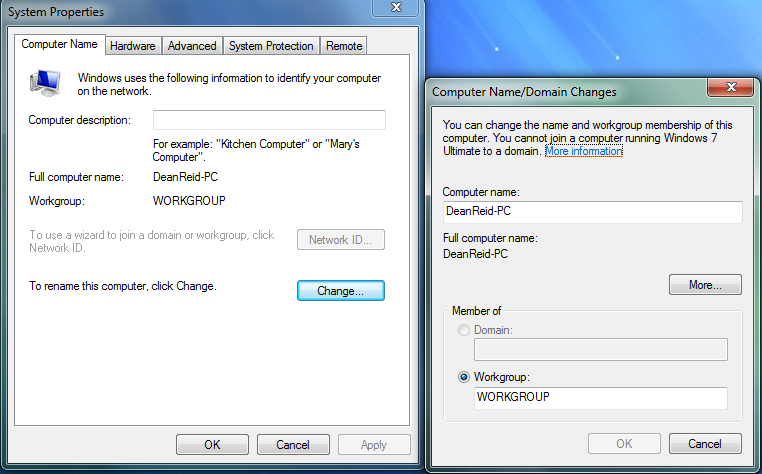
QI6eQ0T.png


That's what shows up for me when I go to System Properties

Would a System Restore Maybe help??
 

My Computer

Computer type
PC/Desktop
Computer Manufacturer/Model Number
Custom Build
OS
Windows 7 Ultimate
CPU
Intel Core i7 3770k
Motherboard
Gigabyte B75M-D3H
Memory
16GB
Graphics Card(s)
Intel HD Graphics 4000
Sound Card
Tascam US-600
Monitor(s) Displays
32" HD TV
Screen Resolution
1920x1080
Hard Drives
900GB OS Drive
500GB Recording Drive
500GB Gaming Drive
500GB Music Production Drive
1TB External Drive
Keyboard
Mad Catz V7
Mouse
Logitech M705
Internet Speed
60MB-100MB
Antivirus
Avira AntiVir
Browser
Google Chrome
At least we ruled out that you are not part of a domain.

It wouldn't hurt to try doing a system restore using a restore point dated before you believe you had these issues to hopefully sort it without reinstalling Windows. Be warned though that anything installed after the date of the restore point will be removed. Only files in your user folders will not be affected.
 
Last edited:

My Computer

Computer type
PC/Desktop
Computer Manufacturer/Model Number
Self built custom
OS
64-bit Windows 11 Pro for Workstations
CPU
Intel i7-8700K OC'd to 5 GHz
Motherboard
ASUS ROG Maximus XI Formula Z390
Memory
64 GB (4x16GB) G.SKILL TridentZ RGB DDR4 3600 MHz
Graphics Card(s)
ASUS ROG-STRIX-GTX1080TI-O11G-GAMING
Sound Card
Integrated
Monitor(s) Displays
2 x Samsung Odyssey G7 27"
Screen Resolution
2560x1440
Hard Drives
1TB Samsung 990 PRO M.2,
4TB Samsung 990 PRO PRO M.2,
TerraMaster F8 SSD Plus NAS
PSU
Seasonic Prime Titanium 850W
Case
Thermaltake Core P3
Cooling
Corsair Hydro H115i
Keyboard
Logitech wireless K800
Mouse
Logitech MX Master 4
Internet Speed
2 Gb/s Download and 100 Mb/s Upload
Antivirus
Malwarebyte Anti-Malware Premium
Browser
Google Chrome
Other Info
Logitech Z625 speaker system,
Logitech BRIO 4K Pro webcam,
HP Color LaserJet Pro MFP M477fdn,
APC SMART-UPS RT 1000 XL - SURT1000XLI,
Galaxy S23 Plus phone
I'll give it a try and post my findings.
 

My Computer

Computer type
PC/Desktop
Computer Manufacturer/Model Number
Custom Build
OS
Windows 7 Ultimate
CPU
Intel Core i7 3770k
Motherboard
Gigabyte B75M-D3H
Memory
16GB
Graphics Card(s)
Intel HD Graphics 4000
Sound Card
Tascam US-600
Monitor(s) Displays
32" HD TV
Screen Resolution
1920x1080
Hard Drives
900GB OS Drive
500GB Recording Drive
500GB Gaming Drive
500GB Music Production Drive
1TB External Drive
Keyboard
Mad Catz V7
Mouse
Logitech M705
Internet Speed
60MB-100MB
Antivirus
Avira AntiVir
Browser
Google Chrome
Group policy was already covered, so I will not get into that.

1.)
You mentioned the registry in your post. Did you try something like this?

-Click the Start button, then type regedit in the Search box. Click Regedit.exe from the programs list.
-Browse to the following registry key
HKEY_LOCAL_MACHINE\SOFTWARE\Microsoft\Windows\CurrentVersion\Policies\System
-Click to select System
-Double-click the key HideFastUserSwitching and change the value from "1" to "0"

2.) And you made sure when you went into services that you set the start up mode for secondary logon to manual?

3.) What do you see when you go into control panel-user accounts and family safety-user accounts-manage another account
?

4.) If you tried turning on the guest account, could you then try to see if you can switch users to that account?

Please answer all 4 questions.
 

My Computer

Computer type
PC/Desktop
Computer Manufacturer/Model Number
Custom Built
OS
Windows 10 Pro
CPU
AMD Ryzen 5 2400G Processor with Radeon RX Vega 11 Graphics
Motherboard
ASRock X470 Master SLI/AC AM4 AMD Promontory X470 SATA 6Gb/s
Memory
G.SKILL Ripjaws V Series 16GB (2 x 8GB) 288-Pin DDR4 SDRAM D
Graphics Card(s)
2047MB NVIDIA GeForce GTX 1060 6GB (EVGA)
Sound Card
Motherboard Built in
Monitor(s) Displays
Acer R240HY bidx 23.8-Inch IPS HDMI DVI VGA (1920 x 1080) Wi
Screen Resolution
1920 x 1080
Hard Drives
1TB Sandisk SSD PLUS (Main drive)
500 GB Seagate 7200 RPM (Games)
500 GB Western Digital 7200 RPM (Virtual Machines)
PSU
CORSAIR TX Series TX650M 650W 80+ Gold Modular Power Supply
Case
CORSAIR CARBIDE SPEC-02 Mid-Tower Gaming Case, Red LED Fan
Cooling
220mm, two 120mm, and four 60mm fans
Keyboard
Wired Dell keyboard
Mouse
Wireless Logitech mouse
Internet Speed
250mb down, 30mb up
Antivirus
Panda Cloud Antivirus
Browser
Chrome-ish x64
Other Info
Your awesome for reading this.
Unfortunatly for me System Restore didn't go back long enough that it would fix it and I had to reinstall Windows which obviously worked I'm going to need more hard drives and backup all my stuff more xD

Thanks for trying to help guys :)
 

My Computer

Computer type
PC/Desktop
Computer Manufacturer/Model Number
Custom Build
OS
Windows 7 Ultimate
CPU
Intel Core i7 3770k
Motherboard
Gigabyte B75M-D3H
Memory
16GB
Graphics Card(s)
Intel HD Graphics 4000
Sound Card
Tascam US-600
Monitor(s) Displays
32" HD TV
Screen Resolution
1920x1080
Hard Drives
900GB OS Drive
500GB Recording Drive
500GB Gaming Drive
500GB Music Production Drive
1TB External Drive
Keyboard
Mad Catz V7
Mouse
Logitech M705
Internet Speed
60MB-100MB
Antivirus
Avira AntiVir
Browser
Google Chrome
You can apportion more space for System Restore points so there are more and they last longer if needed in the future. Having this happen once is a good occasion to do this. Here's how: http://www.sevenforums.com/tutorials/335-system-protection-change-disk-space-usage.html

There are backup methods in http://www.sevenforums.com/tutorials/219487-clean-reinstall-factory-oem-windows-7-a.html#post1839164 including how to save a Win7 image so you can restore it in minutes instead of having to reinstall again.
 
Back
Top