mirror polisher
New member
- Local time
- 8:38 PM
- Messages
- 30
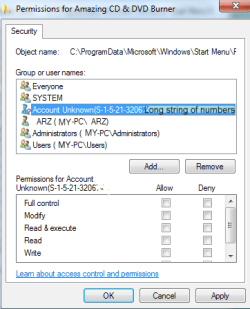
I was trying to get rid of the long string of numbers etc, but don't understand the long long help pages from microsoft concerning permissions  By the time you get to the end of it, you've forgotten the beginning. What do you nice people recommend ?
Looks like some spyware from an old program I installed. Also I'm scratching my head about the top where it says "Everyone". Some of the characters have been changed to protect the idiot that posted this. Thanks
By the time you get to the end of it, you've forgotten the beginning. What do you nice people recommend ? Looks like some spyware from an old program I installed. Also I'm scratching my head about the top where it says "Everyone". Some of the characters have been changed to protect the idiot that posted this. Thanks
Attachments
Last edited:
My Computer
- Computer type
- PC/Desktop
- Computer Manufacturer/Model Number
- Unknown Intel board
- OS
- Windows 7 64bit
- CPU
- 2.7
- Memory
- 4gb
- Browser
- Firefox