How do i type special characters?

FuturDreamz

Spacemonaut
Guru
Local time
10:52 PM
Messages
1,660
Location
Lethbridge, AB
On my Mac if I wanted to type "è" I just type option+e to get the little tick thingy with a highlight field then e again to to "è". On Windows the only way i've found how to do that is to bring up the character map, which is a bit of a pain when you just want to use the keyboard.
help?
 

My Computer

Computer type
PC/Desktop
Computer Manufacturer/Model Number
Apple 17" iMac MA199LL (Early 2006)
OS
Windows 8 Pro (32-bit)
CPU
1.83GHz Intel Core Duo
Memory
2GB 667MHz DDR2 SDRAM (PC2-5300) (upgrade)
Graphics Card(s)
ATI Radeon X1600 with 128MB GDDR3 memory
Monitor(s) Displays
17-inch TFT active-matrix LCD, millions of colors
Screen Resolution
1440 x 900
Hard Drives
Hitachi 320GB HDT721032SLA360 7200RPM SATA II (upgrade)
Keyboard
Microsoft Wired Keyboard 600
Mouse
Microsoft Basic Optical Mouse v2.0
Internet Speed
4 Mbps
Antivirus
Microsoft Security Essentials
Browser
Google Chrome
Other Info
WEI:
Base Score: 3.9 Processor: 4.4 Memory 4.7
Graphics: 3.9 Gaming Graphics: 4.1 Primary HD: 5.9

My Computer

Computer Manufacturer/Model Number
Samsung NP550P5C-S02IN
OS
Windows 7 Ultimate - 64-bit | Windows 8 Pro - 64-bit
CPU
Intel® Core™ i7 Processor 3,610QM (2.30Hz, 6MB L3 Cach
Memory
8 GB
Graphics Card(s)
NVIDIA® GeForce® GT 650M 2GB Graphics, Optimus™ techno
Sound Card
SoundAlive™ JBL 3 Speakers (With sub-Woofer)
Monitor(s) Displays
39.62cm (15.6) SuperBright 300nit HD+ LED Display
Screen Resolution
1,600 x 900, Anti-Reflective
Hard Drives
1TB S-ATA II Hard Drive (5,400RPM)
On my Mac if I wanted to type "è" I just type option+e to get the little tick thingy with a highlight field then e again to to "è". On Windows the only way i've found how to do that is to bring up the character map, which is a bit of a pain when you just want to use the keyboard.
help?

I use this PDF minimized to the side. Faster for me, anyway.
 

Attachments

My Computer

Computer type
PC/Desktop
Computer Manufacturer/Model Number
Self build
OS
Windows 10 Home
CPU
Intel Core i5 3550
Motherboard
ASUS P8Z77-V LX (LGA1155)
Memory
Corsair Vengeance DDR3 16GB
Graphics Card(s)
Nvidia GEForce GTX 970 SSC
Monitor(s) Displays
Hanns-G 23.6", Acer 17"
Screen Resolution
1920x1080, 1440x900
Hard Drives
Sandisk SSD 256 GB
WD500GB
WD640GB
Seagage Ultra + 1TB ext.
BWD 800GB
WD 1TB ext
PSU
Antec 650w
Case
Cooler Master Centurion 534
Cooling
COOLER MASTER GeminII S524, 3 120 mm case fans.
Keyboard
Logitech MK300
Mouse
Logitech MK300
Internet Speed
Cable
Antivirus
MSSE, Malwarebytes
Browser
IE 10, Chrome
On my Mac if I wanted to type "è" I just type option+e to get the little tick thingy with a highlight field then e again to to "è". On Windows the only way i've found how to do that is to bring up the character map, which is a bit of a pain when you just want to use the keyboard.
help?

I use this PDF minimized to the side. Faster for me, anyway.
yeah, faster than Fn+numlock-alt+0232-Fn+numlock but not as fast as alt+e-e
Why do they have to make letters that are common usage so complicated? I mean, Have the Microsoft programmers never eaten an éclair in a café with their fiancé?
sure, ☺ is right there at alt+1, but have you ever seen even a web article that had a ☺ sitting smack dab in the middle of it?
 

My Computer

Computer type
PC/Desktop
Computer Manufacturer/Model Number
Apple 17" iMac MA199LL (Early 2006)
OS
Windows 8 Pro (32-bit)
CPU
1.83GHz Intel Core Duo
Memory
2GB 667MHz DDR2 SDRAM (PC2-5300) (upgrade)
Graphics Card(s)
ATI Radeon X1600 with 128MB GDDR3 memory
Monitor(s) Displays
17-inch TFT active-matrix LCD, millions of colors
Screen Resolution
1440 x 900
Hard Drives
Hitachi 320GB HDT721032SLA360 7200RPM SATA II (upgrade)
Keyboard
Microsoft Wired Keyboard 600
Mouse
Microsoft Basic Optical Mouse v2.0
Internet Speed
4 Mbps
Antivirus
Microsoft Security Essentials
Browser
Google Chrome
Other Info
WEI:
Base Score: 3.9 Processor: 4.4 Memory 4.7
Graphics: 3.9 Gaming Graphics: 4.1 Primary HD: 5.9
found something that may be able to do that here, but it would be nice to have simple character shortcuts built in.
now I just need to type `+e+return to get é.
 

My Computer

Computer type
PC/Desktop
Computer Manufacturer/Model Number
Apple 17" iMac MA199LL (Early 2006)
OS
Windows 8 Pro (32-bit)
CPU
1.83GHz Intel Core Duo
Memory
2GB 667MHz DDR2 SDRAM (PC2-5300) (upgrade)
Graphics Card(s)
ATI Radeon X1600 with 128MB GDDR3 memory
Monitor(s) Displays
17-inch TFT active-matrix LCD, millions of colors
Screen Resolution
1440 x 900
Hard Drives
Hitachi 320GB HDT721032SLA360 7200RPM SATA II (upgrade)
Keyboard
Microsoft Wired Keyboard 600
Mouse
Microsoft Basic Optical Mouse v2.0
Internet Speed
4 Mbps
Antivirus
Microsoft Security Essentials
Browser
Google Chrome
Other Info
WEI:
Base Score: 3.9 Processor: 4.4 Memory 4.7
Graphics: 3.9 Gaming Graphics: 4.1 Primary HD: 5.9
"Have the Microsoft programmers never eaten an éclair in a café with their fiancé?"

LOL. Probably not.

They say you have to work for the good things, but some things are not that good to have to work that hard. Hope you find something that helps.
 

My Computer

Computer type
PC/Desktop
Computer Manufacturer/Model Number
Self build
OS
Windows 10 Home
CPU
Intel Core i5 3550
Motherboard
ASUS P8Z77-V LX (LGA1155)
Memory
Corsair Vengeance DDR3 16GB
Graphics Card(s)
Nvidia GEForce GTX 970 SSC
Monitor(s) Displays
Hanns-G 23.6", Acer 17"
Screen Resolution
1920x1080, 1440x900
Hard Drives
Sandisk SSD 256 GB
WD500GB
WD640GB
Seagage Ultra + 1TB ext.
BWD 800GB
WD 1TB ext
PSU
Antec 650w
Case
Cooler Master Centurion 534
Cooling
COOLER MASTER GeminII S524, 3 120 mm case fans.
Keyboard
Logitech MK300
Mouse
Logitech MK300
Internet Speed
Cable
Antivirus
MSSE, Malwarebytes
Browser
IE 10, Chrome

My Computer

Computer type
PC/Desktop
Computer Manufacturer/Model Number
Dell OP7010
OS
Windows 7 Enterprise (x64); Windows Server 2008 R2 (x64)
Memory
16GB
Monitor(s) Displays
4 Dell 24" LCD
Screen Resolution
1280x1024
Keyboard
Dell
Mouse
Dell Optical
Internet Speed
40meg
On my Mac if I wanted to type "è" I just type option+e to get the little tick thingy with a highlight field then e again to to "è". On Windows the only way i've found how to do that is to bring up the character map, which is a bit of a pain when you just want to use the keyboard.
help?

I use this PDF minimized to the side. Faster for me, anyway.
yeah, faster than Fn+numlock-alt+0232-Fn+numlock but not as fast as alt+e-e
Why do they have to make letters that are common usage so complicated? I mean, Have the Microsoft programmers never eaten an éclair in a café with their fiancé?
sure, ☺ is right there at alt+1, but have you ever seen even a web article that had a ☺ sitting smack dab in the middle of it?


Because I think Microsoft wants to do away with such BS

éclair=eclair
café=cafe
fiancé=fiance

Why dose the e need the special little mark on top? é? I for one would not have any prob seeing that bit of stupidity removed from written English :)

back on topic: Just get a cheat sheet till you memories with windows way of doing it :P
 

My Computer

Computer Manufacturer/Model Number
custom build
OS
Windows 7 Pro X64
CPU
AMD Phenom II X4 975 Black Edition
Motherboard
MSI 870A-G54 (FX)
Memory
CORSAIR Vengeance 8GB (2 x 4GB) 240-Pin DDR3 SDRAM DDR3 1600
Graphics Card(s)
ASUS EN9800GT HB/HTDI/512M GeForce 9800 GT 512MB 256-bit GDD
Sound Card
Realtek ALC892
Monitor(s) Displays
Viewsonic 19' 16:10
Screen Resolution
1680X1050
Hard Drives
Western Digital Caviar Black WD6401AALS 640GB 7200 RPM SATA,
Western Digital Caviar Black 1TB 7200RPM SATA
PSU
Thermaltake Purepower W0100RU 500W ATX 12V
Case
COOLER MASTER Elite RC-331-KKN1-GP Black SECC ATX Mid Tower
Cooling
Nothing beyond what etch part came with
Keyboard
Logitech G11
Mouse
USB Logitech gaming mouse
Internet Speed
Cable
Other Info
New CPU, Motherboard, and Ram installed 02/2012

Logitech G35 Headset
Hi there

BTW smsff7 - not everyone on this Forum has English as their first Language -- you might not like special symbols in English --but in other Languages these are necessary and often work to make the letter they are added to equivalent to a different letter.

Perhaps THESE days we could design a unique symbol for each sound in each Language -- but that would not be worth the re-design effort or costs in all current equipment to say nothing of confusion in the interim period.

To the OP

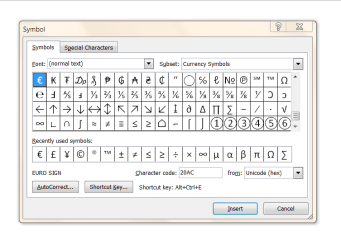
Do you have Word

If so go to Insert symbol -- you can then make a file or whatever and then just cut and paste the relevant symbol into your application.


It also gives you the Ascii code if you want to type directly.

Enc screenshot.

Cheers
jimbo
 

Attachments

  • chars.png
    chars.png
    20.5 KB · Views: 137

My Computer

Computer type
PC/Desktop
Computer Manufacturer/Model Number
Custom built, several laptops HP/ASUS
OS
Linux CENTOS 7 / various Windows OS'es and servers
CPU
Intel i7 Intel i5
Memory
8GB, 16GB
Graphics Card(s)
On Motherboard
Sound Card
Realtek HD audio
Monitor(s) Displays
Apple Cinema display, Samsung LCD
Screen Resolution
1920 X 1080
Hard Drives
4 X 1TB SATA
Mouse
Toshiba wireless laser
Internet Speed
> 20MB up
As everyone has pretty much covered all the standard stuff, I just wanted to add that when I was learning Chinese I downloaded a pinyin IME. This allowed me to type the word normally on an English keyboard and it would work out if the word required macron's, umlauts, or what-ever accents and add them automatically.

This was useful for me because 4 out of every 5 letters required an accent when writing in Pinyin. So changing to another IME was useful when I needed to type a whole lot of these at once.
 

My Computer

Computer Manufacturer/Model Number
Custom Hack job
OS
Windows 7 Ultimate 64 bit
CPU
Intel(R) Core(TM)2 Quad CPU Q8200 @ 2.33GHz
Motherboard
GigaByte EP45-UD3
Memory
8 GB Kingston
Graphics Card(s)
Nvidia GeForce 9600GT
Sound Card
Soundblaster Audigy
Monitor(s) Displays
AOC x2 22"
Hard Drives
2 x Samsung 500GB (RAID)
2 x Samsung 2TB
1 x WD Green 2TB
1 x Seagate 1TB
1 x Samsung 500GB
PSU
Thermaltake QFan 750W
Case
CM Scout Gaming
Cooling
Coolermaster V10
Keyboard
Microsoft Wireless Keyboard 1000
Mouse
Microsoft Wireless Optical 2000
Internet Speed
320
Other Info
Winfast PVR2000CP
LG DVD-RAM DVD/RW/DL Super Multi
Linksys WMP300Nx2 Wireless Adapter
Hi there

BTW smsff7 - not everyone on this Forum has English as their first Language -- you might not like special symbols in English --but in other Languages these are necessary and often work to make the letter they are added to equivalent to a different letter.

Perhaps THESE days we could design a unique symbol for each sound in each Language -- but that would not be worth the re-design effort or costs in all current equipment to say nothing of confusion in the interim period.

To the OP

Do you have Word

If so go to Insert symbol -- you can then make a file or whatever and then just cut and paste the relevant symbol into your application.


It also gives you the Ascii code if you want to type directly.

Enc screenshot.

Cheers
jimbo
Yeah your right...I guess I should not be posting at 4AM anymore
 

My Computer

Computer Manufacturer/Model Number
custom build
OS
Windows 7 Pro X64
CPU
AMD Phenom II X4 975 Black Edition
Motherboard
MSI 870A-G54 (FX)
Memory
CORSAIR Vengeance 8GB (2 x 4GB) 240-Pin DDR3 SDRAM DDR3 1600
Graphics Card(s)
ASUS EN9800GT HB/HTDI/512M GeForce 9800 GT 512MB 256-bit GDD
Sound Card
Realtek ALC892
Monitor(s) Displays
Viewsonic 19' 16:10
Screen Resolution
1680X1050
Hard Drives
Western Digital Caviar Black WD6401AALS 640GB 7200 RPM SATA,
Western Digital Caviar Black 1TB 7200RPM SATA
PSU
Thermaltake Purepower W0100RU 500W ATX 12V
Case
COOLER MASTER Elite RC-331-KKN1-GP Black SECC ATX Mid Tower
Cooling
Nothing beyond what etch part came with
Keyboard
Logitech G11
Mouse
USB Logitech gaming mouse
Internet Speed
Cable
Other Info
New CPU, Motherboard, and Ram installed 02/2012

Logitech G35 Headset
yeah and it seems that the ° symbol and the ™ symbols also need to be accessed via the character map, and the tm symbol requires a lot of scrolling to find.
 

My Computer

Computer type
PC/Desktop
Computer Manufacturer/Model Number
Apple 17" iMac MA199LL (Early 2006)
OS
Windows 8 Pro (32-bit)
CPU
1.83GHz Intel Core Duo
Memory
2GB 667MHz DDR2 SDRAM (PC2-5300) (upgrade)
Graphics Card(s)
ATI Radeon X1600 with 128MB GDDR3 memory
Monitor(s) Displays
17-inch TFT active-matrix LCD, millions of colors
Screen Resolution
1440 x 900
Hard Drives
Hitachi 320GB HDT721032SLA360 7200RPM SATA II (upgrade)
Keyboard
Microsoft Wired Keyboard 600
Mouse
Microsoft Basic Optical Mouse v2.0
Internet Speed
4 Mbps
Antivirus
Microsoft Security Essentials
Browser
Google Chrome
Other Info
WEI:
Base Score: 3.9 Processor: 4.4 Memory 4.7
Graphics: 3.9 Gaming Graphics: 4.1 Primary HD: 5.9
Type charmap in the Start Menu search window, and right click it and send it to Desktop. Then drag the shortcut to the Quick Launch, and it always near at hand. Since I don't use it too often, I keep it among the hidden items.
 

My Computer

Computer Manufacturer/Model Number
DIY
OS
W7x64 Pro, SuSe 12.1/** W7 x64 Pro, XP MCE
CPU
Phenom II 1090T w/Noctua NH-D14 /**4400+ X2 w/CM Hyper TX 3
Motherboard
ASRock 890FX Deluxe 4/**A8N-SLI
Memory
2 x 2GB Patriot PGS34g1600LLKA/**4x1GB Corsair VS
Graphics Card(s)
EVGA GTX460 SC/**EVGA 8800GTS
Sound Card
Asus Xonar D2X/**Xonar D1
Monitor(s) Displays
Acer X233H, Dell E152FPc /**LG M237-WD
Screen Resolution
1920x1080 & 1024x768/**1980x1080
Hard Drives
WDC 2TB, 1.5TB, 1TB, 500GB,Seagate 500GB , Maxtor 80GB /**500GB Seagate & WDC 1TB Black
PSU
CM RS600 w/ APC BX1000G/**Antec 500 TP w/ APC BX1000
Case
HAF922/**Antec 1040IIB
Cooling
3x200mm, 1x140 and 1x120mm/**5x80mm fans
Keyboard
Logitech Media USB/**Saitek Eclipse
Mouse
Cordless Trackman Wheel/**Ditto
Internet Speed
3.3Mbps
Other Info
SB 560 5.1 w/ Sennheiser RS140/**Creative T20 speakers, Dvico FusionHDTV7 Gold RT, Cisco E3000, HP 5510V AIO, Linksys E3000, Belkin F5U237 hub and **F5D8055 adapter
(** = 2nd rig)
You can use the shortcut keys to bring up ™ and °, providing that you have a numeric keypad on the right of your keyboard. (Some laptops need numlock turned on for this to work, and some just don't support it)
For ™ hold down ALT and press 0,1,5,3 (then release ALT). When you open CHARMAP you can see the ALT code in the bottom right.

™ = ALT+0153
° = ALT+0176
 

My Computer

Computer Manufacturer/Model Number
Custom Hack job
OS
Windows 7 Ultimate 64 bit
CPU
Intel(R) Core(TM)2 Quad CPU Q8200 @ 2.33GHz
Motherboard
GigaByte EP45-UD3
Memory
8 GB Kingston
Graphics Card(s)
Nvidia GeForce 9600GT
Sound Card
Soundblaster Audigy
Monitor(s) Displays
AOC x2 22"
Hard Drives
2 x Samsung 500GB (RAID)
2 x Samsung 2TB
1 x WD Green 2TB
1 x Seagate 1TB
1 x Samsung 500GB
PSU
Thermaltake QFan 750W
Case
CM Scout Gaming
Cooling
Coolermaster V10
Keyboard
Microsoft Wireless Keyboard 1000
Mouse
Microsoft Wireless Optical 2000
Internet Speed
320
Other Info
Winfast PVR2000CP
LG DVD-RAM DVD/RW/DL Super Multi
Linksys WMP300Nx2 Wireless Adapter
You can use the shortcut keys to bring up ™ and °, providing that you have a numeric keypad on the right of your keyboard. (Some laptops need numlock turned on for this to work, and some just don't support it)
For ™ hold down ALT and press 0,1,5,3 (then release ALT). When you open CHARMAP you can see the ALT code in the bottom right.

™ = ALT+0153
° = ALT+0176

like I said, Texter does this in less steps.
Windows default way on my condensed keyboard: fn+numlock, alt+0153, fn+numlock
texter with my settings: `tm
I still wished that Windows had easy character access like Mac built-in. With the mac I just type: alt+e, e, then I get é.
just an annoyance technically, a feature request in reality.
 

My Computer

Computer type
PC/Desktop
Computer Manufacturer/Model Number
Apple 17" iMac MA199LL (Early 2006)
OS
Windows 8 Pro (32-bit)
CPU
1.83GHz Intel Core Duo
Memory
2GB 667MHz DDR2 SDRAM (PC2-5300) (upgrade)
Graphics Card(s)
ATI Radeon X1600 with 128MB GDDR3 memory
Monitor(s) Displays
17-inch TFT active-matrix LCD, millions of colors
Screen Resolution
1440 x 900
Hard Drives
Hitachi 320GB HDT721032SLA360 7200RPM SATA II (upgrade)
Keyboard
Microsoft Wired Keyboard 600
Mouse
Microsoft Basic Optical Mouse v2.0
Internet Speed
4 Mbps
Antivirus
Microsoft Security Essentials
Browser
Google Chrome
Other Info
WEI:
Base Score: 3.9 Processor: 4.4 Memory 4.7
Graphics: 3.9 Gaming Graphics: 4.1 Primary HD: 5.9
Use the Ctrl-key on windows 7

I was also looking voor an easy way to type special character and the ALT-key codes don't work quick and also the character map is not the way to go.

I tried out some possiblities and figured out that you can compose special character with the Ctrl-key. (like composing keys on a linux system). But sadly is looks like it's only working on microsoft office :( :mad:

To type é do the following: pressdown the Ctrl-key (keep it pressed) and then press de single qoute ('). Release the keys and now type de (e). Et voilà there is the é.

Here's a list of compositions:
Ctrl+' e = é
Ctrl+` e = è
Ctrl+: e = ë ( Ctrl+Shift+; )
Ctrl+^ a = â ( Ctrl+Shift+6 )
Ctrl+, c = ç
Ctrl+, C = Ç
Ctrl+@, a = å ( Ctrl+Shift+2 )

etc.

You can ofcourse change the e with an a,o,i or wathever letter you wan't to use to type the accent with it.
 

My Computer

OS
Windows 7
On my Mac if I wanted to type "è" I just type option+e to get the little tick thingy with a highlight field then e again to to "è". On Windows the only way i've found how to do that is to bring up the character map, which is a bit of a pain when you just want to use the keyboard.
help?

I was also looking voor an easy way to type special character and the ALT-key codes don't work quick and also the character map is not the way to go.

I tried out some possiblities and figured out that you can compose special character with the Ctrl-key. (like composing keys on a linux system). But sadly is looks like it's only working on microsoft office :-(.

To type é do the following: pressdown the Ctrl-key (keep it pressed) and then press de single qoute ('). Release the keys and now type de (e). Et voilà there is the é.

Here's a list of compositions:
Ctrl+' e = é
Ctrl+` e = è
Ctrl+: e = ë ( Ctrl+Shift+; )
Ctrl+^ a = â ( Ctrl+Shift+6 )
Ctrl+, c = ç
Ctrl+, C = Ç
Ctrl+@, a = å ( Ctrl+Shift+2 )

etc.

You can ofcourse change the e with an a,o,i or wathever letter you wan't to use to type the accent with it.
 

My Computer

OS
Windows 7
Just discovered that IE10 - at least on Windows 8 - will automatically add the thingy to words that need them, like éclair or café.

Voila doesn't do it though. but fiancé does.
 

My Computer

Computer type
PC/Desktop
Computer Manufacturer/Model Number
Apple 17" iMac MA199LL (Early 2006)
OS
Windows 8 Pro (32-bit)
CPU
1.83GHz Intel Core Duo
Memory
2GB 667MHz DDR2 SDRAM (PC2-5300) (upgrade)
Graphics Card(s)
ATI Radeon X1600 with 128MB GDDR3 memory
Monitor(s) Displays
17-inch TFT active-matrix LCD, millions of colors
Screen Resolution
1440 x 900
Hard Drives
Hitachi 320GB HDT721032SLA360 7200RPM SATA II (upgrade)
Keyboard
Microsoft Wired Keyboard 600
Mouse
Microsoft Basic Optical Mouse v2.0
Internet Speed
4 Mbps
Antivirus
Microsoft Security Essentials
Browser
Google Chrome
Other Info
WEI:
Base Score: 3.9 Processor: 4.4 Memory 4.7
Graphics: 3.9 Gaming Graphics: 4.1 Primary HD: 5.9
I've always used Alt 130 which produces é
 

My Computer

OS
Windows 7 pro 64 bit with XP Mode
Back
Top