Solved How do I upgrade XP 32 bit with 64 bit

DRG35

New member
Local time
11:23 AM
Messages
8
Location
Canton
Hi, Looking for help with an xp to 7 update. Did the windows 7 upgrade advisor and thought that I would be able to do the 64 bit upgrade only to find out after purchasing the 64 bit w7 home premium intended for distribution w/a new pc that it would not allow me the custom install mode nor the setup.exe mode only setup and when opening that rec'd message D:\setup.exe is not a valid Win32 application. Upon checking my old Dell E510 system it is a 32 bit, so I am at a stand still. Upgrade Advisor stated cpu speed 2.8 ghz, 3.5gb ram, 23gb free space on C, custom install required. I do have a w7 home product key info that came with the 64 bit. Looking for help.
 

My Computer My Computer

Computer type
PC/Desktop
Computer Manufacturer/Model Number
Dell e510
OS
xp home 5.1.2600 service pack 3 build 2600 (32 bit)
CPU
Intel Pentium D CPU 2.80GHz
Motherboard
Dell OHJ054 chipset Intel i945/G (southbridge 82801GB/GR
Memory
4.096.00 mb
Graphics Card(s)
Advanced Micro Devices (AMD/ATI Radeon x600 (0x5B62)
Sound Card
Sigma Tel High Definition audio CODEC
Monitor(s) Displays
Dell E177FP
Hard Drives
Western Digital 80GB (WDC WD800JD-75MSA3)
Did the windows 7 upgrade advisor and thought that I would be able to do the 64 bit upgrade........

What made you think so?

Is this disc you obtained supposedly intended for some particular PC brand?
 

My Computer My Computer

Computer type
PC/Desktop
Computer Manufacturer/Model Number
Ignatz Special; 4 speed manual gearbox; factory air conditioning; one of one
OS
Windows 7 Home Premium SP1, 64-bit
CPU
Intel Skylake i5-6600K, not overclocked
Motherboard
AsRock Z170M Extreme 4, micro ATX
Memory
8 GB HyperX DDR4-2666 (2 x 4 GB)
Graphics Card(s)
none; graphics are integrated on CPU
Sound Card
onboard: Realtek ALC1150; external: USB Behringer UF0-202
Monitor(s) Displays
Dell S2340M 23 inch IPS
Screen Resolution
1600 x 900
Hard Drives
System: Crucial MX100 series SSD, 128 GB;
Data: Samsung Spinpoint 103SJ, 1 TB;
Backup: WD Caviar Green WD30EZRX-00D8PB0, 3 TB
PSU
Rosewill SilentNight 500 watt fanless, semi-modular
Case
Antec Solo II
Cooling
Noctua NH-U12S; Noctua F12 intake, Noctua S12A exhaust
Keyboard
Microsoft 200 6JH-00001 USB
Mouse
Dell or Microsoft optical wired; USB
Antivirus
Microsoft Security Essentials and Malwarebytes Premium
Browser
Pale Moon
Other Info
All fans PWM; speeds at idle: CPU circa 500 rpm; intake circa 600 rpm; exhaust circa 600 rpm; CPU temps 27 idle and 47 C load in a warm room (27 C/81 F) when running Intel Extreme Tuning Utility stress test.
DRG35 it would be very helpful if we had more information.
If you can complete this tutorial by Brink so we know what we are working with.

http://www.sevenforums.com/tutorials/180324-system-info-see-your-system-specs.html

If you hardware is capable of using a Windows 64 bit operating system you will have to do a Clean Install using the proper media and COA key.

Any time one switches bit's (32 to 64 or 64 to 32) bits a Clean Install is a must.

Take a read through this tutorial by Brink. I should be very helpful.

http://www.sevenforums.com/tutorials/1649-clean-install-windows-7-a.html
 

My Computer My Computer

Computer type
PC/Desktop
Computer Manufacturer/Model Number
Home made Desktop
OS
Windows 10 Pro. 64/ version 1709 Windows 7 Pro/64
CPU
Intel i7-6800K @ 4.3
Motherboard
ASUS X-99 Deluxe II
Memory
Corsair Platinum 16 gig @2400
Graphics Card(s)
EVGA GTX 1070 OC
Monitor(s) Displays
Asus 27" LED LCD/VE278Q
Screen Resolution
1920-1080 or 1280-720 HDMI
Hard Drives
INTEL SSD 730-240 Gb Sata 3.0/
PSU
EVGA Platium 1200W
Case
Phanteks Luxe Tempered Glass 8 fans/ one radiator
Cooling
XSPC/ Water Cooled CPU
Keyboard
Das 4 Professional
Mouse
Logitech M705/MX Anywhere 2-S
Internet Speed
100 mbits
Antivirus
Microsoft Security Essentials/ Malwarebytes Premium 3.0/ SAS
Browser
I.E. 11 default/Firefox/ ISP Time Warner Cable/Spectrum
Other Info
LG BluRay Burner/
Sound system-KLipsch-THX/
Icy Dock ssd Hot Swap bays.
You can not upgrade XP to Windows 7, just clean install Windows 7.

I hope your hardware is up to the task, consider maxing out everything and getting a good video card and a solid state drive to run Windows 7 well and enjoy it fully.

http://www.sevenforums.com/tutorials/1649-clean-install-windows-7-a.html

Get your network drivers on a flash drive before you do any install.

Product Support | Dell US

SSD 850 PRO 2.5” SATA III MZ-7KE256BW | Memory & Storage

or

SSD 850 EVO 2.5" SATA III 250GB | Samsung Solid State Drives
 

My Computer My Computer

Computer type
PC/Desktop
Computer Manufacturer/Model Number
Skylake Special #666
OS
Windows 10 Pro x64
CPU
Intel Core i7 6700K
Motherboard
Asus Sabertooth Z170 Mark 1
Memory
GSkill TridentZ RGB 16GB 3600 16-16-16-36
Graphics Card(s)
EVGA GTX 980 Ti SC x2
Sound Card
Realtek High Definition
Monitor(s) Displays
AOC G2460PG
Screen Resolution
1920 x 1080 144Hz
Hard Drives
Samsung 860 Pro 256GB, Seagate Barracuda 4TB x2
PSU
EVGA 1000 P2, EVGA White Custom Braided Cables
Case
Corsair Vengeance C70 Gunmetal Black
Cooling
Corsair H100i v2, Corsair ML120 x2, Thermal Grizzly Kryonaut
Keyboard
Logitech G910 Orion Spectrum
Mouse
Logitech G700s
Internet Speed
Verizon Fios Quantum Gateway 75/75
Antivirus
Windows Defender, Malwarebytes Free 3.8.3
Browser
Chrome
Other Info
Corsair SP120 x4, LG Blu-ray Drive, Durabrand HT-395 100 Watt Dolby Digital Amp, Corsair H2100 Wireless 7.1 Headset
Did the windows 7 upgrade advisor and thought that I would be able to do the 64 bit upgrade........

What made you think so?
Was able to print off information about upgrading to 64 bit windows 7 stating I must perform a custom install.

Is this disc you obtained supposedly intended for some particular PC brand?
No. windows 7 home premium includes service pack 1. intended for distribution with a new pc. includes windows anytime upgrade 64 bit 2011 Microsoft 6/11 17 03406-02.
 

My Computer My Computer

Computer type
PC/Desktop
Computer Manufacturer/Model Number
Dell e510
OS
xp home 5.1.2600 service pack 3 build 2600 (32 bit)
CPU
Intel Pentium D CPU 2.80GHz
Motherboard
Dell OHJ054 chipset Intel i945/G (southbridge 82801GB/GR
Memory
4.096.00 mb
Graphics Card(s)
Advanced Micro Devices (AMD/ATI Radeon x600 (0x5B62)
Sound Card
Sigma Tel High Definition audio CODEC
Monitor(s) Displays
Dell E177FP
Hard Drives
Western Digital 80GB (WDC WD800JD-75MSA3)
DRG35 it would be very helpful if we had more information.
If you can complete this tutorial by Brink so we know what we are working with.

http://www.sevenforums.com/tutorials/180324-system-info-see-your-system-specs.html
I posted my system info.

If you hardware is capable of using a Windows 64 bit operating system you will have to do a Clean Install using the proper media and COA key.

Any time one switches bit's (32 to 64 or 64 to 32) bits a Clean Install is a must.
( I found that my system is 32 bit, had I realized that I was going to have a problem I would have purchased the 32 bit W7)

Take a read through this tutorial by Brink. I should be very helpful.

( I printed off the upgrading from Wxp to W7 from Microsoft and have been following that.)

http://www.sevenforums.com/tutorials/1649-clean-install-windows-7-a.html

Will check it out.
 

My Computer My Computer

Computer type
PC/Desktop
Computer Manufacturer/Model Number
Dell e510
OS
xp home 5.1.2600 service pack 3 build 2600 (32 bit)
CPU
Intel Pentium D CPU 2.80GHz
Motherboard
Dell OHJ054 chipset Intel i945/G (southbridge 82801GB/GR
Memory
4.096.00 mb
Graphics Card(s)
Advanced Micro Devices (AMD/ATI Radeon x600 (0x5B62)
Sound Card
Sigma Tel High Definition audio CODEC
Monitor(s) Displays
Dell E177FP
Hard Drives
Western Digital 80GB (WDC WD800JD-75MSA3)
Hi DRG,
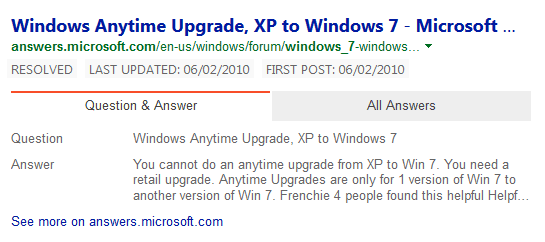
Where did you get the disc, as you can see in the screenshot, you cant unless its Retail.
Upgrades improve your current system capabilities, there not for a NEW OS.
(note there were OEM comps sold with upgrade rights XP/vista Vista/w7)

Roy
 

Attachments

  • xp7.PNG
    xp7.PNG
    7.7 KB · Views: 21

My Computer My Computer

Computer type
PC/Desktop
Computer Manufacturer/Model Number
medionl/Aspire 6930G/acer x55a
OS
W7 home premium 32bit/W7HP 64bit/w10 tp insider ring
CPU
E5300 dual core
Motherboard
medion MS7366
Memory
3gb
Graphics Card(s)
Nvidia Geforce 7100 Nforce 630i
Monitor(s) Displays
avixc
Internet Speed
n (isp resticted to 72)
Antivirus
mse/pands
Browser
palemoon
Other Info
Belkin Fd7050 n USB using Railink RT2870 drivers, more upto date
Was finally able to do a custom install using the Dell reinstall 7 method found on the net. Working on installing files and programs. Need to upgrade hd as the old was only 80gb.
 

My Computer My Computer

Computer type
PC/Desktop
Computer Manufacturer/Model Number
Dell e510
OS
xp home 5.1.2600 service pack 3 build 2600 (32 bit)
CPU
Intel Pentium D CPU 2.80GHz
Motherboard
Dell OHJ054 chipset Intel i945/G (southbridge 82801GB/GR
Memory
4.096.00 mb
Graphics Card(s)
Advanced Micro Devices (AMD/ATI Radeon x600 (0x5B62)
Sound Card
Sigma Tel High Definition audio CODEC
Monitor(s) Displays
Dell E177FP
Hard Drives
Western Digital 80GB (WDC WD800JD-75MSA3)
Back
Top