How do workgroup PC's load on a home network

loninappleton

New member
Member
VIP
Local time
8:35 AM
Messages
892
My homenet called HOMENET seems to have a mind of it's own.
Can someone say what the rule is that all the PC's that are on the homenet see
each other? Would a restart of a PC begin the discovery process for instance?


Or should I check some naming conventions at the inspect the workgroup
screen ('find out what workgroup this computer is on' I think is the phrase.)


Is there something in Admin that can trigger the discovery and keep from
having to restart? I've seen the green bar track across the screen top
but I certainly don't know what the function is.
 

My Computer My Computer

At a glance

Windows 7 x64 UltimateAMD Athlon II x3 4502 GB
Computer type
PC/Desktop
Computer Manufacturer/Model Number
custom
OS
Windows 7 x64 Ultimate
CPU
AMD Athlon II x3 450
Motherboard
MSI 880GM
Memory
2 GB
Hard Drives
various
Browser
Firefox, Opera
Windows doesn't look for PC's it asks the master browser for a list this updates every 20 mins so if you turn a pc innit may not be seen for 20 mins that resolving by name but in the meantime you can access the pc by its IP is \\192.168.1.34\sharename
 

My Computer My Computer

At a glance

win 8 32 bit
Computer type
PC/Desktop
OS
win 8 32 bit
Thanks for the reply.


What is the sharename? Is that the identity on system such as my scheme of using motherboard names
like MSI880?


And does that make it pop on in the network list?
 

My Computer My Computer

At a glance

Windows 7 x64 UltimateAMD Athlon II x3 4502 GB
Computer type
PC/Desktop
Computer Manufacturer/Model Number
custom
OS
Windows 7 x64 Ultimate
CPU
AMD Athlon II x3 450
Motherboard
MSI 880GM
Memory
2 GB
Hard Drives
various
Browser
Firefox, Opera
To access other pcs they have to share a folder this is the share name the name you gave to the share
 

My Computer My Computer

At a glance

win 8 32 bit
Computer type
PC/Desktop
OS
win 8 32 bit
I did not respond here because the reply sounds like one of those file sharing setups where you have to assign this and that as drive J and things I never ever understood.


I only use the preset public folder.


My question was simply on seeing the PC's icons when clicking on Network. So to poll the system
between those 20 mins or whatever is there a command at system to do this? Be specific if there are answers.
 

My Computer My Computer

At a glance

Windows 7 x64 UltimateAMD Athlon II x3 4502 GB
Computer type
PC/Desktop
Computer Manufacturer/Model Number
custom
OS
Windows 7 x64 Ultimate
CPU
AMD Athlon II x3 450
Motherboard
MSI 880GM
Memory
2 GB
Hard Drives
various
Browser
Firefox, Opera
a followup.


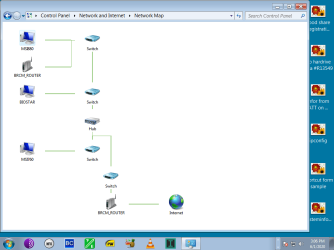
I didn't understand the previous reply. But yesterday I looked at the 'network map' on Windows 7
which I had never done that I recall. The missing PC was outside of the 'group' of the other two.
There's only one router from ATT but it showed a tree of where things were found.


I replugged the problem ethernet PC at the router. Today all three are recognized but I don't
know exactly what was accomplished. The ATT ethernet inputs are identical. And the map looks
the same. I made a screen shot. Maybe someone can interpret the tree. All three PC's are just plugged into available ehternet ports on the standard ATT DSL router.


A further question is: on the network two 'media sharing ' device icons are seen-- looking like
routers or some other gizmo. I don't know what they are there for. My only file sharing is between
my rigs for backup.
 

My Computer My Computer

At a glance

Windows 7 x64 UltimateAMD Athlon II x3 4502 GB
Computer type
PC/Desktop
Computer Manufacturer/Model Number
custom
OS
Windows 7 x64 Ultimate
CPU
AMD Athlon II x3 450
Motherboard
MSI 880GM
Memory
2 GB
Hard Drives
various
Browser
Firefox, Opera
the screen shot
 

Attachments

  • network map.png
    network map.png
    37.3 KB · Views: 0

My Computer My Computer

At a glance

Windows 7 x64 UltimateAMD Athlon II x3 4502 GB
Computer type
PC/Desktop
Computer Manufacturer/Model Number
custom
OS
Windows 7 x64 Ultimate
CPU
AMD Athlon II x3 450
Motherboard
MSI 880GM
Memory
2 GB
Hard Drives
various
Browser
Firefox, Opera
Why so many switch's? One is a hub a switch transmits data over one port a hub blasts data over all ports blocking access and giving problems with packet collisions
 

My Computer My Computer

At a glance

win 8 32 bit
Computer type
PC/Desktop
OS
win 8 32 bit
There is only one hardware device which is the ATT 'shark' or whatevs. My motherboards are all old
and have nothing but plain ethernet. Only thing I can think of is that Biostar uses one ethernet software and MSI uses the 'other one.'

I used to have a passive switch on an older DSL modem from a previous ISP. But I'm pretty sure I reinstalled Win 7 from scratch at one time or another on the new installation. Could that be an issue?

If there's a way to clean it up and which is easily explained, I can work on shortening up
the data paths.
 

My Computer My Computer

At a glance

Windows 7 x64 UltimateAMD Athlon II x3 4502 GB
Computer type
PC/Desktop
Computer Manufacturer/Model Number
custom
OS
Windows 7 x64 Ultimate
CPU
AMD Athlon II x3 450
Motherboard
MSI 880GM
Memory
2 GB
Hard Drives
various
Browser
Firefox, Opera
The hub needs to go and unless its down to distance the swith connected to it the msi isnt needed
 

My Computer My Computer

At a glance

win 8 32 bit
Computer type
PC/Desktop
OS
win 8 32 bit
Is this a series of adminstrative commands? I did look at the map and there didn't seem to be

any right click options to do anything. But I'll listen to any advice.


One thing I'd want is to have all of my HDs with the same format since I want to be able to
retrieve backup in various ways-- example between two MSI PCs that will oad each others backups
in case of a power out, meltdown or some such.
 

My Computer My Computer

At a glance

Windows 7 x64 UltimateAMD Athlon II x3 4502 GB
Computer type
PC/Desktop
Computer Manufacturer/Model Number
custom
OS
Windows 7 x64 Ultimate
CPU
AMD Athlon II x3 450
Motherboard
MSI 880GM
Memory
2 GB
Hard Drives
various
Browser
Firefox, Opera
Windows doesn't look for PC's it asks the master browser for a list this updates every 20 mins so if you turn a pc innit may not be seen for 20 mins that resolving by name but in the meantime you can access the pc by its IP is \\192.168.1.34\sharename


Minimal problems with this lately but I came back to this instruction.
What is the share name? Does it have to be created or simply the name of the location such as MSI One if that is how it appears.


Also I know nothing more about that network map and how to reorganize it. I found some old notes about
Local Area Connection status but that is for IP Connectivity testing and diagnostics. The point is this is the way it's always been. I had no knowlege of the structure before seeing the map.
 

My Computer My Computer

At a glance

Windows 7 x64 UltimateAMD Athlon II x3 4502 GB
Computer type
PC/Desktop
Computer Manufacturer/Model Number
custom
OS
Windows 7 x64 Ultimate
CPU
AMD Athlon II x3 450
Motherboard
MSI 880GM
Memory
2 GB
Hard Drives
various
Browser
Firefox, Opera
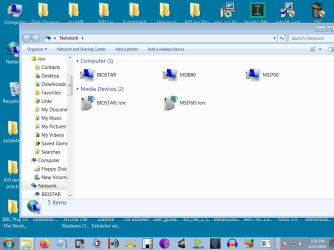
Perhaps a screen shot will help.
The screen shot shown shows everything-- the three pcs on the workgroup.


But clcking on network earlier did not show 760gm which is _always on-. In other words,
apparrently not discovered when Biostar was turn on.


What seemed to get 760gm visible was using the small arrow at number of pcs and the 760gm appeared.
But that may have been the 20 second polling of system you mentioned.


But those media devices shown below the pcs , they seem to skip around as an 880gm or 760gm or what have you if doing any right click inspections. I do not know what they are there for.
 

Attachments

  • pc s on workgroup.png
    pc s on workgroup.png
    48.4 KB · Views: 0
Last edited:

My Computer My Computer

At a glance

Windows 7 x64 UltimateAMD Athlon II x3 4502 GB
Computer type
PC/Desktop
Computer Manufacturer/Model Number
custom
OS
Windows 7 x64 Ultimate
CPU
AMD Athlon II x3 450
Motherboard
MSI 880GM
Memory
2 GB
Hard Drives
various
Browser
Firefox, Opera
Back
Top