Solved how do you run a .cmd file?

ArlisT

New member
Local time
1:06 PM
Messages
33
Location
Indiana
Okay. I have this .txt file called, say, "xxxxxxx.cmd" . It's a sort of 'one ring to rule them all' to remove the telemetry MS snuck into W7 via updates. Of course, it already displays as xxxxxxx.cmd but it's really a .txt file, so when I double click it, it just opens in NotePad. Fascinating read and all, but it's doing nothing about the telemetry, know what I mean? I'm supposed to 'rename it as "xxxxxxx.cmd" and run it'. Obviously right clicking and 'Rename' isn't the answer. So what do I have to do to "rename it as xxxxxxx.cmd and run it."? I know this must be dead simple, but I've been a half hour with the usual search engines and and all the search results are just more confusing, probably because I don't know how to word the question. I thought "How do I run a .cmd file?" would take me right to the answer, but no. No it didn't. Every search just had me rewording the question and trying again.

It's a .cmd file saved as a .txt file. Please ELI5 how I'm supposed to run it.

This is what the .txt file reads:

wusa /uninstall /kb:3035583 /quiet /norestart
wusa /uninstall /kb:2952664 /quiet /norestart
wusa /uninstall /kb:3068708 /quiet /norestart
wusa /uninstall /kb:3022345 /quiet /norestart
wusa /uninstall /kb:3075249 /quiet /norestart
wusa /uninstall /kb:3080149 /quiet /norestart
wusa /uninstall /kb:971033 /quiet /norestart
wusa /uninstall /kb:2990214 /quiet /norestart
wusa /uninstall /kb:3021917 /quiet /norestart
wusa /uninstall /kb:3123862 /quiet /norestart

Thanks, and pardon my ignorance.
 

My Computer

Computer type
PC/Desktop
Computer Manufacturer/Model Number
Dell Optiplex 7010
OS
Windows 7 Pro x64
CPU
Intel i5 - 3470
Motherboard
Dell Inc. 0WR7PY
Memory
16 GB
Graphics Card(s)
Intel(R) HD Graphics
Sound Card
Realtek High Definition Audio
Monitor(s) Displays
Insignia 50" Flat Screen TV
Screen Resolution
1080p
Hard Drives
1863 GB HITACHI HUA723020ALA640 ATA Device (SATA)
Keyboard
Logitech K800
Mouse
Logitech M325
Internet Speed
25 Mbps down 5 Mbps up
Antivirus
MalwareBytes Premium
Browser
Firefox
Other Info
I am the rightful King of France
Entering "what is a .cmd file" in a search engine yields this: CMD File Extension - What is a .cmd file and how do I open it?

If the .cmd file is opening Notepad and not running the file like a batch file should, then you have a misplaced file association. Meaning Notepad is associated to opening a .CMD file which it shouldn't.

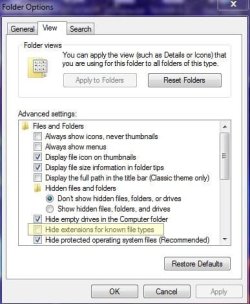
Or you absolutely DO have to rename the file as a .CMD nad double click the file to execute. If you say you can't do this, thenm you must have the option "hide extensions for known file types" checked in the Folder options forund in the control panel. This option should ALWAYS be unchecked for better security and power user ability.


efrthrfrtht.JPG


You might be interested in this: Remove telemetry updates for Windows 7 and 8.1 . GitHub

The what the hell is all this shit part. Remove telemetry updates for Windows 7 and 8.1 . GitHub

Better to use NTLite and only install updates you need for software and hardware needs. That's what I do. I have but four or so updates. Never got malware (I run a tight ship, believe me.) and never got hacked by some Guy Fawkes mask weaning hacker who loves black hoodies for some reason.

There's lots of other telemetry beyond just Microsoft. LOL Programs you install have it, Firefox and other browsers, NVIDIA has it, possible hardware, your UEFI, firmware, etc.

GitHub - Jamesits/dropWPBT: Disables the Windows Platform Binary Table (WPBT) in your UEFI firmware.

Microsoft WPBT flaw lets hackers install rootkits on Windows devices

If you know how to use the hosts file.


Code:
# nVidia Telemetry
127.0.0.1 gfwsl.geforce.com
127.0.0.1 gfe.geforce.com
127.0.0.1 telemetry.nvidia.com
127.0.0.1 gfe.nvidia.com
127.0.0.1 telemetry.gfe.nvidia.com
127.0.0.1 events.gfe.nvidia.com
127.0.0.1 activation-dc1.gfe.nvidia.com
127.0.0.1 activation.gfe.nvidia.com
127.0.0.1 services.gfe.nvidia.com
::1 activation.gfe.nvidia.com
::1 activation-dc1.gfe.nvidia.com
::1 gfwsl.geforce.com
::1 gfe.geforce.com
::1 telemetry.nvidia.com
::1 gfe.nvidia.com
::1 telemetry.gfe.nvidia.com
::1 events.gfe.nvidia.com


The hardware based firewall pfSense would be a lot better.


OpenDNS et al can help via blocking certain domain resolution. The hosts file can ONLY block domains. Not IP addresses. And it should be used in a limited way. It was never meant to be a personal firewall of sorts.
 
Last edited:

My Computer

Computer type
PC/Desktop
OS
Windows 7 Ultimate x64
Or you absolutely DO have to rename the file as a .CMD nad double click the file to execute. If you say you can't do this, thenm you must have the option "hide extensions for known file types" checked in the Folder options forund in the control panel. This option should ALWAYS be unchecked for better security and power user ability.

View attachment 421911
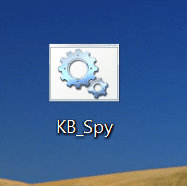
That did it. Unticked this and was able to right click/rename the .txt file to a .cmd file, and now it looks like this:

kbspy.PNG

Double-clicked it and it ran fine. Thanks.
 

My Computer

Computer type
PC/Desktop
Computer Manufacturer/Model Number
Dell Optiplex 7010
OS
Windows 7 Pro x64
CPU
Intel i5 - 3470
Motherboard
Dell Inc. 0WR7PY
Memory
16 GB
Graphics Card(s)
Intel(R) HD Graphics
Sound Card
Realtek High Definition Audio
Monitor(s) Displays
Insignia 50" Flat Screen TV
Screen Resolution
1080p
Hard Drives
1863 GB HITACHI HUA723020ALA640 ATA Device (SATA)
Keyboard
Logitech K800
Mouse
Logitech M325
Internet Speed
25 Mbps down 5 Mbps up
Antivirus
MalwareBytes Premium
Browser
Firefox
Other Info
I am the rightful King of France
Back
Top