Solved How does Dual-Channel RAM architecture work?

DextrousDave

New member
Member
VIP
Local time
5:19 PM
Messages
135
Hi All

I would like to know the requirements of dual channel architecture RAM:

Here is my understanding:


- Dual-Channel Architecture uses Banks consisting of pairs of RAM slots (2 slots per bank)
- Both Slots must contain a RAM DIMM (Stick) - eg. You cannot put a single RAM DIMM into a dual channel bank, both slots
must be filled...
- RAM DIMMs in a bank(matching pair) can have different speeds BUT the slower RAM speed will be chosen...
- RAM DIMMs in a bank(matching pair) can have different sizes/capacities(eg. 1x2GB and 1x1GB)
- RAM DIMMs in a bank(matching pair) MUST be of the same type - eg. DDR, DDR2, DDR3 etc

Am I correct on all my 'assumptions'?

Thank you
 

My Computer

Computer Manufacturer/Model Number
MSI
OS
Windows 7 Ultimate x32
CPU
Intel Core 2 Quad Q9400 @ 2.66GHz
Motherboard
MSI
Memory
2048MB
Graphics Card(s)
NVIDIA GeForce GTX 275
Monitor(s) Displays
Generic PnP Monitor
Hard Drives
2x HDD Drives (ATA Devices) 140GB and 368GB
Cooling
Fans
Some of your assumptions are true regardless of what type of chipset they are going into. But I think I can clarify.

A dual channel refers to two slots working as a bank. So in those two slots, you will want to have matching pairs (as you said). Matching pairs means the same memory...same type, brand, speed, capacity, etc. If you mix memory, you run the risk of it not functioning properly. Anytime you mix memory, you run that risk of instability.

Considering the fact it's been 8-10 years since memory has been available in pairs or kits, there's no reason anymore NOT to use matching pairs. You can mismatch across banks, though. For example, I have 4 memory sticks. They are identical in ever way, except I have 2x4 and then 2x2 for a total of 12 GB. All memory is the same brand, speed, timing, etc.
 

My Computer

OS
Windows 7 Ultimate x64 SP1
CPU
Intel Core i7-2600
Motherboard
Gigabyte GA-P67A-UD3P-B3
Memory
12 GB Patriot Extreme DDR3-1333
Graphics Card(s)
Nvidia GTX 470
Monitor(s) Displays
Dell UltraSharp 2209WA
Hard Drives
OCZ Agility3 240 GB, WD5001AALS, WD7501AALS
PSU
OCZ ModStream 700W
Case
CoolerMaster HAF 912 Advanced
Cooling
CoolerMaster Hyper 212 Plus
Ok cool thank you. So what I understand is that you can mismatch inside a single bank but it is not advised(depending on the motherboard). Also, in dual channel you have to fill both slots right? Filling one slot won't work?
 

My Computer

Computer Manufacturer/Model Number
MSI
OS
Windows 7 Ultimate x32
CPU
Intel Core 2 Quad Q9400 @ 2.66GHz
Motherboard
MSI
Memory
2048MB
Graphics Card(s)
NVIDIA GeForce GTX 275
Monitor(s) Displays
Generic PnP Monitor
Hard Drives
2x HDD Drives (ATA Devices) 140GB and 368GB
Cooling
Fans
It should work, but at least the single DIMM will run in single channel mode, so it will be slower.
 

My Computer

Computer type
PC/Desktop
Computer Manufacturer/Model Number
Home built (GeneO industries)/Model 4
OS
Windows 10 Pro. EFI boot partition, full EFI boot
CPU
i7 4770k 4.4GHz (44-44-43-43 turbo) @ 1.248V
Motherboard
ASUS Maximus VI Hero
Memory
16GB (8GBx2) @2200 MHz G.skill Sniper 10-11-10-30-1, 1.6V
Graphics Card(s)
MSI GTX 970 Gaming 4G
Sound Card
Onboard SupremeFX Audio
Monitor(s) Displays
NEC Spectraview 2490WUXi-SV
Screen Resolution
1920 x 1200
Hard Drives
Samsung 850 Pro 256GB (OS), Samsung 2x 128GB 840 Pro SSD in RAID0, 3x WD Blue 6Gb/s 1TB RAID0, WD 2TB Black external USB 3.0, 2TB WD20EARS Green external USB 3.0, 2x 500GB Seagate and 1 750 GB external USB, 1x 350GB external USB3
PSU
Seasonic X-850 (2012 KM3 model)
Case
Fractal Design Define R4
Cooling
NH-D14, NF-F12, NF-A15; NF-P14, NF-P12,NF-A14, S12A PWM
Keyboard
Cooler Master Storm Quickfire Rapid - Brown
Mouse
Logitech G602
Internet Speed
126.4 Mb/s down, 24.3 Mb/s up
Other Info
USB 3.0 x8 , SATA III x8, eSATA, USB 2.0 x6. Samsung DVD R/W drive.

WEI: CPU 7.8, Memory 7.9, Graphics 7.9, Disk 7.9
For best performance, assuming your motherboard has 4 DIMM slots, you need 2 or 4 sticks of the exact same RAM. Same frequency, timing, and capacity. Symmetry plays a big part in RAM performance.

Example: My old rig came with 3GB of RAM. 2x1GB sticks in one channel, and 2x512MB sticks in the other channel. Exact same frequency. It scored a 6.0 in WEI. I took that out and installed 4x1GB of the same RAM and it went from a 6.0 to a 7.1 in WEI! I reran the assessment because I thought it was a fluke. Sure enough, it had improved the performance that much, and going from 3-4gb in capacity didn't account for the difference.......it was everything being symmetrical. I would either get a 2-stick kit or a 4-stick kit that was matched and rock on.

Here is a picture of a MSI motherboard, focusing on the DIMM slots.
MSI DIMM Slots.JPG
Notice the different colors, blue and black. If you had two sticks of RAM you would install them in either the blue slots OR the black slots. That is how the channels are seperated. Refer to your motherboard manual or website to see which channel is which......if you are only using 2 sticks. For example, in my Asus Sabertooth mobo, if installing 2 sticks only, I would use the 2nd/4th slots, although if you are using 4 sticks, you would obviously populate all 4.

Hope this helped
 

My Computer

Computer type
PC/Desktop
Computer Manufacturer/Model Number
Custom Built
OS
Windows 7 Professional 64bit SP1
CPU
Intel Core i5-3570K @ 4.5GHz
Motherboard
Asus Sabertooth Z77
Memory
Corsair Vengeance 16GB (4x4) @1866MHz CL 9-9-9-24 1T
Graphics Card(s)
EVGA GTX 750 Ti FTW
Sound Card
Onboard Audio
Monitor(s) Displays
Dell S2309W
Screen Resolution
1920x1080
Hard Drives
Samsung 830 128GB SSD - OS
(4) Seagate 5TB HDD
(1) Seagate 2TB HDD
PSU
Seasonic X750 80+ Gold Full Modular
Case
Antec Eleven Hundred Super Mid Tower
Cooling
Intel Liquid Cooler
Keyboard
Max Nighthawk X8 Mechanical keyboard
Mouse
Mionix Naos 7000
Internet Speed
50 Mbps Down / 10 Mbps Up
Antivirus
Microsoft Security Essentials/Malwarebytes Anti-Malware
Browser
Chrome/Firefox
Other Info
Klipsch ProMedia 2.1's
Asus RT-N66R Wireless Router
Ok cool thank you. So what I understand is that you can mismatch inside a single bank but it is not advised(depending on the motherboard). Also, in dual channel you have to fill both slots right? Filling one slot won't work?
I wouldn't even bother trying to mismatch, especially given how cheap memory is now. In the end, it isn't worth a huge amount of effort. Dual channel memory configurations are faster than single channel, but not wice as fast. You likely wouldn't see a difference between the two until you ran some memory benchmark utility. Many new laptops come with one slot only, or only one slot filled.
 

My Computer

OS
Windows 7 Ultimate x64 SP1
CPU
Intel Core i7-2600
Motherboard
Gigabyte GA-P67A-UD3P-B3
Memory
12 GB Patriot Extreme DDR3-1333
Graphics Card(s)
Nvidia GTX 470
Monitor(s) Displays
Dell UltraSharp 2209WA
Hard Drives
OCZ Agility3 240 GB, WD5001AALS, WD7501AALS
PSU
OCZ ModStream 700W
Case
CoolerMaster HAF 912 Advanced
Cooling
CoolerMaster Hyper 212 Plus
Thanks everyone, appreciate your answers!
 

My Computer

Computer Manufacturer/Model Number
MSI
OS
Windows 7 Ultimate x32
CPU
Intel Core 2 Quad Q9400 @ 2.66GHz
Motherboard
MSI
Memory
2048MB
Graphics Card(s)
NVIDIA GeForce GTX 275
Monitor(s) Displays
Generic PnP Monitor
Hard Drives
2x HDD Drives (ATA Devices) 140GB and 368GB
Cooling
Fans
Some laptops also come with mismatched, our Toshiba has 6GB of RAM and as you can't get a 3GB stick it's made up of a 4GB stick and a 2GB stick, it only has 2 slots so can't be running dual channel as each slot has a different size in it.

I'm no expert but those are my thoughts on the subject. ;)
 

My Computer

Computer type
PC/Desktop
Computer Manufacturer/Model Number
Acer Aspire XC-704 x64 bit/ Asus K55A Notebook PC/HP Envy x360 Convertible 15-bq0xx
OS
Windows 10 64bit/Windows 10 64bit/Windows 10 64bit
CPU
Intel Pentium J3710 @ 60GHz/Intel B820,1.7GHz/AMD A9 Radeon
Motherboard
Acer Aspire XC-704 (SOCKET 0)/Asus/HP 8312 (Socket FP4)
Memory
8.00GB DDR3 @ 1599MHz/8GB 2 x 4GB DDR3/8.00GB Dual-Channel
Graphics Card(s)
Intel HD Graphics/Intel/512MB ATI AMD Radeon R5 Graphics (HP
Sound Card
Realtek High Definition Audio/Onboard/AMD High Definition Au
Monitor(s) Displays
Acer LCD K222HQL /Asus 15.6/Generic PnP Monitor (1920x1080@6
Screen Resolution
1920x1080@59Hz/1366 x 768/1920x1080@60Hz
Hard Drives
1863GBWesternn Digital WDC/Asus/119GB SanDisk SD8SN8U-128G-1006 (SSD)
931GB Hitachi HGST HTS721010A9E630 (SATA)
Keyboard
Microsoft Natural Ergonomic Keyboard 4000 (UK)/Inbuilt/Inbui
Mouse
Microsoft Optical Wheel Mouse/Same plus Touchpad/Same + Pad
Internet Speed
Infinity 2 up to 76 Mbps
Antivirus
MSE/MSE/MSE and all 3 have MalwareBytes Premium
Browser
Edge, Firefox/Edge, Firefox/Edge, Firefox, Chrome
Other Info
Seagate Expansion 500GB External Desktop Drive
Seagate Expansion Portable Drives 500GB and 1TB
Epson XP-332 Wireless Printer
an interesting piece of history

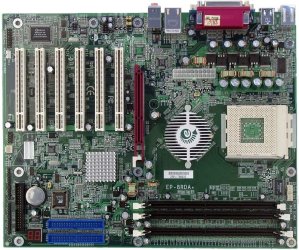
I'm running a epox board that was built with 3 slots. 2 in a pair on one chan. and a single for the other chan. In WinXP and in Linux I can fully populate all three slots with their max value which is 1GB per slot.

But with Win7 I can only populate the two in a pair for single channel or one in each of the channels for a max of 2 GB in any of the allowed combinations.

If I put in 3GB of ram I get BSOD and no boot up 0x0000000A.
The ram is all new and has all passed every test I can throw at it.

A local IT guy says that 7 is prejudiced against non-paired ram and there is no way to fix this. He suggested I try a 10 disk but I told him that my AMD XP cpu is too old for anything newer than 7.

So anyone any ideas??? or am I truly been abandoned by MS.
IMHO only a merchant who is a fool turns his back on a paying customer, but then MS has been playing that for quite a while.

Lucky for me there is Linux Mint so I can still surf the net. I use my old XP drive for running programs that are incompatible with Linux.
As it is, my 7 drive just sits there b/c who wants to pull a stick out just to run it.

Thanks for any ideas.
Dave
no money for anything newer.
 

My Computer

Computer type
PC/Desktop
Computer Manufacturer/Model Number
epox8rda+
OS
windows 7 ultimate 32 bit
CPU
athlon xp barton core 2500
Motherboard
epox8rda+
Memory
Edge Tech pc3200 DDR
Graphics Card(s)
sis 315 pro
Hard Drives
WD and Maxtor
Antivirus
avast
Browser
firefox
3 memory slots, no sata ports, AGP ? how old is that board ?
 

Attachments

  • 8rda+board.jpg
    8rda+board.jpg
    150.9 KB · Views: 1

My Computer

Computer type
PC/Desktop
Computer Manufacturer/Model Number
Skylake Special #666
OS
Windows 10 Pro x64
CPU
Intel Core i7 6700K
Motherboard
Asus Sabertooth Z170 Mark 1
Memory
GSkill TridentZ RGB 16GB 3600 16-16-16-36
Graphics Card(s)
EVGA GTX 980 Ti SC x2
Sound Card
Realtek High Definition
Monitor(s) Displays
AOC G2460PG
Screen Resolution
1920 x 1080 144Hz
Hard Drives
Samsung 860 Pro 256GB, Seagate Barracuda 4TB x2
PSU
EVGA 1000 P2, EVGA White Custom Braided Cables
Case
Corsair Vengeance C70 Gunmetal Black
Cooling
Corsair H100i v2, Corsair ML120 x2, Thermal Grizzly Kryonaut
Keyboard
Logitech G910 Orion Spectrum
Mouse
Logitech G700s
Internet Speed
Verizon Fios Quantum Gateway 75/75
Antivirus
Windows Defender, Malwarebytes Free 3.8.3
Browser
Chrome
Other Info
Corsair SP120 x4, LG Blu-ray Drive, Durabrand HT-395 100 Watt Dolby Digital Amp, Corsair H2100 Wireless 7.1 Headset
very, and also very famous, "the over-clocker’s dream"
It ain't broke.
 

My Computer

Computer type
PC/Desktop
Computer Manufacturer/Model Number
epox8rda+
OS
windows 7 ultimate 32 bit
CPU
athlon xp barton core 2500
Motherboard
epox8rda+
Memory
Edge Tech pc3200 DDR
Graphics Card(s)
sis 315 pro
Hard Drives
WD and Maxtor
Antivirus
avast
Browser
firefox
Back
Top