How fast should be NB Frequency?

Jezuz

New member
Member
Local time
4:50 AM
Messages
41
Location
Braila
I have 2x2GB DD3 1333mhz Kingmax RAM and I see the NB Frequency at 1597mhz(1600mhz) and i want to know how much should be this NB Frequency.

P.S:I heard it should be 3xDRAM Frequency(667mhz).
 

My Computer

Computer type
PC/Desktop
Computer Manufacturer/Model Number
I built it with duct tape, so......
OS
Windows 7 Ultimate x64
CPU
AMD Athlon X4 740
Motherboard
MSI FM2-A55M-E33
Memory
Kingmax Semiconductor 4GB DDR3
Graphics Card(s)
Nvidia GeForce 210 1GB
Sound Card
Integrated
Monitor(s) Displays
Dell P2210
Screen Resolution
1680x1050
Hard Drives
Hitachi HDP725050GLA360 ATA 465GB
PSU
ATX
Cooling
Stock Fans
Keyboard
Serioux Noblesse 9600WR+Mouse
Internet Speed
Slow!
Antivirus
AVG Internet Security 2013
Browser
Mozzila Firefox
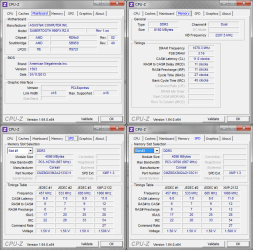
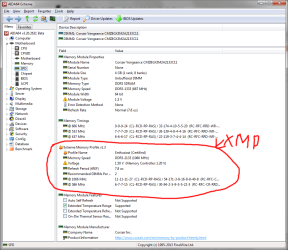
its actually MT and not mhz but people say mhz and to answer your question your motherboard is slight OC'ing that RAM to 12800(1600) instead of its rated 10600(1333) speed which if its stable is fine. you get your sticks speed by doubling its speed so a 1600 stick runs at 2x800 mhz to give you that speed. its confusing i know. if you look at your memory in cpu-z like i posted below you can get an idea for what your memory supports and what it is at?
rvcjew

Taken from my post on a lenovo forum:

heres mine for reference> CPU-Z :you can see in my shot that it shows what its currently at. my NB actualy shows what it is at real time because mines a little nicer of a motherboard thats all. Also cpu-z seems to read some speeds funny as for mine its says its 10700 under SPD when its really 17000. this is because it does not read my XMP profile. Here is a more detailed picture of my ram info to give you an idea> AIDA64
 

Attachments

  • dAEvNuH.png
    dAEvNuH.png
    44.7 KB · Views: 0
  • 161REvr.png
    161REvr.png
    52 KB · Views: 0

My Computer

Computer type
PC/Desktop
Computer Manufacturer/Model Number
Custom
OS
10 Pro x64
CPU
Ryzen 9 3900X
Motherboard
Asrock x370 Tachi
Memory
64GB(4x16GB) DDR4
Graphics Card(s)
EVGA 1080ti FTW3
Sound Card
ASUS Xonar Essence STX (V4 Bursons), ODAC rev B, NFB-11, O2
Monitor(s) Displays
3xASUS PB278Q/R, Optoma HD142X
Screen Resolution
3x1440p, 1080p
Hard Drives
512GB 850 EVO(OS, Programs)
4TB (Movies)
3TB (Downloads)
3TB (Programs)
1TB HDD (Games)
2x6TB R1 (videos)
PSU
AX760
Case
Fractal Define R5
Cooling
NH-D15S
Keyboard
Massdrop Ctrl with Box Navy's
Mouse
G903, Alioth XXL Mat
Internet Speed
280/40
Antivirus
MBAM, ESET
Browser
Canary 64 Bit
Other Info
I also own a Thinkpad P50 Xeon 4K, X220T, X1C5
I have 2x2GB DD3 1333mhz Kingmax RAM and I see the NB Frequency at 1597mhz(1600mhz) and i want to know how much should be this NB Frequency.

P.S:I heard it should be 3xDRAM Frequency(667mhz).
My memory runs at 800 MHz (DDR3-1600) and my NB at 2200, so the 3X rule is not true.

Your motherboard will set your NB frequency to a default which is suitable for your processor and memory. I don't suggest changing it unless you're prepared to do a lot of trial and error, and you don't mind running the risk of burning out your CPU sooner. A lot of overclockers adjust the NB to get more memory throughput, however, they usually have to adjust the NB voltage upwards, too. This can prematurely wear the CPU (especially AMD chips when sometimes the NB is in the CPU package) and it may require active cooling on the NB if you go too high.

I suggest that you leave the NB clock alone, unless you're going for a serious overclock. The default setting is usually more than adequate for the RAM in use.

its actually MT and not mhz but people say mhz
A Northbridge is actually measured in MHz, just like your CPU and HT clock.
 

My Computer

Computer type
PC/Desktop
Computer Manufacturer/Model Number
Mellon Labs (custom build)
OS
Win 7 Pro x64/Win 10 Pro x64 dual boot
CPU
AMD FX 8350 Vishera @ 4200
Motherboard
ASUS M5A97 R2.0
Memory
16 GB Mushkin Blackline DDR3-2400 @ 1866 (9-10-10-10-31)
Graphics Card(s)
XFX Radeon R9 280 Double D Black Edition
Sound Card
Realtek HD Audio on MB. Sounds great.
Monitor(s) Displays
Acer 24", Acer 22"
Screen Resolution
3840 x 1080
Hard Drives
1 x Mushkin Chronos 120 GB SSD (Win 10)
1 x Samsung 850 EVO 250 GB SSD (Win 7)
1 x WD 1TB SATA Blue
1 x WD 1TB SATA Green
PSU
Corsair TX-750
Case
CoolerMaster HAF 912+
Cooling
Coolermaster Seidon 240M Liquid AIO. 6 case fans
Keyboard
Logitech G710+
Mouse
Logitech G500s
Internet Speed
Much better since I got fiber, but still way overpriced.
Antivirus
MSE, Malware Bytes for scanning
Browser
Firefox
Other Info
Corsair VOID USB headphones.

A Mellon Labs X-1 - LCD Smartie driven system status display.

Brought to you by the letter E
Back
Top