How hard/complex is it to remove heatsink?

Dj SharK

New member
Member
Local time
3:53 PM
Messages
93
Location
S.E.A
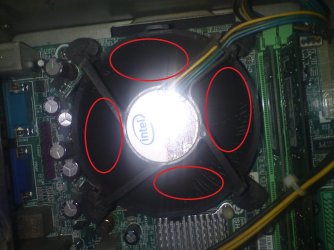
I was looking in my CPU because my HDD temp went up to 53C. I wanted to clean out the dust and noticed a lump of disgusting dust in my heatsink fan (if that's what it's called).

So my question, is there a picture tutorial or video on how to remove and clean them? And is it safe for someone that have little experience in this? I mean, installing RAM is one thing but this seems a little complex. I cannot risk the dust build-up and my PC end up dead (if that's even possible). I tried using the can of air thingy and that doesn't clear it.

I looked in YouTube and there are soooo many different ones but i can't find one similar or close to the one i've got.
 

Attachments
  • DSC00507.JPG
    DSC00507.JPG
    135.8 KB · Views: 27

My Computer My Computer

Computer Manufacturer/Model Number
DIY
OS
Windows 7 Ultimate x86 7600
CPU
Intel Pentium Dual CPU E2180 @ 2.00 GHz
Motherboard
Gigabyte G41M Combo (rev 1.3)
Memory
1 x 2GB | 1 x 1GB Kingston 667
Graphics Card(s)
512MB Nvidia GeForce EN8500GT Silent Magic
Sound Card
Onboard HD 7.1 Audio
Monitor(s) Displays
22" LG W2242T
Screen Resolution
1680 X 1050
Hard Drives
1 x 500GB SATA Hitachi ( Internal )
1 x 1TB SATA Hitachi ( Internal )
1 x 320GB Western Digital ( External )
PSU
500W
Case
Coolermaster
Cooling
Coolermaster
Keyboard
Logitech Media Wireless Keyboard
Mouse
A4Tech G6 Wireless Mouse
Internet Speed
DL : 12MB/s | UL : 1.2MB/s
Other Info
I'm not a gamer. I don't overclock. I use my PC for web browsing, listening to music and watching HD movies.
I was looking in my CPU because my HDD temp went up to 53C. I wanted to clean out the dust and noticed a lump of disgusting dust in my heatsink fan (if that's what it's called).

So my question, is there a picture tutorial or video on how to remove and clean them? And is it safe for someone that have little experience in this? I mean, installing RAM is one thing but this seems a little complex. I cannot risk the dust build-up and my PC end up dead (if that's even possible). I tried using the can of air thingy and that doesn't clear it.

I looked in YouTube and there are soooo many different ones but i can't find one similar or close to the one i've got.


Try youtube for a video.
 

My Computer My Computer

Computer Manufacturer/Model Number
HP Pavillion dv-7 1005 Tx
OS
Win 8 Release candidate 8400
CPU
[email protected]
Memory
4 gigs
Graphics Card(s)
Nvidia 9600M
Sound Card
HD built-in
Monitor(s) Displays
17" Wxga
Screen Resolution
1440x900
Cooling
none
Internet Speed
45Mb down 5Mb up
If you have a preinstalled OEM OS, there should be a hardware section in Help and Support that describes the bit. Else you should find it on the homepage of your PC manufacturer.
 

My Computer My Computer

Computer Manufacturer/Model Number
HP, Dell, Gateway, Toshiba - 4 laptops and 2 desktops
OS
Vista, Windows7, Mint Mate, Zorin, Windows 8
CPU
from 1.6GHz Duo to i7
Monitor(s) Displays
2x HP w2207
Hard Drives
5x HDD, 7x SSD, 12x Externals
Keyboard
with trackball - no mices
Mouse
Trackball mice
Internet Speed
DSL 6000
First go buy some Arctic Silver 5, you can get at Frys, Radio Shack etc for about $10 or online sometimes cheaper. On that heatsink, the four black "cams" turn them the direction of the arrow and then pull up on each one. Then you will need to clean the heatsink and fan, clean off the old thermal compound and apply new compound, following Arctic Silvers instructions. Be VERY VERY careful when putting the pins back into the board, not to bend the white plastic clips at the end.

http://www.arcticsilver.com/intel_application_method.html#
 

My Computer My Computer

OS
Windows 7
CPU
i5-750
Motherboard
Asus
Memory
4GB DDR3 1600
Graphics Card(s)
GT220
  • Like
Reactions: whs

My Computer My Computer

Computer Manufacturer/Model Number
HP, Dell, Gateway, Toshiba - 4 laptops and 2 desktops
OS
Vista, Windows7, Mint Mate, Zorin, Windows 8
CPU
from 1.6GHz Duo to i7
Monitor(s) Displays
2x HP w2207
Hard Drives
5x HDD, 7x SSD, 12x Externals
Keyboard
with trackball - no mices
Mouse
Trackball mice
Internet Speed
DSL 6000
Alternativley, pickup a can of compressed air and blow it out real well.

With the stock HeatSink, you can get by without removing it to clean it out, if you prefer. The compressed air should be able to blow most if not all of it.
 

My Computer My Computer

Computer Manufacturer/Model Number
Custom (Self Build)
OS
Windows 7 Home Premium 64bit
CPU
Intel Core i7 2700k
Motherboard
eVGA P67 SLI
Memory
8GB Mushkin Redline Ridgebacks @1866
Graphics Card(s)
EVGA GTX570 SC
Sound Card
XiFi Titanium HD
Monitor(s) Displays
LG W2453V
Screen Resolution
1920x1080
Hard Drives
Intel 320 80GB -- Intel X25-V 40GB --WD Black 1TB x2 -- WD Blue 640GB
PSU
Seasonic x750
Case
Corsair 600T SE White
Cooling
eVGA Superclocked CPU Cooler
Keyboard
Saitek Cyborg
Antivirus
Kaspersky
Browser
IE
Other Info
LG BD/DVD
@ Desslok & whs: I'm not really familiar or heard of Arctic silver 5 but i'll be sure to read up all i could regarding that matter. Also, thank you Desslok for the quick tutorial. I've seen a video on YouTube on how to remove that (pretty simple) but am not too sure how to detach the fan from the heatsink. The video doesn't show that. Do i need to remove my MB from my case to be able to remove the heatsink?

@Wishmaster: I tried that a number of times but most of it gets lodged deeper or doesn't move much. It's these really think sticky dust. I've had this PC for 2 years and never cleaned that part. :S
 

My Computer My Computer

Computer Manufacturer/Model Number
DIY
OS
Windows 7 Ultimate x86 7600
CPU
Intel Pentium Dual CPU E2180 @ 2.00 GHz
Motherboard
Gigabyte G41M Combo (rev 1.3)
Memory
1 x 2GB | 1 x 1GB Kingston 667
Graphics Card(s)
512MB Nvidia GeForce EN8500GT Silent Magic
Sound Card
Onboard HD 7.1 Audio
Monitor(s) Displays
22" LG W2242T
Screen Resolution
1680 X 1050
Hard Drives
1 x 500GB SATA Hitachi ( Internal )
1 x 1TB SATA Hitachi ( Internal )
1 x 320GB Western Digital ( External )
PSU
500W
Case
Coolermaster
Cooling
Coolermaster
Keyboard
Logitech Media Wireless Keyboard
Mouse
A4Tech G6 Wireless Mouse
Internet Speed
DL : 12MB/s | UL : 1.2MB/s
Other Info
I'm not a gamer. I don't overclock. I use my PC for web browsing, listening to music and watching HD movies.
Removing the heatsink should be a very last resort as you can damage hardware if it not done properly.
Using a fairly stiff paintbrush and the compressed air will remove it without causing any damage
 

My Computer My Computer

Computer type
PC/Desktop
Computer Manufacturer/Model Number
Self Built Custom Computer.
OS
Windows 10 Pro x64
CPU
i7-4770K
Motherboard
Asus Z87 Sabertooth
Memory
16Gig DDR3-2400
Graphics Card(s)
Gigabyte GT740
Sound Card
Onboard
Monitor(s) Displays
Benq 27" - Dell 23' - Benq 22"
Screen Resolution
1680x1050
Hard Drives
Samsung 840 Pro 128g SSD
1xWestern Digital Caviar Green 1tb
2xWestern Digital Caviar Green 2 tb
PSU
Seasonic 760 watt Platinum
Case
Coolermaster Haf - X
Cooling
Noctua NH-C12P CPU Cooler
Keyboard
Logitech illuminated keyboard
Mouse
Logitech Perfomance MX
Internet Speed
Cable = speeds to 20Mbps downsteam and 512kbps upsteam
Antivirus
Avast Internet Security
Browser
Firefox
Arctic Silver 5 is the thermal Paste that needs to be applied between the CPU itself, and the Heatsink.
This must be done properly.

You can not re-use the old thermal paste. I find a soft, lint free cloth and rubbing alcohol works fine for removing the old.

Arctic Silver thermal paste is prefered by many, and is quite good.

Personally, I prefer MX-2. I find it easier to work with and seems to do just as good, or a little better than AS5. At least for me.

But its just a personal prefernce there. Either will do the job nicely.
 

My Computer My Computer

Computer Manufacturer/Model Number
Custom (Self Build)
OS
Windows 7 Home Premium 64bit
CPU
Intel Core i7 2700k
Motherboard
eVGA P67 SLI
Memory
8GB Mushkin Redline Ridgebacks @1866
Graphics Card(s)
EVGA GTX570 SC
Sound Card
XiFi Titanium HD
Monitor(s) Displays
LG W2453V
Screen Resolution
1920x1080
Hard Drives
Intel 320 80GB -- Intel X25-V 40GB --WD Black 1TB x2 -- WD Blue 640GB
PSU
Seasonic x750
Case
Corsair 600T SE White
Cooling
eVGA Superclocked CPU Cooler
Keyboard
Saitek Cyborg
Antivirus
Kaspersky
Browser
IE
Other Info
LG BD/DVD
To add to Wishmasters guidance - once the top of the CPU was properly cleaned, it is recommended to squeeze a pea size amount of Arctic Silver on the middle of the CPU and then reinstall the heatsink. The pressure from the heatsink will distribute it evenly. Just make sure none is left lurking out of the sides.
 

My Computer My Computer

Computer Manufacturer/Model Number
HP, Dell, Gateway, Toshiba - 4 laptops and 2 desktops
OS
Vista, Windows7, Mint Mate, Zorin, Windows 8
CPU
from 1.6GHz Duo to i7
Monitor(s) Displays
2x HP w2207
Hard Drives
5x HDD, 7x SSD, 12x Externals
Keyboard
with trackball - no mices
Mouse
Trackball mice
Internet Speed
DSL 6000
Thank you for all the tips. I will read up on it (since i read somewhere that if applied too much/wrongly, it would only spike up the temps even more).

Appreciate everything. ;)
 

My Computer My Computer

Computer Manufacturer/Model Number
DIY
OS
Windows 7 Ultimate x86 7600
CPU
Intel Pentium Dual CPU E2180 @ 2.00 GHz
Motherboard
Gigabyte G41M Combo (rev 1.3)
Memory
1 x 2GB | 1 x 1GB Kingston 667
Graphics Card(s)
512MB Nvidia GeForce EN8500GT Silent Magic
Sound Card
Onboard HD 7.1 Audio
Monitor(s) Displays
22" LG W2242T
Screen Resolution
1680 X 1050
Hard Drives
1 x 500GB SATA Hitachi ( Internal )
1 x 1TB SATA Hitachi ( Internal )
1 x 320GB Western Digital ( External )
PSU
500W
Case
Coolermaster
Cooling
Coolermaster
Keyboard
Logitech Media Wireless Keyboard
Mouse
A4Tech G6 Wireless Mouse
Internet Speed
DL : 12MB/s | UL : 1.2MB/s
Other Info
I'm not a gamer. I don't overclock. I use my PC for web browsing, listening to music and watching HD movies.
Thank you for all the tips. I will read up on it (since i read somewhere that if applied too much/wrongly, it would only spike up the temps even more).

Appreciate everything. ;)

This is quite true.
The reason is, rather than efficently dissipating the heat from the CPU to the Heatsink (as it is supposed to), it acts as a insulator if it is applied too thick.
 

My Computer My Computer

Computer Manufacturer/Model Number
Custom (Self Build)
OS
Windows 7 Home Premium 64bit
CPU
Intel Core i7 2700k
Motherboard
eVGA P67 SLI
Memory
8GB Mushkin Redline Ridgebacks @1866
Graphics Card(s)
EVGA GTX570 SC
Sound Card
XiFi Titanium HD
Monitor(s) Displays
LG W2453V
Screen Resolution
1920x1080
Hard Drives
Intel 320 80GB -- Intel X25-V 40GB --WD Black 1TB x2 -- WD Blue 640GB
PSU
Seasonic x750
Case
Corsair 600T SE White
Cooling
eVGA Superclocked CPU Cooler
Keyboard
Saitek Cyborg
Antivirus
Kaspersky
Browser
IE
Other Info
LG BD/DVD
just a note, do NOT force the clips holding the fan/heatsink assembly on the cpu. they require a certain amount of pressure to release, but can be broken rather easily.
 

My Computer My Computer

Computer Manufacturer/Model Number
HP dv6519tx
OS
Windows 7 Ultimate x64
CPU
1.80 GHz Intel Core 2 Duo processor T7100
Memory
3 gig ddr2
Graphics Card(s)
NVIDIA GeForce 8400M GS
Sound Card
Realtek High Definition Audio
Monitor(s) Displays
15.4” WXGA High Definition BrightView Widescreen
Screen Resolution
1280 x 800
Hard Drives
Hitachi 320 GB (5400 rpm)
PSU
90 W AC Power Adapter
Cooling
Kitchen plate under the lappy
Keyboard
101 key compatible
Mouse
Touch Pad with On/Off button and dedicated vertical Scroll
Internet Speed
Three Wireless internet prepaid using E160G USB dongle
I did it! Well, i picked up my 500GB HDD from servicing a couple hours ago and since i was at the hardware store, decided to get a new power supply (500W) and went to a friends' place to get a Nvidia 8500 GT 512MB graphic card that he no longer use.

Since i have no experience at all with any of these (except fitting the graphic card; which is straight forward), i decided to risk it all by change the power supply and remove the heatsink. Did a little twist (90 degree) and it came loose but did not detach. I wiggle it and it didn't come off. So i yanked it a tad bit and it came off one and a time. I got a toothpick and cleaned out the heatsink (since i can't figure out how to remove the fan). Unfortunately, i totally forgot about the thermal paste. I'll get them soon though.

Everything seems to be running fine and looks great! Except the GPU temp is crazy high (80+C when case is on and 75~C when i remove my side panel. For now, i'm leaving the side panel open since i don't exactly want anything in my CPU to burn. :S
 

My Computer My Computer

Computer Manufacturer/Model Number
DIY
OS
Windows 7 Ultimate x86 7600
CPU
Intel Pentium Dual CPU E2180 @ 2.00 GHz
Motherboard
Gigabyte G41M Combo (rev 1.3)
Memory
1 x 2GB | 1 x 1GB Kingston 667
Graphics Card(s)
512MB Nvidia GeForce EN8500GT Silent Magic
Sound Card
Onboard HD 7.1 Audio
Monitor(s) Displays
22" LG W2242T
Screen Resolution
1680 X 1050
Hard Drives
1 x 500GB SATA Hitachi ( Internal )
1 x 1TB SATA Hitachi ( Internal )
1 x 320GB Western Digital ( External )
PSU
500W
Case
Coolermaster
Cooling
Coolermaster
Keyboard
Logitech Media Wireless Keyboard
Mouse
A4Tech G6 Wireless Mouse
Internet Speed
DL : 12MB/s | UL : 1.2MB/s
Other Info
I'm not a gamer. I don't overclock. I use my PC for web browsing, listening to music and watching HD movies.
Without the thermal paste you are taking a great risk. I would fix that asap.
 

My Computer My Computer

Computer Manufacturer/Model Number
HP, Dell, Gateway, Toshiba - 4 laptops and 2 desktops
OS
Vista, Windows7, Mint Mate, Zorin, Windows 8
CPU
from 1.6GHz Duo to i7
Monitor(s) Displays
2x HP w2207
Hard Drives
5x HDD, 7x SSD, 12x Externals
Keyboard
with trackball - no mices
Mouse
Trackball mice
Internet Speed
DSL 6000
Without the thermal paste you are taking a great risk. I would fix that asap.

+1 - I'm hoping that the CPU was not pulled attached to the heatsink. Otherwise he should be definitely having issues with his box.
 

My Computer My Computer

Computer Manufacturer/Model Number
Custom
OS
Win7 HP (x64)/Win7 Ultimate (x64)
CPU
Core i7 920
Motherboard
Intel X58
Memory
6 x 2GB Corsair XMS3
Graphics Card(s)
CF HD4890
Sound Card
Asus Xonar
Monitor(s) Displays
Dell 2408WFP
Screen Resolution
1920 x 1200
Hard Drives
2 x 150GB WDC Velociraptors (Raid 0)
1 x 1TB Seagate
1 x 1.5TB Seagate
PSU
Corsair HX1000W
Case
Antec 1200
Keyboard
Razer Lycosa/N52te
Mouse
Razer Lachesis
). Unfortunately, i totally forgot about the thermal paste. I'll get them soon though.

Everything seems to be running fine and looks great! Except the GPU temp is crazy high (80+C when case is on and 75~C when i remove my side panel. For now, i'm leaving the side panel open since i don't exactly want anything in my CPU to burn. :S


If you don't have thermal paste, shut it off and unplug it until you get some. Your GPU is hot, not your CPU? Are you sure the GPU fan is running? Is there a plastic shroud around the fan/heatsink part of the vid card?
 

My Computer My Computer

OS
Windows 7
CPU
i5-750
Motherboard
Asus
Memory
4GB DDR3 1600
Graphics Card(s)
GT220
Guys, not sure if i missed, but did anyone mention to the OP about Thermal paste remover.

Arctic Silver ArctiClean 30ml Thermal material remover.. | Ebuyer.com

That is what i use, cleaner first then purifier (if you look, you can get these in one bottle, obviously called something else, TIM Remover i think)

Sorry peeps to hijack but were'nt sure if that was mentioned.

Lucky
 

My Computer My Computer

Computer Manufacturer/Model Number
The HAFmeister (Custom)
OS
Windows 7 Ultimate x64 RTM + SP1
CPU
Intel Core i7 950 3.06GHZ (OC'd to 3.99Ghz)
Motherboard
Asus Rampage III Extreme x58 SATA 6GB & USB 3.0
Memory
6GB OCZ Reaper HPC Edition PC3-16000 (set 1606Mhz 8-8-8-26)
Graphics Card(s)
EVGA Nvidia Geforce GTX 570
Sound Card
Creative SB X-Fi Titanium Fatal1ty Professional Series
Monitor(s) Displays
Samsung SM2433BW 24" Widescreen Monitor
Screen Resolution
1920x1200
Hard Drives
Western Digital Caviar Black 500GB 32Mb Buffer SATA II
Western Digital Caviar Black 750GB 32Mb Buffer SATA II
Western Digital Caviar Blue 500GB 16Mb Buffer SATA II
Western Digital My Book Essential Edition 750GB USB
Samsung Spinpoint 2TB SATA II
PSU
Thermaltake Toughpower 1200w (Modular)
Case
CoolerMaster HAF-932
Cooling
Zalman Reserator XT and ZM-WB5 Plus - GPU uses Stock coolers
Keyboard
Logitech G510
Mouse
Logitech G9 Gaming Mouse
Internet Speed
3MB Profile - 350-400kbs (Real-Speed)
Other Info
IcyBox Hot-Swap Bay,
Logitech G27 Steering Wheel,
Xbox 360 Wirless Elite Controller with Microsoft Reciever and
Play & Charge Kit,
Belkin USB Wireless Adaptor,
GAME Generic Controller (Playstation Looky-Likey),
Epson SX125 All-in-One.
  • Like
Reactions: whs
I got a toothpick and cleaned out the heatsink (since i can't figure out how to remove the fan).

If you had read my previous post and used a paint brush you would not have to remove the heatsink at all and you would not have to replace the thermal paste
 

My Computer My Computer

Computer type
PC/Desktop
Computer Manufacturer/Model Number
Self Built Custom Computer.
OS
Windows 10 Pro x64
CPU
i7-4770K
Motherboard
Asus Z87 Sabertooth
Memory
16Gig DDR3-2400
Graphics Card(s)
Gigabyte GT740
Sound Card
Onboard
Monitor(s) Displays
Benq 27" - Dell 23' - Benq 22"
Screen Resolution
1680x1050
Hard Drives
Samsung 840 Pro 128g SSD
1xWestern Digital Caviar Green 1tb
2xWestern Digital Caviar Green 2 tb
PSU
Seasonic 760 watt Platinum
Case
Coolermaster Haf - X
Cooling
Noctua NH-C12P CPU Cooler
Keyboard
Logitech illuminated keyboard
Mouse
Logitech Perfomance MX
Internet Speed
Cable = speeds to 20Mbps downsteam and 512kbps upsteam
Antivirus
Avast Internet Security
Browser
Firefox
If you don't have thermal paste, shut it off and unplug it until you get some. Your GPU is hot, not your CPU? Are you sure the GPU fan is running? Is there a plastic shroud around the fan/heatsink part of the vid card?

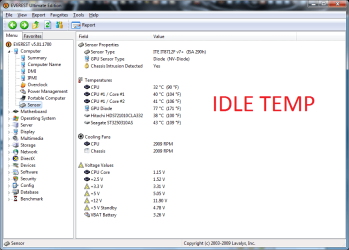
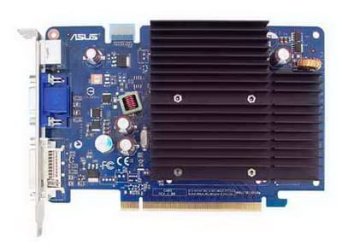
Yes, CPU temp is quite alright i guess. Only the graphic card temp is insane (attachment 1). GPU fan? My previous card (Nvidia 7300 LE 256 MB) have a tiny little fan on it. My current card (Asus/Nvidia EN8500GT 512 MB) doesn't though (attachment 2). Which would you reckon is better? One with a little fan or the other?

@Everybody else, thank you!
 

Attachments

  • 12.png
    12.png
    40.8 KB · Views: 14
  • EN8500GT SILENT MAGIC - HTP - 512M.jpg
    EN8500GT SILENT MAGIC - HTP - 512M.jpg
    18 KB · Views: 6

My Computer My Computer

Computer Manufacturer/Model Number
DIY
OS
Windows 7 Ultimate x86 7600
CPU
Intel Pentium Dual CPU E2180 @ 2.00 GHz
Motherboard
Gigabyte G41M Combo (rev 1.3)
Memory
1 x 2GB | 1 x 1GB Kingston 667
Graphics Card(s)
512MB Nvidia GeForce EN8500GT Silent Magic
Sound Card
Onboard HD 7.1 Audio
Monitor(s) Displays
22" LG W2242T
Screen Resolution
1680 X 1050
Hard Drives
1 x 500GB SATA Hitachi ( Internal )
1 x 1TB SATA Hitachi ( Internal )
1 x 320GB Western Digital ( External )
PSU
500W
Case
Coolermaster
Cooling
Coolermaster
Keyboard
Logitech Media Wireless Keyboard
Mouse
A4Tech G6 Wireless Mouse
Internet Speed
DL : 12MB/s | UL : 1.2MB/s
Other Info
I'm not a gamer. I don't overclock. I use my PC for web browsing, listening to music and watching HD movies.
Back
Top