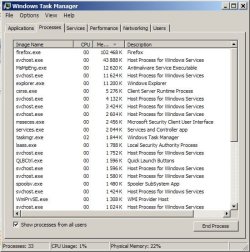
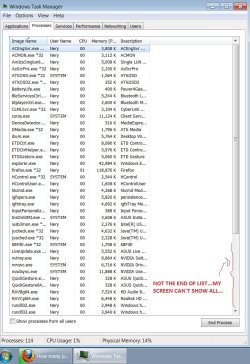
How many processes should ideally be running?

Simply prevent any process, you don't think you need, from starting when booting using CCleaner, to keep it simple of course.

Alternatively, use "MSConfig" by typing it into "Run" found in "Start Menu".
 

My Computer My Computer

At a glance

Windows 8 Professional 64-bitIntel Core i3-21004GBGeForece GTX 550 Ti
Computer Manufacturer/Model Number
Custom
OS
Windows 8 Professional 64-bit
CPU
Intel Core i3-2100
Motherboard
ASRock Intel Z68M/USB3
Memory
4GB
Graphics Card(s)
GeForece GTX 550 Ti
Screen Resolution
1680 x 1050
PSU
750w
Here is the ideal list right from my computer. I'm not likely to trade with anybody and have it fit me better.
TaskManager-runningProcesses51.png

WhatsRunning.png

I wouldn't call that an ideal list. It's what's currently running on your PC, but it's not *the* ideal list. You've got quite a few un-needed processes there, and a bunch are from vmware, which not everyone is going to be running.
 

My Computer My Computer

At a glance

Windows 8.1 Pro x64Intel Core i7 4790k8GB Corsair Dominator 1600MHzMSI TwinFrozr GeForce GTX770
Computer type
PC/Desktop
Computer Manufacturer/Model Number
Custom Built
OS
Windows 8.1 Pro x64
CPU
Intel Core i7 4790k
Motherboard
MSI Z97S Krait Edition
Memory
8GB Corsair Dominator 1600MHz
Graphics Card(s)
MSI TwinFrozr GeForce GTX770
Sound Card
ASUS Xonar DX/XD 7.1
Monitor(s) Displays
Dell 24" S2409W + Dell 20" E207WFP
Screen Resolution
1920x1080 + 1680x1050
Hard Drives
1x 120GB OCZ Agility 3, 1x 750GB Western Digital Caviar Black, 1x 1TB Western Digital Caviar Blue
PSU
Corsair HX850 modular
Case
Fractal Design Define R4
Cooling
Corsair H60 w/ twin Corsair SP120 fans
Keyboard
Logitech G510S Keyboard
Mouse
Logitech G500S Laser Mouse
Internet Speed
40Mbps
Antivirus
Microsoft Security Essentials
Browser
Google Chrome
Other Info
LG Blu-Ray player
Sorry...that was a joke. It's ideal because it meets my needs perfectly....because it is MY computer. I figured people would pick up on that. Sorry for the subtle humor.
 

My Computer My Computer

At a glance

Windows 7 Ultimate x64Intel Q9550 2.83Ghz OC'd to 3.40Ghz8GB G.Skill PI DDR2-800, 4-4-4-12 timingsEVGA 1280MB Nvidia GeForce GTX570
Computer Manufacturer/Model Number
Self-Built in July 2009
OS
Windows 7 Ultimate x64
CPU
Intel Q9550 2.83Ghz OC'd to 3.40Ghz
Motherboard
Gigabyte GA-EP45-UD3R rev. 1.1, F12 BIOS
Memory
8GB G.Skill PI DDR2-800, 4-4-4-12 timings
Graphics Card(s)
EVGA 1280MB Nvidia GeForce GTX570
Sound Card
Realtek ALC899A 8 channel onboard audio
Monitor(s) Displays
23" Acer x233H
Screen Resolution
1920x1080
Hard Drives
Intel X25-M 80GB Gen 2 SSD
Western Digital 1TB Caviar Black, 32MB cache. WD1001FALS
PSU
Corsair 620HX modular
Case
Antec P182
Cooling
stock
Keyboard
ABS M1 Mechanical
Mouse
Logitech G9 Laser Mouse
Internet Speed
15/2 cable modem
Other Info
Windows and Linux enthusiast. Logitech G35 Headset.
Here is the ideal list right from my computer. I'm not likely to trade with anybody and have it fit me better.

You're right about that! Having the 'ideal' list is very subjective and its certainly not about having the least total amount of services running, but rather having all of the services that you need running which you have shown us you do. I sure wish my computer's svchost.exe ran for as little RAM as it does on your computer though.

~Maxx~
.
da59fa57.png
 

My Computer My Computer

At a glance

Windows 7 x64 Home PremiumIntel Core i7 930 @ 2.8 Ghz Socket 1366 LGA8 GB 1366 Mhz DDR3 (PC3-10700) RAMATI Radeon 5770 1 GB DDR5 RAM
Computer Manufacturer/Model Number
HP HPE 270f
OS
Windows 7 x64 Home Premium
CPU
Intel Core i7 930 @ 2.8 Ghz Socket 1366 LGA
Motherboard
Pegatron Truckee v1.04E41
Memory
8 GB 1366 Mhz DDR3 (PC3-10700) RAM
Graphics Card(s)
ATI Radeon 5770 1 GB DDR5 RAM
Sound Card
Realtech High Definition
Monitor(s) Displays
32" Sony Bravia
Screen Resolution
1366 X 768
Hard Drives
Intel 25nm 120 GB Series 320 SSD HD Tune- 265 MBps Read/ 130 MBps Write

LaCie 1TB + 1TB RAID 0 eSATA Drive HD Tune- 160 MBps Read/ 90 MBps Write
Keyboard
Logitech Illuminated
Mouse
Logitech MX Revolution
Internet Speed
36.4 Mbps Maximum on a 37 Mbps Motorola SB501 Modem
A few minutes after booting the PC, after the delayed services run, I show 27 processes running. (show processes from all users is checked)

At this point it's basically a stripped down Windows.
It runs my audio programs, does the Internet, is part of a home network and can download digital pics from my camera so I'm happy.

Ap
 

My Computer My Computer

At a glance

Windows 7 Home PremiumIntel Core 2 Duo @ 3.00gHz4 GBATI Radeon HD 2600 XT
Computer Manufacturer/Model Number
Assembled in my workshop
OS
Windows 7 Home Premium
CPU
Intel Core 2 Duo @ 3.00gHz
Motherboard
Gigabyte GA-P35-S3G
Memory
4 GB
Graphics Card(s)
ATI Radeon HD 2600 XT
Sound Card
RME 24/96 Card, Realtek Internal Audio PreSonus FireStudio
Monitor(s) Displays
Acer 1917 (x2)
Screen Resolution
1280 x 1024 on both monitors
Hard Drives
Three 250GB Seagate SATA Barracuda 7200rpm
PSU
Rosewill 500-watt
Case
Rosewill mid-tower
Cooling
Noctua NH-U9B (CPU), PwrSupply fan + single large case Fan
Keyboard
Macally w/2/USB ports.
Mouse
Trackman Wheel
Other Info
Event 20/20 bas studio monitors, Yamaha sub.
Rackmount Korg/Roland/Yamaha synthesizers,
Cubase MIDI/audio recording. Sony Soundforge audio/mastering software. CD Architect Mastering. RME & Presonus audio interfaces.
A few minutes after booting the PC, after the delayed services run, I show 27 processes running.

My Win 7 computer currently boots up with 35 services running. There used to be 39 running, but I disabled the MS CEIP information collection schedules in Task Scheduler and I instantly had 4 less services running all day. What prompted me to do this was that I found out that starting in Win 7 these CEIP information collection services located in the Task Scheduler Library> Microsoft> Windows file continue to run even after the user opts out of the CEIP program.

~Maxx~
.
da59fa57.png
 

My Computer My Computer

At a glance

Windows 7 x64 Home PremiumIntel Core i7 930 @ 2.8 Ghz Socket 1366 LGA8 GB 1366 Mhz DDR3 (PC3-10700) RAMATI Radeon 5770 1 GB DDR5 RAM
Computer Manufacturer/Model Number
HP HPE 270f
OS
Windows 7 x64 Home Premium
CPU
Intel Core i7 930 @ 2.8 Ghz Socket 1366 LGA
Motherboard
Pegatron Truckee v1.04E41
Memory
8 GB 1366 Mhz DDR3 (PC3-10700) RAM
Graphics Card(s)
ATI Radeon 5770 1 GB DDR5 RAM
Sound Card
Realtech High Definition
Monitor(s) Displays
32" Sony Bravia
Screen Resolution
1366 X 768
Hard Drives
Intel 25nm 120 GB Series 320 SSD HD Tune- 265 MBps Read/ 130 MBps Write

LaCie 1TB + 1TB RAID 0 eSATA Drive HD Tune- 160 MBps Read/ 90 MBps Write
Keyboard
Logitech Illuminated
Mouse
Logitech MX Revolution
Internet Speed
36.4 Mbps Maximum on a 37 Mbps Motorola SB501 Modem
You're right about that! Having the 'ideal' list is very subjective and its certainly not about having the least total amount of services running, but rather having all of the services that you need running which you have shown us you do. I sure wish my computer's svchost.exe ran for as little RAM as it does on your computer though.

~Maxx~
.
da59fa57.png

It's all about whether your computer is fast enough for you. While I might be able to tweak a handful of things and speed it up by a teeny, tiny amount, the time effort involved to measure it and make sure that it didn't actually slow something down far outweighs the benefits in my eyes. My box is plenty fast for me, it's running with a light install load, it's running an SSD, my timings on my RAM are low, my CPU is overclocked just a bit and pretty much everything I do is near instantaneous...so it's just not worth screwing with further. (For me).
 

My Computer My Computer

At a glance

Windows 7 Ultimate x64Intel Q9550 2.83Ghz OC'd to 3.40Ghz8GB G.Skill PI DDR2-800, 4-4-4-12 timingsEVGA 1280MB Nvidia GeForce GTX570
Computer Manufacturer/Model Number
Self-Built in July 2009
OS
Windows 7 Ultimate x64
CPU
Intel Q9550 2.83Ghz OC'd to 3.40Ghz
Motherboard
Gigabyte GA-EP45-UD3R rev. 1.1, F12 BIOS
Memory
8GB G.Skill PI DDR2-800, 4-4-4-12 timings
Graphics Card(s)
EVGA 1280MB Nvidia GeForce GTX570
Sound Card
Realtek ALC899A 8 channel onboard audio
Monitor(s) Displays
23" Acer x233H
Screen Resolution
1920x1080
Hard Drives
Intel X25-M 80GB Gen 2 SSD
Western Digital 1TB Caviar Black, 32MB cache. WD1001FALS
PSU
Corsair 620HX modular
Case
Antec P182
Cooling
stock
Keyboard
ABS M1 Mechanical
Mouse
Logitech G9 Laser Mouse
Internet Speed
15/2 cable modem
Other Info
Windows and Linux enthusiast. Logitech G35 Headset.
My box is plenty fast for me, it's running with a light install load, it's running an SSD, my timings on my RAM are low, my CPU is overclocked just a bit and pretty much everything I do is near instantaneous...so it's just not worth screwing with further. (For me).

Your level of candidness concerning the intricacies of the extensive modifications that you have made to your Win 7 computer are encouraging to someone like me who is in the early stages of setting one up. I look forward to someday being able to follow your example and upgrade to an SSD, but I've just had my new Win 7 x64 desktop for 2 months and I'm trying to delay the implementation of the very noticable improvement in performance that an SSD would bring until I've run it for a while and the 600% improvement in performance over the laptop I just upgraded from has worn off a bit.

~Maxx~
.
da59fa57.png
 
Last edited:

My Computer My Computer

At a glance

Windows 7 x64 Home PremiumIntel Core i7 930 @ 2.8 Ghz Socket 1366 LGA8 GB 1366 Mhz DDR3 (PC3-10700) RAMATI Radeon 5770 1 GB DDR5 RAM
Computer Manufacturer/Model Number
HP HPE 270f
OS
Windows 7 x64 Home Premium
CPU
Intel Core i7 930 @ 2.8 Ghz Socket 1366 LGA
Motherboard
Pegatron Truckee v1.04E41
Memory
8 GB 1366 Mhz DDR3 (PC3-10700) RAM
Graphics Card(s)
ATI Radeon 5770 1 GB DDR5 RAM
Sound Card
Realtech High Definition
Monitor(s) Displays
32" Sony Bravia
Screen Resolution
1366 X 768
Hard Drives
Intel 25nm 120 GB Series 320 SSD HD Tune- 265 MBps Read/ 130 MBps Write

LaCie 1TB + 1TB RAID 0 eSATA Drive HD Tune- 160 MBps Read/ 90 MBps Write
Keyboard
Logitech Illuminated
Mouse
Logitech MX Revolution
Internet Speed
36.4 Mbps Maximum on a 37 Mbps Motorola SB501 Modem
hi guys!

I bought a asus n76v and I was thinking about use OEM w7 64bits install or a new fresh install...first off al, on the first use I uninstalled some boring and things that was installed by asus...like face recognize logon (sometimes, delay to recognize is annoying), and more 2 or 3 things that I will never use...like mixer for audio e video edit software... I unchecked some itens on msconfig (startup) too...like cyberlink dvd burning options, power dvd, adobe reader... (you can use this normally WHEN you will need)

after this I checked process list, almost fell of chair...119 process running....a lot of stupid programs running like process.... my machine is a i7 with 16gb, but, and I will migrate to a SSD this week, but I will not lost energy with this things...

My old desktop (e8400 - 8gb), after 3 year of fresh w7 sp1 32bits instalation and a lot of software after, show me 72 process running...I don`t know if had difference between quantity of process running between w7 32 bits an w7 64 bits..both sp1.

OEM factory install never more....

Sorry my english, this is not my native language and sorry for the post on old topic, but this is a simple report to help people with this same doubt...

 

My Computer My Computer

At a glance

W7 SP1 64BITS
OS
W7 SP1 64BITS
Reading the posts here, some with over 100 services? I wonder how it's possible to end up with that many, like 75 programs\applications opened at the same time??

I've got 3 laptops running, all doing fine in the 30 to 40 range, depending on open programs.
 

Attachments

  • proc.jpg
    proc.jpg
    59.2 KB · Views: 10

My Computer My Computer

At a glance

W7, W8.1
Computer type
Laptop
Computer Manufacturer/Model Number
Dell \ Lenovo\ HP \ Toshiba
OS
W7, W8.1
Antivirus
MSE, Malwarebytes
Browser
FF
4wd,

Look this...I only install firefox after first use...

SCREEN.jpg
 

My Computer My Computer

At a glance

W7 SP1 64BITS
OS
W7 SP1 64BITS
silx2000, I'd believe you can get rid of dozens of services\startup items. But which can go still leaving a fast, fully functional pc? That's up to you, your skills and patience. I can't believe the amount of stuff that gets crammed into new pc's these days.

My personal opinions and basic approach:

Take it over time, be careful, have recent complete backups\images (preferably from a good 3rd party program, creating the usb\cd boot\restore tool) + create fresh windows restore points regularly, should save the day if anything goes wrong). Alternatively, do a clean windows install + only the needed drivers (can be a combination of default windows drivers + some specific stuff from the manufacturer).

I use Ccleaner as the easy way to enable\disable startup items. Process Explorer from Sysinternals is a good tool. Regarding services, set things to manual if in any doubt, choose disabled only when 111% sure about the function of a particular service. Tip: always check Dependencies.

Be careful, don't do more than 1 or 2 changes at a time, spend time reading\googling before acting, it's the alternative to staying up all night trying to undo mistakes lol
 

My Computer My Computer

At a glance

W7, W8.1
Computer type
Laptop
Computer Manufacturer/Model Number
Dell \ Lenovo\ HP \ Toshiba
OS
W7, W8.1
Antivirus
MSE, Malwarebytes
Browser
FF
100 or more processes is a lot. I run between 50 and 60 on all my systems. But I always disable all startup programs - except those that I started myself (like Rocket Dock or Sidebar - gadgets).
 

My Computer My Computer

At a glance

Vista, Windows7, Mint Mate, Zorin, Windows 8from 1.6GHz Duo to i7
Computer Manufacturer/Model Number
HP, Dell, Gateway, Toshiba - 4 laptops and 2 desktops
OS
Vista, Windows7, Mint Mate, Zorin, Windows 8
CPU
from 1.6GHz Duo to i7
Monitor(s) Displays
2x HP w2207
Hard Drives
5x HDD, 7x SSD, 12x Externals
Keyboard
with trackball - no mices
Mouse
Trackball mice
Internet Speed
DSL 6000
WD and Whs,

you are right...

until last year all my new machines I installed a clean windows + essential drivers only, but on last 10 months my job took my time a lot, I'm very tired and for a few moments with this new asus I Thought use factory default windows until I confirm that it was not worth.

My computer routine on last 5 or 7 years was: new clean windows instalation + essential drivers + basic programs + specific programs + personal preferences(shortcuts, email client + wallpapers, etc) after this: CCleaner and defrag and after all: macrium reflect (disk image copy) saved on external drive.

normally once a year or when windows was slow or failing I always replaced instalation for image on backup, and this routine always work fine to me, except when I did hardware upgrade.

well...I just installed clean windows on this morning: 33 services running, now I will install the basic drivers. possibly no more than 50 services will running after basic drivers.
 

My Computer My Computer

At a glance

W7 SP1 64BITS
OS
W7 SP1 64BITS
Back
Top