Solved How much difference would RAM make?

darksupernova

New member
Power User
Local time
10:35 PM
Messages
55
Hi everyone,

This has been bugging me for years, and now, being a student my budget is tighter than ever so I have to chose my upgrades carefully!
My question is:

Currently I have 4GB DDR3 installed in my machine, without any games running I'm using about 1.5GB in Win7 ultimate x64. I like to game, but also use my machine for work. The RAM im currently using it nothing special, but its also not rubbish. My computer never exceeds 4GB of RAM (according to task manager). How much difference would I notice in gaming and for programmes starting if I were to ditch this RAM and get 8GB of good DDR3 RAM?

Simply, how much difference does buying more RAM make if you never use ALL the RAM you have already?

I have been searching but seem to only find dummy answers, or posts dating back to ~2005! I would greatly appreciate any input or advice you have.

Computer specs:

Core i7 860 @ 2.8GHz
4GB DDR3 RAM
ATI Radeon HD5750 1GB
23" 1080p 120hz monitor running natively
SATA 2 HDD's

Im looking at this RAM specifically:

BL3KIT51264BA160A - 12GB kit (4GBx3), Ballistix 240-pin DIMM , DDR3 PC3-12800 from Crucial.com

However my question is more to do with buying more space than to do with the speed of the RAM in use.

Many thanks,

Max
 

My Computer

Computer Manufacturer/Model Number
Me
OS
Windows 8 Pro
CPU
Intel Core i7 860 @ 3.6GHz
Motherboard
Asus P7P55-M
Memory
Crucial 8GB (2x4GB) DDR3 1866Mhz
Graphics Card(s)
Sapphire ATI Radeon HD 5850 1024MB GDDR5
Sound Card
Creative Sound Blaster HS-1100 Arena USB Surround Sound Head
Monitor(s) Displays
Asus VG236H 120Hz
Screen Resolution
1080p
Hard Drives
120GB OCZ Agility 3 SATA3 + 2.5TB Total SATA2
PSU
Antec TruePower 650W Modular PSU
Case
Antec P183 Noise Reducing case
Cooling
4x120mm Antec 3-speed fans + Arctic Cooling Freezer7 CPU fan
Keyboard
G15 (orange backlight)
Mouse
Logitech G9
Internet Speed
125Mb/s Virgin Media
Other Info
Steel Series Metal mouse matt
As for whether or not you'll see that much of a benefit moving to 8GB from 4GB...

Some yes.
Windows itself will see more memory, and will start using a bit more. keeping more in memory means the system feels a bit more responsive.
For example, alt+tabbing in and out of a game may feel a bit smoother.

However, this difference will not be huge and may not be worth the investment based on that alone.

The big advantage will come from using 64bit applications that can use alot of memory.
Some HD video encoders, 3D rendering apps, running Virtual machines are a few examples.


So long story short, yes it will make a little bit of difference. But it may not be worth the investment if you do not really have a specific need for it. But this is highly dependant on the price.
Although there is a slight bit of difference from going from 4-6 or 4-8GB of RAM, anything more than 6 or 8GB however, would certainly be a waste unless you have the specific need for that much.
If you run multiple VMs often for example, the 12GB may be useful, but otherwise , No.

If you can get a kit cheap enough, like a 2x4GB kit, then go for it. Just don't expect everything to instantly become 2 times faster.


Generally speaking, having more RAM is better than faster RAM.
When it comes to overclocking/tweaking RAM, adjusting timings etc, there very little to be gained. To the point, its really not worth it.

Also, populating only 2 slots outs of 4, or 3 out of 6, is better than populting them all, for stability purposes.

So ideally for 8GB, 2 sticks at 4GB ea would be better than having 4 sticks at 2GB each.


4GB is plenty for most. But, if you want to upgrade, I would look into a 8GB kit of DDR3 1333 or 1600. Anything more than that is likely just a waste.
 

My Computer

Computer Manufacturer/Model Number
Custom (Self Build)
OS
Windows 7 Home Premium 64bit
CPU
Intel Core i7 2700k
Motherboard
eVGA P67 SLI
Memory
8GB Mushkin Redline Ridgebacks @1866
Graphics Card(s)
EVGA GTX570 SC
Sound Card
XiFi Titanium HD
Monitor(s) Displays
LG W2453V
Screen Resolution
1920x1080
Hard Drives
Intel 320 80GB -- Intel X25-V 40GB --WD Black 1TB x2 -- WD Blue 640GB
PSU
Seasonic x750
Case
Corsair 600T SE White
Cooling
eVGA Superclocked CPU Cooler
Keyboard
Saitek Cyborg
Antivirus
Kaspersky
Browser
IE
Other Info
LG BD/DVD
I think 4GB is plenty for most average users. Cases where you need more:

1. Photo or video editing, where you work with really big files.
2. Software development, where you need to multitask, e.g. visual studio, sql server, version control system, etc.
3. Related to 2, run virtual machines to test your latest and greatest on older os's or browsers like IE6.
 

My Computer

OS
Windows 7 Professional 64bit
  • Like
Reactions: JMH
Hi,

Thank you both for your answers. In conclusion what you are saying is, other than the speed of the RAM, if your not using all of what you currently have, adding more wont give you more speed.

Thank you wishmaster for the extra information about slots and speed, I had just been wondering which configuration to get, so thats very much appreciated!

So if im looking for a framerate boost in games, really I need a gfx card update?

Max
 

My Computer

Computer Manufacturer/Model Number
Me
OS
Windows 8 Pro
CPU
Intel Core i7 860 @ 3.6GHz
Motherboard
Asus P7P55-M
Memory
Crucial 8GB (2x4GB) DDR3 1866Mhz
Graphics Card(s)
Sapphire ATI Radeon HD 5850 1024MB GDDR5
Sound Card
Creative Sound Blaster HS-1100 Arena USB Surround Sound Head
Monitor(s) Displays
Asus VG236H 120Hz
Screen Resolution
1080p
Hard Drives
120GB OCZ Agility 3 SATA3 + 2.5TB Total SATA2
PSU
Antec TruePower 650W Modular PSU
Case
Antec P183 Noise Reducing case
Cooling
4x120mm Antec 3-speed fans + Arctic Cooling Freezer7 CPU fan
Keyboard
G15 (orange backlight)
Mouse
Logitech G9
Internet Speed
125Mb/s Virgin Media
Other Info
Steel Series Metal mouse matt
In terms of gaming, the RAM speed itself will not really help anything.
It does to a degree, but its quite insignificant.
For example, going from 4GB 1066 to 4GB 1600 might get you 1FPS, depending on the game.
But so long as you have at least 4GB, you should be fine there.


But, typically and in most cases, yes.
The GPU itself is what will impact gaming performance the most, followed by the CPU.
Of course theres also resolution and other factors that should be considered when choosing a Graphics Card.
 

My Computer

Computer Manufacturer/Model Number
Custom (Self Build)
OS
Windows 7 Home Premium 64bit
CPU
Intel Core i7 2700k
Motherboard
eVGA P67 SLI
Memory
8GB Mushkin Redline Ridgebacks @1866
Graphics Card(s)
EVGA GTX570 SC
Sound Card
XiFi Titanium HD
Monitor(s) Displays
LG W2453V
Screen Resolution
1920x1080
Hard Drives
Intel 320 80GB -- Intel X25-V 40GB --WD Black 1TB x2 -- WD Blue 640GB
PSU
Seasonic x750
Case
Corsair 600T SE White
Cooling
eVGA Superclocked CPU Cooler
Keyboard
Saitek Cyborg
Antivirus
Kaspersky
Browser
IE
Other Info
LG BD/DVD
  • Like
Reactions: JMH
Well Wishmaster, in that case I wont buy the RAM and I'll put the money towards a new card. Thanks very much for all your useful and insightful information, its answered a question that I've been thinking about since I first learn about RAM!

I know this is unrelated to this thread, and perhaps I should start a new one, but just in case you know:

Does the core i7 still overclock itself even if you dont have the windows gadget showing the little blue bar? Also, if i overclock my processor manually, up to lets say 3.5Ghz, will the i7 overclock itself further on demand?

Thanks,

Max
 

My Computer

Computer Manufacturer/Model Number
Me
OS
Windows 8 Pro
CPU
Intel Core i7 860 @ 3.6GHz
Motherboard
Asus P7P55-M
Memory
Crucial 8GB (2x4GB) DDR3 1866Mhz
Graphics Card(s)
Sapphire ATI Radeon HD 5850 1024MB GDDR5
Sound Card
Creative Sound Blaster HS-1100 Arena USB Surround Sound Head
Monitor(s) Displays
Asus VG236H 120Hz
Screen Resolution
1080p
Hard Drives
120GB OCZ Agility 3 SATA3 + 2.5TB Total SATA2
PSU
Antec TruePower 650W Modular PSU
Case
Antec P183 Noise Reducing case
Cooling
4x120mm Antec 3-speed fans + Arctic Cooling Freezer7 CPU fan
Keyboard
G15 (orange backlight)
Mouse
Logitech G9
Internet Speed
125Mb/s Virgin Media
Other Info
Steel Series Metal mouse matt
Also, don't go by your current idle memory usage. Windows 7 will use a chunk of your memory for caching and fetching. If that RAM was needed for something intense, like a game, it would be unloaded to make room for the game. Windows 7 does a remarkable job of managing the memory you give it.
 

My Computer

OS
Windows 7 Ultimate x64 SP1
CPU
Intel Core i7-2600
Motherboard
Gigabyte GA-P67A-UD3P-B3
Memory
12 GB Patriot Extreme DDR3-1333
Graphics Card(s)
Nvidia GTX 470
Monitor(s) Displays
Dell UltraSharp 2209WA
Hard Drives
OCZ Agility3 240 GB, WD5001AALS, WD7501AALS
PSU
OCZ ModStream 700W
Case
CoolerMaster HAF 912 Advanced
Cooling
CoolerMaster Hyper 212 Plus
  • Like
Reactions: JMH
This is very true & 7 does do a very good job of managing memory.


For example, I have 8GB in my PC. I do use a few apps that use alot of memory, but for normal use 2GB or a little more is average idle useage for me.

But, if you take a closer look at your Resource Manager you'll find that its most likely making use of all the RAM you have.
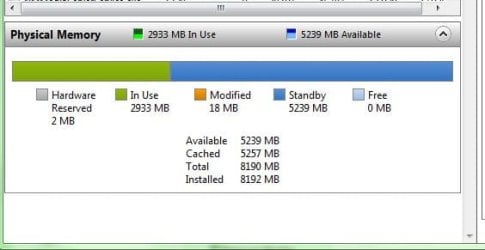
1.JPG

I have something going on ATM, so in use is a bit higher than normal, but as you can see in this snip there is 0 space free.
This means Windows is actually using all 8GB.

To clarify if it helps:
In Use is RAM the system is actively using.
Standby is data you used earlier, or Windows assumes you will use soon
Free is RAM thats not even being used.
Available, is the same as Standby.

Since DATA in Standby is not currently in use, this DATA can be unloaded to make room if its needed.
So although its technically being used, it can also be quickly dumped and is considered as available space since this DATA is not important at the current time.

The good thing about this is that if I was to open something thats in standby, that memory just switches from "Standby" to "In Use" instantly and theres no need to reload anything.
Since memory is much faster than a HHD, or even a SSD for that matter, the transition will seem smoother and more responsive.


So there are advantages to having more RAM. Windows will use it.
Its just not going to be such a drastic performance gain such as upgrading to a SSD would be.
 

My Computer

Computer Manufacturer/Model Number
Custom (Self Build)
OS
Windows 7 Home Premium 64bit
CPU
Intel Core i7 2700k
Motherboard
eVGA P67 SLI
Memory
8GB Mushkin Redline Ridgebacks @1866
Graphics Card(s)
EVGA GTX570 SC
Sound Card
XiFi Titanium HD
Monitor(s) Displays
LG W2453V
Screen Resolution
1920x1080
Hard Drives
Intel 320 80GB -- Intel X25-V 40GB --WD Black 1TB x2 -- WD Blue 640GB
PSU
Seasonic x750
Case
Corsair 600T SE White
Cooling
eVGA Superclocked CPU Cooler
Keyboard
Saitek Cyborg
Antivirus
Kaspersky
Browser
IE
Other Info
LG BD/DVD
Right, well maybe its something I'll consider in the near future. I feel like I need to upgrade from 4GB, and I think what you've just told me about win 7 is quite compelling, however if I'm honest with myself I don't really need more RAM, the money would be better suited in a graphics card.

Thank you all for your help, you have definitely given me some very useful information.

Thanks,

Max
 

My Computer

Computer Manufacturer/Model Number
Me
OS
Windows 8 Pro
CPU
Intel Core i7 860 @ 3.6GHz
Motherboard
Asus P7P55-M
Memory
Crucial 8GB (2x4GB) DDR3 1866Mhz
Graphics Card(s)
Sapphire ATI Radeon HD 5850 1024MB GDDR5
Sound Card
Creative Sound Blaster HS-1100 Arena USB Surround Sound Head
Monitor(s) Displays
Asus VG236H 120Hz
Screen Resolution
1080p
Hard Drives
120GB OCZ Agility 3 SATA3 + 2.5TB Total SATA2
PSU
Antec TruePower 650W Modular PSU
Case
Antec P183 Noise Reducing case
Cooling
4x120mm Antec 3-speed fans + Arctic Cooling Freezer7 CPU fan
Keyboard
G15 (orange backlight)
Mouse
Logitech G9
Internet Speed
125Mb/s Virgin Media
Other Info
Steel Series Metal mouse matt
  • Like
Reactions: JMH
If it was me I would looking for a new video card. Once your card runs out of 364 mb of ram and goes to motherboard ram it will slow down a lot.
 

My Computer

Computer type
PC/Desktop
Computer Manufacturer/Model Number
Home made Desktop
OS
Windows 10 Pro. 64/ version 1709 Windows 7 Pro/64
CPU
Intel i7-6800K @ 4.3
Motherboard
ASUS X-99 Deluxe II
Memory
Corsair Platinum 16 gig @2400
Graphics Card(s)
EVGA GTX 1070 OC
Monitor(s) Displays
Asus 27" LED LCD/VE278Q
Screen Resolution
1920-1080 or 1280-720 HDMI
Hard Drives
INTEL SSD 730-240 Gb Sata 3.0/
PSU
EVGA Platium 1200W
Case
Phanteks Luxe Tempered Glass 8 fans/ one radiator
Cooling
XSPC/ Water Cooled CPU
Keyboard
Das 4 Professional
Mouse
Logitech M705/MX Anywhere 2-S
Internet Speed
100 mbits
Antivirus
Microsoft Security Essentials/ Malwarebytes Premium 3.0/ SAS
Browser
I.E. 11 default/Firefox/ ISP Time Warner Cable/Spectrum
Other Info
LG BluRay Burner/
Sound system-KLipsch-THX/
Icy Dock ssd Hot Swap bays.
Hopefully theres enough info here to help prioritize what upgrades to focus on, depending on what you want to accomplish.

I would agree with Layback Bear.
Gaming performance go for the GPU. Thats where the most gain will be for what your looking for.
 

My Computer

Computer Manufacturer/Model Number
Custom (Self Build)
OS
Windows 7 Home Premium 64bit
CPU
Intel Core i7 2700k
Motherboard
eVGA P67 SLI
Memory
8GB Mushkin Redline Ridgebacks @1866
Graphics Card(s)
EVGA GTX570 SC
Sound Card
XiFi Titanium HD
Monitor(s) Displays
LG W2453V
Screen Resolution
1920x1080
Hard Drives
Intel 320 80GB -- Intel X25-V 40GB --WD Black 1TB x2 -- WD Blue 640GB
PSU
Seasonic x750
Case
Corsair 600T SE White
Cooling
eVGA Superclocked CPU Cooler
Keyboard
Saitek Cyborg
Antivirus
Kaspersky
Browser
IE
Other Info
LG BD/DVD
Hi,

Thank you both for your answers. In conclusion what you are saying is, other than the speed of the RAM, if your not using all of what you currently have, adding more wont give you more speed.

Thank you wishmaster for the extra information about slots and speed, I had just been wondering which configuration to get, so thats very much appreciated!

So if im looking for a framerate boost in games, really I need a gfx card update?

Max
My experience is the same. I added an addition 4GB to my laptop & notice very little difference. However, DDR3 laptop RAM is very inexpensive, 2 modules for $40. A month ago, I paid $26 for one.
 

My Computer

Computer type
PC/Desktop
Computer Manufacturer/Model Number
Dell Inspiron 660
OS
Windows 7 Home Premium 64bit
CPU
Intel Core i3-3240
Motherboard
Dell 084J0R
Memory
8GB DDR3 SDRAM
Graphics Card(s)
EVGA GeForce GT 620
Sound Card
Intel Panther Point PCH High Definition Audio
Monitor(s) Displays
Acer G205HV
Screen Resolution
1600 x 900
Hard Drives
Sandisk SSD 64GB SDSSDP064G
Seagate HDD 1TB ST1000DM003-1CH162
PSU
Dell 300W
Case
Dell Inspiron
Keyboard
Logitech Wireless K320/B350
Mouse
Microsoft
Internet Speed
25Mbps/4Mbps
Antivirus
Avast
Browser
Mozilla Firefox
Back
Top