Solved How much do you trust registry cleaners?

I agree on most of you who said to not use a registry cleaner, i ran ccleaner a couple times last week and deleted a bunch of left over entries, then i felt like my computer was becoming slow, programs keep force closing etc, so i did a system recovery and now my computer feels snappy again with no trouble at all, although before that it was spick and span no virus, junk, defragment etc
 

My Computer My Computer

At a glance

Windows 7 Home Premium 64bitIntel i3 550 3.20 GHz5GB DDR3Intel HD Graphics
Computer Manufacturer/Model Number
HP
OS
Windows 7 Home Premium 64bit
CPU
Intel i3 550 3.20 GHz
Memory
5GB DDR3
Graphics Card(s)
Intel HD Graphics
Sound Card
Realtrek
Monitor(s) Displays
HP 2211X
Hard Drives
1.35 TB Hard Drive
A registry cleaner isn't going to make your computer run slowly. Random issues and erro messages...maybe...but it wouldn't affect performance. CCleaner's default settings also don't dig deep enough to do any damage to the OS...that's why it is so heavily recommended.
 

My Computer My Computer

At a glance

Windows 7 Ultimate x64 SP1Intel Core i7-260012 GB Patriot Extreme DDR3-1333Nvidia GTX 470
OS
Windows 7 Ultimate x64 SP1
CPU
Intel Core i7-2600
Motherboard
Gigabyte GA-P67A-UD3P-B3
Memory
12 GB Patriot Extreme DDR3-1333
Graphics Card(s)
Nvidia GTX 470
Monitor(s) Displays
Dell UltraSharp 2209WA
Hard Drives
OCZ Agility3 240 GB, WD5001AALS, WD7501AALS
PSU
OCZ ModStream 700W
Case
CoolerMaster HAF 912 Advanced
Cooling
CoolerMaster Hyper 212 Plus
I agree on most of you who said to not use a registry cleaner, i ran ccleaner a couple times last week and deleted a bunch of left over entries, then i felt like my computer was becoming slow, programs keep force closing etc, so i did a system recovery and now my computer feels snappy again with no trouble at all, although before that it was spick and span no virus, junk, defragment etc

I have been using ccleaner for Past 5_6 years. I never heard no issue with it. It always cleans my left overs and makes my PC better to use. Have u tried unobligated power suite. It is the best
 

My Computer My Computer

At a glance

win 7
OS
win 7
I ran ccleaner today due to my normal cleanup routine, then i went ahead and ran the registry cleaner, it had detected 224 problems thats alot, i didnt clicked on the fix issue yet because i want to hear what the experts would say so should i go ahead and run it or just leave it as it be

Ccleaner has never caused any problems. I've used it for many years on XP and W7 systems, and no problems at all with anything it has found and removed. Like noted it doesn't check too deeply so not much chance of it removing anything that could cause problems. Also as noted there are many registry cleaners that can "brick" your system, be very cautious using any others.
 

My Computer My Computer

At a glance

W7HP-32bitIntel N2702Gb
Computer Manufacturer/Model Number
HP 210
OS
W7HP-32bit
CPU
Intel N270
Memory
2Gb
I ran ccleaner today due to my normal cleanup routine, then i went ahead and ran the registry cleaner, it had detected 224 problems thats alot, i didnt clicked on the fix issue yet because i want to hear what the experts would say so should i go ahead and run it or just leave it as it be

Ccleaner has never caused any problems. I've used it for many years on XP and W7 systems, and no problems at all with anything it has found and removed. Like noted it doesn't check too deeply so not much chance of it removing anything that could cause problems. Also as noted there are many registry cleaners that can "brick" your system, be very cautious using any others.

Registry cleaners might have done some good with XP (and I stress 'might have'), but with 7 they are completely unnecessary. I saw in another post of yours that you have the most trouble with Windows 7 computers - they need to be reinstalled more than your XP systems - so perhaps your instability problems stem from using XP methodology on 7 systems.
 

My Computer My Computer

At a glance

Windows 7 Ultimate x64 SP1Core i7-2670QM8GB DDR3 PC3-10600Intel HD Graphics 3000 + GeForce GT 540M
Computer Manufacturer/Model Number
Dell XPS 15 L502x
OS
Windows 7 Ultimate x64 SP1
CPU
Core i7-2670QM
Memory
8GB DDR3 PC3-10600
Graphics Card(s)
Intel HD Graphics 3000 + GeForce GT 540M
Screen Resolution
1920x1080
Hard Drives
1TB 5400RPM Seagate
Registry cleaners might have done some good with XP (and I stress 'might have'), but with 7 they are completely unnecessary. I saw in another post of yours that you have the most trouble with Windows 7 computers - they need to be reinstalled more than your XP systems - so perhaps your instability problems stem from using XP methodology on 7 systems.
+1
1.5 years of Win 7 and I haven't used a registry cleaner (CCleaner which I use for eveyrthing else).

PC World in the February 2012 issue used CCleaner to clean the registry and they improved boot time by 2 seconds. Is it really worth potentially messing up your system for 2 seconds?

Go for it then.
 

My Computer My Computer

At a glance

Win 7 Home Premium x64Intel Core i3-540 3.07 GHz4 GB (2 X 2) Dual-Channel PC-10600 DDR3 @ 665...Integrated Intel H57
Computer Manufacturer/Model Number
HP p6608f
OS
Win 7 Home Premium x64
CPU
Intel Core i3-540 3.07 GHz
Motherboard
MS-7613 (Iona-GL8E)
Memory
4 GB (2 X 2) Dual-Channel PC-10600 DDR3 @ 665MHz (9-9-9-24)
Graphics Card(s)
Integrated Intel H57
Sound Card
Integrated Realtek ALC888S Audio
Monitor(s) Displays
17" SDM-HS73 (a vestige from my old computer)
Screen Resolution
1280 X 1024
Hard Drives
750GB SATA 7200 RPM
PSU
250W
Keyboard
HP USB keyboard
Mouse
HP USB optical mouse
Internet Speed
15Mbps/1Mbps
Is it really worth potentially messing up your system for 2 seconds?

Do you have a link to a single verified case where CCleaner Registry cleaner has ever messed up someone's Windows?

Let's see some confirmed cases before the hearsay continues, please.
 
No greg I do not.

My point was that in their test PCWorld showed a gain of 2 seconds of boot time when using CCleaner to clean the registry. A published article is not exactly hearsay. If 2 seconds will make a difference to anyones' world then feel free to go for it.

I have been a user of CCleaner for as long or longer as anyone here I am sure. I personally have never used it to clean my Win 7 registry. And for the potential gain of 2 seconds of boot time I certainly will not.
 

My Computer My Computer

At a glance

Win 7 Home Premium x64Intel Core i3-540 3.07 GHz4 GB (2 X 2) Dual-Channel PC-10600 DDR3 @ 665...Integrated Intel H57
Computer Manufacturer/Model Number
HP p6608f
OS
Win 7 Home Premium x64
CPU
Intel Core i3-540 3.07 GHz
Motherboard
MS-7613 (Iona-GL8E)
Memory
4 GB (2 X 2) Dual-Channel PC-10600 DDR3 @ 665MHz (9-9-9-24)
Graphics Card(s)
Integrated Intel H57
Sound Card
Integrated Realtek ALC888S Audio
Monitor(s) Displays
17" SDM-HS73 (a vestige from my old computer)
Screen Resolution
1280 X 1024
Hard Drives
750GB SATA 7200 RPM
PSU
250W
Keyboard
HP USB keyboard
Mouse
HP USB optical mouse
Internet Speed
15Mbps/1Mbps
  • Like
Reactions: JMH
But why? Because of hearsay that there is something questionable about CCleaner Registry cleaner, correct?

Shouldn't we all want to see some confirmed cases before assuming this about CCleaner Registry in almost monthly threads?

I watched it over 15 years be developed by geniuses who perfected it beyond reproach. It may be the most respected and widely used app in the tech world, yet is a gift.

The gift of genius deserves to be defended here in the top tech forum against being continuously confused with other Registry Cleaners which are sales scams without a whit of genius.
 
I have used CCleaner from Windows XP to Windows Developer Preview, most often for cleaning junk files. I used its Registry cleaner function and it did prove to be of help at some occasions such as that one long time ago when I can't save pictures from webpages on Firefox for no apparent reason. I ran the Registry cleaner on CCleaner, picked up and fixed one issue and tada, saving pictures worked again. Actually, performance loss is an almost inevitable thing that happens to PC's especially those running under 2 GB's of RAM and doing maintenance tasks on these lower-abled systems have noticeably improved performance. Removing remnants of malware could also be a function of CCleaner's Registry cleaner. To me, Registry cleaners are like drugs. I believe there are good things that a Registry cleaners could help resolve problems but that is with the right hands, right knowledge and experience, otherwise overuse or misuse will result to complications.

Whenever I see someone with a slow PC, netbook or laptop, I always recommend that they install CCleaner if they don't already have one. Whenever someone asks me to do maintenance on their systems which I like to do, I almost always use CCleaner and from then on, people learn. I still tell them what to avoid anyway. CCleaner is the most popular maintenance tool out there for free and it has cemented its reputation doing just that. I also joined Piriform's forum to help other people getting there asking for answers.

But aggressive Registry cleaners, especially whose authors ask for money and claim that using them could make systems like 300% faster are just plain malicious. Those are what you must not trust.
 

My Computer My Computer

At a glance

Windows 7 Ultimate 32 Bit, Windows Developer ...Intel Pentium Dual CPU E2180@2GHzNVIDIA GeForce 7200 GS
Computer Manufacturer/Model Number
Custom Built
OS
Windows 7 Ultimate 32 Bit, Windows Developer Preview, Linux Mint 9 Gnome 32 Bit
CPU
Intel Pentium Dual CPU E2180@2GHz
Motherboard
Elitegroup 671T-M3
Graphics Card(s)
NVIDIA GeForce 7200 GS
Monitor(s) Displays
AOC TFT1560 15" LCD Monitor
Screen Resolution
1024x768
Keyboard
Logitech USB Keyboard
From Piriform's site:

Over time, the Registry can become cluttered with missing or broken items as you install, upgrade, and uninstall software and updates. CCleaner can help you clean out the Registry so you'll have fewer errors. The Registry will run faster, too.

I think it has said this same thing for years. Is it still applicable to Win 7? I've heard some say no.

So if someone is getting errors, sure give it a go. As for making the registry run faster, I don't know how that is quantified but the article I cited mentions a 2 second improvement in boot time. Again if that is important, go for it.

Piriform has instructions for using the registry cleaning component of CCleaner. From it:

1. Once the scan is finished, you can review the list of issues (this is really for advanced users). Or, to save the list to a text file, right-click anywhere inside the list, and then click Save to text file...

They also list "registry rules", which gives a little description of each category it finds. But for me that just isn't enough information.

At one time I recall seeing something on Piriform's site that really simplified what the registry cleaner finds and basically said which can "potentially" be safely removed. Can't seem to find it now. It might have just been in a post on the forum. Anyone have a link?

Without some specific knowledge of what CCleaner wants me to delete from the registry I certainly will not do it. YMMV.
 

My Computer My Computer

At a glance

Win 7 Home Premium x64Intel Core i3-540 3.07 GHz4 GB (2 X 2) Dual-Channel PC-10600 DDR3 @ 665...Integrated Intel H57
Computer Manufacturer/Model Number
HP p6608f
OS
Win 7 Home Premium x64
CPU
Intel Core i3-540 3.07 GHz
Motherboard
MS-7613 (Iona-GL8E)
Memory
4 GB (2 X 2) Dual-Channel PC-10600 DDR3 @ 665MHz (9-9-9-24)
Graphics Card(s)
Integrated Intel H57
Sound Card
Integrated Realtek ALC888S Audio
Monitor(s) Displays
17" SDM-HS73 (a vestige from my old computer)
Screen Resolution
1280 X 1024
Hard Drives
750GB SATA 7200 RPM
PSU
250W
Keyboard
HP USB keyboard
Mouse
HP USB optical mouse
Internet Speed
15Mbps/1Mbps
Saving 2 seconds of boot time doesn't seam to me a good reason to be fooling around in the registry. I will say again, it's not the method one uses in the registry it's the knowledge one has when in the registry.I have very little knowledge of such things. I think their are some here on Windows 7 Forum that have that knowledge but are very careful giving it out for fear it may be use incorrectly. I don't want or need a door stop. Just my thoughts.
 

My Computer My Computer

At a glance

Windows 10 Pro. 64/ version 1709 Windows 7 Pr...Intel i7-6800K @ 4.3Corsair Platinum 16 gig @2400EVGA GTX 1070 OC
Computer type
PC/Desktop
Computer Manufacturer/Model Number
Home made Desktop
OS
Windows 10 Pro. 64/ version 1709 Windows 7 Pro/64
CPU
Intel i7-6800K @ 4.3
Motherboard
ASUS X-99 Deluxe II
Memory
Corsair Platinum 16 gig @2400
Graphics Card(s)
EVGA GTX 1070 OC
Monitor(s) Displays
Asus 27" LED LCD/VE278Q
Screen Resolution
1920-1080 or 1280-720 HDMI
Hard Drives
INTEL SSD 730-240 Gb Sata 3.0/
PSU
EVGA Platium 1200W
Case
Phanteks Luxe Tempered Glass 8 fans/ one radiator
Cooling
XSPC/ Water Cooled CPU
Keyboard
Das 4 Professional
Mouse
Logitech M705/MX Anywhere 2-S
Internet Speed
100 mbits
Antivirus
Microsoft Security Essentials/ Malwarebytes Premium 3.0/ SAS
Browser
I.E. 11 default/Firefox/ ISP Time Warner Cable/Spectrum
Other Info
LG BluRay Burner/
Sound system-KLipsch-THX/
Icy Dock ssd Hot Swap bays.
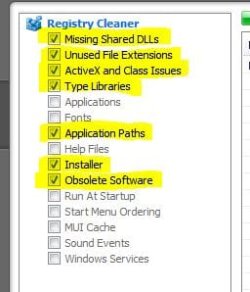
It doesn't discover any Registry items for cleaning that are still connected to an active program or the OS. These are strictly leftovers.

There isn't any such compunction about using Revo which does the same thing.
 
These are the categories for which CCleaner finds registry items. The others come up with nothing.

Even with reading about the tool on Piriform's site and your statement that it only finds "leftovers" I still don't feel comfortable deleting registry items just for the sake of deleting them. If there was a problem I was trying to solve then I could see exploring it further.

So they will remain unless someone wants to look at each of my entries (and there are hundreds) and give me advice. Which I doubt anyone wants to do ;) .
 

Attachments

  • registryc.JPG
    registryc.JPG
    22.4 KB · Views: 155

My Computer My Computer

At a glance

Win 7 Home Premium x64Intel Core i3-540 3.07 GHz4 GB (2 X 2) Dual-Channel PC-10600 DDR3 @ 665...Integrated Intel H57
Computer Manufacturer/Model Number
HP p6608f
OS
Win 7 Home Premium x64
CPU
Intel Core i3-540 3.07 GHz
Motherboard
MS-7613 (Iona-GL8E)
Memory
4 GB (2 X 2) Dual-Channel PC-10600 DDR3 @ 665MHz (9-9-9-24)
Graphics Card(s)
Integrated Intel H57
Sound Card
Integrated Realtek ALC888S Audio
Monitor(s) Displays
17" SDM-HS73 (a vestige from my old computer)
Screen Resolution
1280 X 1024
Hard Drives
750GB SATA 7200 RPM
PSU
250W
Keyboard
HP USB keyboard
Mouse
HP USB optical mouse
Internet Speed
15Mbps/1Mbps
Even though it allows you to back up the changed keys?

How about with a Restore Point?

May I ask where you acquired this fear of CCleaner's Registry cleaner? How long have you used CCleaner?

Your decisions about what you trust and not are your own. I am only trying to understand better since you are willing to explain your concerns more than most - who will hit and run .
 
Last edited:
For anyone "fearing" CCleaner's registry cleaner, back up your system and run it once. Many people who will claim this or that software will do harm haven't ever used it. CCleaner's method is not a real in-depth cleaner and has never harmed Windows 98, XP, 7, nor 8 in my experience using it.

There have been seen registry cleaners from AVG, Iolo, PCTools, and UniBlue that can brick a system. I have no links for this but some are in threads in SF and I have read such in PC World magazine. Webroot, which do I have experience with ain't so good either.
 

My Computer My Computer

At a glance

Windows 7 Ultimate X64 SP1Intel i5-2550K, Differing ~4.4-4.8GHz No buil...16GB G.Skill Sniper 1866MHz @ 2133MHz 2x8GBASUS GTX650TIB-DC2OC-2GD5, (650TI Boost)
Computer type
PC/Desktop
Computer Manufacturer/Model Number
Home Built Desktop By DataTech
OS
Windows 7 Ultimate X64 SP1
CPU
Intel i5-2550K, Differing ~4.4-4.8GHz No built in GPU
Motherboard
ASUS P8Z68-V PRO/GEN3
Memory
16GB G.Skill Sniper 1866MHz @ 2133MHz 2x8GB
Graphics Card(s)
ASUS GTX650TIB-DC2OC-2GD5, (650TI Boost)
Sound Card
Onboard Realtek 5-1
Monitor(s) Displays
Samsung P2570HD
Screen Resolution
1920x1080
Hard Drives
Samsung 840 Pro 256GB SSD for OS, 500GB Seagate Constellation (Enterprise drive) for Data
PSU
Corsair HX650W
Case
Inwin Dragon Rider
Cooling
Hyper 212 EVO w/two Noctua fans, push-pull, @1300 RPM
Keyboard
E-Z Eyes, bright yellow keys with large characters
Mouse
steelseries SENSEI Laser Pro Gaming
Internet Speed
48-51Mbs Mbs down, 11 Mbs up Xfinity Cable
Antivirus
Norton Internet Security 2013
Browser
IE 10, Opera, Pale Moon if needed
Other Info
4 case fans, LG BluRay-RE, ASUS DVD-RW, Mr. Fusion power supply, 1.21 gigawatts.
I ran ccleaner today due to my normal cleanup routine, then i went ahead and ran the registry cleaner, it had detected 224 problems thats alot, i didnt clicked on the fix issue yet because i want to hear what the experts would say so should i go ahead and run it or just leave it as it be

Ccleaner has never caused any problems. I've used it for many years on XP and W7 systems, and no problems at all with anything it has found and removed. Like noted it doesn't check too deeply so not much chance of it removing anything that could cause problems. Also as noted there are many registry cleaners that can "brick" your system, be very cautious using any others.

Registry cleaners might have done some good with XP (and I stress 'might have'), but with 7 they are completely unnecessary. I saw in another post of yours that you have the most trouble with Windows 7 computers - they need to be reinstalled more than your XP systems - so perhaps your instability problems stem from using XP methodology on 7 systems.


That may be an issue with W7 as I have been using the same treatment on all systems. I have noticed that Ccleaner does cause a few minor issues on W7 systems but not on XP. For example the home page on IE9 will be reset occasionally after using Ccleaner on a W7 machine, but the same doesn't appear on XP systems (IE8).

So who knows what other things Ccleaner may be doing that I haven't yet caught. I have subsequently quit using it on W7 systems. I just use the built in disk clean up, and that seems to work well enough.
 

My Computer My Computer

At a glance

W7HP-32bitIntel N2702Gb
Computer Manufacturer/Model Number
HP 210
OS
W7HP-32bit
CPU
Intel N270
Memory
2Gb
I still don't get this win7 doesn't need any maintenance or cleaning thing. Its windows, same old same old. I test lots of software, and remove much of it when Im done. Same instance of win7 since March 2010. I've installed hundreds of applications. I clean up with CCleaner every once in a while. I work in IT, and do the same @ work on many PC's. For the average user who doesn't install and remove many applications/games, you probably don't need it. IE9 does stuff like that on its own, but is easy enough to fix. Mine is rarely used, and still same home page, Google...
 

My Computer My Computer

At a glance

windows sevenPhenom II x2 3.14 gigsNvidia GTS 250
Computer Manufacturer/Model Number
iBuyPower
OS
windows seven
CPU
Phenom II x2 3.1
Motherboard
asus
Memory
4 gigs
Graphics Card(s)
Nvidia GTS 250
Monitor(s) Displays
23in Acre
I've found Ccleaner a great tool for IT purposes. It cleans up well after installs and updates, and fixes lots of house keeping in one package. I agree W7 is for the most part is the same old windows and leaves a lot of background clutter. But like mentioned for the average user and a gigantic hard drive clutter is probably not a prominent concern.

I can not directly attribute any W7 crash on any cleaner. I am guessing it's a fundamental lack compatability as I use a lot of scientific software and some packages just don't play well with W7, even the W7 versions.
 

My Computer My Computer

At a glance

W7HP-32bitIntel N2702Gb
Computer Manufacturer/Model Number
HP 210
OS
W7HP-32bit
CPU
Intel N270
Memory
2Gb
There are Registry Cleaners and Registry Cleaners. Some are real good and trustworthy and others are not including some that are plain scam.

I would refer you to read this article (http://www.informationweek.com/news/171203805) by Fred Langa in this connection. It is very good and tells you a lot. It shall then help you in deciding the course of action that you should adopt.

Good luck.


I ran ccleaner today due to my normal cleanup routine, then i went ahead and ran the registry cleaner, it had detected 224 problems thats alot, i didnt clicked on the fix issue yet because i want to hear what the experts would say so should i go ahead and run it or just leave it as it be
 

My Computer My Computer

At a glance

Windows 7 Pro with SP1 32bit2 gigs of RAMIntel(R) 82845G/GL/GE/PE/GV Graphics Controller
Computer Manufacturer/Model Number
Custom Built
OS
Windows 7 Pro with SP1 32bit
Motherboard
Intel D845GVS1 X86-based PC
Memory
2 gigs of RAM
Graphics Card(s)
Intel(R) 82845G/GL/GE/PE/GV Graphics Controller
Sound Card
Realtek AC'97 Audio
Monitor(s) Displays
Samsung SyncMaster 931BF Black 19" LCD Monitor
Screen Resolution
1280X960
Hard Drives
1. SAMSUNG SP0822N ATA Device ~ 80 GigaBytes

2. Seagate FreeAgent Go USB Device ~ 500 GigaBytes
Keyboard
COMPAQ Standard PS/2 Keyboard
Mouse
iBall Laser Precise Speedster
Internet Speed
4 mb/sec
Back
Top