How reliable is W7 backup?

TonyWilliams

New member
Local time
3:18 AM
Messages
20
I normally copy and paste my files to an external disk but it does mean that I'm using up an awful lot of space on that disc because they aren't incremental backups, just copies and I don't delet previous versions.

I was thinking about using W7 backup and after one main backup was going to use incremental backups. However I'm concerned that my files will then be in one encrypted backup file plus the incremental backups as against additional copies which I can get at easily.

Has anyone had any experience of W7 backup and have any ideas as to how reliable it is? I would be in a mess if I need the backup copy of a file and the W7 backup file was corrupted!

Thanks
Tony
 

My Computer

OS
Windows 7 Pro
Motherboard
NF520-A2 TE
Memory
AMD
Graphics Card(s)
Nvidia GeForce
Sound Card
Onboard
Monitor(s) Displays
LG 1919S
Tony,
I use it and am 100% satisfied. System image backup, in conjuction with system restore and backup and restore is all the back up that is needed. That being said, a large number of our membership prefer macrium reflex.
http://www.macrium.com/reflectfree.asp
 

My Computer

Computer type
PC/Desktop
Computer Manufacturer/Model Number
Dell XPS 420
OS
Windows 10, Home Clean Install
CPU
Intel Core2 processsor Q8200(2.33Ghz 1333FSB) Quad Core Tech
Motherboard
Dell
Memory
6 gb
Graphics Card(s)
ATI Radeon 256MB HD3650
Sound Card
Intergrated 7.1 Channel Audio
Monitor(s) Displays
Dell SP2009W 20"
Hard Drives
640 GB Serial ATA Hard drive
Cooling
Fan
Keyboard
Dell USB Keyboard
Mouse
Dell Premium Optical USB
Internet Speed
DSL 2.85
I normally copy and paste my files to an external disk but it does mean that I'm using up an awful lot of space on that disc because they aren't incremental backups, just copies and I don't delet previous versions.

I was thinking about using W7 backup and after one main backup was going to use incremental backups. However I'm concerned that my files will then be in one encrypted backup file plus the incremental backups as against additional copies which I can get at easily.

Has anyone had any experience of W7 backup and have any ideas as to how reliable it is? I would be in a mess if I need the backup copy of a file and the W7 backup file was corrupted!

Thanks
Tony

Hi tony and welcome


Windows backup does a fine job for what it can do. It is more reliable than a copy and paste and is compressed (i believe) to save space. On the other h and there are 3rd party apps that are just as reliable and tons more flexible. I do a lot of different kinds of back ups of files and folder and win 7's backup just doesnt cut it for that.

I use Acronis. It is relatively inexpensive and does all sorts of neat things


Let us know if you need help with any of this


Ken J
 

My Computer

Computer Manufacturer/Model Number
HP Pavillion dv-7 1005 Tx
OS
Win 8 Release candidate 8400
CPU
[email protected]
Memory
4 gigs
Graphics Card(s)
Nvidia 9600M
Sound Card
HD built-in
Monitor(s) Displays
17" Wxga
Screen Resolution
1440x900
Cooling
none
Internet Speed
45Mb down 5Mb up
Thanks guys I think I have a copy of Acronis TRue Image v8 I'll have a look at that and see if it includes backups
Thanks again
Tony
 

My Computer

OS
Windows 7 Pro
Motherboard
NF520-A2 TE
Memory
AMD
Graphics Card(s)
Nvidia GeForce
Sound Card
Onboard
Monitor(s) Displays
LG 1919S
Hm? Acronis True Image v8 appears to only create an mage of the whole disc and doesn't just backup individual files and folders. Have to look at alternatives.
Tony
 

My Computer

OS
Windows 7 Pro
Motherboard
NF520-A2 TE
Memory
AMD
Graphics Card(s)
Nvidia GeForce
Sound Card
Onboard
Monitor(s) Displays
LG 1919S
Look at Macrium, its free and I think that you will like it.
 

My Computer

Computer type
PC/Desktop
Computer Manufacturer/Model Number
Dell XPS 420
OS
Windows 10, Home Clean Install
CPU
Intel Core2 processsor Q8200(2.33Ghz 1333FSB) Quad Core Tech
Motherboard
Dell
Memory
6 gb
Graphics Card(s)
ATI Radeon 256MB HD3650
Sound Card
Intergrated 7.1 Channel Audio
Monitor(s) Displays
Dell SP2009W 20"
Hard Drives
640 GB Serial ATA Hard drive
Cooling
Fan
Keyboard
Dell USB Keyboard
Mouse
Dell Premium Optical USB
Internet Speed
DSL 2.85
Windows recoveries have been flawed for a long time. Just think of the system restore problems e.g. in Vista and it did not get much better in /7. There have also been many reports of recovery problems with /7 images.
That being said, there are many people that have no problems at all. I have tried a variety of imaging products and found /7 imaging unnecessarily complex. Therefore I am using free Macrium which is easy and extremely reliable. Other people prefer Acronis, Paragon or Ghost for a variety of different reasons. Norton Ghost that I used in Vista was not easy to operate either, but it did the job.
 

My Computer

Computer Manufacturer/Model Number
HP, Dell, Gateway, Toshiba - 4 laptops and 2 desktops
OS
Vista, Windows7, Mint Mate, Zorin, Windows 8
CPU
from 1.6GHz Duo to i7
Monitor(s) Displays
2x HP w2207
Hard Drives
5x HDD, 7x SSD, 12x Externals
Keyboard
with trackball - no mices
Mouse
Trackball mice
Internet Speed
DSL 6000
Thanks guys. I may be wrong but Acronis and Macrrium are all about taking images of the hard drive. I just want to backup my Documents folder and be able to recover individual files from the backup. They don't appear to do this? I would also just like the backup to do an incremental backup as well, ie only files that have changed, rather than a complete backup each time. What would you guys suggest for that? I thought W7 backup does that?
Thanks
Tony
 

My Computer

OS
Windows 7 Pro
Motherboard
NF520-A2 TE
Memory
AMD
Graphics Card(s)
Nvidia GeForce
Sound Card
Onboard
Monitor(s) Displays
LG 1919S
You have 3 different backups in 7
System Image=The entire hard drive
System restore=The Operating System
Backup and Restore=Your doucments

I use it, they work great and are reliable.
 
Last edited:

My Computer

Computer type
PC/Desktop
Computer Manufacturer/Model Number
Dell XPS 420
OS
Windows 10, Home Clean Install
CPU
Intel Core2 processsor Q8200(2.33Ghz 1333FSB) Quad Core Tech
Motherboard
Dell
Memory
6 gb
Graphics Card(s)
ATI Radeon 256MB HD3650
Sound Card
Intergrated 7.1 Channel Audio
Monitor(s) Displays
Dell SP2009W 20"
Hard Drives
640 GB Serial ATA Hard drive
Cooling
Fan
Keyboard
Dell USB Keyboard
Mouse
Dell Premium Optical USB
Internet Speed
DSL 2.85
Thanks Rich I think I'll give it a go!
Tony
 

My Computer

OS
Windows 7 Pro
Motherboard
NF520-A2 TE
Memory
AMD
Graphics Card(s)
Nvidia GeForce
Sound Card
Onboard
Monitor(s) Displays
LG 1919S
Have any of you guys used SyncToy, that looks like it backs up files on the fly?
Tony
 

My Computer

OS
Windows 7 Pro
Motherboard
NF520-A2 TE
Memory
AMD
Graphics Card(s)
Nvidia GeForce
Sound Card
Onboard
Monitor(s) Displays
LG 1919S
well, in my view i tried using the back up but unfortunately when trying to recover the data it just said unable to locate files.

i had saved it onto my usb-hdd but now it doesnt recognise it for some reason...
so i had to reinstall a new win7 :cry:

overall i would not rely on win 7 backup
 

My Computer

Computer Manufacturer/Model Number
Fujitsu Siemens
OS
Windows 7 Professional
Memory
2gb
Graphics Card(s)
1gb
Sound Card
265
Monitor(s) Displays
1080p
Hard Drives
1 external 1tb
Cooling
fan
I have used sync toy Tony but not the one you get with windows, its a great tool very easy to setup folder pairs and click run bobs your uncle job done your all synced up :)

Download details: SyncToy 2.1
 

My Computer

OS
Windows 7 64bit
CPU
Phenom IIx4 955 Black Edition
Memory
4GB Kingston 1066mhz DDR2
Graphics Card(s)
Gigabyte 260GTX
Monitor(s) Displays
Samsung syncmaster 2033
Hard Drives
500GB Samsung ATA
500GB Segate ATA
PSU
Antec True blue 750W Modular
Case
Antec 1200
Cooling
Prolimatech Megahalems Performance CPU Cooler/2x Apache Fan
Started W7 backup at about 11am it is now 18.20 and has done 82% my used disc space is 83gb this is takeing a looooooooooooooooooong time! I know as it's the first time I've done it it's doing an image as well but 7 hours?
 

My Computer

OS
Windows 7 Pro
Motherboard
NF520-A2 TE
Memory
AMD
Graphics Card(s)
Nvidia GeForce
Sound Card
Onboard
Monitor(s) Displays
LG 1919S
Thanks guys. I may be wrong but Acronis and Macrrium are all about taking images of the hard drive. I just want to backup my Documents folder and be able to recover individual files from the backup. They don't appear to do this? I would also just like the backup to do an incremental backup as well, ie only files that have changed, rather than a complete backup each time. What would you guys suggest for that? I thought W7 backup does that?
Thanks
Tony

Acronis is quite capable.
It can restore individual files or folders from a complete system image without restoring the entire image.

It can also back up individual folders, libraries etc as a separate backup, as well as be set up to do scheduled automatic incremental or differential updates, consolodation of the backups etc.

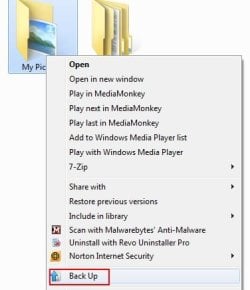
You can backup just a folder from the application itself (Choosing the backup Files/Folders option) , or by right clicking that folder in Windows explorer and choosing the 'Backup" option, at which point you can decide what type of backup & schedule you want, if any.
 

Attachments

  • Untitled.jpg
    Untitled.jpg
    20.5 KB · Views: 3

My Computer

Computer Manufacturer/Model Number
Custom (Self Build)
OS
Windows 7 Home Premium 64bit
CPU
Intel Core i7 2700k
Motherboard
eVGA P67 SLI
Memory
8GB Mushkin Redline Ridgebacks @1866
Graphics Card(s)
EVGA GTX570 SC
Sound Card
XiFi Titanium HD
Monitor(s) Displays
LG W2453V
Screen Resolution
1920x1080
Hard Drives
Intel 320 80GB -- Intel X25-V 40GB --WD Black 1TB x2 -- WD Blue 640GB
PSU
Seasonic x750
Case
Corsair 600T SE White
Cooling
eVGA Superclocked CPU Cooler
Keyboard
Saitek Cyborg
Antivirus
Kaspersky
Browser
IE
Other Info
LG BD/DVD
I have Acronis v8, does that do the same as the latest version? I can't rememeber it adding the Backup option to the right click?
Tony
 

My Computer

OS
Windows 7 Pro
Motherboard
NF520-A2 TE
Memory
AMD
Graphics Card(s)
Nvidia GeForce
Sound Card
Onboard
Monitor(s) Displays
LG 1919S
I have Acronis v8, does that do the same as the latest version? I can't rememeber it adding the Backup option to the right click?
Tony

No, this is the 2010 version.

Apologies. I completely missed you had V8.
 

My Computer

Computer Manufacturer/Model Number
Custom (Self Build)
OS
Windows 7 Home Premium 64bit
CPU
Intel Core i7 2700k
Motherboard
eVGA P67 SLI
Memory
8GB Mushkin Redline Ridgebacks @1866
Graphics Card(s)
EVGA GTX570 SC
Sound Card
XiFi Titanium HD
Monitor(s) Displays
LG W2453V
Screen Resolution
1920x1080
Hard Drives
Intel 320 80GB -- Intel X25-V 40GB --WD Black 1TB x2 -- WD Blue 640GB
PSU
Seasonic x750
Case
Corsair 600T SE White
Cooling
eVGA Superclocked CPU Cooler
Keyboard
Saitek Cyborg
Antivirus
Kaspersky
Browser
IE
Other Info
LG BD/DVD
I use very regularly Win 7 Backup and Restore to perform what MS calls "System Image" backup. The backup I create this way I also have used to perform a restore.

This works marvelously well. Works flawlessly. With this feature I can backup just the C or I can backup the C and the D partitions on my hard drive. My hard drive is divided into two partitions. C , the system, boot, paging partition and D where I keep all data such as documents, pics, videos, etc.

A system image will produce a VHD file for each partition "imaged".

This is NOT the same as the folder backup feature of Win 7 Backup and Restore which essentially zips the folders.

The Zip side of the game is what can take an inordinate amount of time and which has resulted in a hot fix being released by MS for the case where your are backing up to an internal drive and the new backup is bigger than the old. This is where the backup has some difficulties. Personally, I backup to an external drive so the hotfix is not applicable.

For my D drive, which as previously stated, has all of my data, I use SyncToy. Since SyncToy's "echo" mode is only going to write to your backup device when you've renamed a file, changed the file or created a new one or deleted a file, then the backup is quite rapid.

In summary, I "system image" the C drive with Win 7 Backup and Restore and backup my D (data) drive with SyncToy.
 

My Computer

Computer Manufacturer/Model Number
Toshiba Satellite S875D-S7239 laptop
OS
MS Windows 7 Ultimate SP1 64-bit
CPU
AMD A10-4600M
Motherboard
AMD Pumori (Socket FT1)
Memory
6.00 GB Dual-Channel DDR3 @ 798MHz (11-11-12-28)
Graphics Card(s)
AMD Radeon HD 7660G
Sound Card
High Definition Audio Device
Monitor(s) Displays
Generic PnP Monitor (1600x900@60Hz)
Screen Resolution
1600x900@60Hz
Hard Drives
SSD 119GB Corsair CSSD-V128GB2 ATA Device
Keyboard
Standard PS/2 Keyboard
Mouse
HP Wireless Optical Mobile Mouse Model FHA-3410
Internet Speed
What the local pub, local coffee shop offers.
Other Info
Optical Drive:MATSHITA BD-CMB UJ160B ATA Device


Also have an Asus ha1002xp netbook with Win 7 Ultimate installed.
Used Acronis for YEARS and always found it to be fast and reliable.

Then, I upgraded to ATI Home 2010 on an XP box -- and networking got disabled.

Spent a lot of time with ATI support, who were completely unable to solve the problem.

Tried Macrium Reflect. Found it to do everything I needed with ATI, so I switched to it. The free version works quite well and allows you to build a Unix-based restore CD. The paid version comes with the ability to create a Windows-based restore CD (which works better in cases where controller drivers are needed).

Plus, it comes with the ability to add restore boot capability to your Windows boot selection menu, so if your machine crashes, you can boot using that and run a restore -- without having to look around for your restore CD.

Also, once you make the Windows-based restore CD, you can use it on ANY machine, even the ones with the free version of MR installed.

So, since we've already started mentioning alternative backup/restore apps in this thread, I'm putting in my plug for MR.
 

My Computer

Computer type
PC/Desktop
Computer Manufacturer/Model Number
Custom
OS
Win7 Pro 32-bit, Win8 Pro 32-bit
CPU
AMD Phenom II X6 1090T
Motherboard
Gigabyte
Memory
4GB ddr3 1300
Graphics Card(s)
AMD HD 4290 onboard
Sound Card
Builtin Realtek HD Audio
Monitor(s) Displays
Samsung 24" widescreen, LG 23" widescreen
Screen Resolution
1920x1200/1920x1080
Hard Drives
Kingston 256GB SSD
Keyboard
Logitech Illuminated Keyboard
Mouse
Logitech M705 wireless mouse
Antivirus
Norton Av 2013
Browser
IE v10
Used Acronis for YEARS and always found it to be fast and reliable.

Then, I upgraded to ATI Home 2010 on an XP box -- and networking got disabled.

Spent a lot of time with ATI support, who were completely unable to solve the problem.

Tried Macrium Reflect. Found it to do everything I needed with ATI, so I switched to it. The free version works quite well and allows you to build a Unix-based restore CD. The paid version comes with the ability to create a Windows-based restore CD (which works better in cases where controller drivers are needed).

Plus, it comes with the ability to add restore boot capability to your Windows boot selection menu, so if your machine crashes, you can boot using that and run a restore -- without having to look around for your restore CD.

Also, once you make the Windows-based restore CD, you can use it on ANY machine, even the ones with the free version of MR installed.

So, since we've already started mentioning alternative backup/restore apps in this thread, I'm putting in my plug for MR.

Plus the ability to make incremental and differential backups. And yes, this is a very reliable program. I have done numerous restores with it and never had a hickup and I believe backup software should be judged by the ability to do reliable restores.
 

My Computer

OS
Windows 7 64
CPU
AMD Phenom II X4 Black Edition 940
Motherboard
Gigabyte GA-MA790X-UD3P
Memory
8 GB
Graphics Card(s)
Nvidia 8800GTS
Monitor(s) Displays
Benq G2420HDBL
Screen Resolution
1920x1080
Case
Lian-Li
Internet Speed
10/10 mb/s
Back
Top