How to access view to all system restore points list

Diligent

New member
Local time
11:45 PM
Messages
16
Title should tell to. I just simply cannot, via the usual methods from Google searches, tell how to completely and fully obtain a full list of all system restore points.

Thanks for the help in advance guys,

Diligent
 

My Computer My Computer

At a glance

Windows 7 Home premium 64bit
Computer type
PC/Desktop
Computer Manufacturer/Model Number
Gateway SX2855
OS
Windows 7 Home premium 64bit
Antivirus
avast
Browser
firefos (main), IE11 (as needed only), GChrome (secondary)
Does clicking on start, programs, accessories, system tools, then system restore give you a option to show all the restore points? It should show ya the most recent ones at the very least.
 

My Computer My Computer

At a glance

Windows 7 ultimate 64-bitIntel I7 2600K 3.4ghzCorsair 16gb ddr3 1600mhzNvidia Geforce gt 430
Computer type
PC/Desktop
Computer Manufacturer/Model Number
custom built
OS
Windows 7 ultimate 64-bit
CPU
Intel I7 2600K 3.4ghz
Motherboard
Asus Evo P8P67
Memory
Corsair 16gb ddr3 1600mhz
Graphics Card(s)
Nvidia Geforce gt 430
Sound Card
Sound Blaster Titanium x-fi pci express
Monitor(s) Displays
Dell E198WFP
Hard Drives
1 western digital 2TB drive.
PSU
Antec 1200 watt
Case
Inwin Dragon Rider
Cooling
6 case supplied cooling fans
Keyboard
logitech mk700
Mouse
logitech m705
Internet Speed
25-50mbps download; 10mbps upload(i think)
Antivirus
avg free 2014
Browser
mozilla firefox
Other Info
Also have a pretty bad speaker setup which is a klipsch promedia 5.1 surround speaker setup with huge subwoofer and lg blu ray player/writer. Also a hp officejet pro 8600 plus wireless all in one and a logitech s7500 webcam.
Hello Dilligent,

If you like, the free program CCleaner is great to view and manage your restore points with.

CCleaner - Builds


109261d1288467888-system-protection-restore-points-delete-ccleaner.jpg


Hope this helps, :)
Shawn
 

My Computer My Computer

At a glance

64-bit Windows 11 Pro for WorkstationsIntel i7-8700K OC'd to 5 GHz64 GB (4x16GB) G.SKILL TridentZ RGB DDR4 3600...ASUS ROG-STRIX-GTX1080TI-O11G-GAMING
Computer type
PC/Desktop
Computer Manufacturer/Model Number
Self built custom
OS
64-bit Windows 11 Pro for Workstations
CPU
Intel i7-8700K OC'd to 5 GHz
Motherboard
ASUS ROG Maximus XI Formula Z390
Memory
64 GB (4x16GB) G.SKILL TridentZ RGB DDR4 3600 MHz
Graphics Card(s)
ASUS ROG-STRIX-GTX1080TI-O11G-GAMING
Sound Card
Integrated
Monitor(s) Displays
2 x Samsung Odyssey G7 27"
Screen Resolution
2560x1440
Hard Drives
1TB Samsung 990 PRO M.2,
4TB Samsung 990 PRO PRO M.2,
TerraMaster F8 SSD Plus NAS
PSU
Seasonic Prime Titanium 850W
Case
Thermaltake Core P3
Cooling
Corsair Hydro H115i
Keyboard
Logitech wireless K800
Mouse
Logitech MX Master 4
Internet Speed
2 Gb/s Download and 100 Mb/s Upload
Antivirus
Malwarebyte Anti-Malware Premium
Browser
Google Chrome
Other Info
Logitech Z625 speaker system,
Logitech BRIO 4K Pro webcam,
HP Color LaserJet Pro MFP M477fdn,
APC SMART-UPS RT 1000 XL - SURT1000XLI,
Galaxy S23 Plus phone
I also use Ccleaner to see restore points and remove restore points that I don't want any more. You can remove restore points one at a time.
I's alway worked flawlessly for me.
 

My Computer My Computer

At a glance

Windows 10 Pro. 64/ version 1709 Windows 7 Pr...Intel i7-6800K @ 4.3Corsair Platinum 16 gig @2400EVGA GTX 1070 OC
Computer type
PC/Desktop
Computer Manufacturer/Model Number
Home made Desktop
OS
Windows 10 Pro. 64/ version 1709 Windows 7 Pro/64
CPU
Intel i7-6800K @ 4.3
Motherboard
ASUS X-99 Deluxe II
Memory
Corsair Platinum 16 gig @2400
Graphics Card(s)
EVGA GTX 1070 OC
Monitor(s) Displays
Asus 27" LED LCD/VE278Q
Screen Resolution
1920-1080 or 1280-720 HDMI
Hard Drives
INTEL SSD 730-240 Gb Sata 3.0/
PSU
EVGA Platium 1200W
Case
Phanteks Luxe Tempered Glass 8 fans/ one radiator
Cooling
XSPC/ Water Cooled CPU
Keyboard
Das 4 Professional
Mouse
Logitech M705/MX Anywhere 2-S
Internet Speed
100 mbits
Antivirus
Microsoft Security Essentials/ Malwarebytes Premium 3.0/ SAS
Browser
I.E. 11 default/Firefox/ ISP Time Warner Cable/Spectrum
Other Info
LG BluRay Burner/
Sound system-KLipsch-THX/
Icy Dock ssd Hot Swap bays.
@ brink, Tried CC, showed nothing. Good tip though. Thanks!

@ matts6887, yes have been there. At first got from a December install, just two Jan 7-8 sys-restore point, then somehow it went to just Jan 8 restore points, so I am mystified being a now ex-P user:confused:

Any further help will be greatly appreciated!:)
 

My Computer My Computer

At a glance

Windows 7 Home premium 64bit
Computer type
PC/Desktop
Computer Manufacturer/Model Number
Gateway SX2855
OS
Windows 7 Home premium 64bit
Antivirus
avast
Browser
firefos (main), IE11 (as needed only), GChrome (secondary)
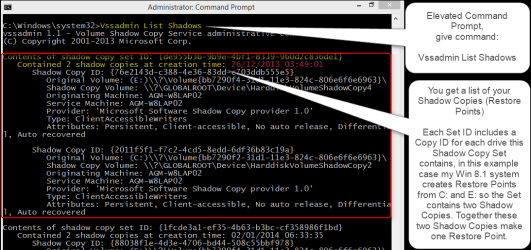
The Vssadmin command with List Shadows switch on an elevated command prompt is also quite useful.

2014-01-09_02h53_10.png
(Click to enlarge.)
 

My Computer My Computer

At a glance

Windows 10 Pro x64 EN-GB1.6 GHz Intel Core i7-720QM Processor6 GBATI Mobility Radeon HD 5850 Graphics
Computer type
Laptop
Computer Manufacturer/Model Number
HP ENVY 17-1150eg
OS
Windows 10 Pro x64 EN-GB
CPU
1.6 GHz Intel Core i7-720QM Processor
Memory
6 GB
Graphics Card(s)
ATI Mobility Radeon HD 5850 Graphics
Sound Card
Beats sound system with integrated subwoofer
Monitor(s) Displays
17" laptop display, 22" LED and 32" Full HD TV through HDMI
Screen Resolution
1600*900 (1), 1920*1080 (2&3)
Hard Drives
Internal: 2 x 500 GB SATA Hard Disk Drive 7200 rpm
External: 2TB for backups, 3TB USB3 network drive for media
Cooling
As Envy runs a bit warm, I have it on a Cooler Master pad
Keyboard
Logitech diNovo Media Desktop Laser (bluetooth)
Mouse
Logitech Performance Mouse MX
Internet Speed
50/10 Mbps VDSL
Antivirus
Windows Defender 4.3.9431.0
Browser
Maxthon 3.5.2., IE11
Hey Kari, from one old besard to another, just do not know anything about what the "The Vssadmin command with List Shadows" is or is about. Not being negative but just at a total loss.:)
 

My Computer My Computer

At a glance

Windows 7 Home premium 64bit
Computer type
PC/Desktop
Computer Manufacturer/Model Number
Gateway SX2855
OS
Windows 7 Home premium 64bit
Antivirus
avast
Browser
firefos (main), IE11 (as needed only), GChrome (secondary)
You asked how to get a list of all Restore Points. My reply shows how to do it from elevated Command Prompt. In my humble although subjective opinion the screenshot explains it.

A Windows Restore Point is a Shadow Copy Set, containing Shadow Copies for each drive you have turned restore (protection) on. In the example in my previous post one Shadow Copy Set (Restore Point) contains two Shadow Copies, for drives C: (System) and E: (User Profiles) because these are the only two drives in this system with protection enabled.

Vssadmin is the command to manage Shadow Copies (Restore Points). Adding a so called Switch, in this case List Shadows to the command itself, it lists the Shadow Copies.

Kari
 

My Computer My Computer

At a glance

Windows 10 Pro x64 EN-GB1.6 GHz Intel Core i7-720QM Processor6 GBATI Mobility Radeon HD 5850 Graphics
Computer type
Laptop
Computer Manufacturer/Model Number
HP ENVY 17-1150eg
OS
Windows 10 Pro x64 EN-GB
CPU
1.6 GHz Intel Core i7-720QM Processor
Memory
6 GB
Graphics Card(s)
ATI Mobility Radeon HD 5850 Graphics
Sound Card
Beats sound system with integrated subwoofer
Monitor(s) Displays
17" laptop display, 22" LED and 32" Full HD TV through HDMI
Screen Resolution
1600*900 (1), 1920*1080 (2&3)
Hard Drives
Internal: 2 x 500 GB SATA Hard Disk Drive 7200 rpm
External: 2TB for backups, 3TB USB3 network drive for media
Cooling
As Envy runs a bit warm, I have it on a Cooler Master pad
Keyboard
Logitech diNovo Media Desktop Laser (bluetooth)
Mouse
Logitech Performance Mouse MX
Internet Speed
50/10 Mbps VDSL
Antivirus
Windows Defender 4.3.9431.0
Browser
Maxthon 3.5.2., IE11
Ok, shadow copies means sys-restore points. Will take another look-see
 

My Computer My Computer

At a glance

Windows 7 Home premium 64bit
Computer type
PC/Desktop
Computer Manufacturer/Model Number
Gateway SX2855
OS
Windows 7 Home premium 64bit
Antivirus
avast
Browser
firefos (main), IE11 (as needed only), GChrome (secondary)
I'm I understanding correctly Kari.
Using your method if their isn't a shadow copy listed there isn't a restore point. Using a 3rd party program will also show no listing for restore point.

To put it another way. Their must be a shadow copy to have a restore point.
 

My Computer My Computer

At a glance

Windows 10 Pro. 64/ version 1709 Windows 7 Pr...Intel i7-6800K @ 4.3Corsair Platinum 16 gig @2400EVGA GTX 1070 OC
Computer type
PC/Desktop
Computer Manufacturer/Model Number
Home made Desktop
OS
Windows 10 Pro. 64/ version 1709 Windows 7 Pro/64
CPU
Intel i7-6800K @ 4.3
Motherboard
ASUS X-99 Deluxe II
Memory
Corsair Platinum 16 gig @2400
Graphics Card(s)
EVGA GTX 1070 OC
Monitor(s) Displays
Asus 27" LED LCD/VE278Q
Screen Resolution
1920-1080 or 1280-720 HDMI
Hard Drives
INTEL SSD 730-240 Gb Sata 3.0/
PSU
EVGA Platium 1200W
Case
Phanteks Luxe Tempered Glass 8 fans/ one radiator
Cooling
XSPC/ Water Cooled CPU
Keyboard
Das 4 Professional
Mouse
Logitech M705/MX Anywhere 2-S
Internet Speed
100 mbits
Antivirus
Microsoft Security Essentials/ Malwarebytes Premium 3.0/ SAS
Browser
I.E. 11 default/Firefox/ ISP Time Warner Cable/Spectrum
Other Info
LG BluRay Burner/
Sound system-KLipsch-THX/
Icy Dock ssd Hot Swap bays.
Sounds OK Bear, though I am now near totally confused from all th kind and honest input
 

My Computer My Computer

At a glance

Windows 7 Home premium 64bit
Computer type
PC/Desktop
Computer Manufacturer/Model Number
Gateway SX2855
OS
Windows 7 Home premium 64bit
Antivirus
avast
Browser
firefos (main), IE11 (as needed only), GChrome (secondary)

My Computer My Computer

At a glance

Vista, Windows7, Mint Mate, Zorin, Windows 8from 1.6GHz Duo to i7
Computer Manufacturer/Model Number
HP, Dell, Gateway, Toshiba - 4 laptops and 2 desktops
OS
Vista, Windows7, Mint Mate, Zorin, Windows 8
CPU
from 1.6GHz Duo to i7
Monitor(s) Displays
2x HP w2207
Hard Drives
5x HDD, 7x SSD, 12x Externals
Keyboard
with trackball - no mices
Mouse
Trackball mice
Internet Speed
DSL 6000
Btw: Kari's command is:

vssadmin list shadows

The output looks like this. Not easy to read for a layman, LOL.


Shadow Copy ID: {12edb509-5a62-4c72-a0b2-f2851f340142}
Original Volume: (E:)\\?\Volume{f4916598-31b0-11e1-a4e9-d4bed98cc025}\
Shadow Copy Volume: \\?\GLOBALROOT\Device\HarddiskVolumeShadowCopy21
Originating Machine: whs-PC
Service Machine: whs-PC
Provider: 'Microsoft Software Shadow Copy provider 1.0'
Type: ClientAccessibleWriters
Attributes: Persistent, Client-accessible, No auto release, Differential, Auto recov
ered
Contents of shadow copy set ID: {fed1d352-0e19-4514-85fd-29a634d8d98c}
Contained 2 shadow copies at creation time: 12/29/2013 5:30:33 PM
Shadow Copy ID: {4b812476-cdfc-405b-b267-858d3d736719}
Original Volume: (E:)\\?\Volume{f4916598-31b0-11e1-a4e9-d4bed98cc025}\
Shadow Copy Volume: \\?\GLOBALROOT\Device\HarddiskVolumeShadowCopy22
Originating Machine: whs-PC
Service Machine: whs-PC
Provider: 'Microsoft Software Shadow Copy provider 1.0'
Type: ClientAccessibleWriters
Attributes: Persistent, Client-accessible, No auto release, Differential, Auto recov
ered
Contents of shadow copy set ID: {7331e75b-96ba-4191-a3c8-8649eb92ae78}
Contained 2 shadow copies at creation time: 12/29/2013 5:30:40 PM
Shadow Copy ID: {8b9fa698-8e51-44d2-af7f-2bf21d7c840c}
Original Volume: (E:)\\?\Volume{f4916598-31b0-11e1-a4e9-d4bed98cc025}\
Shadow Copy Volume: \\?\GLOBALROOT\Device\HarddiskVolumeShadowCopy23
Originating Machine: whs-PC
Service Machine: whs-PC
Provider: 'Microsoft Software Shadow Copy provider 1.0'
Type: ClientAccessibleWriters
Attributes: Persistent, Client-accessible, No auto release, Differential, Auto recov
ered
Contents of shadow copy set ID: {9cfdca9b-18b5-45b2-aa02-2db126fab529}
Contained 2 shadow copies at creation time: 12/29/2013 5:32:21 PM
Shadow Copy ID: {c6ee9054-26cc-41cb-a552-70542fbb1001}
Original Volume: (E:)\\?\Volume{f4916598-31b0-11e1-a4e9-d4bed98cc025}\
Shadow Copy Volume: \\?\GLOBALROOT\Device\HarddiskVolumeShadowCopy24
Originating Machine: whs-PC
Service Machine: whs-PC
Provider: 'Microsoft Software Shadow Copy provider 1.0'
Type: ClientAccessibleWriters
Attributes: Persistent, Client-accessible, No auto release, Differential, Auto recov
ered
Contents of shadow copy set ID: {a876be82-8bae-4412-b04c-4320ba461634}
Contained 2 shadow copies at creation time: 1/1/2014 11:44:25 AM
Shadow Copy ID: {fb739b8e-e105-40b7-8a85-4c218b280c35}
Original Volume: (E:)\\?\Volume{f4916598-31b0-11e1-a4e9-d4bed98cc025}\
Shadow Copy Volume: \\?\GLOBALROOT\Device\HarddiskVolumeShadowCopy25
Originating Machine: whs-PC
Service Machine: whs-PC
Provider: 'Microsoft Software Shadow Copy provider 1.0'
Type: ClientAccessibleWriters
Attributes: Persistent, Client-accessible, No auto release, Differential, Auto recov
ered
Contents of shadow copy set ID: {1bab2ae3-c9c5-499f-99a3-fd9832798a55}
Contained 2 shadow copies at creation time: 1/2/2014 8:33:35 PM
Shadow Copy ID: {fe89a19f-1695-4c9f-bb30-cac806425e9d}
Original Volume: (E:)\\?\Volume{f4916598-31b0-11e1-a4e9-d4bed98cc025}\
Shadow Copy Volume: \\?\GLOBALROOT\Device\HarddiskVolumeShadowCopy26
Originating Machine: whs-PC
Service Machine: whs-PC
Provider: 'Microsoft Software Shadow Copy provider 1.0'
Type: ClientAccessibleWriters
Attributes: Persistent, Client-accessible, No auto release, Differential, Auto recov
ered
Contents of shadow copy set ID: {df3836a5-8a33-4821-9efe-6ed628394e3e}
Contained 2 shadow copies at creation time: 1/2/2014 10:19:08 PM
Shadow Copy ID: {f3128f8d-b79f-415b-bbc9-48a391279afe}
Original Volume: (E:)\\?\Volume{f4916598-31b0-11e1-a4e9-d4bed98cc025}\
Shadow Copy Volume: \\?\GLOBALROOT\Device\HarddiskVolumeShadowCopy27
Originating Machine: whs-PC
Service Machine: whs-PC
Provider: 'Microsoft Software Shadow Copy provider 1.0'
Type: ClientAccessibleWriters
Attributes: Persistent, Client-accessible, No auto release, Differential, Auto recov
ered
Contents of shadow copy set ID: {6cec3d18-2062-4645-952d-541e5f6919fc}
Contained 2 shadow copies at creation time: 1/2/2014 10:29:43 PM
Shadow Copy ID: {06d0b395-2ffa-41b4-a45c-a62ec29a53ed}
Original Volume: (E:)\\?\Volume{f4916598-31b0-11e1-a4e9-d4bed98cc025}\
Shadow Copy Volume: \\?\GLOBALROOT\Device\HarddiskVolumeShadowCopy28
Originating Machine: whs-PC
Service Machine: whs-PC
Provider: 'Microsoft Software Shadow Copy provider 1.0'
Type: ClientAccessibleWriters
Attributes: Persistent, Client-accessible, No auto release, Differential, Auto recov
ered
Contents of shadow copy set ID: {28a7d9cb-37b3-4518-a389-15556c51bb78}
Contained 2 shadow copies at creation time: 1/2/2014 10:31:23 PM
Shadow Copy ID: {834d82df-9945-4851-b0d3-1e1f97276564}
Original Volume: (E:)\\?\Volume{f4916598-31b0-11e1-a4e9-d4bed98cc025}\
Shadow Copy Volume: \\?\GLOBALROOT\Device\HarddiskVolumeShadowCopy29
Originating Machine: whs-PC
Service Machine: whs-PC
Provider: 'Microsoft Software Shadow Copy provider 1.0'
Type: ClientAccessibleWriters
Attributes: Persistent, Client-accessible, No auto release, Differential, Auto recov
ered
Contents of shadow copy set ID: {2b9c69b0-9e85-4097-8998-183002277ba7}
Contained 2 shadow copies at creation time: 1/2/2014 10:32:55 PM
Shadow Copy ID: {b15016ad-1394-4373-8fcc-547210e8d0a8}
Original Volume: (E:)\\?\Volume{f4916598-31b0-11e1-a4e9-d4bed98cc025}\
Shadow Copy Volume: \\?\GLOBALROOT\Device\HarddiskVolumeShadowCopy30
Originating Machine: whs-PC
Service Machine: whs-PC
Provider: 'Microsoft Software Shadow Copy provider 1.0'
Type: ClientAccessibleWriters
Attributes: Persistent, Client-accessible, No auto release, Differential, Auto recov
ered
Contents of shadow copy set ID: {f649f0a3-17f2-487e-a23d-5dde1b052af4}
Contained 2 shadow copies at creation time: 1/2/2014 10:41:50 PM
Shadow Copy ID: {638a7269-6352-4cd4-a778-42b587e4a403}
Original Volume: (E:)\\?\Volume{f4916598-31b0-11e1-a4e9-d4bed98cc025}\
Shadow Copy Volume: \\?\GLOBALROOT\Device\HarddiskVolumeShadowCopy31
Originating Machine: whs-PC
Service Machine: whs-PC
Provider: 'Microsoft Software Shadow Copy provider 1.0'
Type: ClientAccessibleWriters
Attributes: Persistent, Client-accessible, No auto release, Differential, Auto recov
ered
Contents of shadow copy set ID: {2c0c7d5b-2836-42c1-a6b0-d65d50ace895}
Contained 3 shadow copies at creation time: 1/4/2014 5:07:12 PM
Shadow Copy ID: {d40fb5a2-79e4-443c-9e43-5b422fee7b83}
Original Volume: (E:)\\?\Volume{f4916598-31b0-11e1-a4e9-d4bed98cc025}\
Shadow Copy Volume: \\?\GLOBALROOT\Device\HarddiskVolumeShadowCopy32
Originating Machine: whs-PC
Service Machine: whs-PC
Provider: 'Microsoft Software Shadow Copy provider 1.0'
Type: ClientAccessibleWriters
Attributes: Persistent, Client-accessible, No auto release, Differential, Auto recov
ered
Contents of shadow copy set ID: {2b09df5a-8eb6-4208-8f2f-6f2dd050d7d0}
Contained 2 shadow copies at creation time: 1/5/2014 10:13:08 AM
Shadow Copy ID: {089c96eb-e6d5-46f1-aa0f-af9c063a69b4}
Original Volume: (E:)\\?\Volume{f4916598-31b0-11e1-a4e9-d4bed98cc025}\
Shadow Copy Volume: \\?\GLOBALROOT\Device\HarddiskVolumeShadowCopy33
Originating Machine: whs-PC
Service Machine: whs-PC
Provider: 'Microsoft Software Shadow Copy provider 1.0'
Type: ClientAccessibleWriters
Attributes: Persistent, Client-accessible, No auto release, Differential, Auto recov
ered
Contents of shadow copy set ID: {596e5ffa-538b-439d-85b5-7927094b88d5}
Contained 2 shadow copies at creation time: 1/7/2014 8:07:51 PM
Shadow Copy ID: {2f89b7d1-1ae5-45d2-8e39-0d6ffb5c9440}
Original Volume: (E:)\\?\Volume{f4916598-31b0-11e1-a4e9-d4bed98cc025}\
Shadow Copy Volume: \\?\GLOBALROOT\Device\HarddiskVolumeShadowCopy35
Originating Machine: whs-PC
Service Machine: whs-PC
Provider: 'Microsoft Software Shadow Copy provider 1.0'
Type: ClientAccessibleWriters
Attributes: Persistent, Client-accessible, No auto release, Differential, Auto recov
ered
Shadow Copy ID: {6bfeb6fc-39a2-41a9-b567-b7500f3a73f5}
Original Volume: (C:)\\?\Volume{d6637946-33eb-11e1-8bdf-806e6f6e6963}\
Shadow Copy Volume: \\?\GLOBALROOT\Device\HarddiskVolumeShadowCopy43
Originating Machine: whs-PC
Service Machine: whs-PC
Provider: 'Microsoft Software Shadow Copy provider 1.0'
Type: ClientAccessibleWriters
Attributes: Persistent, Client-accessible, No auto release, Differential, Auto recov
ered
Contents of shadow copy set ID: {d55390b5-ab9f-4c17-963e-2a9785411f14}
Contained 2 shadow copies at creation time: 1/7/2014 8:08:00 PM
Shadow Copy ID: {48f2ff39-394b-4be5-876f-a7c994a9bca8}
Original Volume: (E:)\\?\Volume{f4916598-31b0-11e1-a4e9-d4bed98cc025}\
Shadow Copy Volume: \\?\GLOBALROOT\Device\HarddiskVolumeShadowCopy36
Originating Machine: whs-PC
Service Machine: whs-PC
Provider: 'Microsoft Software Shadow Copy provider 1.0'
Type: ClientAccessibleWriters
Attributes: Persistent, Client-accessible, No auto release, Differential, Auto recov
ered
Shadow Copy ID: {2f83876b-eedc-4dff-bd85-ed2b29ef5272}
Original Volume: (C:)\\?\Volume{d6637946-33eb-11e1-8bdf-806e6f6e6963}\
Shadow Copy Volume: \\?\GLOBALROOT\Device\HarddiskVolumeShadowCopy44
Originating Machine: whs-PC
Service Machine: whs-PC
Provider: 'Microsoft Software Shadow Copy provider 1.0'
Type: ClientAccessibleWriters
Attributes: Persistent, Client-accessible, No auto release, Differential, Auto recov
ered
Contents of shadow copy set ID: {94814f64-6ad3-4eaa-ad05-f2080358ef1b}
Contained 2 shadow copies at creation time: 1/7/2014 8:09:26 PM
Shadow Copy ID: {b8736550-7e8e-4062-a9e0-dd0303d9d993}
Original Volume: (E:)\\?\Volume{f4916598-31b0-11e1-a4e9-d4bed98cc025}\
Shadow Copy Volume: \\?\GLOBALROOT\Device\HarddiskVolumeShadowCopy37
Originating Machine: whs-PC
Service Machine: whs-PC
Provider: 'Microsoft Software Shadow Copy provider 1.0'
Type: ClientAccessibleWriters
Attributes: Persistent, Client-accessible, No auto release, Differential, Auto recov
ered
Shadow Copy ID: {44795531-90c0-4809-be41-b2885365590c}
Original Volume: (C:)\\?\Volume{d6637946-33eb-11e1-8bdf-806e6f6e6963}\
Shadow Copy Volume: \\?\GLOBALROOT\Device\HarddiskVolumeShadowCopy45
Originating Machine: whs-PC
Service Machine: whs-PC
Provider: 'Microsoft Software Shadow Copy provider 1.0'
Type: ClientAccessibleWriters
Attributes: Persistent, Client-accessible, No auto release, Differential, Auto recov
ered
Contents of shadow copy set ID: {15037187-8a2a-459d-9af0-946361e372c5}
Contained 2 shadow copies at creation time: 1/7/2014 8:54:30 PM
Shadow Copy ID: {0581f61f-076d-46c9-8f44-94bc09238efa}
Original Volume: (E:)\\?\Volume{f4916598-31b0-11e1-a4e9-d4bed98cc025}\
Shadow Copy Volume: \\?\GLOBALROOT\Device\HarddiskVolumeShadowCopy38
Originating Machine: whs-PC
Service Machine: whs-PC
Provider: 'Microsoft Software Shadow Copy provider 1.0'
Type: ClientAccessibleWriters
Attributes: Persistent, Client-accessible, No auto release, Differential, Auto recov
ered
Shadow Copy ID: {749a77d7-dc7d-4a17-ae95-48a1fb39f6e2}
Original Volume: (C:)\\?\Volume{d6637946-33eb-11e1-8bdf-806e6f6e6963}\
Shadow Copy Volume: \\?\GLOBALROOT\Device\HarddiskVolumeShadowCopy46
Originating Machine: whs-PC
Service Machine: whs-PC
Provider: 'Microsoft Software Shadow Copy provider 1.0'
Type: ClientAccessibleWriters
Attributes: Persistent, Client-accessible, No auto release, Differential, Auto recov
ered
Contents of shadow copy set ID: {773d1c63-e7c1-45e2-a45a-96681529e362}
Contained 2 shadow copies at creation time: 1/8/2014 11:37:01 AM
Shadow Copy ID: {5e3afe63-bb90-459a-b021-69690da62dfd}
Original Volume: (E:)\\?\Volume{f4916598-31b0-11e1-a4e9-d4bed98cc025}\
Shadow Copy Volume: \\?\GLOBALROOT\Device\HarddiskVolumeShadowCopy39
Originating Machine: whs-PC
Service Machine: whs-PC
Provider: 'Microsoft Software Shadow Copy provider 1.0'
Type: ClientAccessibleWriters
Attributes: Persistent, Client-accessible, No auto release, Differential, Auto recov
ered
Shadow Copy ID: {27a3f999-6a3b-486c-b7da-d9a3f755031f}
Original Volume: (C:)\\?\Volume{d6637946-33eb-11e1-8bdf-806e6f6e6963}\
Shadow Copy Volume: \\?\GLOBALROOT\Device\HarddiskVolumeShadowCopy47
Originating Machine: whs-PC
Service Machine: whs-PC
Provider: 'Microsoft Software Shadow Copy provider 1.0'
Type: ClientAccessibleWriters
Attributes: Persistent, Client-accessible, No auto release, Differential, Auto recov
ered
Contents of shadow copy set ID: {54474f7b-5b34-4aa8-ba47-7734239df9fb}
Contained 1 shadow copies at creation time: 12/3/2013 10:39:15 PM
Shadow Copy ID: {3d109055-d62d-44a0-a818-43e5d9f47f05}
Original Volume: (L:)\\?\Volume{ae2372b7-778e-11e2-b064-005056c00008}\
Shadow Copy Volume: \\?\GLOBALROOT\Device\HarddiskVolumeShadowCopy40
Originating Machine: whs-PC
Service Machine: whs-PC
Provider: 'Microsoft Software Shadow Copy provider 1.0'
Type: DataVolumeRollback
Attributes: Persistent, No auto release, No writers, Differential
Contents of shadow copy set ID: {43ef62dc-bed8-4e2c-9ce7-54700b0e3d3a}
Contained 1 shadow copies at creation time: 12/3/2013 11:02:18 PM
Shadow Copy ID: {ce72d2ee-cc17-461b-b24a-b50785848707}
Original Volume: (L:)\\?\Volume{ae2372b7-778e-11e2-b064-005056c00008}\
Shadow Copy Volume: \\?\GLOBALROOT\Device\HarddiskVolumeShadowCopy41
Originating Machine: whs-PC
Service Machine: whs-PC
Provider: 'Microsoft Software Shadow Copy provider 1.0'
Type: DataVolumeRollback
Attributes: Persistent, No auto release, No writers, Differential
Contents of shadow copy set ID: {41c4350a-be87-4a14-9364-ac730d481128}
Contained 1 shadow copies at creation time: 1/4/2014 5:11:57 PM
Shadow Copy ID: {da9111cd-2609-4a05-bef0-c469fce1dbdd}
Original Volume: (L:)\\?\Volume{ae2372b7-778e-11e2-b064-005056c00008}\
Shadow Copy Volume: \\?\GLOBALROOT\Device\HarddiskVolumeShadowCopy42
Originating Machine: whs-PC
Service Machine: whs-PC
Provider: 'Microsoft Software Shadow Copy provider 1.0'
Type: DataVolumeRollback
Attributes: Persistent, No auto release, No writers, Differential

C:\Windows\system32>

 

My Computer My Computer

At a glance

Vista, Windows7, Mint Mate, Zorin, Windows 8from 1.6GHz Duo to i7
Computer Manufacturer/Model Number
HP, Dell, Gateway, Toshiba - 4 laptops and 2 desktops
OS
Vista, Windows7, Mint Mate, Zorin, Windows 8
CPU
from 1.6GHz Duo to i7
Monitor(s) Displays
2x HP w2207
Hard Drives
5x HDD, 7x SSD, 12x Externals
Keyboard
with trackball - no mices
Mouse
Trackball mice
Internet Speed
DSL 6000
I did Kari cmd vssadmin list shadows and got the same thing you got whs. A list of shadow copies and compared the dates with restore points in Ccleaner and they were the same.

That cmd vssadmin list shadows is a neat command.
 

My Computer My Computer

At a glance

Windows 10 Pro. 64/ version 1709 Windows 7 Pr...Intel i7-6800K @ 4.3Corsair Platinum 16 gig @2400EVGA GTX 1070 OC
Computer type
PC/Desktop
Computer Manufacturer/Model Number
Home made Desktop
OS
Windows 10 Pro. 64/ version 1709 Windows 7 Pro/64
CPU
Intel i7-6800K @ 4.3
Motherboard
ASUS X-99 Deluxe II
Memory
Corsair Platinum 16 gig @2400
Graphics Card(s)
EVGA GTX 1070 OC
Monitor(s) Displays
Asus 27" LED LCD/VE278Q
Screen Resolution
1920-1080 or 1280-720 HDMI
Hard Drives
INTEL SSD 730-240 Gb Sata 3.0/
PSU
EVGA Platium 1200W
Case
Phanteks Luxe Tempered Glass 8 fans/ one radiator
Cooling
XSPC/ Water Cooled CPU
Keyboard
Das 4 Professional
Mouse
Logitech M705/MX Anywhere 2-S
Internet Speed
100 mbits
Antivirus
Microsoft Security Essentials/ Malwarebytes Premium 3.0/ SAS
Browser
I.E. 11 default/Firefox/ ISP Time Warner Cable/Spectrum
Other Info
LG BluRay Burner/
Sound system-KLipsch-THX/
Icy Dock ssd Hot Swap bays.
I'm I understanding correctly Kari.
Using your method if their isn't a shadow copy listed there isn't a restore point. Using a 3rd party program will also show no listing for restore point.

To put it another way. Their must be a shadow copy to have a restore point.

Yes.

When you create a Restore Point, it creates a so called snapshot of the system. This snapshot is called a Shadow Copy Set. The Set contains individual Shadow Copies of each drive which have protection turned on (Restore Points enabled).

The command to manage these snapshots is called Vssadmin, which is short of Volume Snapshot Service Administrator (or Volume Shadow Copy Service). I told about List Shadows switch which as the name says lists the Shadow Copy Sets. Here's the complete list of available switches:

   Information
vssadmin 1.1 - Volume Shadow Copy Service administrative command-line tool
(C) Copyright 2001-2013 Microsoft Corp.

---- Commands Supported ----

Delete Shadows - Delete volume shadow copies
List Providers - List registered volume shadow copy providers
List Shadows - List existing volume shadow copies
List ShadowStorage - List volume shadow copy storage associations
List Volumes - List volumes eligible for shadow copies
List Writers - List subscribed volume shadow copy writers
Resize ShadowStorage - Resize a volume shadow copy storage association

Look here:
2014-01-09_04h11_11.png

I created a Restore Point just now for the purpose of a screenshot, a bit after 4 AM here in Leipzig, and when the restore point was created I gave the command Vssadmin List Shadows. As the screenshot shows, the newly created Shadow copy Set contains a Shadow Copy of my drives C: and E:.

Kari
 

My Computer My Computer

At a glance

Windows 10 Pro x64 EN-GB1.6 GHz Intel Core i7-720QM Processor6 GBATI Mobility Radeon HD 5850 Graphics
Computer type
Laptop
Computer Manufacturer/Model Number
HP ENVY 17-1150eg
OS
Windows 10 Pro x64 EN-GB
CPU
1.6 GHz Intel Core i7-720QM Processor
Memory
6 GB
Graphics Card(s)
ATI Mobility Radeon HD 5850 Graphics
Sound Card
Beats sound system with integrated subwoofer
Monitor(s) Displays
17" laptop display, 22" LED and 32" Full HD TV through HDMI
Screen Resolution
1600*900 (1), 1920*1080 (2&3)
Hard Drives
Internal: 2 x 500 GB SATA Hard Disk Drive 7200 rpm
External: 2TB for backups, 3TB USB3 network drive for media
Cooling
As Envy runs a bit warm, I have it on a Cooler Master pad
Keyboard
Logitech diNovo Media Desktop Laser (bluetooth)
Mouse
Logitech Performance Mouse MX
Internet Speed
50/10 Mbps VDSL
Antivirus
Windows Defender 4.3.9431.0
Browser
Maxthon 3.5.2., IE11
I hope I'm not getting in the way but I have seen so many post with problems with Restore Points I thought a good understand of how it works would help. Thanks for the help whs and Kari.

My Restore points have always worked for me but I never understood the under the hood workings until now.
 

My Computer My Computer

At a glance

Windows 10 Pro. 64/ version 1709 Windows 7 Pr...Intel i7-6800K @ 4.3Corsair Platinum 16 gig @2400EVGA GTX 1070 OC
Computer type
PC/Desktop
Computer Manufacturer/Model Number
Home made Desktop
OS
Windows 10 Pro. 64/ version 1709 Windows 7 Pro/64
CPU
Intel i7-6800K @ 4.3
Motherboard
ASUS X-99 Deluxe II
Memory
Corsair Platinum 16 gig @2400
Graphics Card(s)
EVGA GTX 1070 OC
Monitor(s) Displays
Asus 27" LED LCD/VE278Q
Screen Resolution
1920-1080 or 1280-720 HDMI
Hard Drives
INTEL SSD 730-240 Gb Sata 3.0/
PSU
EVGA Platium 1200W
Case
Phanteks Luxe Tempered Glass 8 fans/ one radiator
Cooling
XSPC/ Water Cooled CPU
Keyboard
Das 4 Professional
Mouse
Logitech M705/MX Anywhere 2-S
Internet Speed
100 mbits
Antivirus
Microsoft Security Essentials/ Malwarebytes Premium 3.0/ SAS
Browser
I.E. 11 default/Firefox/ ISP Time Warner Cable/Spectrum
Other Info
LG BluRay Burner/
Sound system-KLipsch-THX/
Icy Dock ssd Hot Swap bays.
I did Kari cmd vssadmin list shadows and got the same thing you got whs. A list of shadow copies and compared the dates with restore points in Ccleaner and they were the same.

That cmd vssadmin list shadows is a neat command.
There are some more neat commands. To show how much shadowstorage is uase, allocated and maximum use

vssadmin list shadowstorage

To resize the shadow storage, use

vssadmin resize shadowstorage /For=C: /On=C: /MaxSize=xxGB - you can also use xx%

This is the example for C but it works, of course, for any drive letter.
 

My Computer My Computer

At a glance

Vista, Windows7, Mint Mate, Zorin, Windows 8from 1.6GHz Duo to i7
Computer Manufacturer/Model Number
HP, Dell, Gateway, Toshiba - 4 laptops and 2 desktops
OS
Vista, Windows7, Mint Mate, Zorin, Windows 8
CPU
from 1.6GHz Duo to i7
Monitor(s) Displays
2x HP w2207
Hard Drives
5x HDD, 7x SSD, 12x Externals
Keyboard
with trackball - no mices
Mouse
Trackball mice
Internet Speed
DSL 6000
A shame that the IMO most practical usage of vssadmin command only works on Windows Server systems. With the command vssadmin add shadowstorage /for=C: /on=X: on Windows Server you can set the Shadow Copy of C: to be created and located on X:.

Do this for all your protected drives and you can "collect" Restore Points for each drive on a specific Restore Point drive, freeing storage on all other drives.
 

My Computer My Computer

At a glance

Windows 10 Pro x64 EN-GB1.6 GHz Intel Core i7-720QM Processor6 GBATI Mobility Radeon HD 5850 Graphics
Computer type
Laptop
Computer Manufacturer/Model Number
HP ENVY 17-1150eg
OS
Windows 10 Pro x64 EN-GB
CPU
1.6 GHz Intel Core i7-720QM Processor
Memory
6 GB
Graphics Card(s)
ATI Mobility Radeon HD 5850 Graphics
Sound Card
Beats sound system with integrated subwoofer
Monitor(s) Displays
17" laptop display, 22" LED and 32" Full HD TV through HDMI
Screen Resolution
1600*900 (1), 1920*1080 (2&3)
Hard Drives
Internal: 2 x 500 GB SATA Hard Disk Drive 7200 rpm
External: 2TB for backups, 3TB USB3 network drive for media
Cooling
As Envy runs a bit warm, I have it on a Cooler Master pad
Keyboard
Logitech diNovo Media Desktop Laser (bluetooth)
Mouse
Logitech Performance Mouse MX
Internet Speed
50/10 Mbps VDSL
Antivirus
Windows Defender 4.3.9431.0
Browser
Maxthon 3.5.2., IE11
A shame that the IMO most practical usage of vssadmin command only works on Windows Server systems. With the command vssadmin add shadowstorage /for=C: /on=X: on Windows Server you can set the Shadow Copy of C: to be created and located on X:.

Do this for all your protected drives and you can "collect" Restore Points for each drive on a specific Restore Point drive, freeing storage on all other drives.
That is true. I never understood why they would not make that available for desktop systems. The only real option are images - but NOT Windows images.
 

My Computer My Computer

At a glance

Vista, Windows7, Mint Mate, Zorin, Windows 8from 1.6GHz Duo to i7
Computer Manufacturer/Model Number
HP, Dell, Gateway, Toshiba - 4 laptops and 2 desktops
OS
Vista, Windows7, Mint Mate, Zorin, Windows 8
CPU
from 1.6GHz Duo to i7
Monitor(s) Displays
2x HP w2207
Hard Drives
5x HDD, 7x SSD, 12x Externals
Keyboard
with trackball - no mices
Mouse
Trackball mice
Internet Speed
DSL 6000
I don't understand either why it would be left out of any Windows 7 other than maybe Starter.
It's been a good learning day for me and hopefully it was helpful to Diligent .
 

My Computer My Computer

At a glance

Windows 10 Pro. 64/ version 1709 Windows 7 Pr...Intel i7-6800K @ 4.3Corsair Platinum 16 gig @2400EVGA GTX 1070 OC
Computer type
PC/Desktop
Computer Manufacturer/Model Number
Home made Desktop
OS
Windows 10 Pro. 64/ version 1709 Windows 7 Pro/64
CPU
Intel i7-6800K @ 4.3
Motherboard
ASUS X-99 Deluxe II
Memory
Corsair Platinum 16 gig @2400
Graphics Card(s)
EVGA GTX 1070 OC
Monitor(s) Displays
Asus 27" LED LCD/VE278Q
Screen Resolution
1920-1080 or 1280-720 HDMI
Hard Drives
INTEL SSD 730-240 Gb Sata 3.0/
PSU
EVGA Platium 1200W
Case
Phanteks Luxe Tempered Glass 8 fans/ one radiator
Cooling
XSPC/ Water Cooled CPU
Keyboard
Das 4 Professional
Mouse
Logitech M705/MX Anywhere 2-S
Internet Speed
100 mbits
Antivirus
Microsoft Security Essentials/ Malwarebytes Premium 3.0/ SAS
Browser
I.E. 11 default/Firefox/ ISP Time Warner Cable/Spectrum
Other Info
LG BluRay Burner/
Sound system-KLipsch-THX/
Icy Dock ssd Hot Swap bays.
Back
Top