
Hi all,
Using some tools like anti-static wrist strap we can avoid this ESD. But when we don't have any of those tools, as a scenario, one good work is touching the body of the power supply when it's not colored repeatedly to be the same ground with it.
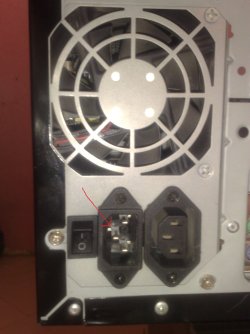
OK. Please have a look at below images. I don't know the body of that power supply is colored or not so what can I do?
I think of two solutions:
1- I can touch that 3 jacks of the power supply (PS) which they are directly connected to the inside of the PS. Or,
2- Put a metal screw driver into the PS from its vents and hit some things in inside part and touch that screwdriver from out while it's attached to inside!
Which method do you agree with?
Thanks.
"America needs another Luther King."
Using some tools like anti-static wrist strap we can avoid this ESD. But when we don't have any of those tools, as a scenario, one good work is touching the body of the power supply when it's not colored repeatedly to be the same ground with it.
OK. Please have a look at below images. I don't know the body of that power supply is colored or not so what can I do?
I think of two solutions:
1- I can touch that 3 jacks of the power supply (PS) which they are directly connected to the inside of the PS. Or,
2- Put a metal screw driver into the PS from its vents and hit some things in inside part and touch that screwdriver from out while it's attached to inside!
Which method do you agree with?
Thanks.
"America needs another Luther King."
Attachments

My Computer
At a glance
windows 7 32-bitIntel(R) Core(TM) i3-2120 CPU @ 3.30GHz4.00 GBNVIDIA GeForce GTS 450
- Computer type
- PC/Desktop
- OS
- windows 7 32-bit
- CPU
- Intel(R) Core(TM) i3-2120 CPU @ 3.30GHz
- Motherboard
- Gigabyte Technology Co., Ltd. P61A-D3
- Memory
- 4.00 GB
- Graphics Card(s)
- NVIDIA GeForce GTS 450
- Sound Card
- (1) NVIDIA High Definition Audio (2) NVIDIA Virtual Audio
- Monitor(s) Displays
- Samsung
- Hard Drives
- ST500DM002-1BC142 ATA Device
- Internet Speed
- 1 Mbps
- Antivirus
- KIS 2013
- Browser
- chrome


