Solved How to bipass Boot screen

cheezit

New member
Member
Local time
5:57 PM
Messages
45
When booting my PC, I get a boot manager screen where I have to choose Windows 7. Problem is, it is the only choice. Granted, all I have to do is press "enter" and it continues to boot up. But it is an annoyance to be sure.

I found this thread -- http://www.sevenforums.com/installa...i-skip-win-boot-manager-screen-upon-boot.html

I tried the instructions given there, but I still get the boot manager screen. Any other suggestions that I can try? Thanks.
 

My Computer

Computer Manufacturer/Model Number
Dell Inspiron 660s
OS
Windows 7 64 bit
CPU
Intel Pentium processor G630(2 .60GHz, 3MB)
Memory
8GB SDRAM at 1600MHz
Monitor(s) Displays
Dell ST2320L
Screen Resolution
1920 X 1080
Internet Speed
Cable 30 MB per second download

My Computer

Computer type
Laptop
Computer Manufacturer/Model Number
Sony Vaio VPCEB47GM Laptop
OS
Win 7 Pro 64-bit
CPU
Intel i5 2.4 Ghz
Memory
8GB DDR3
Graphics Card(s)
Intel HD 3000
Sound Card
IDT High Definition
Monitor(s) Displays
15.6 WGXA Anti-Glare LED
Screen Resolution
1280x800
Hard Drives
640Gb 7200rpm
Antivirus
MSE
Browser
Opera (primary) with IE9 backup
In run write " msconfig" press enter
a window will open click on the " boot " tab
there you ill see "Timeout" having value "30" make it "0" and click apply restart pc and i hope you wont have to press enter again :)
 

My Computer

Computer Manufacturer/Model Number
INTEL
OS
Windows 7 Ultimate x64
CPU
DUAL CORE e5700
Motherboard
DG41Wv
Memory
4GB ddr3 kingston
Graphics Card(s)
9500gt IGB ddr2
Sound Card
Built-in realteck
Monitor(s) Displays
SAMSUNG sync 73
Screen Resolution
1024x768
Hard Drives
80GB
PSU
400W Enermax
Case
SV
Cooling
Stock
Keyboard
-
Mouse
DELL
Internet Speed
1Mbps
Other Info
WHAT U WANNA KNOW !!!
In run write " msconfig" press enter
a window will open click on the " boot " tab
there you ill see "Timeout" having value "30" make it "0" and click apply restart pc and i hope you wont have to press enter again :)
It was already set at "0", so I set it for "3" then hit OK, then changed it back to "0" and hit OK again. I rebooted it and the boot screen didn't show up. Hopefully it won't come back.
 

My Computer

Computer Manufacturer/Model Number
Dell Inspiron 660s
OS
Windows 7 64 bit
CPU
Intel Pentium processor G630(2 .60GHz, 3MB)
Memory
8GB SDRAM at 1600MHz
Monitor(s) Displays
Dell ST2320L
Screen Resolution
1920 X 1080
Internet Speed
Cable 30 MB per second download
I spoke too soon. It still shows up. :confused:
 

My Computer

Computer Manufacturer/Model Number
Dell Inspiron 660s
OS
Windows 7 64 bit
CPU
Intel Pentium processor G630(2 .60GHz, 3MB)
Memory
8GB SDRAM at 1600MHz
Monitor(s) Displays
Dell ST2320L
Screen Resolution
1920 X 1080
Internet Speed
Cable 30 MB per second download
tell me that has the timer reset again by it self in the msconfig ??????????????
 

My Computer

Computer Manufacturer/Model Number
INTEL
OS
Windows 7 Ultimate x64
CPU
DUAL CORE e5700
Motherboard
DG41Wv
Memory
4GB ddr3 kingston
Graphics Card(s)
9500gt IGB ddr2
Sound Card
Built-in realteck
Monitor(s) Displays
SAMSUNG sync 73
Screen Resolution
1024x768
Hard Drives
80GB
PSU
400W Enermax
Case
SV
Cooling
Stock
Keyboard
-
Mouse
DELL
Internet Speed
1Mbps
Other Info
WHAT U WANNA KNOW !!!
When I first looked at it, it was set at "0". It still is. But the bootscreen comes on during boot up and stays until I hit "enter".

It's just a minor annoyance that I can live with if I *need* to.
 

My Computer

Computer Manufacturer/Model Number
Dell Inspiron 660s
OS
Windows 7 64 bit
CPU
Intel Pentium processor G630(2 .60GHz, 3MB)
Memory
8GB SDRAM at 1600MHz
Monitor(s) Displays
Dell ST2320L
Screen Resolution
1920 X 1080
Internet Speed
Cable 30 MB per second download
I hate such little problem, once i just re-installed windows as i was getting 2 windows 7 options . . . .

Try this one
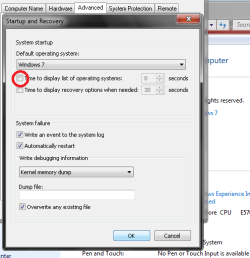
goto computer properties >advance system settings and hit on the settings button under " startup and recovery "
there uncheck the box saying " time to display list...... "
and tell me if it has worked or not ..................
I will kill your problem its annoying me tooooooooooooooo now :mad:
 

Attachments

  • Untitled.png
    Untitled.png
    13.6 KB · Views: 6

My Computer

Computer Manufacturer/Model Number
INTEL
OS
Windows 7 Ultimate x64
CPU
DUAL CORE e5700
Motherboard
DG41Wv
Memory
4GB ddr3 kingston
Graphics Card(s)
9500gt IGB ddr2
Sound Card
Built-in realteck
Monitor(s) Displays
SAMSUNG sync 73
Screen Resolution
1024x768
Hard Drives
80GB
PSU
400W Enermax
Case
SV
Cooling
Stock
Keyboard
-
Mouse
DELL
Internet Speed
1Mbps
Other Info
WHAT U WANNA KNOW !!!
I'll check it when I get home from work. But if memory serves me, I've already unchecked that spot. But I could be wrong.
 

My Computer

Computer Manufacturer/Model Number
Dell Inspiron 660s
OS
Windows 7 64 bit
CPU
Intel Pentium processor G630(2 .60GHz, 3MB)
Memory
8GB SDRAM at 1600MHz
Monitor(s) Displays
Dell ST2320L
Screen Resolution
1920 X 1080
Internet Speed
Cable 30 MB per second download
It may help to know that this is a brand new computer -- less than a week old. I didn't have this problem the first couple of days I had it. But I've added a few programs to it since I got it.
 

My Computer

Computer Manufacturer/Model Number
Dell Inspiron 660s
OS
Windows 7 64 bit
CPU
Intel Pentium processor G630(2 .60GHz, 3MB)
Memory
8GB SDRAM at 1600MHz
Monitor(s) Displays
Dell ST2320L
Screen Resolution
1920 X 1080
Internet Speed
Cable 30 MB per second download
I was right. That is already unchecked. :(
 

My Computer

Computer Manufacturer/Model Number
Dell Inspiron 660s
OS
Windows 7 64 bit
CPU
Intel Pentium processor G630(2 .60GHz, 3MB)
Memory
8GB SDRAM at 1600MHz
Monitor(s) Displays
Dell ST2320L
Screen Resolution
1920 X 1080
Internet Speed
Cable 30 MB per second download
I downloaded and installed EasyBCD. It took care of the problem. :thumbsup:

Thanks for the help!!
 

My Computer

Computer Manufacturer/Model Number
Dell Inspiron 660s
OS
Windows 7 64 bit
CPU
Intel Pentium processor G630(2 .60GHz, 3MB)
Memory
8GB SDRAM at 1600MHz
Monitor(s) Displays
Dell ST2320L
Screen Resolution
1920 X 1080
Internet Speed
Cable 30 MB per second download
I downloaded and installed EasyBCD. It took care of the problem. :thumbsup:

Thanks for the help!!

Glad to hear you got it sorted out. Thanks for posting back.
 

My Computer

Computer type
Laptop
Computer Manufacturer/Model Number
Sony Vaio VPCEB47GM Laptop
OS
Win 7 Pro 64-bit
CPU
Intel i5 2.4 Ghz
Memory
8GB DDR3
Graphics Card(s)
Intel HD 3000
Sound Card
IDT High Definition
Monitor(s) Displays
15.6 WGXA Anti-Glare LED
Screen Resolution
1280x800
Hard Drives
640Gb 7200rpm
Antivirus
MSE
Browser
Opera (primary) with IE9 backup
OMG :eek:

I gave up after searching on google for about 20min . . Glad u didn't gave up and found the solution :)
 

My Computer

Computer Manufacturer/Model Number
INTEL
OS
Windows 7 Ultimate x64
CPU
DUAL CORE e5700
Motherboard
DG41Wv
Memory
4GB ddr3 kingston
Graphics Card(s)
9500gt IGB ddr2
Sound Card
Built-in realteck
Monitor(s) Displays
SAMSUNG sync 73
Screen Resolution
1024x768
Hard Drives
80GB
PSU
400W Enermax
Case
SV
Cooling
Stock
Keyboard
-
Mouse
DELL
Internet Speed
1Mbps
Other Info
WHAT U WANNA KNOW !!!
OMG :eek:

I gave up after searching on google for about 20min . . Glad u didn't gave up and found the solution :)

The solution was in Post # 2 all along. ;)
 

My Computer

Computer type
Laptop
Computer Manufacturer/Model Number
Sony Vaio VPCEB47GM Laptop
OS
Win 7 Pro 64-bit
CPU
Intel i5 2.4 Ghz
Memory
8GB DDR3
Graphics Card(s)
Intel HD 3000
Sound Card
IDT High Definition
Monitor(s) Displays
15.6 WGXA Anti-Glare LED
Screen Resolution
1280x800
Hard Drives
640Gb 7200rpm
Antivirus
MSE
Browser
Opera (primary) with IE9 backup
Back
Top