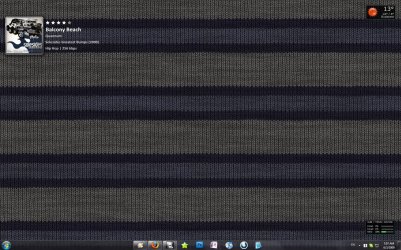
How to center dock icons?

Cam

New member
Local time
6:42 AM
Messages
160
Location
New Jersey, United States
How do I center my dock icons, so that they're in the middle, almost like Mac OS X's dock?
 

My Computer My Computer

Computer Manufacturer/Model Number
Dell Studio 540
OS
Windows 7 RTM
CPU
Intel Q660 Quad-Core CPU (2.40GHz)
Memory
4GB Dual Channel DDR2 SDRAM (800MHz)
Graphics Card(s)
ATI Radeon HD 4850 (512MB)
Monitor(s) Displays
20'' Dell E207WFP
Screen Resolution
1680x1050
Hard Drives
500GB Serial ATA Hard Drive (7200RPM)

250GB Serial ATA Hard Drive (7200RPM)
PSU
400 Watt DC Power Supply
Case
H: 14.2 inches | W: 6.7 inches | D: 17.1 inches
Keyboard
Dell Multimedia Keyboard
Mouse
Dell Premium Optical USB Mouse
Internet Speed
Download Rate: 5533 KB/s | Upload Rate: 2085 KB/s
1. right-click on the taskbar and unlock it.
2. create a new, empty folder someplace.
3. right-click on the taskbar, make a new toolbar, and point it to the empty folder.
4. drag the new toolbar to the left side of the taskbar icons, by the start orb.
5. right-click the toolbar, and turn off the label.
6. resize the taskbar to position the taskbar buttons where you want them to be.
7. right-click the taskbar and lock it again.

this is an imperfect solution. more a work-around really. the problem is that it works fine to put pinned apps in the middle, but any new taskbar buttons that might appear as you open non-pinned apps will be added to the right side of the bunch, so opening more than one or two will make it appear to be lopsided.

still, it's the best way i know of to accomplish this...
 

Attachments

  • Clipboard Image (12).jpg
    Clipboard Image (12).jpg
    364.1 KB · Views: 401

My Computer My Computer

OS
7600 x86
CPU
Core 2 Duo e7200, 2.53 ghz
Motherboard
Micro-Star MS-7529
Memory
2x DDR2 PC5300 1gb, 667 mhz
Graphics Card(s)
GeForce 9500gt, 512mb
Monitor(s) Displays
22" LG Flatron w2234s
Screen Resolution
1680x1050
Hard Drives
Excelstor SATA-II 250gb 7200rpm, 8mb cache
PSU
CoolerMaster M520
Internet Speed
30/20 mbits

My Computer My Computer

Computer Manufacturer/Model Number
HP Touchsmart IQ771.uk
OS
Windows 7 Ultimate x64
CPU
AMD Turion(tm) 64 X2 Mobile Technology TL-56
Motherboard
ASUS Pheonix
Memory
3GB Nanya PC2-6400 DDR2-SDRAM SO-DIM (400MHz)
Graphics Card(s)
NVIDIA GeForce Go 7600 256MB GDDR3 SDRAM
Sound Card
High Definition Intergrated NVIDIA MCP51
Monitor(s) Displays
46" Sony Bravia HDTV
Screen Resolution
1600x1200
Hard Drives
1.5TB Samsug
320GB Seagate ST3320820AS - SATA 3Gb/s 8MB
500GB Maxtor Basics STM305003EHD301-RK
Internet Speed
↓6.32 Mb/s ↑0.35 Mb/s ↔26ms
Other Info
BIOS - American Megatrends Inc. 5.07
Ethernet Port - NVIDIA nForce 10/100/1000 Mbps
DVD Drive - TSSTcorp DVDR/RW TS-T632L
Good stuff, appreciate it
 

My Computer My Computer

Computer Manufacturer/Model Number
HP DV4
OS
Windows & / Ubuntu
CPU
Intel Code Duo 2.1
Memory
4gb
Graphics Card(s)
Intel 4500mhd
Hard Drives
320gb
Back
Top