How-to Change AIMP3 Main Icon ?

Gunniz

ARSENAL LONDON
Member
VIP
Local time
9:07 PM
Messages
101

My Computer My Computer

At a glance

Windows 7 Professional x64 Service Pack 1
OS
Windows 7 Professional x64 Service Pack 1

My Computer My Computer

At a glance

Win 7 Pro x64 / Win 10 ProIntel(R) Core(TM) i7-3630QM CPU @ 2.40GHz12 GB(1) Intel(R) HD Graphics 4000 (2) NVIDIA GeFo...
Computer type
Laptop
Computer Manufacturer/Model Number
Sager NP9170
OS
Win 7 Pro x64 / Win 10 Pro
CPU
Intel(R) Core(TM) i7-3630QM CPU @ 2.40GHz
Motherboard
CLEVO P170EM
Memory
12 GB
Graphics Card(s)
(1) Intel(R) HD Graphics 4000 (2) NVIDIA GeForce GTX 675M
Sound Card
(1) Realtek High Definition Audio (2) Intel(R) Display Aud
Monitor(s) Displays
17.3
Screen Resolution
1920x1080
Hard Drives
(1) Samsung 860 EVO 500GB(OS) (1) Samsung 860 EVO 500GB(Data)
Keyboard
Backlite
Antivirus
MSE, Malwarebytes Pro
Browser
Firefox
Other Info
DESKTOP: Custom-built.
OS: Win 10 Pro x64.
CASE: Rosewill R5.
CPU: Intel I5 4670K CPU @ 3.40GHz.
CPU COOLER: Cool Master Hyper 212 EVO.
MOTHERBOARD: Asus Z87-A.
MEMORY: Kingston HyperX 2x4 GB.
GPU: Nvidia Geforce 650 TI.
PSU: Corsair TX750.
DRIVES: (1) Samsung 840 120 GB SSD (2) Western Digital blue 500 GB 7200 RPM.
Hello there. Download the rar file,and extract the files,small and large picture.

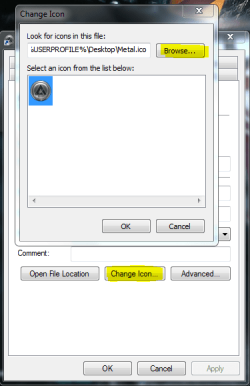
Search in Start :orb: for AIMP3. Right click on it and select Properties.

Capture.PNG

Select Change Icon,and click on Browse. Locate the picture (small one 48x48) and select it. Apply and OK.
After that the icon should be changed.

Result.
icon.PNG
 

My Computer My Computer

At a glance

Windows 10 Pro x64Intel Core i5 4440 @Stock4 x 4GB HyperX Fury DDR3Gigabyte GTX 1050Ti O4G
Computer type
PC/Desktop
Computer Manufacturer/Model Number
Custom Build
OS
Windows 10 Pro x64
CPU
Intel Core i5 4440 @Stock
Motherboard
Gigabyte Z97 D3H
Memory
4 x 4GB HyperX Fury DDR3
Graphics Card(s)
Gigabyte GTX 1050Ti O4G
Sound Card
Integrated
Monitor(s) Displays
Dell P2417H
Screen Resolution
1920 x 1080
Hard Drives
Samsung EVO 850 120GB / Toshiba DT01ACA050 1TB 7200prm 32MB
PSU
Riotoro Onyx 750W
Case
NZXT H500 Black-Red
Cooling
Stock CPU + NZXT 120mm + 2x120mm red fans
Keyboard
Modecom Volcano Lanparty
Mouse
Asus ROG Gladius / DeepCool E-Pad Plus
Internet Speed
DOCSIS 50/3 Mbit
Browser
Google Chrome
Other Info
Asus K55VJ(i5 3210M, GT635M / 2GB, 8GB DDR3, 500GB HDD)
Hello there. Download the rar file,and extract the files,small and large picture.

Search in Start :orb: for AIMP3. Right click on it and select Properties.

View attachment 179751

Select Change Icon,and click on Browse. Locate the picture (small one 48x48) and select it. Apply and OK.
After that the icon should be changed.

Result.
View attachment 179752
Possible For Change Default Programs Icon ? [I Mean Not Desktop Icon Only]

Follow Your Step AIMP3 Icon On Dekdtop Is Change But It NO Effect In C:\Program Files (x86)\AIMP3
 

My Computer My Computer

At a glance

Windows 7 Professional x64 Service Pack 1
OS
Windows 7 Professional x64 Service Pack 1
Like this? You need to edit the AIMP3.exe with a resource editor.
AIMP3.png

Here is the .exe for build 916 just rename the Original one to AIMP3.backup.exe and move the one in the zip folder below into that folder.
Jerry
 

Attachments

My Computer My Computer

At a glance

Win 7 Pro x64 / Win 10 ProIntel(R) Core(TM) i7-3630QM CPU @ 2.40GHz12 GB(1) Intel(R) HD Graphics 4000 (2) NVIDIA GeFo...
Computer type
Laptop
Computer Manufacturer/Model Number
Sager NP9170
OS
Win 7 Pro x64 / Win 10 Pro
CPU
Intel(R) Core(TM) i7-3630QM CPU @ 2.40GHz
Motherboard
CLEVO P170EM
Memory
12 GB
Graphics Card(s)
(1) Intel(R) HD Graphics 4000 (2) NVIDIA GeForce GTX 675M
Sound Card
(1) Realtek High Definition Audio (2) Intel(R) Display Aud
Monitor(s) Displays
17.3
Screen Resolution
1920x1080
Hard Drives
(1) Samsung 860 EVO 500GB(OS) (1) Samsung 860 EVO 500GB(Data)
Keyboard
Backlite
Antivirus
MSE, Malwarebytes Pro
Browser
Firefox
Other Info
DESKTOP: Custom-built.
OS: Win 10 Pro x64.
CASE: Rosewill R5.
CPU: Intel I5 4670K CPU @ 3.40GHz.
CPU COOLER: Cool Master Hyper 212 EVO.
MOTHERBOARD: Asus Z87-A.
MEMORY: Kingston HyperX 2x4 GB.
GPU: Nvidia Geforce 650 TI.
PSU: Corsair TX750.
DRIVES: (1) Samsung 840 120 GB SSD (2) Western Digital blue 500 GB 7200 RPM.
Bongo was faster that me. :)
 

My Computer My Computer

At a glance

Windows 10 Pro x64Intel Core i5 4440 @Stock4 x 4GB HyperX Fury DDR3Gigabyte GTX 1050Ti O4G
Computer type
PC/Desktop
Computer Manufacturer/Model Number
Custom Build
OS
Windows 10 Pro x64
CPU
Intel Core i5 4440 @Stock
Motherboard
Gigabyte Z97 D3H
Memory
4 x 4GB HyperX Fury DDR3
Graphics Card(s)
Gigabyte GTX 1050Ti O4G
Sound Card
Integrated
Monitor(s) Displays
Dell P2417H
Screen Resolution
1920 x 1080
Hard Drives
Samsung EVO 850 120GB / Toshiba DT01ACA050 1TB 7200prm 32MB
PSU
Riotoro Onyx 750W
Case
NZXT H500 Black-Red
Cooling
Stock CPU + NZXT 120mm + 2x120mm red fans
Keyboard
Modecom Volcano Lanparty
Mouse
Asus ROG Gladius / DeepCool E-Pad Plus
Internet Speed
DOCSIS 50/3 Mbit
Browser
Google Chrome
Other Info
Asus K55VJ(i5 3210M, GT635M / 2GB, 8GB DDR3, 500GB HDD)
THANKS ALL. I'll Try

And For Update Version OF AIMP3. I Must Uninstall Old Version Before Install New Version ? ..It Can Replace ?
 

My Computer My Computer

At a glance

Windows 7 Professional x64 Service Pack 1
OS
Windows 7 Professional x64 Service Pack 1
I always installed the new version on top of the older one. So far without a problem. Just be aware that you have to "patch" every new aimp.exe if you want to keep the new icon. Easily done with this:
Resource Hacker - Free software downloads and software reviews - CNET Download.com (for 32-Bit OS)
Download New Updated “Resource Hacker 3.6.0″ with 64-bit and PNG File Support - Tweaking with Vishal (64-Bit support)

Here's a small "Howto": http://www.sevenforums.com/tutorials/73191-icons-change-using-resource-hacker.html

-DG
 

My Computer My Computer

At a glance

Windows 7 Ultimate x86DualCore AMD Athlon 64 X2, 2600 MHz 5200+Samsung 2GB DDR2Onboard NVIDIA GeForce 6150SE nForce 430
Computer Manufacturer/Model Number
HP m8000n
OS
Windows 7 Ultimate x86
CPU
DualCore AMD Athlon 64 X2, 2600 MHz 5200+
Motherboard
Asus M2N68-LA (Narra)
Memory
Samsung 2GB DDR2
Graphics Card(s)
Onboard NVIDIA GeForce 6150SE nForce 430
Sound Card
Onboard nVIDIA nForce 6100-430 (MCP61P)
Monitor(s) Displays
Westinghouse 19" LED
Screen Resolution
1280x1024
Hard Drives
SATA II Seagate Barracuda 500GB
USB II WD Elements 500GB
USB II WD My Book 1TB
USB II WD My Book 2TB
PSU
Stock (HP)
Case
Stock (HP)
Cooling
Stock
Keyboard
Logitech Classic KB 200
Mouse
Standard HP opticle USB mouse
Also on Windows 10......... i have installed this app and the icon it's not watchable from desktop and from file manager............. how i can fix this ?
 

My Computer My Computer

At a glance

Windows 7 X64
Computer type
PC/Desktop
OS
Windows 7 X64
Back
Top