How to change colour in the simple Theme ?

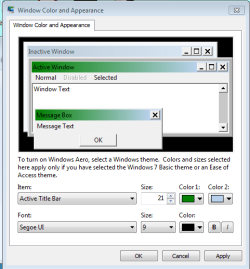
If you go into the window color box you were in to try to change it, click the dropdown menu and select "Active Title Bar". Then you should be able to change the color of the window. Here I took a picture of the box and where to select the option:
Capture.png

EDIT: I just tried this again, and this time it isn't working, however when I minimize or maximize it, the bar is green until it finishes the animation, then its light blue again. :(
 

My Computer My Computer

Computer Manufacturer/Model Number
Hewlett Packard / Dv4-1120us
OS
Windows 7 Final
CPU
Intel Core 2 Duo @ 2.0Ghz
Memory
4GB DDR2 @ 800Mhz
Graphics Card(s)
Mobile Intel(R) 4 Series Express Chipset Family
Monitor(s) Displays
Generic PnP Monitor
Screen Resolution
1280 x 800
PSU
6-Cell Battery
Keyboard
Standard PS/2 Keyboard
Mouse
Synaptics PS/2 Port Touchpad
Internet Speed
Anywhere Between 11.0 and 48.0 Mbps
Okay, try this tutorial. I believe it could help you at least with the taskbar color. I do not believe you can change the other colors though. :|
 

My Computer My Computer

Computer Manufacturer/Model Number
Hewlett Packard / Dv4-1120us
OS
Windows 7 Final
CPU
Intel Core 2 Duo @ 2.0Ghz
Memory
4GB DDR2 @ 800Mhz
Graphics Card(s)
Mobile Intel(R) 4 Series Express Chipset Family
Monitor(s) Displays
Generic PnP Monitor
Screen Resolution
1280 x 800
PSU
6-Cell Battery
Keyboard
Standard PS/2 Keyboard
Mouse
Synaptics PS/2 Port Touchpad
Internet Speed
Anywhere Between 11.0 and 48.0 Mbps
Back
Top