How to change monitor idenities

yuriymen

New member
Local time
6:39 PM
Messages
2
I have windows 7 ultimate and just got a new video card with HDMI out, Asus EN210. My monitor is connected through VGA and my TV is connected through HDMI. For some reason my TV is identified as #1 and my monitor is identified as #2, meaning that my boot up screen shows on my TV. I use my monitor primarily for computing and TV just for watching movies. I want to make it so my boot up screen is shown on my monitor.

I tried many different things found on this and other forums, such as using NVIDIA Control Panel. Changing the registry then uninstalling NVIDIA drivers and reinstalling them. None of this worked.

Any idea would be greatly appreciated.

Thanks.
 

My Computer My Computer

At a glance

windows 7 ultimate
OS
windows 7 ultimate
Hello yuriymen, welcome to the Seven Forums.

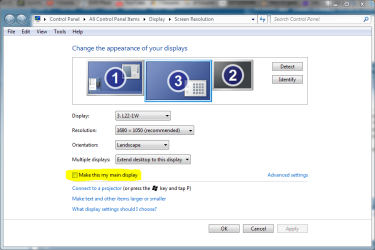
right click desktop, choose Screen Resolution. Click your monitor symbol, check Make this my main display.

Done, should work now.

Kari
 

Attachments

  • main_display.PNG
    main_display.PNG
    39.2 KB · Views: 356

My Computer My Computer

At a glance

Windows 10 Pro x64 EN-GB1.6 GHz Intel Core i7-720QM Processor6 GBATI Mobility Radeon HD 5850 Graphics
Computer type
Laptop
Computer Manufacturer/Model Number
HP ENVY 17-1150eg
OS
Windows 10 Pro x64 EN-GB
CPU
1.6 GHz Intel Core i7-720QM Processor
Memory
6 GB
Graphics Card(s)
ATI Mobility Radeon HD 5850 Graphics
Sound Card
Beats sound system with integrated subwoofer
Monitor(s) Displays
17" laptop display, 22" LED and 32" Full HD TV through HDMI
Screen Resolution
1600*900 (1), 1920*1080 (2&3)
Hard Drives
Internal: 2 x 500 GB SATA Hard Disk Drive 7200 rpm
External: 2TB for backups, 3TB USB3 network drive for media
Cooling
As Envy runs a bit warm, I have it on a Cooler Master pad
Keyboard
Logitech diNovo Media Desktop Laser (bluetooth)
Mouse
Logitech Performance Mouse MX
Internet Speed
50/10 Mbps VDSL
Antivirus
Windows Defender 4.3.9431.0
Browser
Maxthon 3.5.2., IE11
Thanks Kari,
I tried that, however my TV is still identified as #1 and the boot screen shows up on the TV.
 

My Computer My Computer

At a glance

windows 7 ultimate
OS
windows 7 ultimate
Changing monitor order

Found this on another forum:

"You can't change primary and secondary monitors unless your display adapter
drivers let you ... but you can go into display properties and drag monitor
#1 onto the other side of monitor #2 and reverse which one is on the right
and which one is on the left with any dual-display card."

I had a similar problem with two monitors in a fixed position. This solution with Kari's advice should help.
 

My Computer My Computer

At a glance

Win 7AMD Athlon 64 3000+3gbATI Radeon X1300/1550
Computer Manufacturer/Model Number
Home built
OS
Win 7
CPU
AMD Athlon 64 3000+
Motherboard
Gigabyte nForce
Memory
3gb
Graphics Card(s)
ATI Radeon X1300/1550
Sound Card
on board
Monitor(s) Displays
Viewsonic P95f+, VA1900wa
I have exactly the same problem. Wrong IDs... How to change 1 with 2 and 2 with 1?
 

My Computer My Computer

At a glance

7 64-bit Ultimatei7-2600KCorsair 1866MHz 8GBSapphire ATI HD6990
Computer Manufacturer/Model Number
zYxMa Computers, Inc. iFixYourPC.co
OS
7 64-bit Ultimate
CPU
i7-2600K
Motherboard
ASUS Maximus IV Extreme
Memory
Corsair 1866MHz 8GB
Graphics Card(s)
Sapphire ATI HD6990
Sound Card
HD6990 + Yamaha RX-V467
Monitor(s) Displays
Dell U3011 | Panasonic P50VT20 3D
Screen Resolution
30" 2560x1600 | 50" 1920x1080 3D
Hard Drives
OCZ HybridDrive 1TB | OCZ Agility 3 - OS | Hitachi 250GB - Random | WD 1TB - Files | Seagate 1TB - Files | WD 1.5TB - Files
PSU
Cooler Master Silent Pro Gold 1200W
Case
CoolerMaster Cosmos-II
Cooling
Liquid-cooled
Keyboard
Logitech Illuminated K800 + diNovo Mini
Mouse
RAT9 + MX Revolution + MX Air + Harmony One
Internet Speed
18mbps
Other Info
iPhone 4S 64GB
I don't think you can change the number. The video card decides that during bootup. I have a GT 220 with DVI and VGA outputs. My post screen only ever shows up on one monitor. If I connect one monitor to the VGA connector or the DVI connector it is monitor 1. As soon as I connect a second monitor the one on the DVI connector becomes no. 1 and the VGA no. 2. BIOS only shows on the monitor on the DVI connector. The only time the BIOS post screen shows up on the VGA connector is if that is the only connector with a monitor on it. It looks to me that Monitor no. 1 will be whatever monitor is connected to the better quality connector on the card.
 

My Computer My Computer

At a glance

Windows 10 Education 64 bitAMD Phenom II X4 980 Black Edition Deneb 3.7GHz8GB 4GBx2 Kingston PC10600 DDR3 1333 MemoryZotac NVIDIA Geforce GT640 2 Gig DDR3 PCIe
Computer type
PC/Desktop
Computer Manufacturer/Model Number
Home Built
OS
Windows 10 Education 64 bit
CPU
AMD Phenom II X4 980 Black Edition Deneb 3.7GHz
Motherboard
Asus M4N68T-M V2 µATX Motherboard
Memory
8GB 4GBx2 Kingston PC10600 DDR3 1333 Memory
Graphics Card(s)
Zotac NVIDIA Geforce GT640 2 Gig DDR3 PCIe
Sound Card
VIA VT1708s High Definition Audio 8-channel Onboard
Monitor(s) Displays
22" LG E2242 1080p and 2 19" I-INC AG191D
Screen Resolution
1280x1024 - 1920x1080 - 1280x1024
Hard Drives
Crucial M100 256 GB SSD and 500 GB WD Blue SATA
PSU
Thermaltake TR 620
Case
Power Up Black ATX Mid-Tower Case
Cooling
Stock heatsink and fan
Keyboard
Logitech Wireless K350 Wave
Mouse
Logitech Wireless M570 Trackman Wheel
Internet Speed
80 Mbps Down 30 Mbps Up
Antivirus
Windows Defender
Browser
Internet Explorer 11
Other Info
HP DVD1040e Lightscribe - External USB2
I recently upgraded my graphics to GTX 460 and at first it was ok, except for one feature which made me to install older drivers due to the latest ones having a bug which prevented a certain feature to work. Though, I'm not so sure whether it was the drivers, because I was doing other stuff at that time too.

This to me seems to be a very strange behavior. My friend also upgraded to GTX 580 recently and has the same issue, but he also started having this issue not long ago. Again, this could be down to the drivers, coz I think he was updating his drivers too. We don't know at which point the IDs switched over.

Then again I saw other posts on the net, Ati Radeon graphic card owners having exactly the same problem on windows 7 (x64?), so they had different drivers installed.

I have 2xDVI, 1xVGA and 1xHDMI. Few weeks ago I was trying to swap DVI cables between two sockets, unplugged HDMI, rebooted the system with several different setups to try to get the BIOS screens to display on my monitor, without any luck. My TV remained ID 1 (Win+P - Only computer?), the monitor was ID 2 (Win+P Only projector?) and the BIOS was still displayed on my TV....
The back panel of my gtx 460 has VGA, DVI and HDMI sockets at the top and just DVI at the bottom. At some point, for some reason I couldn't extend or switch my desktop to the TV when both, the TV and the monitor were connected to the top sockets. I had to swap the DVI cable to the bottom DVI socket. The BIOS was still displayed on my TV, but at least I could extend or switch to the TV from windows level.

Yesterday though, I was vacuuming the dust from my tower ;p and I don't know why, but I connected the bottom DVI cable to the top DVI socket, next to the HDMI, booted my PC and the bios was displayed on my monitor yay :party:

Unfortunately, in windows, the tv and the monitor IDs are still ehmm vice versa...

I have a bad feeling that it will go back to what it was before, sooner or later. Can't say now as my PC stays on 24/7 at the moment.

There was also another topic about the same thing that I started few weeks ago.

I haven't installed the SP1 for win7 yet so don't know if that will help at all..

 

My Computer My Computer

At a glance

7 64-bit Ultimatei7-2600KCorsair 1866MHz 8GBSapphire ATI HD6990
Computer Manufacturer/Model Number
zYxMa Computers, Inc. iFixYourPC.co
OS
7 64-bit Ultimate
CPU
i7-2600K
Motherboard
ASUS Maximus IV Extreme
Memory
Corsair 1866MHz 8GB
Graphics Card(s)
Sapphire ATI HD6990
Sound Card
HD6990 + Yamaha RX-V467
Monitor(s) Displays
Dell U3011 | Panasonic P50VT20 3D
Screen Resolution
30" 2560x1600 | 50" 1920x1080 3D
Hard Drives
OCZ HybridDrive 1TB | OCZ Agility 3 - OS | Hitachi 250GB - Random | WD 1TB - Files | Seagate 1TB - Files | WD 1.5TB - Files
PSU
Cooler Master Silent Pro Gold 1200W
Case
CoolerMaster Cosmos-II
Cooling
Liquid-cooled
Keyboard
Logitech Illuminated K800 + diNovo Mini
Mouse
RAT9 + MX Revolution + MX Air + Harmony One
Internet Speed
18mbps
Other Info
iPhone 4S 64GB
Back
Top