How to change my HD from GPT partition

Thomas46

New member
Local time
12:02 AM
Messages
3
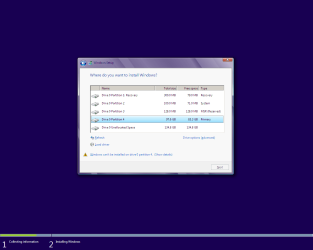
When I try to install windows 7 it says it cannot install onto my HD because it is set up as a GPT partition. I have tried using advanced options and formatting the HD but it still says it is GPT. Any help for a novice when it comes to things like this?
 

My Computer My Computer

At a glance

Windows 7 Home Premium 64 bit
OS
Windows 7 Home Premium 64 bit

My Computer My Computer

At a glance

Windows 7 Enterprise x64 SP1 Version 6.1 Buil...x64bit AMD Turion(tm) X2 Ultra Dual-Core Mobi...4096 (2048 + 2048) MB, DDR2 RAM (800 MHz), ma...ATI Mobility Radeon™ HD 3650+HyperMemory™(512...
Computer Manufacturer/Model Number
Toshiba Satelite P300D 13J (Short model No: PSPDCE)
OS
Windows 7 Enterprise x64 SP1 Version 6.1 Build 7601
CPU
x64bit AMD Turion(tm) X2 Ultra Dual-Core Mobile ZM-82
Memory
4096 (2048 + 2048) MB, DDR2 RAM (800 MHz), max 8,192 MB
Graphics Card(s)
ATI Mobility Radeon™ HD 3650+HyperMemory™(512MB VRAM+2302MB)
Sound Card
Manufacturer: harman/kardon
Monitor(s) Displays
Generic PnP Monitor (MONITOR\LPLA101)
Screen Resolution
1440 x 900 (19" LCD)
Hard Drives
HDD1: TOSHIBA MK3252GSX ATA Device (IDE 320 GB 5,400 o/min) ,
HDD2: Msft Virtual Disk SCSI Disk Device (Virtual Hard Drive),
HDD3: TOSHIBA MK3263GSX USB Device (USB Mobile HDD) (TakeMS MemLine)
PSU
Batery: technology : lithium-ion
Cooling
integrated cooler + 3x external cooler
Keyboard
USB Logitech S520
Mouse
USB Logitech S520
Internet Speed
WAN: 7,2 Mbit/sec, WLAN: 54 Mbit/sec + Bluetooth®

My Computer My Computer

At a glance

ME/XP/Vista/Win7
OS
ME/XP/Vista/Win7
You need to do a clean install,
As the new MOBO's now have a uEFI BIOS.
How to install Windows 64 bit on a uEFI BIOS:
http://www.sevenforums.com/tutorial...e-firmware-interface-install-windows-7-a.html
or
UEFI (Unified Extensible Firmware Interface) - Install Windows 8 with

Make the first in Drive Options

View attachment 240770

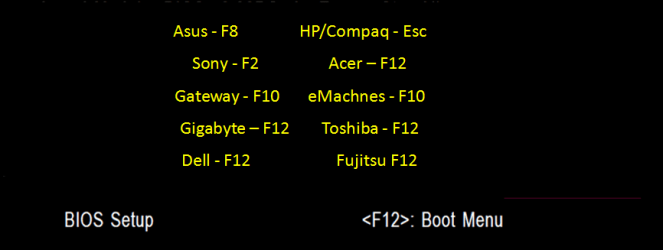
To boot your DVD, use boot menu

View attachment 240771

press enter on the UEFI DVD drive

View attachment 240772

When I run the installation disk I still cannot create a new partition and formatting also does not work...

ALSO:


I got to the last step but then when i said to convert to MBR it said this was not possible.., is that bad?
 

My Computer My Computer

At a glance

Windows 7 Home Premium 64 bit
OS
Windows 7 Home Premium 64 bit
Boot from the uEFI DVD drive, as in screenshot above.
 

My Computer My Computer

At a glance

ME/XP/Vista/Win7
OS
ME/XP/Vista/Win7
Boot from the uEFI DVD drive, as in screenshot above.

I have tried that as I stated previously, it seems to be no different from booting from the normal DVD drive
 

My Computer My Computer

At a glance

Windows 7 Home Premium 64 bit
OS
Windows 7 Home Premium 64 bit
This simplest way to do it is to delete the old partitions and let the Windows installer re-establish them.

Alternately, boot the installer as UEFI and keep the GPT partitions.
 

My Computer My Computer

At a glance

Windows 7 Pro X64 SP1Intel Core I7-3930k16 GB Gskill DDR3-2133eVGA GTX680
Computer Manufacturer/Model Number
homegrown
OS
Windows 7 Pro X64 SP1
CPU
Intel Core I7-3930k
Motherboard
Asus P9X79 Pro
Memory
16 GB Gskill DDR3-2133
Graphics Card(s)
eVGA GTX680
Sound Card
Creative X-Fi Titanium
Monitor(s) Displays
As PA246Q
Screen Resolution
1920 X 1200
Hard Drives
Corsair Force GT, 120 GB
WDC 1.5TB Caviar Black
PSU
PCP&C Silencer 750 Crossfire
Case
Silverstone FT02
Cooling
Noctua NH-D14
Keyboard
cheap Logitech USB
Mouse
Microsoft Intellimouse Explorer (old optical) USB
Internet Speed
6Mb cable
Other Info
Pioneer BDR-205
Samsung SH-203B
Monsoon 5.1 speakers
If you do not want to use the EFI function in your BIOS, but instead install normally to MBR disk, follow these steps:

Unplug all other HD's and peripherals, Boot into BIOS setup to see if there is an EFI Boot Disk in BIOS Boot order. If so remove it, set DVD drive first to boot. If EFI BIOS also set to Legacy BIOS. Then set SATA controller to AHCI. Save changes and Exit.

Then boot into installer DVD or flash stick, at first screen Press Shift + F10 to open a Command Box, type:

DISKPART
LIST DISK
SEL DIS 0 (after confirming Windows 7 target HD #)
CLEAN
CONVERT MBR
CREATE PARTITION PRIMARY SIZE=102400
FORMAT FS=NTFS LABEL="WINDOWS 7"
ACTIVE
EXIT

Next click Install Now to Clean Install Windows 7 to the partition you created. If it fails then report back at which step and the verbatim error message.

In addition read over these steps to understand the tools and methods which work best to get and maintain a perfect Clean Reinstall - Factory OEM Windows 7. The steps are the same for retail.

 
Back
Top