
You are using an out of date browser. It may not display this or other websites correctly.
You should upgrade or use an alternative browser.
You should upgrade or use an alternative browser.
Solved How to change PC language?
- Thread starter iTRiP
- Start date

Basically, you are looking for an utility, which will help you to open up bios and translate it yourself?
Such programs do exist for some BIOS vendors. But problem is, that there are some many vendors and versions of firmwares that it is not possible to create a universal editor. And most of those firmware are available only in English versions.
There will be no visible reaction of Windows 7 to a new BIOS, whether officially patched or not offically (if your won't brick your computer of course and it will start).
There used to be a custom patcher for BIOS firmwares, that allowed motherboards to recognize bigger hard drives. Those things were totally home made and Windows run smothly on those computers with non-orginal firmwares.
Changing bios - whether that is it's language, ability to read bigger HDDs, SLIC information or some other information in it, will take no affect on language of Windows itself (menus & help files).
Language feature of Windows 7 is independent. You would have to have Windows 7 Ultimate, Enterprise (for corporations only) where you can legally change Windows language yourself, but that feature is not auto-configuring (you have to manually select it and download some Language Interface Pack [LIP] files).
Such programs do exist for some BIOS vendors. But problem is, that there are some many vendors and versions of firmwares that it is not possible to create a universal editor. And most of those firmware are available only in English versions.
There will be no visible reaction of Windows 7 to a new BIOS, whether officially patched or not offically (if your won't brick your computer of course and it will start).
There used to be a custom patcher for BIOS firmwares, that allowed motherboards to recognize bigger hard drives. Those things were totally home made and Windows run smothly on those computers with non-orginal firmwares.
Changing bios - whether that is it's language, ability to read bigger HDDs, SLIC information or some other information in it, will take no affect on language of Windows itself (menus & help files).
Language feature of Windows 7 is independent. You would have to have Windows 7 Ultimate, Enterprise (for corporations only) where you can legally change Windows language yourself, but that feature is not auto-configuring (you have to manually select it and download some Language Interface Pack [LIP] files).
My Computer
- Computer type
- PC/Desktop
- OS
- Windows 8.1 ; Windows 7 x86 (Dec2008-Jan2013)
- Other Info
- "The scale icon at the top right of a post or tutorial is how you can give rep to the member."
Well, it is all quite well understood by me.
You did not posted any proof for what you have said.
Actual links would be nice here.
I believe that answer is simple. Flashing bios could turn out to be a disaster.
It is very easy to brick your computer while flashing a new bios firmware (There is a lot of things that you should not do and success of flashing depends on it). My guess is that those companies care about customers and provide BIOS "installing" packages with instructions inside in native languages, but bios itself is likely English.
Once again in an easy format: shell (installer) is different, but content is likely the same.
Need to look at your links, because all drivers and bioses I have ever downloaded came from official websites, that make you select your language and region BEFORE you go to download section.
You did not posted any proof for what you have said.
Actual links would be nice here.
I believe that answer is simple. Flashing bios could turn out to be a disaster.
It is very easy to brick your computer while flashing a new bios firmware (There is a lot of things that you should not do and success of flashing depends on it). My guess is that those companies care about customers and provide BIOS "installing" packages with instructions inside in native languages, but bios itself is likely English.
Once again in an easy format: shell (installer) is different, but content is likely the same.
Need to look at your links, because all drivers and bioses I have ever downloaded came from official websites, that make you select your language and region BEFORE you go to download section.
My Computer
- Computer type
- PC/Desktop
- OS
- Windows 8.1 ; Windows 7 x86 (Dec2008-Jan2013)
- Other Info
- "The scale icon at the top right of a post or tutorial is how you can give rep to the member."

Let's make one thing clear: whatever language your BIOS has has nothing to do with the language Windows is using.
I must say I am not sure what you are asking and what you want to achieve but I can tell you you don't get an English Windows by changing a German BIOS to English one.
Kari
I must say I am not sure what you are asking and what you want to achieve but I can tell you you don't get an English Windows by changing a German BIOS to English one.
Kari
My Computer
- Computer type
- Laptop
- Computer Manufacturer/Model Number
- HP ENVY 17-1150eg
- OS
- Windows 10 Pro x64 EN-GB
- CPU
- 1.6 GHz Intel Core i7-720QM Processor
- Memory
- 6 GB
- Graphics Card(s)
- ATI Mobility Radeon HD 5850 Graphics
- Sound Card
- Beats sound system with integrated subwoofer
- Monitor(s) Displays
- 17" laptop display, 22" LED and 32" Full HD TV through HDMI
- Screen Resolution
- 1600*900 (1), 1920*1080 (2&3)
- Hard Drives
- Internal: 2 x 500 GB SATA Hard Disk Drive 7200 rpm
External: 2TB for backups, 3TB USB3 network drive for media
- Cooling
- As Envy runs a bit warm, I have it on a Cooler Master pad
- Keyboard
- Logitech diNovo Media Desktop Laser (bluetooth)
- Mouse
- Logitech Performance Mouse MX
- Internet Speed
- 50/10 Mbps VDSL
- Antivirus
- Windows Defender 4.3.9431.0
- Browser
- Maxthon 3.5.2., IE11
seavixen32
New member
Detailed information for your computer setup is contained in the CMOS chip, which can be reconfigured as and when system variables change, but it is not something you could do without specialist knowledge and equipment.
HowStuffWorks "How BIOS Works"
The bottom line is this: if you want multi-language support, you need to upgrade to the Ultimate version of Windows 7.
If it was as simple as tweaking the BIOS, people would be doing that instead of shelling out hard-earned cash to upgrade their operating system.
HowStuffWorks "How BIOS Works"
The bottom line is this: if you want multi-language support, you need to upgrade to the Ultimate version of Windows 7.
If it was as simple as tweaking the BIOS, people would be doing that instead of shelling out hard-earned cash to upgrade their operating system.
My Computer
- Computer Manufacturer/Model Number
- HP Pavilion Elite 495UK
- OS
- Windows 7 Ultimate SP1 64-Bit
- CPU
- Intel Core i7 870 @ 2.93GHz
- Motherboard
- MSI 2A9C (CPU1)
- Memory
- 8Gb Dual-Channel DDR3 @ 664MHz
- Graphics Card(s)
- nVidia GeForce GTX 460 1024MB dedicated RAM
- Sound Card
- Realtek HD Audio
- Monitor(s) Displays
- HP2310i
- Screen Resolution
- 1920 x 1080
- Hard Drives
- 1x1954GB Hitachi HDS22020ALA 330 (RAID), 1x1954GB Hitachi External for backup and storage
- PSU
- 460W
- Case
- HP Elite
- Cooling
- Air cooled
- Keyboard
- Logitech K750 solar-powered keyboard
- Mouse
- Logitech Wireless M180 mouse
- Internet Speed
- 2Mb
- Other Info
- Pure Avanti Flow Internet Radio with iPod Dock, 64Gb iPod, HP USB Speakers, Sony MDR-V500 Headphones, Sony Vaio F-Series Laptop
seavixen32
New member
It's painfully obvious you're not prepared to listen to reason.
If what you're suggesting could be done, it would have been done - trust me.
If you want a different language for your operating system, then buy another Windows DVD, they're not expensive if you shop around.
Failing that, a Windows Anytime Upgrade to the Ultimate version will unlock the files you need, but you will have to buy a Anytime Upgrade product key first.
Adopting this King Canute-like attitude endears you to no-one.
I can't put it plainer than this: you cannot do what you want without specialist knowledge and equipment.
If what you're suggesting could be done, it would have been done - trust me.
If you want a different language for your operating system, then buy another Windows DVD, they're not expensive if you shop around.
Failing that, a Windows Anytime Upgrade to the Ultimate version will unlock the files you need, but you will have to buy a Anytime Upgrade product key first.
Adopting this King Canute-like attitude endears you to no-one.
I can't put it plainer than this: you cannot do what you want without specialist knowledge and equipment.
My Computer
- Computer Manufacturer/Model Number
- HP Pavilion Elite 495UK
- OS
- Windows 7 Ultimate SP1 64-Bit
- CPU
- Intel Core i7 870 @ 2.93GHz
- Motherboard
- MSI 2A9C (CPU1)
- Memory
- 8Gb Dual-Channel DDR3 @ 664MHz
- Graphics Card(s)
- nVidia GeForce GTX 460 1024MB dedicated RAM
- Sound Card
- Realtek HD Audio
- Monitor(s) Displays
- HP2310i
- Screen Resolution
- 1920 x 1080
- Hard Drives
- 1x1954GB Hitachi HDS22020ALA 330 (RAID), 1x1954GB Hitachi External for backup and storage
- PSU
- 460W
- Case
- HP Elite
- Cooling
- Air cooled
- Keyboard
- Logitech K750 solar-powered keyboard
- Mouse
- Logitech Wireless M180 mouse
- Internet Speed
- 2Mb
- Other Info
- Pure Avanti Flow Internet Radio with iPod Dock, 64Gb iPod, HP USB Speakers, Sony MDR-V500 Headphones, Sony Vaio F-Series Laptop
My fellow guru Seavixen said it all here above. Basically I have nothing to add, but here you get detailed answers for your questions.
 . Just do advanced search here at SF searching my posts using "Language pack" as search criteria and you can see it yourself. OK?
The decisive factor is the language of the Windows DVD you have bought, or the language of a pre-installed Windows if you got your Windows already installed with PC. There's no way you can change this language in Windows 7 Starter, Home Basic, Home Premium and Professional editions.
In Windows 7 Ultimate and Enterprise editions it is possible to change the display language completely using so called Language Packs. This change can be made individually and separately for each and every user account. For instance all my PCs have user accounts in my native Finnish and Swedish, as well as in English and German:
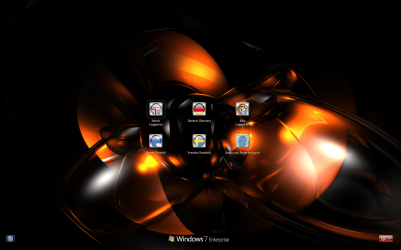
Notice that in some areas computers with pre-installed Windows let you select the language of the operating system when first time OOBE boot is made, when computer is first time set up. For instance in my native Finland all new PCs let you select between Finnish, Swedish and English. Once this selection is made it can not be reverted, even if you do a factory reset the language remains as that which was selected during the first OOBE boot.
Also in some areas you can buy Windows DVDs with more than one language. Then it is a simply question of selection when installing Windows.
I am not bothering to find more proof to you. If you will not believe me and my expertise in multilingual Windows, feel free to search Internet or ask elsewhere.
You have two choices:
1. Buy Windows 7 DVD or ISO in language you'd like to have and use it to reinstall
2. Use Windows Anytime Upgrade to upgrade your Home Premium to Ultimate, then using Windows Update download and install language packs of your preferred language
No. Flashing BIOS and changing BIOS language, then reinstalling Windows does not change the language of Windows. The decisive factor is not the BIOS language but the language of your Windows install media.
Kari
Yes, although it's useless regarding what you want to achieve and has nothing to do with the language of your windows setup. Only things that will change language are BIOS setup screen and some of the so called POST information shown on screen when PC is booting. These have nothing to do with the language of the Windows.But do u now however admit that one can change a English bios to a German bios and vice versa?
Yes, I am sure. I consider myself as a language expert when it comes to Windows. Geeks here know I am not a modest person so let's say I know about everything there is to know about Windows language changes and language packsAnd if u are sertain about this satement u made that it is not the bios that is the determinating factor for the language that the computer uses for everything then what is the determinating factor for language then?
. Just do advanced search here at SF searching my posts using "Language pack" as search criteria and you can see it yourself. OK?The decisive factor is the language of the Windows DVD you have bought, or the language of a pre-installed Windows if you got your Windows already installed with PC. There's no way you can change this language in Windows 7 Starter, Home Basic, Home Premium and Professional editions.
In Windows 7 Ultimate and Enterprise editions it is possible to change the display language completely using so called Language Packs. This change can be made individually and separately for each and every user account. For instance all my PCs have user accounts in my native Finnish and Swedish, as well as in English and German:
Notice that in some areas computers with pre-installed Windows let you select the language of the operating system when first time OOBE boot is made, when computer is first time set up. For instance in my native Finland all new PCs let you select between Finnish, Swedish and English. Once this selection is made it can not be reverted, even if you do a factory reset the language remains as that which was selected during the first OOBE boot.
Also in some areas you can buy Windows DVDs with more than one language. Then it is a simply question of selection when installing Windows.
and if proof can be had that this is true, how do u apply a system wide language change to a computer without using non~native software or other utilitys?
I am not bothering to find more proof to you. If you will not believe me and my expertise in multilingual Windows, feel free to search Internet or ask elsewhere.
thank u .. id really like to figre this out with all of your help and be able to properly setup a computer in a language I can compute.
You have two choices:
1. Buy Windows 7 DVD or ISO in language you'd like to have and use it to reinstall
2. Use Windows Anytime Upgrade to upgrade your Home Premium to Ultimate, then using Windows Update download and install language packs of your preferred language
Any way if the bios change from german to english does succeed by flashing...! then u all say that windows wont adapt? So what would happen if one installs a new harddrive or simply format the old drive after the flashing of the bios completed ... will the computer then accept the new language of the system and give one an option for that language when windows setup is in progress?
No. Flashing BIOS and changing BIOS language, then reinstalling Windows does not change the language of Windows. The decisive factor is not the BIOS language but the language of your Windows install media.
Kari
My Computer
- Computer type
- Laptop
- Computer Manufacturer/Model Number
- HP ENVY 17-1150eg
- OS
- Windows 10 Pro x64 EN-GB
- CPU
- 1.6 GHz Intel Core i7-720QM Processor
- Memory
- 6 GB
- Graphics Card(s)
- ATI Mobility Radeon HD 5850 Graphics
- Sound Card
- Beats sound system with integrated subwoofer
- Monitor(s) Displays
- 17" laptop display, 22" LED and 32" Full HD TV through HDMI
- Screen Resolution
- 1600*900 (1), 1920*1080 (2&3)
- Hard Drives
- Internal: 2 x 500 GB SATA Hard Disk Drive 7200 rpm
External: 2TB for backups, 3TB USB3 network drive for media
- Cooling
- As Envy runs a bit warm, I have it on a Cooler Master pad
- Keyboard
- Logitech diNovo Media Desktop Laser (bluetooth)
- Mouse
- Logitech Performance Mouse MX
- Internet Speed
- 50/10 Mbps VDSL
- Antivirus
- Windows Defender 4.3.9431.0
- Browser
- Maxthon 3.5.2., IE11
seavixen32
New member
Thanks for the comprehensive answer Kari as it has helped me too.
Whether it has helped the OP is a moot point I feel.
Whether it has helped the OP is a moot point I feel.
My Computer
- Computer Manufacturer/Model Number
- HP Pavilion Elite 495UK
- OS
- Windows 7 Ultimate SP1 64-Bit
- CPU
- Intel Core i7 870 @ 2.93GHz
- Motherboard
- MSI 2A9C (CPU1)
- Memory
- 8Gb Dual-Channel DDR3 @ 664MHz
- Graphics Card(s)
- nVidia GeForce GTX 460 1024MB dedicated RAM
- Sound Card
- Realtek HD Audio
- Monitor(s) Displays
- HP2310i
- Screen Resolution
- 1920 x 1080
- Hard Drives
- 1x1954GB Hitachi HDS22020ALA 330 (RAID), 1x1954GB Hitachi External for backup and storage
- PSU
- 460W
- Case
- HP Elite
- Cooling
- Air cooled
- Keyboard
- Logitech K750 solar-powered keyboard
- Mouse
- Logitech Wireless M180 mouse
- Internet Speed
- 2Mb
- Other Info
- Pure Avanti Flow Internet Radio with iPod Dock, 64Gb iPod, HP USB Speakers, Sony MDR-V500 Headphones, Sony Vaio F-Series Laptop
Now a word I honestly believe I have never used in a post outside joke forums: LOL! Sometimes it is hard to get message through...So the determinating language factor of a computers systems UO language is the bios and the determinating language factor of the operating system UO language is the product key!
Sorry, mate, you got it wrong. Product key has nothing to do with the language of Windows OS. If you install your Windows Home Premium using a German install DVD using a product key originally given for Italian Windows Home Premium, you still have a German Windows Home Premium.
A Windows 7 product key is edition specific but language neutral. If you buy a Windows 7 Home Premium DVD in Spain, it is most probably in Spanish. But if you do not use that product key to activate Windows, you can give the code for your friend in Athens in Greece and he can activate his Greek Windows 7 Home Premium with it. But only Home Premium; product keys are edition specific.
Notice that the above mentioned is true when using retail versions of Windows 7. I have met some OEM product keys belonging to a pre-installed Windows edition which have not been accepted when trying to replace pre-installed language version with another. This is because some manufacturers add bits to Windows code to check the used install media is the original OEM media, in original language.
Windows versions 101:
- Retail = install media you have bought separately from the computer as a standalone product, which you are allowed to reinstall and reactivate on another computer
- OEM = pre-installed Windows which comes with your PC. Reactivation only possible on same computer
- Confusing
 = OEM can also be bought as standalone product. You can then freely decide on which computer you install and activate it, reactivation only possible on that same computer
 Did you read what I told you in my last post:
The decisive factor is the language of the Windows DVD you have bought, or the language of a pre-installed Windows if you got your Windows already installed with PC. There's no way you can change this language in Windows 7 Starter, Home Basic, Home Premium and Professional editions.
Make a cup of coffee or other hot beverage of your choice, sit down and read the answers you have got carefully and thoughtfully through one more time.
Yours,
Kari
My Computer
- Computer type
- Laptop
- Computer Manufacturer/Model Number
- HP ENVY 17-1150eg
- OS
- Windows 10 Pro x64 EN-GB
- CPU
- 1.6 GHz Intel Core i7-720QM Processor
- Memory
- 6 GB
- Graphics Card(s)
- ATI Mobility Radeon HD 5850 Graphics
- Sound Card
- Beats sound system with integrated subwoofer
- Monitor(s) Displays
- 17" laptop display, 22" LED and 32" Full HD TV through HDMI
- Screen Resolution
- 1600*900 (1), 1920*1080 (2&3)
- Hard Drives
- Internal: 2 x 500 GB SATA Hard Disk Drive 7200 rpm
External: 2TB for backups, 3TB USB3 network drive for media
- Cooling
- As Envy runs a bit warm, I have it on a Cooler Master pad
- Keyboard
- Logitech diNovo Media Desktop Laser (bluetooth)
- Mouse
- Logitech Performance Mouse MX
- Internet Speed
- 50/10 Mbps VDSL
- Antivirus
- Windows Defender 4.3.9431.0
- Browser
- Maxthon 3.5.2., IE11
seavixen32
New member
Kari, is it me or are we just banging our heads against a brick wall here? 
My Computer
- Computer Manufacturer/Model Number
- HP Pavilion Elite 495UK
- OS
- Windows 7 Ultimate SP1 64-Bit
- CPU
- Intel Core i7 870 @ 2.93GHz
- Motherboard
- MSI 2A9C (CPU1)
- Memory
- 8Gb Dual-Channel DDR3 @ 664MHz
- Graphics Card(s)
- nVidia GeForce GTX 460 1024MB dedicated RAM
- Sound Card
- Realtek HD Audio
- Monitor(s) Displays
- HP2310i
- Screen Resolution
- 1920 x 1080
- Hard Drives
- 1x1954GB Hitachi HDS22020ALA 330 (RAID), 1x1954GB Hitachi External for backup and storage
- PSU
- 460W
- Case
- HP Elite
- Cooling
- Air cooled
- Keyboard
- Logitech K750 solar-powered keyboard
- Mouse
- Logitech Wireless M180 mouse
- Internet Speed
- 2Mb
- Other Info
- Pure Avanti Flow Internet Radio with iPod Dock, 64Gb iPod, HP USB Speakers, Sony MDR-V500 Headphones, Sony Vaio F-Series Laptop
Similar threads
- Replies
- 3
- Views
- 2K

- Replies
- 1
- Views
- 519

- Replies
- 0
- Views
- 686

- Replies
- 1
- Views
- 876