How to change permission?

xhimi

TonT
Member
Local time
6:02 AM
Messages
45
Hi.
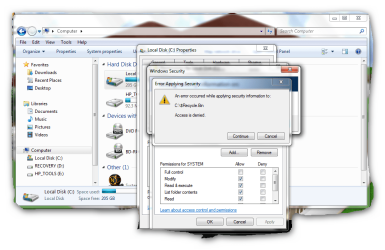
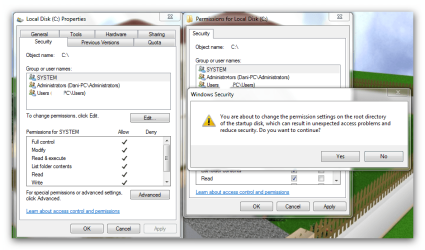
Can someone tell me, how to find solution for this problem:?
See picture.
 

Attachments
  • 2010.06.22 10.22.04_001.png
    2010.06.22 10.22.04_001.png
    62.3 KB · Views: 140
  • Snap_2010.06.22 10.35.30_002.png
    Snap_2010.06.22 10.35.30_002.png
    82.4 KB · Views: 76
Last edited:

My Computer My Computer

At a glance

w7 home premium2.13gb1gb
OS
w7 home premium
CPU
2.1
Motherboard
amd athlon
Memory
3gb
Graphics Card(s)
1gb
Internet Speed
8MBS/S
I'm confused.... what exactly is the problem? Why are you changing Permissions on C:\?
 

My Computer My Computer

At a glance

Windows 10 Pro x64Intel Core i5 7400 @ 3.00GHz8GB 2133Mhz DDR4 (OEM supplied)Gygabyte Windforce GTX 1050Ti (Factory Overcl...
Computer type
PC/Desktop
Computer Manufacturer/Model Number
Medion Erazer (note to self: insert model number) - with custom additions
OS
Windows 10 Pro x64
CPU
Intel Core i5 7400 @ 3.00GHz
Motherboard
OEM supllied with PC
Memory
8GB 2133Mhz DDR4 (OEM supplied)
Graphics Card(s)
Gygabyte Windforce GTX 1050Ti (Factory Overclocked)
Sound Card
Realtek
Monitor(s) Displays
Acer Al1980 + HKC
Screen Resolution
1360*768(HKC) / 1280*1024(Acer)
Hard Drives
1TB Toshiba
1TB WD Caviar Green
120GB Samsung Evo 840
PSU
OEM supplied (no power rating on case)
Case
OEM Supplied
Cooling
Stock
Keyboard
Logitech Wireless
Mouse
Logitect Wireless
Internet Speed
40Mb/s Down 10Mb/s Up
Antivirus
Defender
Browser
Firefox
I'm confused.... what exactly is the problem? Why are you changing Permissions on C:\?

My guess is the OP was given the your do not have the required permission screen and went to the process to take permission and got the screen they posted. To the OP, generally picking yes works but you may have to do the same for each user type as well, I found my laptop Windows 7 Professional 64 does this and I can fix it but don't understand why it does.
 

My Computer My Computer

At a glance

Vista 64 Ultimate, Windows 7 64 Ultimate, Ubu...i7 975 3.3 GHz Extreme (Factory OC'd to 3.6 GHz)18 Gb Tri-Channel 1066ATI 5970 2048 Mb
Computer Manufacturer/Model Number
DELL XPS Studio 435T
OS
Vista 64 Ultimate, Windows 7 64 Ultimate, Ubuntu 9.10
CPU
i7 975 3.3 GHz Extreme (Factory OC'd to 3.6 GHz)
Motherboard
DELL provided
Memory
18 Gb Tri-Channel 1066
Graphics Card(s)
ATI 5970 2048 Mb
Sound Card
X-Fi Extreme Gamer
Monitor(s) Displays
Vizio 37" HD-TV
Screen Resolution
1920 x 1080
Hard Drives
1.5 Tb HDD
1.5 Tb HDD
2.0 Tb Network Drive
512 Gb Crucial SSD
PSU
DELL Provided 475 watts
Case
DELL
Cooling
3 fans
Keyboard
Logitech Performance K350 Wireless
Mouse
Logitech Performance MX Wireless
Internet Speed
3 Mb up 750 Kb down
Other Info
Bamboo Fun Tablet, Belkin N+ Wireless router, Pioneer Dolby System Wireless Headphones, Bose 5.1 Dolby Surround Sound System, LifeCam VX 3000 Webcam, Blu-Ray/Hi Def DVD +RW combo and Blu-ray +RW,l 15 in 1 media card reader, Logitech Rumblepad 2, Hauppauge 2250 DTV Tuner with MS Media Center Remote

Laptop:Alienware M17x, Q9100 CPU, 8Gb RAM, 1920x1200 WUXGA LCD driven by 4870's in CrossFireX, Bl
Hi.
Can someone tell me, how to find solution for this problem:?
See picture.

This warning is because you are attempting to change the security permissions on the entire C drive which is considered a security risk because a potential attacker would have access to your entire drive.

After choosing the security tab you would also need to use the "Edit" button and the "add" button to add "Everyone" to the list. Then put checks in the little squares for permission levels. This is not very secure at all but is required if you need to share the entire drive.

From a security standpoint you would be better off sharing the User folder instead. Although if you feel your network is safe it might be ok to share the entire C drive if needed.

To share the entire C drive with everyone you would also need to go into the Advanced Sharing permissions and add "Everyone" to the "share with" list and also put checks in the boxes to allow for full permissions. Sometimes it's required to share an entire drive depending on what you want to do but it's not the safest method of sharing.
 

My Computer My Computer

At a glance

Windows 7 Ult, Windows 8.1 Pro,Q9650-4.275GHz, E8600 4.5GHz, E6750-3.8GHzG.Skill PC2 9600 1200Mhz 5 5 5 15 2TGTX480
Computer type
PC/Desktop
Computer Manufacturer/Model Number
Home built
OS
Windows 7 Ult, Windows 8.1 Pro,
CPU
Q9650-4.275GHz, E8600 4.5GHz, E6750-3.8GHz
Motherboard
Evga 780i FTW
Memory
G.Skill PC2 9600 1200Mhz 5 5 5 15 2T
Graphics Card(s)
GTX480
Sound Card
Asus Xonar D2
Monitor(s) Displays
HannsG
Screen Resolution
1680X1050
Hard Drives
GSkill Phoenix Pro 120GB SSD
PSU
ThermalTake Toughpower 1000Watt modular
Case
ThermalTake XaserV
Cooling
Xigmatek S1283
Keyboard
Logitech G15
Mouse
Logitech G9
Internet Speed
T1
...What in the world are you doing? Why are you messing with the system drive's permissions? Do you know how dangerous that can be?!
 

My Computer My Computer

At a glance

Windows 10 Pro (x64)Intel Core i7-3930K (3.2GHz - 4.5GHz)4x Samsung 4GB PC3-12800 DDR3 (16GB 1600MHz)Nvidia Geforce GTX 690
Computer type
PC/Desktop
Computer Manufacturer/Model Number
Alienware Aurora ALX R4
OS
Windows 10 Pro (x64)
CPU
Intel Core i7-3930K (3.2GHz - 4.5GHz)
Motherboard
Alienware Aurora-R4 x79
Memory
4x Samsung 4GB PC3-12800 DDR3 (16GB 1600MHz)
Graphics Card(s)
Nvidia Geforce GTX 690
Sound Card
SteelSeries Siberia Elite
Monitor(s) Displays
Dell UltraSharp U3011
Screen Resolution
2560x1600
Hard Drives
Samsung 850 Pro 256 GB, Seagate 1TB Desktop Hybrid HDD, 2x Western Digital 4TB Green HDD
PSU
875W Some Dell PSU <.<
Case
Alienware Aurora ALX
Cooling
Custom Liquid Cooling (EK CPU & GPU blocks) dual EK 480RAD
Keyboard
Logitech G710+ Mechanical
Mouse
Logitech G700s
Internet Speed
Verizon Fios (50 mbps average)
Other Info
Server: Intel NUC D54250WYK: i5-4250U, 16GB, 256 GB mSATA, Windows Server 2012 R2
...What in the world are you doing? Why are you messing with the system drive's permissions? Do you know how dangerous that can be?!


Just to change "welcome" message on startup windows.
However thnx.
 

My Computer My Computer

At a glance

w7 home premium2.13gb1gb
OS
w7 home premium
CPU
2.1
Motherboard
amd athlon
Memory
3gb
Graphics Card(s)
1gb
Internet Speed
8MBS/S
Just to change "welcome" message on startup windows.
However thnx.
You would really want to disable a huge security measure in your system to change a message most people never see, or only see for a split second?

If you are talking about your logon screen, you certainly don't need to edit drive permissions to change that.
 

My Computer My Computer

At a glance

Windows 7 Ultimate x64 SP1Intel Core i7-260012 GB Patriot Extreme DDR3-1333Nvidia GTX 470
OS
Windows 7 Ultimate x64 SP1
CPU
Intel Core i7-2600
Motherboard
Gigabyte GA-P67A-UD3P-B3
Memory
12 GB Patriot Extreme DDR3-1333
Graphics Card(s)
Nvidia GTX 470
Monitor(s) Displays
Dell UltraSharp 2209WA
Hard Drives
OCZ Agility3 240 GB, WD5001AALS, WD7501AALS
PSU
OCZ ModStream 700W
Case
CoolerMaster HAF 912 Advanced
Cooling
CoolerMaster Hyper 212 Plus
Yes it's not a safe practice, I did mention that more than once already guys. It seemed like the Op needed to have total access to an external drive for some reason although he was a bit unclear on what the actual problem was. I even highlighted the better option in bold. ;)

I always warn people against doing this and recommend that they share the User folder instead. The warnings in the pictures he posted were showing that access to the drive wasn't working so I thought I would fill him in on why that was happening.

How to change permission? 06-22-2010 03:19 AMxhimi thnx. < thanks for rep.
 
Last edited:

My Computer My Computer

At a glance

Windows 7 Ult, Windows 8.1 Pro,Q9650-4.275GHz, E8600 4.5GHz, E6750-3.8GHzG.Skill PC2 9600 1200Mhz 5 5 5 15 2TGTX480
Computer type
PC/Desktop
Computer Manufacturer/Model Number
Home built
OS
Windows 7 Ult, Windows 8.1 Pro,
CPU
Q9650-4.275GHz, E8600 4.5GHz, E6750-3.8GHz
Motherboard
Evga 780i FTW
Memory
G.Skill PC2 9600 1200Mhz 5 5 5 15 2T
Graphics Card(s)
GTX480
Sound Card
Asus Xonar D2
Monitor(s) Displays
HannsG
Screen Resolution
1680X1050
Hard Drives
GSkill Phoenix Pro 120GB SSD
PSU
ThermalTake Toughpower 1000Watt modular
Case
ThermalTake XaserV
Cooling
Xigmatek S1283
Keyboard
Logitech G15
Mouse
Logitech G9
Internet Speed
T1
Just to change "welcome" message on startup windows.
However thnx.
You would really want to disable a huge security measure in your system to change a message most people never see, or only see for a split second?

If you are talking about your logon screen, you certainly don't need to edit drive permissions to change that.

I want just to try this.
How to do this with another way?
However,thnx for reply.
 

My Computer My Computer

At a glance

w7 home premium2.13gb1gb
OS
w7 home premium
CPU
2.1
Motherboard
amd athlon
Memory
3gb
Graphics Card(s)
1gb
Internet Speed
8MBS/S
Maybe I'm just getting older, but was it really worth it to consider disabling the security on your system volume just for a different welcome screen?

Anyway, here's an app that lets you do it...without editing permissions.

Logon Changer Customizes the Windows 7 Login Screen
 

My Computer My Computer

At a glance

Windows 7 Ultimate x64 SP1Intel Core i7-260012 GB Patriot Extreme DDR3-1333Nvidia GTX 470
OS
Windows 7 Ultimate x64 SP1
CPU
Intel Core i7-2600
Motherboard
Gigabyte GA-P67A-UD3P-B3
Memory
12 GB Patriot Extreme DDR3-1333
Graphics Card(s)
Nvidia GTX 470
Monitor(s) Displays
Dell UltraSharp 2209WA
Hard Drives
OCZ Agility3 240 GB, WD5001AALS, WD7501AALS
PSU
OCZ ModStream 700W
Case
CoolerMaster HAF 912 Advanced
Cooling
CoolerMaster Hyper 212 Plus
Back
Top