How to clean last opened files, folders, etc list?

marienkafer

New member
Local time
11:30 AM
Messages
2
Hi

How can I clean last opened files, folders on taskbar? I mean if we click for example for folders icon, then we have list with opened folders in past. The same with other files. How can I clean that? I mean like this: http://img34.imageshack.us/img34/3116/win7ti.jpg
 

My Computer My Computer

At a glance

Windows 7
OS
Windows 7
Hi marienkafer, welcome to the forums.

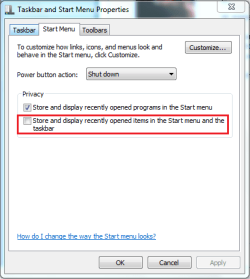
You can rt-click each file/folder and 'Remove from list' of you could rt-click the taskbar, select properties then Start Menu. Here you can un-check 'Store and display recently opend programs and files in the Start Menu and the Taskbar.

Capture.PNG

Hope this helps :)


OS
 

My Computer My Computer

At a glance

Windows 7 Ultimate x64AMD Sempron Dual Core3GBNVIDIA GeForce 6150SE nForce 430
Computer Manufacturer/Model Number
Compaq Desktop
OS
Windows 7 Ultimate x64
CPU
AMD Sempron Dual Core
Memory
3GB
Graphics Card(s)
NVIDIA GeForce 6150SE nForce 430
Screen Resolution
1024x768
Hard Drives
150GB Sata
Done. Thanks!
 

My Computer My Computer

At a glance

Windows 7
OS
Windows 7
You're welcome, and hope you enjoy your stay here at SevenForums :p
 

My Computer My Computer

At a glance

Windows 7 Ultimate x64AMD Sempron Dual Core3GBNVIDIA GeForce 6150SE nForce 430
Computer Manufacturer/Model Number
Compaq Desktop
OS
Windows 7 Ultimate x64
CPU
AMD Sempron Dual Core
Memory
3GB
Graphics Card(s)
NVIDIA GeForce 6150SE nForce 430
Screen Resolution
1024x768
Hard Drives
150GB Sata
Back
Top