Solved How to configure wifi router 2L-WR307

howto

New member
Local time
6:07 AM
Messages
3

Attachments

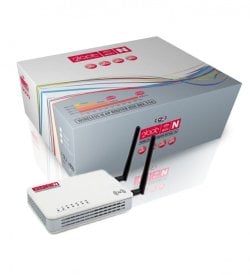
  • 2L-WR307-WiFi-Router-v03-608x667.jpg
    2L-WR307-WiFi-Router-v03-608x667.jpg
    28.4 KB · Views: 17

My Computer My Computer

At a glance

Windows 7 Ultimate x644 GB of RAM
Computer type
PC/Desktop
Computer Manufacturer/Model Number
Toshiba
OS
Windows 7 Ultimate x64
Memory
4 GB of RAM
Hard Drives
700 GB
Antivirus
Kaspersky
Browser
Google Chrome
Knowing how you plan to use your network will determine what kind of config you need. Please elaborate a bit.
 

My Computer My Computer

At a glance

Microsoft Windows 10 Home Build 15036Intel(R) Core(TM) i7-860 @ 2.80GHz4.00 GBNVIDIA GeForce GTX 750
Computer type
PC/Desktop
Computer Manufacturer/Model Number
iBuyPower NZXT
OS
Microsoft Windows 10 Home Build 15036
CPU
Intel(R) Core(TM) i7-860 @ 2.80GHz
Motherboard
Gigabyte Technology Co., Ltd. P55-UD3L
Memory
4.00 GB
Graphics Card(s)
NVIDIA GeForce GTX 750
Sound Card
(1) Line 6 UX2 (2) Realtek High Definition Audio
Monitor(s) Displays
23" acer
Screen Resolution
1920 x 1080 x 32 bits (4294967296 colors) @ 60 Hz
Hard Drives
(1) WDC WD5000AAKS-00D2B0 ATA Device (2) Seagate FreeAgent Go 250G USB Device
Cooling
Corsair H75 liquid cooler (Very easy to install, actually)
Internet Speed
60M cable modem-->Linksys E1200-->1Gbps net card
Browser
Chrome
Other Info
This is probably the longest I've ever had a Windows machine run without having to restore it to scratch. I'm used to restoring to "factory" about every 2 yrs. I've run with Win7 since new in 2009 and only recently (Nov, '14) restored to clean up the machine from all my 'xperimenting. LOL!! I may never need another machine.

Upgraded to 10 when it was still free, then installed 2017 update.
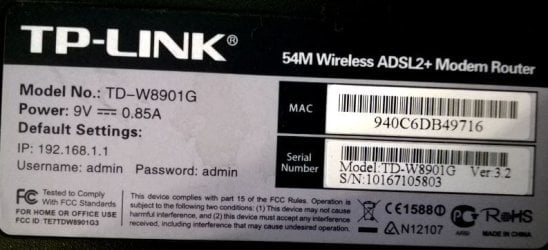
I want to replace my old TP-LINK
tplnkkkkkk.JPG
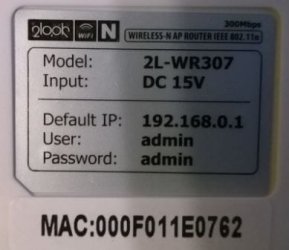
...with new 2look
newr.JPG
I plan to use ADSL wireless connection
I guess I understood your question so forgive me if I'm wrong :) Thank you for your time!
 

My Computer My Computer

At a glance

Windows 7 Ultimate x644 GB of RAM
Computer type
PC/Desktop
Computer Manufacturer/Model Number
Toshiba
OS
Windows 7 Ultimate x64
Memory
4 GB of RAM
Hard Drives
700 GB
Antivirus
Kaspersky
Browser
Google Chrome
From the looks of things, here's what you'll need to do:

1. After connecting your router into the ADSL modem, as you did with the TP-LINK, find CAT6 cable and connect your computer directly to one of the four ethernet ports.

2. Start a browser and go to http://192.168.0.1 (When prompted for username and password, use Admin/admin, per the sticker on your new router.)

3. Find your administrator settings and change that password to something new.

4. Find your wireless settings and set your security to WPA2/WPA Personal and set a passphrase that you'll need to remember.

5. Find the settings for DHCP and enable that. Also, check your DNS settings. I usually set mine to the servers at OpenDNS (208.67.220.220 and 208.67.222.222)

6. Log out of the setup page then reboot the router. Disconnect your computer from the router (pull the CAT6 cable).

Once the router reboots, attempt to connect your system to the network using wireless (you will need that passphrase from step 4).

Good luck. Let us know if there is anything else that needs to be configured...
 

My Computer My Computer

At a glance

Microsoft Windows 10 Home Build 15036Intel(R) Core(TM) i7-860 @ 2.80GHz4.00 GBNVIDIA GeForce GTX 750
Computer type
PC/Desktop
Computer Manufacturer/Model Number
iBuyPower NZXT
OS
Microsoft Windows 10 Home Build 15036
CPU
Intel(R) Core(TM) i7-860 @ 2.80GHz
Motherboard
Gigabyte Technology Co., Ltd. P55-UD3L
Memory
4.00 GB
Graphics Card(s)
NVIDIA GeForce GTX 750
Sound Card
(1) Line 6 UX2 (2) Realtek High Definition Audio
Monitor(s) Displays
23" acer
Screen Resolution
1920 x 1080 x 32 bits (4294967296 colors) @ 60 Hz
Hard Drives
(1) WDC WD5000AAKS-00D2B0 ATA Device (2) Seagate FreeAgent Go 250G USB Device
Cooling
Corsair H75 liquid cooler (Very easy to install, actually)
Internet Speed
60M cable modem-->Linksys E1200-->1Gbps net card
Browser
Chrome
Other Info
This is probably the longest I've ever had a Windows machine run without having to restore it to scratch. I'm used to restoring to "factory" about every 2 yrs. I've run with Win7 since new in 2009 and only recently (Nov, '14) restored to clean up the machine from all my 'xperimenting. LOL!! I may never need another machine.

Upgraded to 10 when it was still free, then installed 2017 update.
Thank you very much for your instructions on how to configure this router.
I did it but the Internet speed was 150 now it is 54 just like on TP-LINK.
Radio type is 802.11g and it should I guess be 802.11n like it says on the router surface.
I think that the range stayed like it was before.
Now I have two wireless connections.
 
Last edited:

My Computer My Computer

At a glance

Windows 7 Ultimate x644 GB of RAM
Computer type
PC/Desktop
Computer Manufacturer/Model Number
Toshiba
OS
Windows 7 Ultimate x64
Memory
4 GB of RAM
Hard Drives
700 GB
Antivirus
Kaspersky
Browser
Google Chrome
Remove your wireless connections and create a new one, set the new router to 802.11N. Also if you have any other wireless routers they will need to be 802.11N otherwise the speed is going to drop down to the slower speed. (i.e. 802.11G)
 

My Computer My Computer

At a glance

Win 7 32 bit
Computer type
PC/Desktop
OS
Win 7 32 bit
Back
Top