How to convert .wtv files

Convert .WTV files and keep subtitles? Recommended formats?

Hello,

I have looked extensively online, but there does not appear to be anything about editing .WTV and keeping the subtitles option.

Ideally, I would like to edit all the adverts out of my recordings but keep the subtitles. The problem with DVR-MS is that as soon as you convert, you lose the subtitle option. Is there any way at all that you can edit without this happening?

As a side issue, I have noticed that .WTV files are HUGE - too big and I need to convert them to something more manageable. What is everyone using?

As far as I am aware, SD .WTV files use the MPEG-2 codec, so I reckon my options are to change the codec to h.264 to make them quite a bit smaller. Also, should you keep the same container? - I have heard that a lot of people are using MKV files at the moment.

In summary (and this is a long shot) - is there anyway I can convert my .WTV files to MKV h.264 and preserve subtitles?

I would be really grateful if anyone might be able to help.

Thanks
 

My Computer My Computer

At a glance

Windows 7 64bit
OS
Windows 7 64bit
Hello,

I have looked extensively online, but there does not appear to be anything about editing .WTV and keeping the subtitles option.

Ideally, I would like to edit all the adverts out of my recordings but keep the subtitles. The problem with DVR-MS is that as soon as you convert, you lose the subtitle option. Is there any way at all that you can edit without this happening?

As a side issue, I have noticed that .WTV files are HUGE - too big and I need to convert them to something more manageable. What is everyone using?

As far as I am aware, SD .WTV files use the MPEG-2 codec, so I reckon my options are to change the codec to h.264 to make them quite a bit smaller. Also, should you keep the same container? - I have heard that a lot of people are using MKV files at the moment.

In summary (and this is a long shot) - is there anyway I can convert my .WTV files to MKV h.264 and preserve subtitles?

I would be really grateful if anyone might be able to help.

Thanks
Record your programs with subtitles turned on.
Taking the adds out will make the files smaller for a start, anything you do to make them smaller after that will result in loss of quality.
Why bother anyway, I find the majority of shows I record, I delete after watching. Any I realy want to keep to watch again go on my 1TB drive that will hold about 220 movies.
 

My Computer My Computer

At a glance

Vista Home Premium & Windows 7
OS
Vista Home Premium & Windows 7
I convert wtv files with Windows Movie Maker, I can trim it if I want and it will be saved as a wmv. I can edit wmv files with VideoPad free version. I think there are more options out there for converting wmv than wtv.
 

My Computer My Computer

At a glance

Windows 7 Home Premium x64
Computer Manufacturer/Model Number
Acer Aspire 5732Z Notebook
OS
Windows 7 Home Premium x64
Internet Speed
DSL
Nero 9 will convert .wtv files to TS format, possibly others (I've not tried any other conversions).
 

My Computer My Computer

At a glance

Windows 7 Home Premium & Professional 64-bit
OS
Windows 7 Home Premium & Professional 64-bit
Thanks for your replies - I shall have a look at these other options for editing.
 

My Computer My Computer

At a glance

Windows 7 64bit
OS
Windows 7 64bit
I used eRightSoft Super to convert about any type of media to any other type, including .wtv to .avi. Work great and cost nothing! Absolutely free. SUPER © .
Weird web site and it's difficult to get the program but don't give up, it's worth the effort.​
The WTV files recorded from a MPEG4 channel cannot be corverted with super either.:mad::cry:
 

My Computer My Computer

At a glance

Win 7
OS
Win 7
MPEG4 recorded WTV files are my problem

Until now all your answers have not given the wanted result. I can burn the files but there is no sound:cry:
 

My Computer My Computer

At a glance

Win 7
OS
Win 7
How I Lost and Regained Ability to Convert .wtv Files

This is a very late post to an earlier issue in this string, but I was constantly losing the file association of .wtv files to WMC and losing the ability to right click and convert from .wtv to .dvr-ms. The only way to restore both the association and the in-context right click menu with the convert option was to uninstall and then reinstall Windows Media Center entirely and ensure it has all of its file associations.

I finally figured out the the Glary Utilities Registry Cleaner was identifying as problems and removing these features from the registry. Once I marked these entries for Glary to ignore they are fine, but its a good lesson how registry cleaners can mess things up on your computer!
 

My Computer My Computer

At a glance

Windows 7 Home Premium 64 bit
OS
Windows 7 Home Premium 64 bit
The absolute easiest way to "convert" .wtv files into .dvr-ms files (which have several good free converters available) is to just do the following:

(Do it on a copy if you're not comfortable on editing original files)

1) Right click on the .wtv file
2) Select "Rename"
3) Change .wtv into .dvr-ms
 

My Computer My Computer

At a glance

Windows 7 Ultimate x86Core i7-8604GBASUS 5770
Computer Manufacturer/Model Number
Homebuilt ASUS system
OS
Windows 7 Ultimate x86
CPU
Core i7-860
Motherboard
ASUS P7P55LX
Memory
4GB
Graphics Card(s)
ASUS 5770
Sound Card
Onboard
Monitor(s) Displays
22inch HP monitor
Hard Drives
Several...
.WTV conversion?

With all the recordings eating up storage space on my DVR, I also was looking to convert .wtv files, but without much luck. Windows Media Center is great to watch these movies, but trying to record them with a touch of the supplied button just archives them on your computer as a .wtv file that you cannot convert to dvr-ms since these are copy protected. So I took a different approach . . . a back door. Using Hauppauge Win TV 885 Video Capture on my Windows 7 os (I use a Studio XPS 8100), I am able to play (in real time) pre-recorded movies stored on my Directv DVR & capture them using Windows DVD Maker. In my case, I have to remember to change the settings for "s video" as it seems "composite" is the default, but so what? Windows DVD Maker takes all the guess work out of encoding as it lets you burn directly to a DVD. I've been able to burn all my DVR's & free up space, not to mention build a nice video library. Directv provides instructions on how to make the connection between your computer & satellite box if you need it.
 
Hi, some times i lose signal and it make a delay, when i convert .wtv to other type, i have delay on sound...
but when i watch the .wtv on media center, i have not delay...
please help me... ppppp pppplease
 

My Computer My Computer

At a glance

Windows 7 Ultimate X64
OS
Windows 7 Ultimate X64
it may have been mentioned already . . . but

the latest VideoReDo TVSuite now accepts wtv files.

VideoReDo MPEG Video Editing Software (not free)

I use it to remove adverts from TV movies, save as mpeg, then use Handbrake (free) to encode the file to mp4.

Jed, UK
 

My Computer My Computer

At a glance

Windows 7 pro x64 SP1Intel i7-2600k o/c to 4.6GHz8GB Mushkin 1866MHzNvidia GTX 750 Ti 2GB
Computer type
PC/Desktop
Computer Manufacturer/Model Number
self build
OS
Windows 7 pro x64 SP1
CPU
Intel i7-2600k o/c to 4.6GHz
Motherboard
MSI Z68-GD80
Memory
8GB Mushkin 1866MHz
Graphics Card(s)
Nvidia GTX 750 Ti 2GB
Sound Card
integrated
Monitor(s) Displays
Liyama ProLite 27"
Screen Resolution
1920*1080 px
Hard Drives
Seagate 2TB
PSU
Coolermaster GX 750W
Case
Antec 300 case + 5 fans
Cooling
Dark Rock Pro
Internet Speed
62Mbit down 18Mbit up
Antivirus
MSE
Browser
Firefox
Other Info
Blackgold BGT3650 Quad HD TV card. Also have various 3770 + 4770K render boxes.
.wtv can be converted to .wmv using Windows Live Movie Maker.
 

My Computer My Computer

At a glance

Windows 7 home x64
OS
Windows 7 home x64
In the UK, HD TV is h264 and the v large wtv files that WMC produces are not recognised by most wtv converters.

The only apps I have had any success with are VideoRedo and Cyberlink PowerDirector, and they are at best a bit flakey.
 

My Computer My Computer

At a glance

Windows 7 pro x64 SP1Intel i7-2600k o/c to 4.6GHz8GB Mushkin 1866MHzNvidia GTX 750 Ti 2GB
Computer type
PC/Desktop
Computer Manufacturer/Model Number
self build
OS
Windows 7 pro x64 SP1
CPU
Intel i7-2600k o/c to 4.6GHz
Motherboard
MSI Z68-GD80
Memory
8GB Mushkin 1866MHz
Graphics Card(s)
Nvidia GTX 750 Ti 2GB
Sound Card
integrated
Monitor(s) Displays
Liyama ProLite 27"
Screen Resolution
1920*1080 px
Hard Drives
Seagate 2TB
PSU
Coolermaster GX 750W
Case
Antec 300 case + 5 fans
Cooling
Dark Rock Pro
Internet Speed
62Mbit down 18Mbit up
Antivirus
MSE
Browser
Firefox
Other Info
Blackgold BGT3650 Quad HD TV card. Also have various 3770 + 4770K render boxes.
Forgive my ignorance, but can't you use the built in converter already with Windows 7?
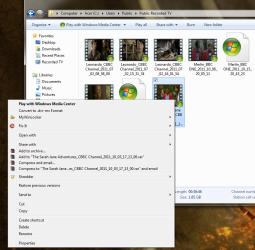
If you go to your recorded WTV file and right click on it - you'll see at the top of the list

Convert to .dvr-ms Format

This is the old format used by media player previously, and in this format you should be able then to use and burn programmes to DVD etc. :D
 

My Computer My Computer

At a glance

Windows 7 Home Premium, 64 bit
OS
Windows 7 Home Premium, 64 bit
Xmedia Recode is a freeware package that can convert .WTV directly to XVID or DIVX .AVI. Decent speed. It has some extras like cropping, resizing, aspect ratio adjustment. Video quality could be better but I haven't played with adjustments that are available so maybe I'm not setting it up right.

Homepage: XMedia Recode. Also available on most freeware sites. JFGI.
 

My Computer My Computer

At a glance

Windows 7 Home Premium 64bitAMD Phenom II x6 1075T (3.00 ghz)6GBAMD Radeon HD 6450
Computer Manufacturer/Model Number
Dell Studio XPS 7100
OS
Windows 7 Home Premium 64bit
CPU
AMD Phenom II x6 1075T (3.00 ghz)
Motherboard
not sure (Dell)
Memory
6GB
Graphics Card(s)
AMD Radeon HD 6450
Sound Card
none
Monitor(s) Displays
Hanns G HW191A
Hard Drives
WDC WD10 02FAEX-00Z3A0 Sata
WDC WD10 EALX-759BA1 Sata
PSU
Corsair TX650
Case
not sure (Dell)
Cooling
not sure (Dell)
I have windows 7 Home Premium,SP1, and it does not have an option to convert.wtv files to ,dvr-ms on the right click menu for some reason :(. Could it be a SP1 change?
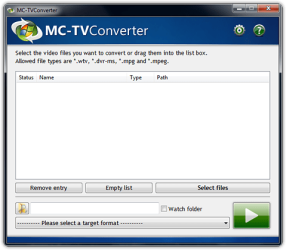
When I use Movie Maker to convert .wtv files to .wmv, I get severe degradation in video quality.. What I use is WTV Converter, Convert .WTV to DVD - new MCE windows 7 video format : Extra Tools and how-to's. It quickly and simply converts my .wtv to .dvr-ms . I then load that file into my Roxio Creator software( can't handle .wtv but can convert .dvr-ms) which converts it to editable form,.mpg, for burning into a DVD of better quality than Movie Maker. Since that is what I primarily wish to do, it works fine for me:). I have free Any video Converter also that I could use to convert the .mpg to several different formats, if I wish.
convert.jpg
 

My Computer My Computer

At a glance

windows 7 64 bitIntel(R) core(TM) i72630QM [email protected] 2.00Ghz8.00 Gb - two 4.0 Gb DDR3-SDRAM( 1333Ghz)Intel ( R) HD Graphics family
Computer Manufacturer/Model Number
Dell XPS L702S
OS
windows 7 64 bit
CPU
Intel(R) core(TM) i72630QM [email protected] 2.00Ghz
Motherboard
Dell OX71K
Memory
8.00 Gb - two 4.0 Gb DDR3-SDRAM( 1333Ghz)
Graphics Card(s)
Intel ( R) HD Graphics family
Sound Card
Real Tek High Definition Audio Intel(R)display Audio
Monitor(s) Displays
Generic PnP monitor 1920x 1080( 32 bit)( 60 hz)
Hard Drives
Seagate ST9500420AS 500.1 Gb

Seagate ST9500420AS 500.1 Gb
dvr.ms convert

Strange I too am on Windows 7 with Sp1 and it does it for me!
 

Attachments

  • dvr-ms.png
    dvr-ms.png
    104.7 KB · Views: 316

My Computer My Computer

At a glance

Windows 7 Home Premium, 64 bit
OS
Windows 7 Home Premium, 64 bit
Back
Top