How to convert zip files to exe?

Uitlander

New member
Member
Local time
10:33 PM
Messages
36
I never learned how to deal with zip files on XP Pro, and now that I have moved on to Win 7 Pro, I'd like to give it another shot. I have tried Google, which gave multiple methods, but not one worked (each one failed at some point in the process). Can anyone walk me through the step-by-step process?
 

My Computers My Computers

System One System Two

  • Computer type
    PC/Desktop
    Computer Manufacturer/Model Number
    Dell OptiPlex 7010 Tower
    OS
    Windows 7 Pro 64-bit
    CPU
    i7-3770
    Memory
    16GB
    Graphics Card(s)
    onboard
    Monitor(s) Displays
    Dell
    Hard Drives
    1TB.
    Keyboard
    Wyse ku8933
    Mouse
    Microsoft optical
    Antivirus
    none
    Browser
    ComodoDragon, Basilisk, WaterFox, Brave, Chrome, Iridium
  • Computer type
    PC/Desktop
Welcome to Seven Forums.

The simplest way to make a self extracting archive is to use 7-Zip: 7-Zip

When you choose its 7z compression format to compress the files it has an option to make a self extracting (SFX) .exe file..For any existing .zip you could extract the files, then use 7-Zip to compress them and make the .exe archive.

image.png
 

My Computers My Computers

System One System Two

  • Computer type
    Laptop
    Computer Manufacturer/Model Number
    Toshiba satellite C650D
    OS
    Windows 7 Home Premium x64
    CPU
    AMD V120
    Memory
    4GB
    Internet Speed
    150 Mbps
    Antivirus
    MSE
    Browser
    IE11, Edge, Firefox
    Other Info
    I also have W7 Pro on my System Two, and several W7 Hyper-V VMs. My other machines run Windows 10/11. Their specs are in my Ten Forums & Eleven Forum profiles.
  • Computer type
    Laptop
    System Manufacturer/Model Number
    Lenovo Thinkpad T430
    OS
    Windows 7 Pro x64
    CPU
    Intel i5-3320M
    Memory
    8 GB
    Hard Drives
    250GB Samsung SSD 860 EVO
    Antivirus
    MSE
That was one I had tried before...

On XP Pro I had installed 7-Zip and another similar one someone suggested. I could not get either to work, and could not find any sort of tutorial for an absolute beginner. I vaguely recall one required some sort of 'drag'n'drop' action that meant nothing to me, along with much else. I had been using XP Pro for at least five years before I went to Win 7 recently, but my use was on a basic level (explore the internet, watch the rare movie/TV show, install an exe file software, use Word, etc.). I only last year figured out how to open attachment in email.

7-zip required more skill than I had. If you are willing to walk me through a step-by-step, or link to a tutorial designed for someone that knows nothing about it, I'll download 7-Zip again. I should mention that all I'm trying to do is install a couple zip files like I do exe files. The Word 2003 came without Copperplate Gothic font (unlike the one that used to be on the public library computers), and there are a couple other zip files gathering dust on my computer that I cannot do anything with.
 

My Computers My Computers

System One System Two

  • Computer type
    PC/Desktop
    Computer Manufacturer/Model Number
    Dell OptiPlex 7010 Tower
    OS
    Windows 7 Pro 64-bit
    CPU
    i7-3770
    Memory
    16GB
    Graphics Card(s)
    onboard
    Monitor(s) Displays
    Dell
    Hard Drives
    1TB.
    Keyboard
    Wyse ku8933
    Mouse
    Microsoft optical
    Antivirus
    none
    Browser
    ComodoDragon, Basilisk, WaterFox, Brave, Chrome, Iridium
  • Computer type
    PC/Desktop
.... all I'm trying to do is install a couple zip files like I do exe files. The Word 2003 came without Copperplate Gothic font (unlike the one that used to be on the public library computers), and there are a couple other zip files gathering dust on my computer that I cannot do anything with.
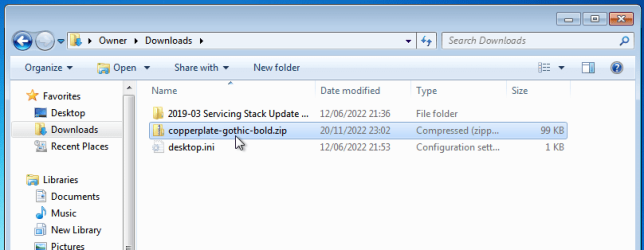
It sounds liked all you need is instructions on how to extract the files from a .zip file. You don't need to turn it into a .exe to do that. Unlike XP, Windows 7 has built in support in Windows Explorer for making and extracting .zip archives.

First, right-click on your .zip file.

image.png

image.png

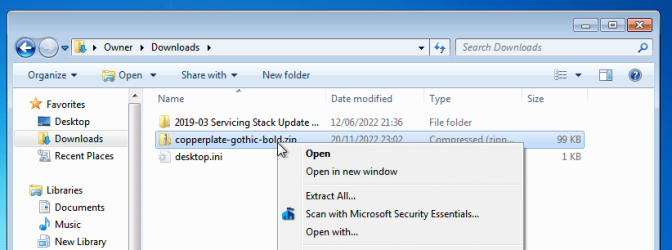
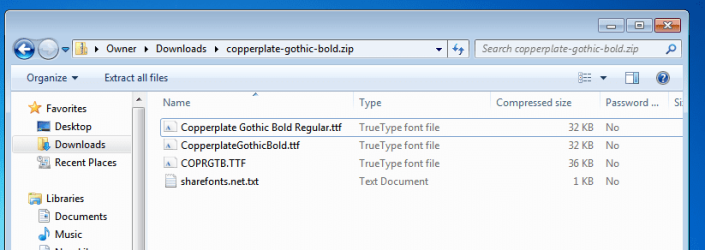
Select Open and you will open the archive just like you can explore any folder. From here you can copy and paste the files it contains to anywhere else you like.

image.png

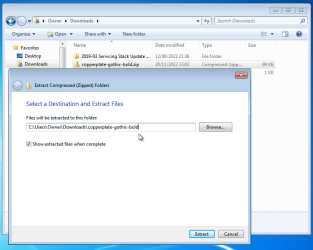
An alternative way to get the files out of the zip archive is to right-click on it and choose 'Extract all...'. This will extract all the files from the archive and place copies of them in a folder of your choice. By default this will be a folder in the same folder as the zip file, and with the same name, but if you wish you can type a new destination, or click Browse to choose another destination folder.

image.png

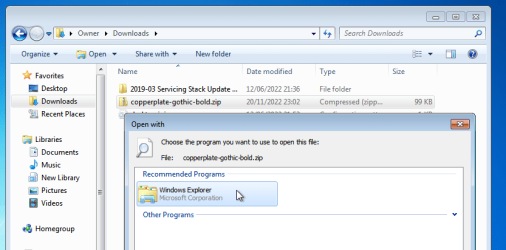
If you have installed any 3rd-party zip software, then you may no longer have Open or Extract all in the right-click menu. In that case select 'Open with...' and choose Windows Explorer.

image.png
 

My Computers My Computers

System One System Two

  • Computer type
    Laptop
    Computer Manufacturer/Model Number
    Toshiba satellite C650D
    OS
    Windows 7 Home Premium x64
    CPU
    AMD V120
    Memory
    4GB
    Internet Speed
    150 Mbps
    Antivirus
    MSE
    Browser
    IE11, Edge, Firefox
    Other Info
    I also have W7 Pro on my System Two, and several W7 Hyper-V VMs. My other machines run Windows 10/11. Their specs are in my Ten Forums & Eleven Forum profiles.
  • Computer type
    Laptop
    System Manufacturer/Model Number
    Lenovo Thinkpad T430
    OS
    Windows 7 Pro x64
    CPU
    Intel i5-3320M
    Memory
    8 GB
    Hard Drives
    250GB Samsung SSD 860 EVO
    Antivirus
    MSE
It sounds liked all you need is instructions on how to extract the files from a .zip file. You don't need to turn it into a .exe to do that. Unlike XP, Windows 7 has built in support in Windows Explorer for making and extracting .zip archives.


First, right-click on your .zip file.

View attachment 422265

View attachment 422266

Select Open and you will open the archive just like you can explore any folder. From here you can copy and paste the files it contains to anywhere else you like.

View attachment 422267

An alternative way to get the files out of the zip archive is to right-click on it and choose 'Extract all...'. This will extract all the files from the archive and place copies of them in a folder of your choice. By default this will be a folder in the same folder as the zip file, and with the same name, but if you wish you can type a new destination, or click Browse to choose another destination folder.

View attachment 422268

If you have installed any 3rd-party zip software, then you may no longer have Open or Extract all in the right-click menu. In that case select 'Open with...' and choose Windows Explorer.

View attachment 422269

I understand it so far. So where do I 'copy & paste' the font file to, for it to get installed into Word 2003? Do I copy all the files or just the ttf one?
 

My Computers My Computers

System One System Two

  • Computer type
    PC/Desktop
    Computer Manufacturer/Model Number
    Dell OptiPlex 7010 Tower
    OS
    Windows 7 Pro 64-bit
    CPU
    i7-3770
    Memory
    16GB
    Graphics Card(s)
    onboard
    Monitor(s) Displays
    Dell
    Hard Drives
    1TB.
    Keyboard
    Wyse ku8933
    Mouse
    Microsoft optical
    Antivirus
    none
    Browser
    ComodoDragon, Basilisk, WaterFox, Brave, Chrome, Iridium
  • Computer type
    PC/Desktop
I understand it so far. So where do I 'copy & paste' the font file to, for it to get installed into Word 2003? Do I copy all the files or just the ttf one?

Anywhere will do, temporarily put them in a folder somewhere then see this tutorial for how to install them. When installed they will be available for all apps to use, not just Word.

This tutorial will show you how to install a font that you have downloaded in Windows 7 and Windows 8.
Fonts - Install
 

My Computers My Computers

System One System Two

  • Computer type
    Laptop
    Computer Manufacturer/Model Number
    Toshiba satellite C650D
    OS
    Windows 7 Home Premium x64
    CPU
    AMD V120
    Memory
    4GB
    Internet Speed
    150 Mbps
    Antivirus
    MSE
    Browser
    IE11, Edge, Firefox
    Other Info
    I also have W7 Pro on my System Two, and several W7 Hyper-V VMs. My other machines run Windows 10/11. Their specs are in my Ten Forums & Eleven Forum profiles.
  • Computer type
    Laptop
    System Manufacturer/Model Number
    Lenovo Thinkpad T430
    OS
    Windows 7 Pro x64
    CPU
    Intel i5-3320M
    Memory
    8 GB
    Hard Drives
    250GB Samsung SSD 860 EVO
    Antivirus
    MSE
Back
Top