How to Create a Bootable Disc from an Image file

mnr367

New member
Local time
5:14 AM
Messages
30
I have windows Server 2008 Iso file but the problem is that its not bootable... i like to use it to install it on Virtual Box...

Can any one please help me figure out how can i make this unbootable Windows Server 2008 Iso in to a Bootable Iso.
 

My Computer My Computer

At a glance

Windows 7
OS
Windows 7

My Computer My Computer

At a glance

Win 7 Pro 64-bitIntel i5 2.4 Ghz8GB DDR3Intel HD 3000
Computer type
Laptop
Computer Manufacturer/Model Number
Sony Vaio VPCEB47GM Laptop
OS
Win 7 Pro 64-bit
CPU
Intel i5 2.4 Ghz
Memory
8GB DDR3
Graphics Card(s)
Intel HD 3000
Sound Card
IDT High Definition
Monitor(s) Displays
15.6 WGXA Anti-Glare LED
Screen Resolution
1280x800
Hard Drives
640Gb 7200rpm
Antivirus
MSE
Browser
Opera (primary) with IE9 backup
I burned the iso in to a dvd... but that dvd is also not bootable.... what i want to know how to make a bootable DVD of windows server 2008 from an unbootable DVD
 

My Computer My Computer

At a glance

Windows 7
OS
Windows 7
Did you just copt the ISO tyo disk ? you need some sort of burning software that allows to burn the ISO rather than copy. If that's done correctly all of the files will be expanded onto the DVD and it will be bootable.
 

My Computer My Computer

At a glance

Windows 7 home premium x64AMD FX-4100 AM3+ 3.6GHz 12MB Black EditionCrsair vengeance 12Gb DDR3 1600MHz CL9Asus GTX 560 1GB
Computer Manufacturer/Model Number
DIY
OS
Windows 7 home premium x64
CPU
AMD FX-4100 AM3+ 3.6GHz 12MB Black Edition
Motherboard
Asus M5A97 Pro
Memory
Crsair vengeance 12Gb DDR3 1600MHz CL9
Graphics Card(s)
Asus GTX 560 1GB
Sound Card
Realtek onboard
Monitor(s) Displays
Hanns G 1680x1050 native
Hard Drives
OCZ 128Gb Petrol ssd
2x500 Gb Samsung
PSU
OCZ StealthXstream II 500W
Internet Speed
8Mb or better

My Computer My Computer

At a glance

Windows 7 Ultimate 64-bitIntel Core 2 Duo E6550 @2.33GHz4GB DDR"NVIDIA GeForce 8600 GS
Computer type
PC/Desktop
Computer Manufacturer/Model Number
Dell / Lenovo g550
OS
Windows 7 Ultimate 64-bit
CPU
Intel Core 2 Duo E6550 @2.33GHz
Motherboard
foxconn g33m02
Memory
4GB DDR"
Graphics Card(s)
NVIDIA GeForce 8600 GS
Hard Drives
HDD 1 = 150GB
HDD 2 = 1.5TB
PSU
450W
Cooling
Stock fan
Internet Speed
12Mb
Antivirus
AVG Internet Security
Did you follow the steps? Also do you have the Server 2008 image saved onto your pc?
 

My Computer My Computer

At a glance

Windows 7 Ultimate 64-bitIntel Core 2 Duo E6550 @2.33GHz4GB DDR"NVIDIA GeForce 8600 GS
Computer type
PC/Desktop
Computer Manufacturer/Model Number
Dell / Lenovo g550
OS
Windows 7 Ultimate 64-bit
CPU
Intel Core 2 Duo E6550 @2.33GHz
Motherboard
foxconn g33m02
Memory
4GB DDR"
Graphics Card(s)
NVIDIA GeForce 8600 GS
Hard Drives
HDD 1 = 150GB
HDD 2 = 1.5TB
PSU
450W
Cooling
Stock fan
Internet Speed
12Mb
Antivirus
AVG Internet Security
Doesn't Virtual Box allow you to mount an ISO to create a VM?

I use VMware Workstation and it lets you mount an ISO to create a VM (VMware Player has that ability too).
 

My Computer My Computer

At a glance

W7 Ultimate SP1, LM19.2 MATE, W10 Home 1703, ...AMD Phenom II x6 1100T, 3.3 GHz12GB DDR3 1333 G-Skill (4GB x 2), G-Skill (2G...NVIDIA GeForce GTX 660
Computer type
PC/Desktop
Computer Manufacturer/Model Number
n/a
OS
W7 Ultimate SP1, LM19.2 MATE, W10 Home 1703, W10 Pro 1703 VM, #All 64 bit
CPU
AMD Phenom II x6 1100T, 3.3 GHz
Motherboard
ASUS M4A88T-M/USB3 (AM3)
Memory
12GB DDR3 1333 G-Skill (4GB x 2), G-Skill (2GB x 2)
Graphics Card(s)
NVIDIA GeForce GTX 660
Sound Card
Realtek?
Monitor(s) Displays
Samsung S23B350
Screen Resolution
1920x1080
Hard Drives
WD Green 2TB (SATA), WD Green 3TB (SATA), WD Blue 4TB (SATA), WD Blue 6TB (SATA)
PSU
Cooler Master
Case
Antec GX300 Tower
Cooling
3x Antec TRICOOL 120mm Fans
Mouse
Wired Optical
Internet Speed
DSL
Antivirus
Avast
Browser
Pale Moon (64 bit)
Other Info
2018-12-27 Upgraded HDDs
2015-12-10 Upgraded case, graphics card, storage
2015-08-15 Upgraded motherboard & RAM
2015-07-15 Upgraded LM17.1 to LM17.2
Doesn't Virtual Box allow you to mount an ISO to create a VM?

I use VMware Workstation and it lets you mount an ISO to create a VM (VMware Player has that ability too).
Yes it does you can just save it on your PC and load it into the VMPlayer/Workstation. But i think the problem he has is that it's not an ISO yet.
 

My Computer My Computer

At a glance

Windows 7 Ultimate 64-bitIntel Core 2 Duo E6550 @2.33GHz4GB DDR"NVIDIA GeForce 8600 GS
Computer type
PC/Desktop
Computer Manufacturer/Model Number
Dell / Lenovo g550
OS
Windows 7 Ultimate 64-bit
CPU
Intel Core 2 Duo E6550 @2.33GHz
Motherboard
foxconn g33m02
Memory
4GB DDR"
Graphics Card(s)
NVIDIA GeForce 8600 GS
Hard Drives
HDD 1 = 150GB
HDD 2 = 1.5TB
PSU
450W
Cooling
Stock fan
Internet Speed
12Mb
Antivirus
AVG Internet Security
Did you follow the steps? Also do you have the Server 2008 image saved onto your pc?

Yes i have the windows server 2008 dvd iso saved in my pc.... and i can acess it through daemon tool also
 

My Computer My Computer

At a glance

Windows 7
OS
Windows 7
Ok well just point it to where the iso is saved.
 

My Computer My Computer

At a glance

Windows 7 Ultimate 64-bitIntel Core 2 Duo E6550 @2.33GHz4GB DDR"NVIDIA GeForce 8600 GS
Computer type
PC/Desktop
Computer Manufacturer/Model Number
Dell / Lenovo g550
OS
Windows 7 Ultimate 64-bit
CPU
Intel Core 2 Duo E6550 @2.33GHz
Motherboard
foxconn g33m02
Memory
4GB DDR"
Graphics Card(s)
NVIDIA GeForce 8600 GS
Hard Drives
HDD 1 = 150GB
HDD 2 = 1.5TB
PSU
450W
Cooling
Stock fan
Internet Speed
12Mb
Antivirus
AVG Internet Security
Where do you buy your ISO from?
 

My Computer My Computer

At a glance

ME/XP/Vista/Win7
OS
ME/XP/Vista/Win7
Not working..... well i like to clarify few things.... i have an iso file of server 2008 but it won't boot but can display contents if mounted using daemon tools..... what i needed is create a bootable iso of the server 2008 from the unbootable server 2008 iso file i have.....

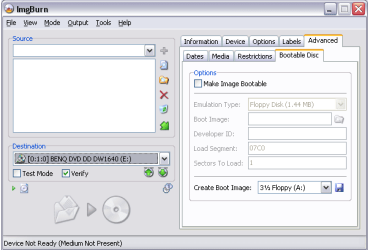
I used image burn added the contenthts of the iso as source file and iso as boot image as per your instruction...but it wont create an bootable iso of windows server 2008.

I did mount the iso file in virtual box dvd room..but beacause its unbootable i am unable to install it in virtual box
 

My Computer My Computer

At a glance

Windows 7
OS
Windows 7
Not working..... well i like to clarify few things.... i have an iso file of server 2008 but it won't boot but can display contents if mounted using daemon tools..... what i needed is create a bootable iso of the server 2008 from the unbootable server 2008 iso file i have.....

I used image burn added the contenthts of the iso as source file and iso as boot image as per your instruction...but it wont create an bootable iso of windows server 2008.

I did mount the iso file in virtual box dvd room..but beacause its unbootable i am unable to install it in virtual box
Did you check the box? as shown below
 

Attachments

  • Capture.PNG
    Capture.PNG
    12.3 KB · Views: 7

My Computer My Computer

At a glance

Windows 7 Ultimate 64-bitIntel Core 2 Duo E6550 @2.33GHz4GB DDR"NVIDIA GeForce 8600 GS
Computer type
PC/Desktop
Computer Manufacturer/Model Number
Dell / Lenovo g550
OS
Windows 7 Ultimate 64-bit
CPU
Intel Core 2 Duo E6550 @2.33GHz
Motherboard
foxconn g33m02
Memory
4GB DDR"
Graphics Card(s)
NVIDIA GeForce 8600 GS
Hard Drives
HDD 1 = 150GB
HDD 2 = 1.5TB
PSU
450W
Cooling
Stock fan
Internet Speed
12Mb
Antivirus
AVG Internet Security
Yes i checked the box.......and it ask for the boot image
 

My Computer My Computer

At a glance

Windows 7
OS
Windows 7

My Computer My Computer

At a glance

Windows 7 Ultimate 64-bitIntel Core 2 Duo E6550 @2.33GHz4GB DDR"NVIDIA GeForce 8600 GS
Computer type
PC/Desktop
Computer Manufacturer/Model Number
Dell / Lenovo g550
OS
Windows 7 Ultimate 64-bit
CPU
Intel Core 2 Duo E6550 @2.33GHz
Motherboard
foxconn g33m02
Memory
4GB DDR"
Graphics Card(s)
NVIDIA GeForce 8600 GS
Hard Drives
HDD 1 = 150GB
HDD 2 = 1.5TB
PSU
450W
Cooling
Stock fan
Internet Speed
12Mb
Antivirus
AVG Internet Security

My Computer My Computer

At a glance

Windows 10 Pro x64Intel Core i7 6700KGSkill TridentZ RGB 16GB 3600 16-16-16-36EVGA GTX 980 Ti SC x2
Computer type
PC/Desktop
Computer Manufacturer/Model Number
Skylake Special #666
OS
Windows 10 Pro x64
CPU
Intel Core i7 6700K
Motherboard
Asus Sabertooth Z170 Mark 1
Memory
GSkill TridentZ RGB 16GB 3600 16-16-16-36
Graphics Card(s)
EVGA GTX 980 Ti SC x2
Sound Card
Realtek High Definition
Monitor(s) Displays
AOC G2460PG
Screen Resolution
1920 x 1080 144Hz
Hard Drives
Samsung 860 Pro 256GB, Seagate Barracuda 4TB x2
PSU
EVGA 1000 P2, EVGA White Custom Braided Cables
Case
Corsair Vengeance C70 Gunmetal Black
Cooling
Corsair H100i v2, Corsair ML120 x2, Thermal Grizzly Kryonaut
Keyboard
Logitech G910 Orion Spectrum
Mouse
Logitech G700s
Internet Speed
Verizon Fios Quantum Gateway 75/75
Antivirus
Windows Defender, Malwarebytes Free 3.8.3
Browser
Chrome
Other Info
Corsair SP120 x4, LG Blu-ray Drive, Durabrand HT-395 100 Watt Dolby Digital Amp, Corsair H2100 Wireless 7.1 Headset
Back
Top