Solved How to create a current date folder using batch file?

nikhil2686

New member
Local time
2:20 AM
Messages
5
Hi

I am using following batch file for cleaning the desktop and also for taking backup of desktop:

@echo off

set curr_date=%DATE:~10,4%-%DATE:~4,2%-%DATE:~7,2%

mkdir "%USERPROFILE%\My Documents\backup\%curr_date%_backup"

xcopy "%USERPROFILE%\Desktop" "%USERPROFILE%\My Documents\backup\%curr_date%_backup" /D/S/H/V/C/F/K/Y

for /d /r "%USERPROFILE%\Desktop" %%x in (*) do rd /s /q "%%x"
for /r "%USERPROFILE%\Desktop" %%x in (*) do del /f "%%x"

copy "%USERPROFILE%\My Documents\backup\%curr_date%_backup\*.lnk" "%USERPROFILE%\Desktop\"

del /q "%USERPROFILE%\My Documents\backup\%curr_date%_backup\*.lnk"


In the first line I am creating a folder with current date, e.g. curr_date_backup. Second, copying the contents of Desktop to the newly created folder. Third, deleting directories from the desktop. Forth, deleting files from the desktop. fifth, Copy back all the shortcuts to the desktop. sixth, deleting all the shortcuts from Current date folder.

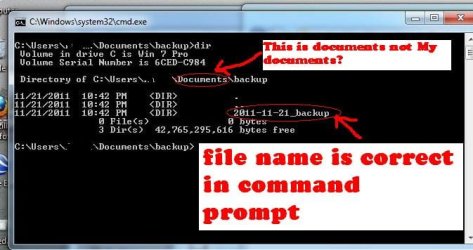
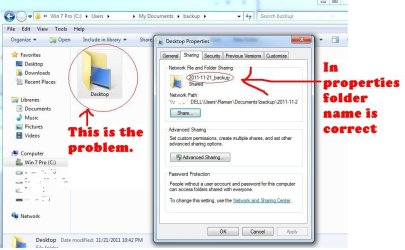
This batch file is working perfectly in Windows XP. It works in win 7 also but the problem is that the name of the current date folder created by first command is "Desktop". when I use command prompt to check the name, the name is correct. I checked the properties of the folder the correct is there also. But in windows the name doesn't match with the expected one.

I need help. Kindly tell me what's going on? why window 7 is showing directory name as "Desktop"? Is there any other way for creating folder in win7 using batch file.

thanks
 

Attachments
  • 1.jpg
    1.jpg
    73.4 KB · Views: 139
  • 2.jpg
    2.jpg
    40.9 KB · Views: 126
  • 1.bat
    1.bat
    523 bytes · Views: 112

My Computer

OS
Window 7 Pro 32 bit
Works for me, at least the first two commands work as advertised.

test.bat
set curr_date=%DATE:~10,4%-%DATE:~4,2%-%DATE:~7,2%
echo %curr_date%"

mkdir "%USERPROFILE%\My Documents\backup\%curr_date%_backup"
dir "%USERPROFILE%\My Documents\backup"


C:\Users\xxxxxxx>set curr_date=2011-11-21

C:\Users\xxxxxxx>echo 2011-11-21"
2011-11-21"

C:\Users\xxxxxxx>mkdir "C:\Users\xxxxxxx\My Documents\backup\2011-11-21_backup"

C:\Users\xxxxxxx>dir "C:\Users\xxxxxxx\My Documents\backup"
Volume in drive C is D370_C
Volume Serial Number is C89E-70E8

Directory of C:\Users\xxxxxxx\My Documents\backup

11/21/2011 01:30 PM <DIR> .
11/21/2011 01:30 PM <DIR> ..
11/21/2011 01:30 PM <DIR> 2011-11-21_backup
0 File(s) 0 bytes
3 Dir(s) 28,082,577,408 bytes free
 

My Computer

Computer type
PC/Desktop
Computer Manufacturer/Model Number
Lenovo IdeaCenter 450
OS
Windows 10 Pro X64
CPU
Intel Quad Core i7-4770 @ 3.4Ghz
Memory
16.0GB PC3-12800 DDR3 SDRAM 1600 MHz
Graphics Card(s)
Intel Integrated HD Graphics
Sound Card
Realtek HD Audio
Monitor(s) Displays
HP 22" LCD
Screen Resolution
1680 x 1050
Hard Drives
250GB Samsung EVO SATA-3 SSD
2TB Seagate ST2000DM001 SATA-2
1.5TB Seagate ST3150041AS SATA
Keyboard
Dell USB
Mouse
Lenovo USB
Internet Speed
Cable via Road Runner 3MB Upload, 30MB Download
Antivirus
Windows Defender, MBAM Pro, MBAE
Browser
Seamonkey
Other Info
UEFI/GPT
PLDS DVD-RW DH16AERSH
No, I won't run 1.bat, sorry. You said "It works in win 7 also but the problem is that the name of the current date folder created by first command is "Desktop". I took the first two lines and put them in a batch file and they work correctly. They did not create a Desktop folder.

What happens if you run just the first two lines? Does it work correctly?
 

My Computer

Computer type
PC/Desktop
Computer Manufacturer/Model Number
Lenovo IdeaCenter 450
OS
Windows 10 Pro X64
CPU
Intel Quad Core i7-4770 @ 3.4Ghz
Memory
16.0GB PC3-12800 DDR3 SDRAM 1600 MHz
Graphics Card(s)
Intel Integrated HD Graphics
Sound Card
Realtek HD Audio
Monitor(s) Displays
HP 22" LCD
Screen Resolution
1680 x 1050
Hard Drives
250GB Samsung EVO SATA-3 SSD
2TB Seagate ST2000DM001 SATA-2
1.5TB Seagate ST3150041AS SATA
Keyboard
Dell USB
Mouse
Lenovo USB
Internet Speed
Cable via Road Runner 3MB Upload, 30MB Download
Antivirus
Windows Defender, MBAM Pro, MBAE
Browser
Seamonkey
Other Info
UEFI/GPT
PLDS DVD-RW DH16AERSH
Okay, tried it as far as running xcopy and ity works correctly for me. I end up with a

C:\Users\xxxxxxxx\My Documents\backup\2011-11-23_backup

xcopy then copied everything from my Desktop directory into it correctly.

I'm not seeing the problem you are describing.
 

My Computer

Computer type
PC/Desktop
Computer Manufacturer/Model Number
Lenovo IdeaCenter 450
OS
Windows 10 Pro X64
CPU
Intel Quad Core i7-4770 @ 3.4Ghz
Memory
16.0GB PC3-12800 DDR3 SDRAM 1600 MHz
Graphics Card(s)
Intel Integrated HD Graphics
Sound Card
Realtek HD Audio
Monitor(s) Displays
HP 22" LCD
Screen Resolution
1680 x 1050
Hard Drives
250GB Samsung EVO SATA-3 SSD
2TB Seagate ST2000DM001 SATA-2
1.5TB Seagate ST3150041AS SATA
Keyboard
Dell USB
Mouse
Lenovo USB
Internet Speed
Cable via Road Runner 3MB Upload, 30MB Download
Antivirus
Windows Defender, MBAM Pro, MBAE
Browser
Seamonkey
Other Info
UEFI/GPT
PLDS DVD-RW DH16AERSH
May be it depends on windows. I am running this batch file on 32 bit OS.
 

My Computer

OS
Window 7 Pro 32 bit
I think the problem might be you have a hidden desktop.ini file in your Desktop folder.

If I'm right, then this file gets copied along with everything else into your backup folder, and when looking at the backup folder with Explorer, the desktop.ini file (its backup, that is) instructs Explorer to show the backup folder as "Desktop".

See if a desktop.ini file is present in your backup folder. If yes, delete it. Does this change Explorer's behavior?

If yes, you've found the problem. From there, all you need to do is modify the xcopy commandline arguments to exclude "desktop.ini" from being copied and you're all set.
 

My Computer

Computer type
PC/Desktop
Computer Manufacturer/Model Number
Custom-built
OS
Windows 7 Professional SP1 32-bit
CPU
Intel Core 2 Duo E6600 2.4GHz
Motherboard
Asus PL5D2
Memory
4GB DDR2-667 (4x1GB in dual-channel config)
Graphics Card(s)
nVidia GeForce 9800 GT
Sound Card
Creative X-Fi XtremeMusic
Monitor(s) Displays
Acer P236H
Screen Resolution
1920x1200 (DVI)
Hard Drives
OCZ SSD Vertex Plus 60GB SATA (Firmware 3.55), 64MB cache
Hitachi HD321KJ SATA, 320GB, 7200rpm, 16MB cache
PSU
Antec TruePower 2.0
Case
Cooler Master Centurion
Cooling
Too many fans
Keyboard
Standard
Mouse
Microsoft wireless optical mouse
Internet Speed
AT&T U-verse (18mbit/sec)
Antivirus
Microsoft Security Essentials
Browser
Firefox
Other Info
Other devices:
Compaq CQ-60 laptop
Google Nexus 7 (2012) tablet
Nvidia SHIELD tablet (US/LTE)
Hardkernel ODROID-XU single-board computer (Samsung Exynos 5420)
Back
Top