Solved how to create a logical drive from an unallocated partition?

Eagle1

New member
Local time
6:50 PM
Messages
5
I have just shrunk my C: drive and the unallocated partition failed to be formatted and assigned a drive letter. I followed the completing the new simple volume wizard but it didnt work. Instead it returned an error message that I have exceeded the number of partitions allowed.

All I wanted was a logical drive. So how do I go about creating one?
 

My Computer My Computer

At a glance

Windows Home Premium 64bitCore i5 4804.0GBnVidia GeForce 310M - 1GB
Computer Manufacturer/Model Number
Lenovo ideapad Z480M
OS
Windows Home Premium 64bit
CPU
Core i5 480
Motherboard
Lenovo
Memory
4.0GB
Graphics Card(s)
nVidia GeForce 310M - 1GB
Monitor(s) Displays
14" LED LCD
Hard Drives
640GB SATA
To use Disk Mgmt you'll have to delete one partition and create a new one to get an Extended Logical partition.

Using free Partition Wizard bootable CD you can create the Logical now, most likely, or rightclick a data partition to Modify>Convert to Logical. Do not convert the System partition or Recovery partition.

Once you have Logical partition you can add as many sub-partitions as desired until you run out of remaining letters.
 
Thanks Greg for the advice. I am a novice and am a bit confused. I have a 244GB unallocated partition that I intended to name E: Data for all my data. But I cannot get it formatted and assigned a drive letter using the New Simple Volume Wizard. See attachment screen shot.

When I right click the unallocated partition, there is no command in the menu for deleting it as you can see from screen shot attached. Appreciate if you can share with me step by step how to go about it.
 

Attachments

My Computer My Computer

At a glance

Windows Home Premium 64bitCore i5 4804.0GBnVidia GeForce 310M - 1GB
Computer Manufacturer/Model Number
Lenovo ideapad Z480M
OS
Windows Home Premium 64bit
CPU
Core i5 480
Motherboard
Lenovo
Memory
4.0GB
Graphics Card(s)
nVidia GeForce 310M - 1GB
Monitor(s) Displays
14" LED LCD
Hard Drives
640GB SATA
Unless I'm blind, you seem to be clicked on the live partition right beside it.
 

My Computer My Computer

At a glance

Windows 7 x64 Ultimate SP1I5 875K UnlockedKingston HyperX Genesis DDR3-1600MHz 9-9-9-27...EVGA GeForce GTX 570 HD 732 MHz GPU 1280 MB, ...
Computer Manufacturer/Model Number
Asus
OS
Windows 7 x64 Ultimate SP1
CPU
I5 875K Unlocked
Motherboard
P7P55D-E-PRO
Memory
Kingston HyperX Genesis DDR3-1600MHz 9-9-9-27 @ 1.65V XMP
Graphics Card(s)
EVGA GeForce GTX 570 HD 732 MHz GPU 1280 MB, 152 GB Mem
Sound Card
Onboard Via 1828S
Monitor(s) Displays
Samsung T240 HD
Screen Resolution
Dual 1920X1200 1027X768
Hard Drives
OCZ Vertex II Extended Sandforce SSD 60 Gig 2X WD Black Caviar 1 terabyte 6GBS Transer Sata 3 Marvell Chip
PSU
Corsair Gold fully Modular 80 Plus 850
Case
Coolermaster Half X Full Tower
Cooling
Noctua NH-U12P
Keyboard
MS
Mouse
MS
Internet Speed
Fast enough
Other Info
My fridge has a water tap
Hello Eagle1, welcome to Seven Forums!


There is a four partition MBR limit on the number of partitions that can be created using Windows disk management.

4 Primary partitions or

3 Primary and a single Extended partition

As many Logical drives as there are available drive letters can be created inside the Extended.

You are already at the partition availibility limit as the dialog box states.
 

My Computer My Computer

At a glance

W 7 64-bit UltimateIntel Q9550 Yorkfield8GB Dominator 8500C5DATI : XFX 5870
Computer Manufacturer/Model Number
* BFK Customs *
OS
W 7 64-bit Ultimate
CPU
Intel Q9550 Yorkfield
Motherboard
ASUS P5Q Pro
Memory
8GB Dominator 8500C5D
Graphics Card(s)
ATI : XFX 5870
Sound Card
Realtek HD Audio 7-1
Monitor(s) Displays
1x 47" LCD HDMI & 3x 26" LCD HDMI
Screen Resolution
1920x1080P & 1920x1200
Hard Drives
1x 80GB Intel X25-M G2 SSD : 1x 500GB & 1x 640GB WD Caviar Black(s)
PSU
Corsair 620HX
Case
Cooler Master RC-690
Cooling
Tuniq Tower 120, 2x 140mm and 3x 120mm case fans
Keyboard
Microsoft 500
Mouse
Razer Diamondback 3G
Internet Speed
14 Mb/s
Other Info
1x Koutech 3Gb/s SATA HDD Hot Swap Rack
Hi Bare Foot Kid,
Yes I'm at the limit. What do I have to do next?
 

My Computer My Computer

At a glance

Windows Home Premium 64bitCore i5 4804.0GBnVidia GeForce 310M - 1GB
Computer Manufacturer/Model Number
Lenovo ideapad Z480M
OS
Windows Home Premium 64bit
CPU
Core i5 480
Motherboard
Lenovo
Memory
4.0GB
Graphics Card(s)
nVidia GeForce 310M - 1GB
Monitor(s) Displays
14" LED LCD
Hard Drives
640GB SATA
Have you made your PC's Recovery Disks?

How many partition would you like?
 
Last edited:

My Computer My Computer

At a glance

ME/XP/Vista/Win7
OS
ME/XP/Vista/Win7
Start by downloading the ISO from the link below and burn it to a CD with ImgBurn at 4x speed with a verify and boot the PC with it; it takes no input from the user to startup.

Partition Wizard Free Bootable CD

ImgBurn Free ISO Burning Software


Then starting with this.
click any image to enlarge
1.jpg
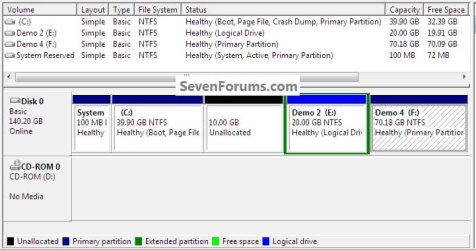
In the Partition Wizard program, right click the Extended partition to select/highlight it and click "Move/Resize" in the selection box.
2.jpg
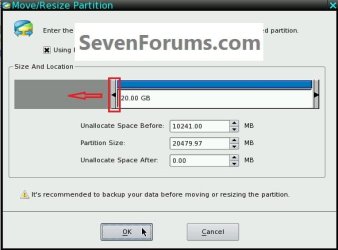
Then click and hold to drag the slider all the way to the left and click ok.
3.jpg
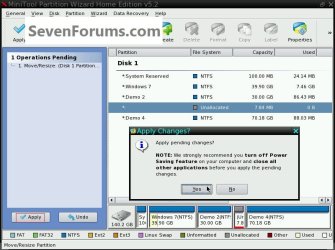
In the left pane "Operations Pending" colume click Apply then Yes for the confirmation.
4.jpg
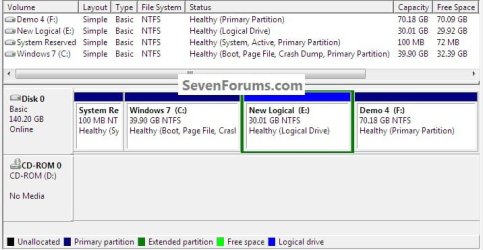
This is what you will end up with and be sure to post back with any further questions you may have and to keep us informed.
5.jpg
 

My Computer My Computer

At a glance

W 7 64-bit UltimateIntel Q9550 Yorkfield8GB Dominator 8500C5DATI : XFX 5870
Computer Manufacturer/Model Number
* BFK Customs *
OS
W 7 64-bit Ultimate
CPU
Intel Q9550 Yorkfield
Motherboard
ASUS P5Q Pro
Memory
8GB Dominator 8500C5D
Graphics Card(s)
ATI : XFX 5870
Sound Card
Realtek HD Audio 7-1
Monitor(s) Displays
1x 47" LCD HDMI & 3x 26" LCD HDMI
Screen Resolution
1920x1080P & 1920x1200
Hard Drives
1x 80GB Intel X25-M G2 SSD : 1x 500GB & 1x 640GB WD Caviar Black(s)
PSU
Corsair 620HX
Case
Cooler Master RC-690
Cooling
Tuniq Tower 120, 2x 140mm and 3x 120mm case fans
Keyboard
Microsoft 500
Mouse
Razer Diamondback 3G
Internet Speed
14 Mb/s
Other Info
1x Koutech 3Gb/s SATA HDD Hot Swap Rack
Hi Bare Foot Kid, Thank you for the genuine & clear instructions. I'll try it out and let you know the result.
 

My Computer My Computer

At a glance

Windows Home Premium 64bitCore i5 4804.0GBnVidia GeForce 310M - 1GB
Computer Manufacturer/Model Number
Lenovo ideapad Z480M
OS
Windows Home Premium 64bit
CPU
Core i5 480
Motherboard
Lenovo
Memory
4.0GB
Graphics Card(s)
nVidia GeForce 310M - 1GB
Monitor(s) Displays
14" LED LCD
Hard Drives
640GB SATA
You're welcome and do remember to keep me informed.
 

My Computer My Computer

At a glance

W 7 64-bit UltimateIntel Q9550 Yorkfield8GB Dominator 8500C5DATI : XFX 5870
Computer Manufacturer/Model Number
* BFK Customs *
OS
W 7 64-bit Ultimate
CPU
Intel Q9550 Yorkfield
Motherboard
ASUS P5Q Pro
Memory
8GB Dominator 8500C5D
Graphics Card(s)
ATI : XFX 5870
Sound Card
Realtek HD Audio 7-1
Monitor(s) Displays
1x 47" LCD HDMI & 3x 26" LCD HDMI
Screen Resolution
1920x1080P & 1920x1200
Hard Drives
1x 80GB Intel X25-M G2 SSD : 1x 500GB & 1x 640GB WD Caviar Black(s)
PSU
Corsair 620HX
Case
Cooler Master RC-690
Cooling
Tuniq Tower 120, 2x 140mm and 3x 120mm case fans
Keyboard
Microsoft 500
Mouse
Razer Diamondback 3G
Internet Speed
14 Mb/s
Other Info
1x Koutech 3Gb/s SATA HDD Hot Swap Rack
Hi Bare Foot Kid,

Thanks for your help, I have successfully named and formatted the unallocated volume on my hard disk ( see attach). Mini Tools Partition Wizard is indeed a really useful program and everyone should have a copy handy. Its much easier to use than Windows 7 Disk Management.

Although I brunt an ISO version of the PW, I didn't have to use it. I simply downloaded PW on to my Hard Disk and ran it form there.

Thank you again.
 

Attachments

My Computer My Computer

At a glance

Windows Home Premium 64bitCore i5 4804.0GBnVidia GeForce 310M - 1GB
Computer Manufacturer/Model Number
Lenovo ideapad Z480M
OS
Windows Home Premium 64bit
CPU
Core i5 480
Motherboard
Lenovo
Memory
4.0GB
Graphics Card(s)
nVidia GeForce 310M - 1GB
Monitor(s) Displays
14" LED LCD
Hard Drives
640GB SATA
Hello again.


That's exactly what you wanted, well done and thanks for the update.


Yes Partition Wizard has an excellent UI and does stuff disk management will not do.
 

My Computer My Computer

At a glance

W 7 64-bit UltimateIntel Q9550 Yorkfield8GB Dominator 8500C5DATI : XFX 5870
Computer Manufacturer/Model Number
* BFK Customs *
OS
W 7 64-bit Ultimate
CPU
Intel Q9550 Yorkfield
Motherboard
ASUS P5Q Pro
Memory
8GB Dominator 8500C5D
Graphics Card(s)
ATI : XFX 5870
Sound Card
Realtek HD Audio 7-1
Monitor(s) Displays
1x 47" LCD HDMI & 3x 26" LCD HDMI
Screen Resolution
1920x1080P & 1920x1200
Hard Drives
1x 80GB Intel X25-M G2 SSD : 1x 500GB & 1x 640GB WD Caviar Black(s)
PSU
Corsair 620HX
Case
Cooler Master RC-690
Cooling
Tuniq Tower 120, 2x 140mm and 3x 120mm case fans
Keyboard
Microsoft 500
Mouse
Razer Diamondback 3G
Internet Speed
14 Mb/s
Other Info
1x Koutech 3Gb/s SATA HDD Hot Swap Rack
Back
Top