Partition an unallocated hard drive??

imcanadian

New member
Local time
3:06 AM
Messages
54
Location
Canada (Belleville, ON)
I was confused with trying to partition the hard drive since last evening. Here is my computer specifications below:

Acer Aspire M3450M-ER20P Desktop
3.3GHz AMD FX-6100 Processor
8GB DDR3 system memory; Expandable up to 16GB
2TB hard disk drive
16X DVD+/-R/RW optical drive
Windows 7 Home Premium operating system
AMD HD7570 Graphics with 1GB dedicated memory

OK I type " Disk Management " in Search programs and files after click " Start" on taskbar.

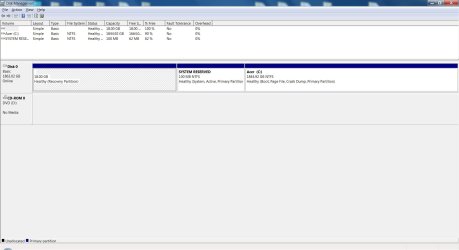
No problem to show Disk Management on the screen and right click the hard drive to shrink. To my surprise that I only had 532 MB to shrink the main hard drive with Acer (C: -- 1844.92 GB (Boot, Page File, Crash Dump, Primary Partition -- Healthy) and two other hard drives that have partition as well. One is with System Reserved -- 100 MB (Healthy) and other is 18.00 GB Healthy (Recovery Partition).

I want to create a partition hard drive for RAMDISK with 6 GB but I don't have enough to create a partition hard drive. Because after the shrink report that I only have 532 MB in Acer C: hard drive. Is 532 MB not enough to create to 6 GB hard drive? I think so but could be wrong.

Your help would be appreciated how to make a partition hard drive for RAMDISK.

Thank you,

John
 

My Computer My Computer

Computer type
PC/Desktop
OS
Windows 7 Home Premium 64bit
Try defragging C: before the shrink operation.
 

My Computer My Computer

Computer Manufacturer/Model Number
HP Media Center
OS
Windows 7 32 bit
CPU
AMD 5200+ dual core
Memory
2 GB
Graphics Card(s)
NVidia GeForce 6150SE 128 MB
Monitor(s) Displays
CRT
Screen Resolution
1280x1024
Hard Drives
500 GB Sata internal :

SIIG USB 3.0 docking stations w/WD Caviar Black 6 Gb/s drives
Keyboard
PS/2
Mouse
PS/2 Wheel Mouse
Other Info
SIIG USB 3.0 PCIexpress card.
I did this twice last night. So how many times do I have to defrag the hard drive before get a better number of megabytes or gigabytes? I was surprised to see that I don't have enough MB or GB in the hard drive to create a partition hard drive. Which program would be the best to defrag the hard drive? I know Disk Defragmenter takes a while to defrag but any freeware disk defragmenter would be helpful and faster to get the job done.

John
 

My Computer My Computer

Computer type
PC/Desktop
OS
Windows 7 Home Premium 64bit

My Computer My Computer

Computer type
PC/Desktop
Computer Manufacturer/Model Number
Custom assembled by me :}
OS
Win-7-Pro64bit 7-H-Prem-64bit
CPU
i7-5930K 2nd i9-9940x both water blocked VRM's too
Motherboard
ASUS SABERTOOTH X99 2nd ASUS x299 Apex
Memory
Trident-z 3200C14 2nd Trident-z 3600C16
Graphics Card(s)
EVGA 1080ti ftw3 2nd Titan Xp both water blocked
Sound Card
Built-in Realtek
Monitor(s) Displays
1-AOC G2460PG 24"G-Sync 144Hz/ 2nd 1-ASUS VG248QE 24" 144Hz
Screen Resolution
1920 x 1080 144Hz
Hard Drives
2-Samsung M.2 Evo & Evo Plus
2-Samsung 850 EVO 500GB SSD's/ 3-2.5 W.D. Black 1tb-&3-1tb/3-3.5 WD Black 1tb hdd's
PSU
EVGA SuperNOVA 1000-P2 2nd 1200-P2
Case
2-Corsair Obsidian Series 450D Black ATX Mid Tower
Cooling
Custom water loops
Keyboard
Logitech G710+/ 2nd Logitech G910
Mouse
2-RedDragon M901 Perdition 16400 dpi Gaming mouse = wired
Internet Speed
Comcast Ping 19ms 89.31mbps download speed 6.12mbps upload
Antivirus
Malwarebytes Pro/ Superantispyware Pro
Browser
FireFox & Pale moon
Other Info
2nd ASUS X299 Apex/Intel i9-9940x with Custom water loop/7H-Prem-x64/Corsair 450D case/Ram Trident-z 3600C16 4x8gb / Samsung970Evo plus 500gb SSD/Dual ssd EZ swap evo/PSU EVGA SuperNova 1200w-P2 80+Platinum/GPU Titan Xp /8-ML-140 on push-pull on 2-280GTX rads
I did this twice last night. So how many times do I have to defrag the hard drive before get a better number of megabytes or gigabytes? I was surprised to see that I don't have enough MB or GB in the hard drive to create a partition hard drive. Which program would be the best to defrag the hard drive? I know Disk Defragmenter takes a while to defrag but any freeware disk defragmenter would be helpful and faster to get the job done.

John

Look for one that shows the unmovable sectors. It's possible there's an unmovable sector near the end of the partition. That would block you from the normal shrinkage. There are ram disks that don't require a dedicated parition to store the info during shutdown. Many just write out an image file.
 

My Computer My Computer

Computer Manufacturer/Model Number
HP Media Center
OS
Windows 7 32 bit
CPU
AMD 5200+ dual core
Memory
2 GB
Graphics Card(s)
NVidia GeForce 6150SE 128 MB
Monitor(s) Displays
CRT
Screen Resolution
1280x1024
Hard Drives
500 GB Sata internal :

SIIG USB 3.0 docking stations w/WD Caviar Black 6 Gb/s drives
Keyboard
PS/2
Mouse
PS/2 Wheel Mouse
Other Info
SIIG USB 3.0 PCIexpress card.
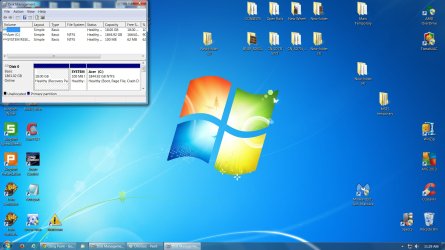
Anyway here is my Screen Capture Image of Disk Management with file attachment:
 

Attachments

  • My Disk Management.jpg
    My Disk Management.jpg
    167 KB · Views: 7

My Computer My Computer

Computer type
PC/Desktop
OS
Windows 7 Home Premium 64bit
You need to make the Disk Management screen snip full screen so we can see everything.
 

My Computer My Computer

Computer type
PC/Desktop
Computer Manufacturer/Model Number
Built them myself, Science Experiments !
OS
Win7 Enterprise, Win7 x86 (Ult 7600), Win7 x64 Ult 7600, TechNet RTM on AMD x64 (2.8Ghz)
CPU
AMD fx8350 4ghz, AMD-32 2400mhz, AMD-64 3200mhz, AMDx64 2.8G
Motherboard
SIS 755, ECS-K8M890M-M (Ult 7600), GigaByte & others
Memory
2gb, 4gb on the Ult 7600, 4gb on Technet RTM, 32gb on FX8350
Graphics Card(s)
Draw my own Graphics, several nVidia cards
Sound Card
on motherboard
Monitor(s) Displays
19" flat scr, 28" I-Inc widescr,22" Emprex Widescr, 23" Acer
Screen Resolution
1280 x 1024, 1440 x 900, 1920 x 1080
Hard Drives
6 pata Ide HD's & 2 Sata HD's
added 80gb external on Ult 7600 computer,
numerous extra 1tb, 2TB, 3Tb SATA HD's
A collection of ext HD Docks w/ HDs
PSU
430w, 550w, 600w, 700, 800, etc
Case
All Generic Full Towers
Cooling
Open Air & a few fans, some w/ colored LEDs
Keyboard
Compaq & Dell recycled from GoodWill
Mouse
Made in China Optical Wired Mouse
Internet Speed
Fast Cable InterNet
Antivirus
AVG Free on 24 different Desktops, NO Problems!
Browser
IE 8 is preferred, but use FireFox sometimes
Other Info
Linksys Routers, switches, & Hubs
Too Many USB Flash Drives to count, Biggest is 64GB !
Eight computers in my home network.
Sixteen computers at my business network.
Linked via TeamViewer !
Lots of old used spare computer parts everywhere!
Double click the picture and you will see the whole picture then click the arrow <-- on top of the webpage back to normal.

Smile,

John
 

My Computer My Computer

Computer type
PC/Desktop
OS
Windows 7 Home Premium 64bit
We know :) He is asking you to maximize disk management window.
 

My Computer My Computer

Computer type
PC/Desktop
Computer Manufacturer/Model Number
Custom Built
OS
Windows 10 Pro
CPU
AMD Ryzen 5 2400G Processor with Radeon RX Vega 11 Graphics
Motherboard
ASRock X470 Master SLI/AC AM4 AMD Promontory X470 SATA 6Gb/s
Memory
G.SKILL Ripjaws V Series 16GB (2 x 8GB) 288-Pin DDR4 SDRAM D
Graphics Card(s)
2047MB NVIDIA GeForce GTX 1060 6GB (EVGA)
Sound Card
Motherboard Built in
Monitor(s) Displays
Acer R240HY bidx 23.8-Inch IPS HDMI DVI VGA (1920 x 1080) Wi
Screen Resolution
1920 x 1080
Hard Drives
1TB Sandisk SSD PLUS (Main drive)
500 GB Seagate 7200 RPM (Games)
500 GB Western Digital 7200 RPM (Virtual Machines)
PSU
CORSAIR TX Series TX650M 650W 80+ Gold Modular Power Supply
Case
CORSAIR CARBIDE SPEC-02 Mid-Tower Gaming Case, Red LED Fan
Cooling
220mm, two 120mm, and four 60mm fans
Keyboard
Wired Dell keyboard
Mouse
Wireless Logitech mouse
Internet Speed
250mb down, 30mb up
Antivirus
Panda Cloud Antivirus
Browser
Chrome-ish x64
Other Info
Your awesome for reading this.

My Computer My Computer

Computer type
PC/Desktop
Computer Manufacturer/Model Number
Self Built
OS
Win 10 Pro x64
CPU
Intel I5-2500K @3.3GHz
Motherboard
Asrock P67 Extreme4
Memory
16GB G.Skill Ripjaws X (4x4GB)
Graphics Card(s)
EVGA GeForce 750 Ti SC 2GB
Sound Card
ASUS Xonar DG 5.1 Channels 24-bit 96KHz PCI Interface Sound
Monitor(s) Displays
auria eq2367
Screen Resolution
1920 x 1080
Hard Drives
250GB Samsung 850 EVO SSD
1TB WD Blue
1TB Hitachi
PSU
SeaSonic X 650W 80 Plus Gold
Case
Corsair Obsidian 750D
Cooling
Corsair H60, Three 140mm case fans
Keyboard
Logitech Wireless Keyboard K520
Mouse
Logitech Wireless Mouse M310
Internet Speed
Wave Broadband ~ 100 dn 5 up
Antivirus
Windows Defender, Malwarebytes Premium
Browser
Edge, IE11, Chrome
Other Info
Laptop specs: HP g7-1365dx /
CPU: AMD A6-3420M APU with Radeon(tm) HD Graphics /
RAM: Crucial 8Gb (2x4Gb) /
SSD: Crucial M4-CT128M4SSD2 ATA Device/ FW 000F /
GFX: AMD Radeon HD 6520G /
OS: Windows 10 Pro x64
Hope this time I did this right as request from other members here in this forum. If not, please let me know about this.
 

Attachments

  • My Disk Management.jpg
    My Disk Management.jpg
    95.9 KB · Views: 6

My Computer My Computer

Computer type
PC/Desktop
OS
Windows 7 Home Premium 64bit
I make a mistake and still the same that you can't see my screen capture so I resized the picture and hopefully this time will work.
 

Attachments

  • Untitled.jpg
    Untitled.jpg
    146.2 KB · Views: 7

My Computer My Computer

Computer type
PC/Desktop
OS
Windows 7 Home Premium 64bit
Back
Top