
How to create references like this?

ampicillin

New member
Local time
4:43 PM
Messages
4
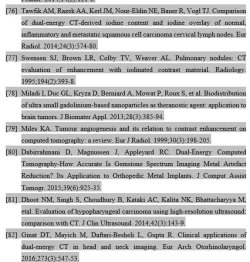
I am trying to create my references like this. How do I do it? I have copy/paste references on my MS word 2016. I didn't use EndNote for creating my references.

I also don't need hyperlink references. When I click reference should come all together like the below.jpg image and it appears darker.

Thanks
 

Attachments
  • References.jpg
    References.jpg
    71.3 KB · Views: 17

My Computer

Computer type
Laptop
OS
Windows 7 Ultimate 64 bit
Hi ampicillin, welcome to the Forum.

Could you explain in more detail exactly what you are trying to achieve. You mention the screen shot you provided is from a .jpg image. For best results & to be able to edit, the copy should be from text.
 

My Computer

Computer type
PC/Desktop
Computer Manufacturer/Model Number
Self built using existing case
OS
Windows 7 Home Premium 64 bit sp1
CPU
Intel i5 3570 3.4Ghz Ivy Bridge SKT 1155 quad core
Motherboard
Gigabyte Z77-HD3 SKT 1155 2xSata 3, 4x USB 3.0
Memory
G-Skill Rip Jaws 16Gb (8x2) DDR3 -1600 PC3 12800 CL 10 red
Graphics Card(s)
Gigabyte NVIDIA GT610 1Gb DDR3 810/1200 PCI-E 2.0 Silent
Sound Card
NVIDIA High Definition & Realtech High Definition Audio
Monitor(s) Displays
2 x Philips 226V4L 16:9 aspect ratio
Screen Resolution
1920 x 1080 HD
Hard Drives
Samsung 840 Pro 256gb SSD, SATA 3.
Hitachi Touro Portable 1tb, USB 3.0 HDD used for image b/ups.
PSU
Corsair VS450
Case
Codeng
Cooling
PSU fan & CPU fan
Keyboard
Logitech
Mouse
Logitech Wireless trackball M570
Internet Speed
Wireless 3G. 3mg down & 550kb up.
Antivirus
Bitdefender Internet Security 2020
Browser
Opera (Current Version) & Firefox
Other Info
MS Office 2013 Pro. Davis weather station software. MGE Nova 600 avr UPS.
Hi ampicillin, welcome to the Forum.

Could you explain in more detail exactly what you are trying to achieve. You mention the screen shot you provided is from a .jpg image. For best results & to be able to edit, the copy should be from text.


Hi, Thanks for replying. I have attached the sample below. My references are not attached together when I click on it. I want my all references to be attached when I once click on it. Only, My reference number is attached as you can see when I click on my reference title it appears as altogether and references appears as normal text only.

I think this is call field shading (grey shading in the background if I am right?) I want my all references to appear like the above page.

Edit 1: Okay, I was able to do colour shading of my background to grey colour but it stays on the references forever. What I meant to say is, shading it doesn't become white when I click on the other part. I want my reference shading to be white background like rest of the document and then when to click on the references turn it into the grey colour background again.

Just like, when I click on my reference title [1], [2] etc it turns into grey shading and when clicking other parts reference title turns into the normal white background. How do I do it for references as well?
 

Attachments

  • myreferences.png
    myreferences.png
    21.4 KB · Views: 12
Last edited:

My Computer

Computer type
Laptop
OS
Windows 7 Ultimate 64 bit
Are you trying to create a bibliography of references that you have used in an article or a document that you have created?. I really can't help you with the shading.

Searching the internet for shading text in Word might help.
 

My Computer

Computer type
PC/Desktop
Computer Manufacturer/Model Number
Self built using existing case
OS
Windows 7 Home Premium 64 bit sp1
CPU
Intel i5 3570 3.4Ghz Ivy Bridge SKT 1155 quad core
Motherboard
Gigabyte Z77-HD3 SKT 1155 2xSata 3, 4x USB 3.0
Memory
G-Skill Rip Jaws 16Gb (8x2) DDR3 -1600 PC3 12800 CL 10 red
Graphics Card(s)
Gigabyte NVIDIA GT610 1Gb DDR3 810/1200 PCI-E 2.0 Silent
Sound Card
NVIDIA High Definition & Realtech High Definition Audio
Monitor(s) Displays
2 x Philips 226V4L 16:9 aspect ratio
Screen Resolution
1920 x 1080 HD
Hard Drives
Samsung 840 Pro 256gb SSD, SATA 3.
Hitachi Touro Portable 1tb, USB 3.0 HDD used for image b/ups.
PSU
Corsair VS450
Case
Codeng
Cooling
PSU fan & CPU fan
Keyboard
Logitech
Mouse
Logitech Wireless trackball M570
Internet Speed
Wireless 3G. 3mg down & 550kb up.
Antivirus
Bitdefender Internet Security 2020
Browser
Opera (Current Version) & Firefox
Other Info
MS Office 2013 Pro. Davis weather station software. MGE Nova 600 avr UPS.
Are you trying to create a bibliography of references that you have used in an article or a document that you have created?. I really can't help you with the shading.

Searching the internet for shading text in Word might help.

Yes, I am trying to create a bibliography of my references but I don't really need it to be precise for an example when you read the document:

When you click on [1]. reference it doesn't matter that it should bring me to the reference [1] or it should highlight the reference while reading the document. This is not necessary for my document.

I just need my all references at the end together, to be highlighted when you click anywhere and it should appear as grey shade and when you click another page (besides references pages) it should become normal white text so when I print out the document it should come as normal without grey shade.

I tried Google it up but couldn't find anything related to it. I now know how to shade the background but it doesn't go away when I click rest of the pages which means when I print the document it will come as a grey shade.
 

My Computer

Computer type
Laptop
OS
Windows 7 Ultimate 64 bit

My Computers

System One System Two

Back
Top