WinXPtoWin7
New member
- Local time
- 10:33 PM
- Messages
- 4
I discovered this forum while planning my system upgrade from XP to Windows 7. There is so much useful information here, thanks to the many contributors.
I am in the planning stages before my Wndows 7 install which is based on Kari's old school geeks method. I have been browsing through the tutorials related to partitioning and dual booting. I have downloaded EasyBCD and Partition Wizard, including the bootable CD to use if needed during the install.
I currently have an XP system, and am upgrading the motherboard/CPU/RAM but keeping the same HDD. My user profile system specs are the existing XP hardware.
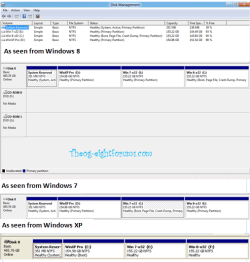
I have some additional requirements - I wanted to keep some XP data on the HDD before my installs (also backed up to my USB drive) to load into the 'user/library' partitions. I prefer to keep the extra copy of my data on my HDD rather than relying on my USB drive in case something goes wrong during installs. I also plan to put a fresh XP SP3 install on the same HDD to occasionally run some old programs. I want to have a 100MB system boot partition created to keep Win XP and Win 7 more independent to allow me to easily remove the XP partition some time in the future.
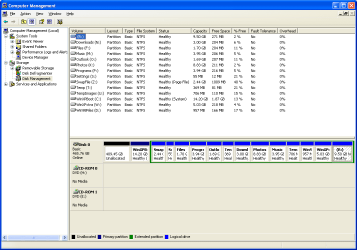
I have free space on my HDD, I was planning to copy data from my XP install to a temp logical partition at the end of the drive, and also run the Windows Easy transfer and save the output there. I would then delete the XP partitions on the drive, then allocate new partitions for Windows 7 and XP during Windows 7 install, then install Windows 7 with a system partition for the boot manager and BCD. I would install XP last, fixing the MBR and BCD with EasyBCD as described in the dual boot tutorial.
I was wondering if the Windows 7 install would create a system partition if there was unallocated space at the beginning of the drive, but there were no active or primary partitions on the drive, just a logical partition? The examples I have seen only show it being created on a completely empty drive. If not, then I might have to forego pre-loading user data onto the HDD before deleting my XP partitions.
Another alternative could be to manually allocate a 100MB system partition with partition wizard boot CD and mark it active before the Windows 7 install. Would a clean Windows 7 install add a boot manager and BCD to an ***empty*** active partition on the same HDD? I did a test install of Windows 7 to a new partition after XP, and it added boot manager and BCD to my active XP partition.
I would like to know what will work before deleting my existing OS.
Thanks for the wonderful Windows 7 resource.
I am in the planning stages before my Wndows 7 install which is based on Kari's old school geeks method. I have been browsing through the tutorials related to partitioning and dual booting. I have downloaded EasyBCD and Partition Wizard, including the bootable CD to use if needed during the install.
I currently have an XP system, and am upgrading the motherboard/CPU/RAM but keeping the same HDD. My user profile system specs are the existing XP hardware.
I have some additional requirements - I wanted to keep some XP data on the HDD before my installs (also backed up to my USB drive) to load into the 'user/library' partitions. I prefer to keep the extra copy of my data on my HDD rather than relying on my USB drive in case something goes wrong during installs. I also plan to put a fresh XP SP3 install on the same HDD to occasionally run some old programs. I want to have a 100MB system boot partition created to keep Win XP and Win 7 more independent to allow me to easily remove the XP partition some time in the future.
I have free space on my HDD, I was planning to copy data from my XP install to a temp logical partition at the end of the drive, and also run the Windows Easy transfer and save the output there. I would then delete the XP partitions on the drive, then allocate new partitions for Windows 7 and XP during Windows 7 install, then install Windows 7 with a system partition for the boot manager and BCD. I would install XP last, fixing the MBR and BCD with EasyBCD as described in the dual boot tutorial.
I was wondering if the Windows 7 install would create a system partition if there was unallocated space at the beginning of the drive, but there were no active or primary partitions on the drive, just a logical partition? The examples I have seen only show it being created on a completely empty drive. If not, then I might have to forego pre-loading user data onto the HDD before deleting my XP partitions.
Another alternative could be to manually allocate a 100MB system partition with partition wizard boot CD and mark it active before the Windows 7 install. Would a clean Windows 7 install add a boot manager and BCD to an ***empty*** active partition on the same HDD? I did a test install of Windows 7 to a new partition after XP, and it added boot manager and BCD to my active XP partition.
I would like to know what will work before deleting my existing OS.
Thanks for the wonderful Windows 7 resource.
My Computer
At a glance
Win 7 Home Premium 64 bit w/SP1 (install pend...Athlon 64 3200+Corsair PC3200 DDR400 - 2 x 512MBOnboard VIA/S3G ?
- Computer type
- PC/Desktop
- Computer Manufacturer/Model Number
- Custom
- OS
- Win 7 Home Premium 64 bit w/SP1 (install pending)
- CPU
- Athlon 64 3200+
- Motherboard
- ASUS A8V-MX
- Memory
- Corsair PC3200 DDR400 - 2 x 512MB
- Graphics Card(s)
- Onboard VIA/S3G ?
- Hard Drives
- WDC WD5000AAKS-00A7B0 (500 GB SATA)
WDC Mybook (640GB USB)
- Antivirus
- AVG9 (on XP)
- Browser
- IE8