
How to default to "Browse Folders" on "Save as.."

Kendall

New member
Local time
7:37 PM
Messages
3
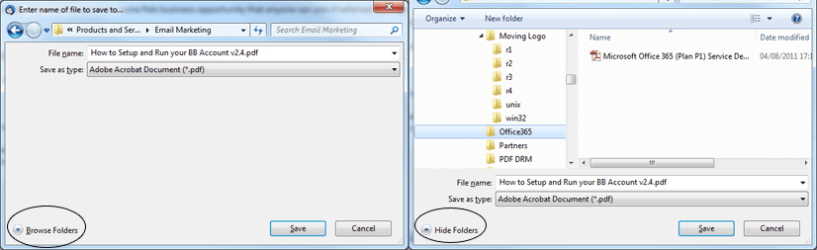
Whenever I perform a "Save As..." or a "Save File" (e.g. with an email attachment), the pop-up save menu always defaults to NOT displaying the navigation pane(s) showing the existing folders/files in the target folder - see thumbnail below left.

To view the folder tree and folder/file list (see thumbnail below right), you have to click on the "Browse Folders" button at the bottom left.

Is there a registry hack or other setting that will reverse this setting for me?

P.S. This problem appears to occur when the application uses the standard Win7 explorer for the save - when using Photoshop, for example, it happily displays the folders and images etc.
 

Attachments
  • no-files-vs-files-shown.png
    no-files-vs-files-shown.png
    32.6 KB · Views: 12

My Computer My Computer

At a glance

Win7 Pro x64
Computer type
PC/Desktop
OS
Win7 Pro x64
Which version of Internet Explorer do you have? Is it 8, 9, or 10? I only have 8 and I didn't see any way of changing this in there and mine does not do what yours does, so I'm thinking that you have either 9 or 10. If you do, then I will install the version you have and take a look.

You see, this kind of thing can be changed in other browsers like Firefox, and it has been possible for as long as I can remember (several years).
 

My Computer My Computer

Computer type
PC/Desktop
It's not really a browser problem - ( I do have IE 10, but I prefer to use Chrome or even Firefox).

When I said explorer, I was referring to Windows Explorer - the standard Windows file management utility.
 

My Computer My Computer

At a glance

Win7 Pro x64
Computer type
PC/Desktop
OS
Win7 Pro x64
Oh, I apologize for misunderstanding that!

Which programs does this happen in?

I have never seen this happen, so I'm just thinking that it might be a setting in these programs.
 

My Computer My Computer

Computer type
PC/Desktop
No problem.

It happens in most applications - e.g. standard Win7 utilities (such as Notepad, WordPad, Paint), Ms Office products (such as Word, Excel), non-Ms products (such as OpenOffice, TextPad, Thunderbird).

The only products where the problem is not present is: Adobe Photoshop, IrfanView - both image utilities....

I think it must be a registry setting for Windows Explorer - but googling it hasn't come up with a solution thus far.
 

My Computer My Computer

At a glance

Win7 Pro x64
Computer type
PC/Desktop
OS
Win7 Pro x64
No problem.

It happens in most applications - e.g. standard Win7 utilities (such as Notepad, WordPad, Paint), Ms Office products (such as Word, Excel), non-Ms products (such as OpenOffice, TextPad, Thunderbird).

The only products where the problem is not present is: Adobe Photoshop, IrfanView - both image utilities....

I think it must be a registry setting for Windows Explorer - but googling it hasn't come up with a solution thus far.

This must be caused by something else because I've never seen this in the 4 years I've been using Windows 7 (since obtaining the official release candidate in July of 2009). I mean, I've saved files in Notepad, WordPad, Paint, Word and even a few other programs, but I've never seen Windows 7 do this to me.

However, I do see the Hide Folders button and if I click it, it shrinks the height of the windows and then that button becomes "Browse Folders". Again, it shrinks the height of the window, unlike what you're seeing.

So, I don't know, but it seems a little bit suspicious to me. I mean, weird things like this could be caused by malware or a virus or something like that.
 

My Computer My Computer

Computer type
PC/Desktop
Back
Top