
- Local time
- 2:12 PM
- Messages
- 182
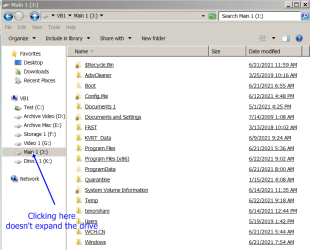
On my 2nd bootable backup drive (W7 freshly compiled from NTLite), when I click on a drive letter in the navigation pane, it keeps on opening folders there and the center pane. That makes it really hard it use the left pane w/o manually condensing it back down to just the single 'Computer' entry. I have multiple drives with a total of seven partitions, I don't want to have it open both listings of the partition I'm interested in.
I realize I can click on the "-" before the drive or Computer entry to collapse the directory everytime, but that is a real pain and doesn't solve the problem.
My main bootable drive (loaded with W7 from RT7 Lite) does not have this problem. Neither does opening up 'save as' or 'open' when in a program.
I realize I can click on the "-" before the drive or Computer entry to collapse the directory everytime, but that is a real pain and doesn't solve the problem.
My main bootable drive (loaded with W7 from RT7 Lite) does not have this problem. Neither does opening up 'save as' or 'open' when in a program.
Attachments
My Computers
-
At a glance
Win7 x64AMD- Computer type
- Laptop
- Computer Manufacturer/Model Number
- Toshiba
- OS
- Win7 x64
- CPU
- AMD
-
At a glance
Win 7 Pro x64AMD FX-835016GBnVidia GeForce 1060- Computer type
- PC/Desktop
- System Manufacturer/Model Number
- AMD based MB
- OS
- Win 7 Pro x64
- CPU
- AMD FX-8350
- Motherboard
- Gigabyte GA-970A-D3P
- Memory
- 16GB
- Graphics Card(s)
- nVidia GeForce 1060
- Monitor(s) Displays
- 25"
- Screen Resolution
- 1920x1200
- Hard Drives
- two SSD;
two 4TB HDD
- PSU
- 700watt Seasonic
- Internet Speed
- 300MB up & down
- Browser
- Firefox
- Other Info
- BD Recorder


