
I am using ad hoc network connection to use our DSL internet connection in my room. We have no wi-fi stuff at home, just network connection. I am having problems whenever I try to connect the network connection, it always says it has no internet access yet it is connected to the network.
Let A be the main laptop I am using right now, the one connected to the DSL model cable, the "mother" network and B be the laptop I am trying to connect to the A's network.
Right now I am using A. I tried all the possible solutions I saw in the internet such as ipconfig /flushdns, disabling microsoft adapter, disabling antivirus and changing DNS server in both A and B. Even restarting the laptops over and over again. Stilll, no improvement.
I took a printscreen of A's connections,
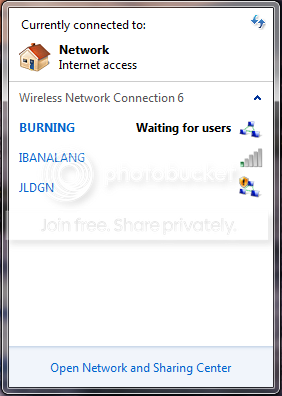
I had this hypothesis that the reason I am not able to have internet access in B via A's network is the existence of network JLDGN (pls refer to the picture). It is a network connection I created, used and was deleted a long time ago yet it still appears to A and B's network connections. My current ad hoc network connection is BURNING.
I don't know how to remove JLDGN, does anybody experienced the same situation as mine?
Replies and solutions will be greatly appreciated. Thank you very much.
Let A be the main laptop I am using right now, the one connected to the DSL model cable, the "mother" network and B be the laptop I am trying to connect to the A's network.
Right now I am using A. I tried all the possible solutions I saw in the internet such as ipconfig /flushdns, disabling microsoft adapter, disabling antivirus and changing DNS server in both A and B. Even restarting the laptops over and over again. Stilll, no improvement.
I took a printscreen of A's connections,
I had this hypothesis that the reason I am not able to have internet access in B via A's network is the existence of network JLDGN (pls refer to the picture). It is a network connection I created, used and was deleted a long time ago yet it still appears to A and B's network connections. My current ad hoc network connection is BURNING.
I don't know how to remove JLDGN, does anybody experienced the same situation as mine?
Replies and solutions will be greatly appreciated. Thank you very much.
My Computer
At a glance
Windows 7 Ultimate 32 bit
- Computer type
- Laptop
- Computer Manufacturer/Model Number
- Acer 4752
- OS
- Windows 7 Ultimate 32 bit
- Antivirus
- AVG 2013


