

City Builder
New member
- Local time
- 8:37 PM
- Messages
- 32
How to delete "Windows.old" when it still has SecureRom files/folders
Hi,
I've installed Windows 7 from fresh again, and was able to delete a good portion of the contents of the Windows.old folder.
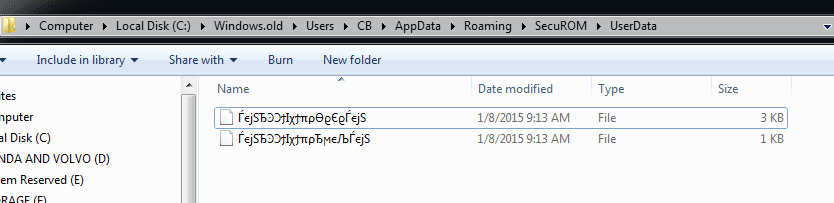
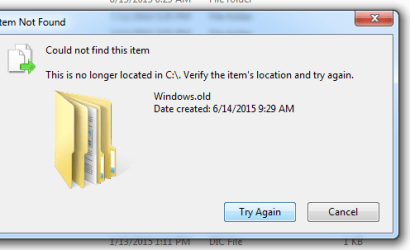
However there is still some SecureRom files inside of it that when I try to delete them, it simply says they don't exist. So it won't let me delete the Windows.old folder because of those files.
I tried the SecureRom remover tool but it can't remove them since they are from an old Windows 7 installation that must have been installed when I installed some game that uses SecureRom.
Any clue how to get rid of them so that I can finally delete the dang Windows.old folder?
Hi,
I've installed Windows 7 from fresh again, and was able to delete a good portion of the contents of the Windows.old folder.
However there is still some SecureRom files inside of it that when I try to delete them, it simply says they don't exist. So it won't let me delete the Windows.old folder because of those files.
I tried the SecureRom remover tool but it can't remove them since they are from an old Windows 7 installation that must have been installed when I installed some game that uses SecureRom.
Any clue how to get rid of them so that I can finally delete the dang Windows.old folder?
Attachments
My Computer
At a glance
Windows Vista 64 bit and Windows 7quadcore 2.2GHz8GBNvidia 8800
- Computer Manufacturer/Model Number
- Gateway
- OS
- Windows Vista 64 bit and Windows 7
- CPU
- quadcore 2.2GHz
- Memory
- 8GB
- Graphics Card(s)
- Nvidia 8800
- Sound Card
- AC97
- Monitor(s) Displays
- Acer 24"
- Hard Drives
- Too many to list.
- PSU
- Thermaltake 750w
- Case
- Gateway
- Cooling
- Stock with added side door fan and added exhaust fan(s)

