Some time ago I tried out the hidden folder tool Winmend Folder Hidden
free available from here:
WinMend Folder Hidden - Safely and quickly hide files and folders.
I uninstalled it later.
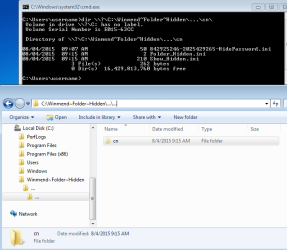
Now I found out that this tool installed silently a strange empty folder in root directory of each partition:
C:\Winmend~Folder~Hidden\...\...\cn\
Mind the two 3-dots-folders!
Unfortunately the uninstall procedure does NOT remove these folders.
All my efforts to remove this folder (hierarchy) were not successful.
It seems to my that these folder are not locked.
They folder names simply are not allowed in Win7 but possible.
Even removal tries from BootCD could not delete them.
So how do I get rid of them?
Peter
free available from here:
WinMend Folder Hidden - Safely and quickly hide files and folders.
I uninstalled it later.
Now I found out that this tool installed silently a strange empty folder in root directory of each partition:
C:\Winmend~Folder~Hidden\...\...\cn\
Mind the two 3-dots-folders!
Unfortunately the uninstall procedure does NOT remove these folders.
All my efforts to remove this folder (hierarchy) were not successful.
It seems to my that these folder are not locked.
They folder names simply are not allowed in Win7 but possible.
Even removal tries from BootCD could not delete them.
So how do I get rid of them?
Peter
My Computer
At a glance
win7pro 64bit
- Computer type
- PC/Desktop
- OS
- win7pro 64bit