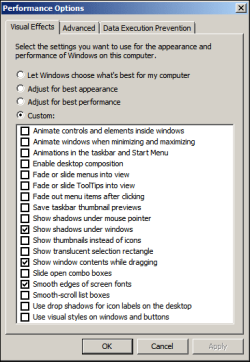
Can anyone tell me how to disable the feature that automatically moves a window the last few millimeters to the edge of the screen?
To be clear, I am NOT talking about Aero Snap, I just mean when moving a window, it "assists" you by moving it the last little bit when close to an edge.
I wish to stop this and have windows only go exactly where they are put.
I am not using aero, my theme is set to Windows Classic.
I have searched for several days and can't find an answer, just endless stuff about disabling aero snap, which I have already done.
To be clear, I am NOT talking about Aero Snap, I just mean when moving a window, it "assists" you by moving it the last little bit when close to an edge.
I wish to stop this and have windows only go exactly where they are put.
I am not using aero, my theme is set to Windows Classic.
I have searched for several days and can't find an answer, just endless stuff about disabling aero snap, which I have already done.
My Computer
At a glance
Windows 7 Professional x64AMD FX 4170 Quad Core16GBAMD Radeon HD 6800 2GB
- Computer type
- PC/Desktop
- Computer Manufacturer/Model Number
- Custom Build
- OS
- Windows 7 Professional x64
- CPU
- AMD FX 4170 Quad Core
- Motherboard
- MSI 970 Gaming
- Memory
- 16GB
- Graphics Card(s)
- AMD Radeon HD 6800 2GB