How To Disable Multiple Network

Dhvanil

New member
Local time
2:54 AM
Messages
7
Hi I m Dhvanil From India..
I Just install Windows 7 32 bit few days ago..
I got a one problem with that is
In network and sharing center i saw multiple network. SO i want to disable one network
i attached my screen Shot for the same plz find it and help me.
 

Attachments

  • Untitled.png
    Untitled.png
    236.9 KB · Views: 254

My Computer

OS
Windows 7 ultimate 32bit
Go to change network adapter settings. Then you can disable it.
 

My Computer

Computer type
PC/Desktop
Computer Manufacturer/Model Number
Apple 2012 Mac Mini
OS
Mac OS X 10.9
CPU
Intel i7 Ivy Bridge (2.3Ghz)
Motherboard
Apple
Memory
8GB's DDR3 (1333 MHz)
Graphics Card(s)
Intel 4000 (1024MB)
Monitor(s) Displays
HP 23inch LED
Screen Resolution
1920 x 1080
Hard Drives
1TB
Case
Mac Mini Case
Keyboard
Mac Logitech Solar Powered
Mouse
Magic Touch Pad
Internet Speed
About 3.00 MBps
Browser
Chrome
Hi I m Dhvanil From India..
I Just install Windows 7 32 bit few days ago..
I got a one problem with that is
In network and sharing center i saw multiple network. SO i want to disable one network
i attached my screen Shot for the same plz find it and help me.


You might want to try the procedure in the link below to fix the Unidentified network problem. This procedure usually works to fix this problem.

Windows 7 Unidentified Network, Limited Access, No Internet Connection Problem Resolved
 

My Computer

Computer type
PC/Desktop
Computer Manufacturer/Model Number
Home built
OS
Windows 7 Ult, Windows 8.1 Pro,
CPU
Q9650-4.275GHz, E8600 4.5GHz, E6750-3.8GHz
Motherboard
Evga 780i FTW
Memory
G.Skill PC2 9600 1200Mhz 5 5 5 15 2T
Graphics Card(s)
GTX480
Sound Card
Asus Xonar D2
Monitor(s) Displays
HannsG
Screen Resolution
1680X1050
Hard Drives
GSkill Phoenix Pro 120GB SSD
PSU
ThermalTake Toughpower 1000Watt modular
Case
ThermalTake XaserV
Cooling
Xigmatek S1283
Keyboard
Logitech G15
Mouse
Logitech G9
Internet Speed
T1
Hi I m Dhvanil From India..
I Just install Windows 7 32 bit few days ago..
I got a one problem with that is
In network and sharing center i saw multiple network. SO i want to disable one network
i attached my screen Shot for the same plz find it and help me.


You might want to try the procedure in the link below to fix the Unidentified network problem. This procedure usually works to fix this problem.

Windows 7 Unidentified Network, Limited Access, No Internet Connection Problem Resolved

This is also not working i tried all thing on it..
I have dial-up broadband connection.
 

My Computer

OS
Windows 7 ultimate 32bit
Hi I m Dhvanil From India..
I Just install Windows 7 32 bit few days ago..
I got a one problem with that is
In network and sharing center i saw multiple network. SO i want to disable one network
i attached my screen Shot for the same plz find it and help me.


You might want to try the procedure in the link below to fix the Unidentified network problem. This procedure usually works to fix this problem.

Windows 7 Unidentified Network, Limited Access, No Internet Connection Problem Resolved

This is also not working i tried all thing on it..
I have dial-up broadband connection.

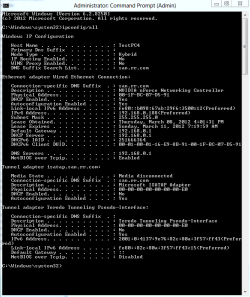
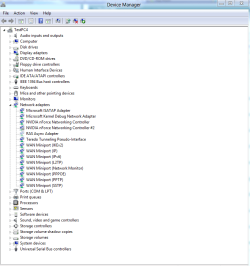
If you can post a screen shot of your ipconfig/all and your device manager with network expanded it would be most helpful. :)

Examples below.
 

Attachments

  • ipconfig2.PNG
    ipconfig2.PNG
    47.7 KB · Views: 107
  • device manager network expanded.PNG
    device manager network expanded.PNG
    76.2 KB · Views: 104

My Computer

Computer type
PC/Desktop
Computer Manufacturer/Model Number
Home built
OS
Windows 7 Ult, Windows 8.1 Pro,
CPU
Q9650-4.275GHz, E8600 4.5GHz, E6750-3.8GHz
Motherboard
Evga 780i FTW
Memory
G.Skill PC2 9600 1200Mhz 5 5 5 15 2T
Graphics Card(s)
GTX480
Sound Card
Asus Xonar D2
Monitor(s) Displays
HannsG
Screen Resolution
1680X1050
Hard Drives
GSkill Phoenix Pro 120GB SSD
PSU
ThermalTake Toughpower 1000Watt modular
Case
ThermalTake XaserV
Cooling
Xigmatek S1283
Keyboard
Logitech G15
Mouse
Logitech G9
Internet Speed
T1
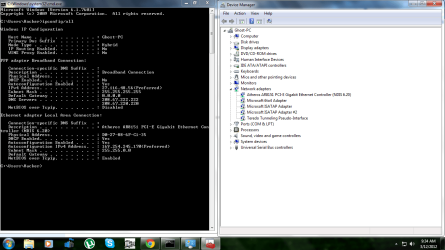
Here is my screenshot of ipconfig and device manager
 

Attachments

  • Untitled.png
    Untitled.png
    210.3 KB · Views: 89

My Computer

OS
Windows 7 ultimate 32bit
Here is my screenshot of ipconfig and device manager

It looks like you have the same problem as described in the link I posted earlier.
http://pocketpccentral.net/blog/200...cess-no-internet-connection-problem-resolved/

For some reason you aren't getting the default IP from your router and instead it's showing up as .0000 which won't work for you.

You should first try resetting your router if you haven't already.

If that doesn't work you need to find out the default gateway of your router and input that number manually as per the link I posted earlier.

The default IP is usually something like 192.168.0.1 although you appear to be in another country that uses a different default gateway which should be similar to your IPv4 address which is shown, something in the range of 27.116.48.XX .
 

My Computer

Computer type
PC/Desktop
Computer Manufacturer/Model Number
Home built
OS
Windows 7 Ult, Windows 8.1 Pro,
CPU
Q9650-4.275GHz, E8600 4.5GHz, E6750-3.8GHz
Motherboard
Evga 780i FTW
Memory
G.Skill PC2 9600 1200Mhz 5 5 5 15 2T
Graphics Card(s)
GTX480
Sound Card
Asus Xonar D2
Monitor(s) Displays
HannsG
Screen Resolution
1680X1050
Hard Drives
GSkill Phoenix Pro 120GB SSD
PSU
ThermalTake Toughpower 1000Watt modular
Case
ThermalTake XaserV
Cooling
Xigmatek S1283
Keyboard
Logitech G15
Mouse
Logitech G9
Internet Speed
T1
I have no Router , I have direct connection of internet
I have fiber optic cable
So my company didn't provide any router or something else.
 

My Computer

OS
Windows 7 ultimate 32bit
In Window 7 must have enable and disable option of installed network connections. It can creates problem when network connection suddenly stop functioning. Additionally, many Windows computers have multiple network connections installed. Sometimes these connections may interfere with each other. Disabling individual connections when they are not being used can improve network reliability and security.
 

My Computer

OS
Windows 7
I have no Router , I have direct connection of internet
I have fiber optic cable
So my company didn't provide any router or something else.

You will at the least need a modem in order to connect to the internet.
Do you have a modem?
 

My Computer

Computer type
PC/Desktop
Computer Manufacturer/Model Number
Home built
OS
Windows 7 Ult, Windows 8.1 Pro,
CPU
Q9650-4.275GHz, E8600 4.5GHz, E6750-3.8GHz
Motherboard
Evga 780i FTW
Memory
G.Skill PC2 9600 1200Mhz 5 5 5 15 2T
Graphics Card(s)
GTX480
Sound Card
Asus Xonar D2
Monitor(s) Displays
HannsG
Screen Resolution
1680X1050
Hard Drives
GSkill Phoenix Pro 120GB SSD
PSU
ThermalTake Toughpower 1000Watt modular
Case
ThermalTake XaserV
Cooling
Xigmatek S1283
Keyboard
Logitech G15
Mouse
Logitech G9
Internet Speed
T1
I have no Router , I have direct connection of internet
I have fiber optic cable
So my company didn't provide any router or something else.

You will at the least need a modem in order to connect to the internet.
Do you have a modem?

No i have no modem or any router ..
My internet cable direct connected in LAN..
I have dial-up connection (1mbps)

Actually Friend i downloaded win 7 via Torrentz and in that file i found to trojan virus .. I removed it through microsoft security essentials.. This problem starts After installing this win 7
My friend also installed this win 7 and he had a same problem but he formatted and installed win XP..So His problem has been resolved and mine is not..
So i Think problem is in Win 7 . what do you think ??
 

My Computer

OS
Windows 7 ultimate 32bit
In Window 7 must have enable and disable option of installed network connections. It can creates problem when network connection suddenly stop functioning. Additionally, many Windows computers have multiple network connections installed. Sometimes these connections may interfere with each other. Disabling individual connections when they are not being used can improve network reliability and security.

Yes there is a enable and disable option of installed network connections but when i disable any one network i lost my internet connection so i cant do this
 

My Computer

OS
Windows 7 ultimate 32bit
Back
Top