How to disable startup programs ?

Shukla

Lost Somewhere
Member
Local time
1:30 AM
Messages
39
Location
India
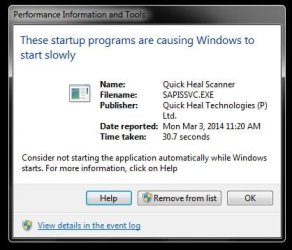
I want to disable my antivirus at statup because it causes my windows to start slowly ..
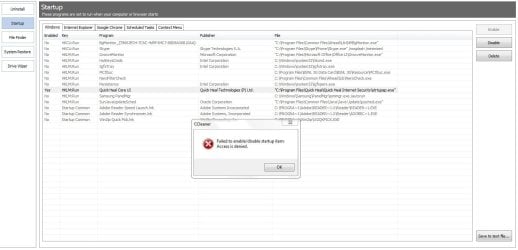
I tried to disable from " msconfig " but it was of no use , ccleaner was unable to do anything it shows access denied..
Any other way ?
 

Attachments

  • 1.JPG
    1.JPG
    30.9 KB · Views: 31
  • 2.JPG
    2.JPG
    107.3 KB · Views: 3

My Computer

Computer type
PC/Desktop
Computer Manufacturer/Model Number
Self Assembled
OS
Windows 7 Ultimate x86 SP1
Internet Speed
4.2 Mbps Up ; 2.6 Mbps Down
Antivirus
Kasperskey Internet Security
Browser
Google Chrome
You can try going into the actual program and look for settings that disable the program from loading at startup. Personally, I wouldn't disable my antivirus in Windows. I know there is a way to delay programs from booting right away you might want to look into that.
 

My Computer

Computer type
PC/Desktop
Computer Manufacturer/Model Number
custom
OS
Windows 7 64-bit
CPU
Intel 4690K
Motherboard
Asus Tuf Gryphon Z97
Memory
Corsair Vengeance 2133
Graphics Card(s)
EVGA GTX1060
Screen Resolution
1080p
Hard Drives
Crucial m500 SSD 240gb
PSU
EVGA
Case
Fractal Design
Cooling
H7
Browser
Chrome
Is there any way to delay it form starting right on booting ?
 

My Computer

Computer type
PC/Desktop
Computer Manufacturer/Model Number
Self Assembled
OS
Windows 7 Ultimate x86 SP1
Internet Speed
4.2 Mbps Up ; 2.6 Mbps Down
Antivirus
Kasperskey Internet Security
Browser
Google Chrome
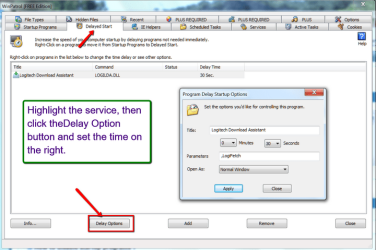
Very easy. Get the free WinPatrol. Go to the Startup button and right click on the service you want to start delayed. Then click 'Move to delayed startup program list'. Then click the Delayed Startup button and set the service to the delay you want. For the rest see the picture.
 

Attachments

  • 2014-03-04_2347.png
    2014-03-04_2347.png
    54.6 KB · Views: 0

My Computer

Computer Manufacturer/Model Number
HP, Dell, Gateway, Toshiba - 4 laptops and 2 desktops

OS
Vista, Windows7, Mint Mate, Zorin, Windows 8
CPU
from 1.6GHz Duo to i7
Monitor(s) Displays
2x HP w2207
Hard Drives
5x HDD, 7x SSD, 12x Externals
Keyboard
with trackball - no mices
Mouse
Trackball mice
Internet Speed
DSL 6000
Back
Top