How To disable time update?

futbolinis

New member
Local time
9:26 PM
Messages
10
Hi everyone, first, sorry if my english language will be understandable;D I'm a new here:) Does anyone know how to disable time update on Windows 7? For examlpe. Timer shows 12:00 o'clock when i am disconnected from internet. When i connect to the internet, it updates + 2 hours and show 14:00. I tried to change time zone, but it wont work for me. Maybe it could be fixed by editing registres?
 

My Computer

OS
Windows 7
hi futbolinis, and welcome to sevenforums,

your english is easy to understand.

try this:

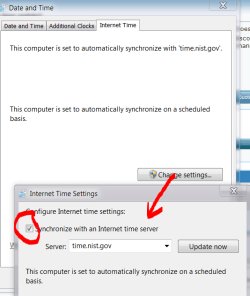
click on your clock >> click 'change date and time settings' >> goto internet time tab >> change settings >> untick the synchronise box.

clock.PNG
 

My Computer

Computer Manufacturer/Model Number
mickey megabyte 1234
OS
ultimate 64 sp1
CPU
i5 2500K [email protected]
Motherboard
MSI P67A-GD53
Memory
8 gigs GSkill Ripjaws 1600
Graphics Card(s)
amd hd6950
Sound Card
creative x-fi gamer
Monitor(s) Displays
samsung 24"
Screen Resolution
1920x1080
Hard Drives
ocz vertex 2e 60 gig, samsung f3 1tb, buffalo 2tb ext
PSU
antec 550
Case
antec three hundred
Cooling
i'm a cooling fan
Keyboard
saitek eclipse ii
Mouse
logitech g3
Internet Speed
about 4 Mbps
Other Info
i love win7
I tried it a few days ago, but it's not working... Maybe there is a way to disable this auto-update throuht registry editor?
 

My Computer

OS
Windows 7
i'm not sure which registry key you need to change.

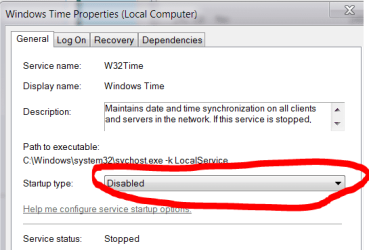
maybe you could try disabling the windows time service instead?

type services.msc into your start-menu searchbox, find 'windows time', and disable it.

time.PNG
 

My Computer

Computer Manufacturer/Model Number
mickey megabyte 1234
OS
ultimate 64 sp1
CPU
i5 2500K [email protected]
Motherboard
MSI P67A-GD53
Memory
8 gigs GSkill Ripjaws 1600
Graphics Card(s)
amd hd6950
Sound Card
creative x-fi gamer
Monitor(s) Displays
samsung 24"
Screen Resolution
1920x1080
Hard Drives
ocz vertex 2e 60 gig, samsung f3 1tb, buffalo 2tb ext
PSU
antec 550
Case
antec three hundred
Cooling
i'm a cooling fan
Keyboard
saitek eclipse ii
Mouse
logitech g3
Internet Speed
about 4 Mbps
Other Info
i love win7
It was already disabled when i get into services.msc

Capture%201.jpg
 

My Computer

OS
Windows 7
Also, you may wat to check that all your Regional Settings are correct

The tutorial will outline all processes to make your system one locale which can possibly resolve issues with Updates (Media Center/Windows Update/Internet Time).
 

My Computer

Computer Manufacturer/Model Number
Compaq Desktop
OS
Windows 7 Ultimate x64
CPU
AMD Sempron Dual Core
Memory
3GB
Graphics Card(s)
NVIDIA GeForce 6150SE nForce 430
Screen Resolution
1024x768
Hard Drives
150GB Sata
hope this helps

  • Open Date and Time by clicking the Start button , clicking Control Panel, and then clicking Date and Time.
  • Click the Date and Time tab, and then click Change date and time. (If you are prompted for an administrator password or confirmation, type the password or provide confirmation.)
  • In the Date and Time Settings dialog box, do one or more of the following:
  • To change the hour, double-click the hour, and then click the arrows to increase or decrease the value.
  • To change the minutes, double-click the minutes, and then click the arrows to increase or decrease the value.
  • To change the seconds, double-click the seconds, and then click the arrows to increase or decrease the value.
  • When you have finished changing the time settings, click OK.
  • To change the time zone, click Change time zone.
  • In the Time Zone Settings dialog box, click your current time zone in the list, and then click OK.

Note
If your time zone observes daylight saving time and you want your computer's clock to be adjusted automatically when daylight saving time changes, make sure the Automatically adjust clock for Daylight Saving Time check box is selected.
 

My Computer

Computer Manufacturer/Model Number
packard bell IXTREME M5722
OS
Operating System : Windows 7 Home Premium Edition 6.01.7600 SP1 (x64)
CPU
Processor : Intel Core 2 Quad Q8300 @ 2500 MHz
Motherboard
Mainboard : Packard Bell (Acer EG43M )
Memory
Physical Memory :8GB Corsair4x 2GB 800MHz C5 DDR2
Graphics Card(s)
Video Card : XFX 6700 AMD
Monitor(s) Displays
Maestro 234DL - BenQ V2220 - BenQ VW2420H
Screen Resolution
Current Display :1920x1080p pixels at 60 Hz in HD LED
Hard Drives
Hard Disks : WDC (1000 GB)
Drive C: (Hard Disk) : 428 GB available on 491 GB
Drive D: (Hard Disk) : 426 GB available on 492 GB
SAMSUNG spinpoint HD103SJ 1000.2 GB
(X 2) KINGSTON SSD NOW V 30GB
PSU
XFX ProSeries 550W PSU
Case
PACKARD BELL IXTREME
Cooling
System Blower Current: 150mA Air Flow16CFM ;Akasa 90mm rear
Keyboard
Gigabyte Aivia K8100
Mouse
TRUST-Wireless Laser Mouse - Carbon edition MI-7770C
Internet Speed
TP-LINK > TL-WN951N / AV500 Gigabit Powerline Adapters
Browser
chrome dev
Other Info
EXTRA COOLING>(FAN CONTROLLER) PC Bay Cooler 3 x 40mm fans; Akasa AK-HD-BL Blue hard drive cooler 2 x 40 mm fan 4500 rpm 29.7 dBA
Bios> American Megatrends Inc.
Version : P01-A1
Date : 08/31/2009
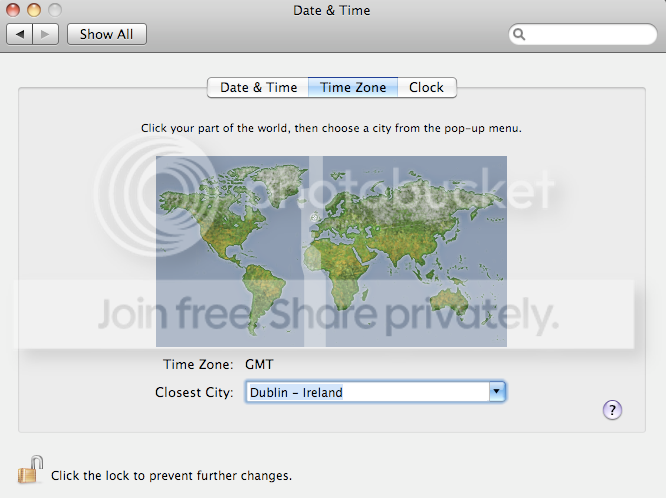
Thank's for your suggestions, but there is another problem om my Win 7. I will try to explain my situation. I have a MacBook Pro, with double OS. Default OS is Mac OS X, other - Windows 7. For example: on Mac OS X is 12:00 and i restart system to Win 7. Everything is ok, when i am disconnected from the internet, time on Win 7 is 12:00. Immediatly when internet connects, it updates -2 hours, and show me 10:00. When i disconnect from the internet again, nothing changes, time remains 10:00. Every time i restart my Mac OS into Win 7, i have to change time +2 hours and it's a very annoying thing. I think, that changing time zones will not solve this problem, because Mac OS X fix time like UTC, but Windows like UTC+2, because my time zone is Lithuania. I have already solve time zone question, i just set the time zone on both OS like UTC.

In Windows (UTC Dublin, Edinburgh, Lisbon, London)
Win.jpg


In Mac OS X (Dublin-Ireland)
Mac.png


As i mentioned, everything is now ok, time is not changing when i change OS, until i am disconnected from the internet. I suppose, if i will find the solution how to disable time autoupdate, this problem will dissapear. I hope you understand my english;D


My Computer

OS
Windows 7

My Computer

Computer Manufacturer/Model Number
packard bell IXTREME M5722
OS
Operating System : Windows 7 Home Premium Edition 6.01.7600 SP1 (x64)
CPU
Processor : Intel Core 2 Quad Q8300 @ 2500 MHz
Motherboard
Mainboard : Packard Bell (Acer EG43M )
Memory
Physical Memory :8GB Corsair4x 2GB 800MHz C5 DDR2
Graphics Card(s)
Video Card : XFX 6700 AMD
Monitor(s) Displays
Maestro 234DL - BenQ V2220 - BenQ VW2420H
Screen Resolution
Current Display :1920x1080p pixels at 60 Hz in HD LED
Hard Drives
Hard Disks : WDC (1000 GB)
Drive C: (Hard Disk) : 428 GB available on 491 GB
Drive D: (Hard Disk) : 426 GB available on 492 GB
SAMSUNG spinpoint HD103SJ 1000.2 GB
(X 2) KINGSTON SSD NOW V 30GB
PSU
XFX ProSeries 550W PSU
Case
PACKARD BELL IXTREME
Cooling
System Blower Current: 150mA Air Flow16CFM ;Akasa 90mm rear
Keyboard
Gigabyte Aivia K8100
Mouse
TRUST-Wireless Laser Mouse - Carbon edition MI-7770C
Internet Speed
TP-LINK > TL-WN951N / AV500 Gigabit Powerline Adapters
Browser
chrome dev
Other Info
EXTRA COOLING>(FAN CONTROLLER) PC Bay Cooler 3 x 40mm fans; Akasa AK-HD-BL Blue hard drive cooler 2 x 40 mm fan 4500 rpm 29.7 dBA
Bios> American Megatrends Inc.
Version : P01-A1
Date : 08/31/2009
I have read these forums, but my english language isn't so perfect to understand everything:) As i understood, there are the same problem, just a different Windows OS. But i don't understand what i need to do on my situation, beacause i have 7, not XP, also my time zone is different. Could any wrote small manual ho to fix my problem?
 

My Computer

OS
Windows 7

My Computer

Computer Manufacturer/Model Number
packard bell IXTREME M5722
OS
Operating System : Windows 7 Home Premium Edition 6.01.7600 SP1 (x64)
CPU
Processor : Intel Core 2 Quad Q8300 @ 2500 MHz
Motherboard
Mainboard : Packard Bell (Acer EG43M )
Memory
Physical Memory :8GB Corsair4x 2GB 800MHz C5 DDR2
Graphics Card(s)
Video Card : XFX 6700 AMD
Monitor(s) Displays
Maestro 234DL - BenQ V2220 - BenQ VW2420H
Screen Resolution
Current Display :1920x1080p pixels at 60 Hz in HD LED
Hard Drives
Hard Disks : WDC (1000 GB)
Drive C: (Hard Disk) : 428 GB available on 491 GB
Drive D: (Hard Disk) : 426 GB available on 492 GB
SAMSUNG spinpoint HD103SJ 1000.2 GB
(X 2) KINGSTON SSD NOW V 30GB
PSU
XFX ProSeries 550W PSU
Case
PACKARD BELL IXTREME
Cooling
System Blower Current: 150mA Air Flow16CFM ;Akasa 90mm rear
Keyboard
Gigabyte Aivia K8100
Mouse
TRUST-Wireless Laser Mouse - Carbon edition MI-7770C
Internet Speed
TP-LINK > TL-WN951N / AV500 Gigabit Powerline Adapters
Browser
chrome dev
Other Info
EXTRA COOLING>(FAN CONTROLLER) PC Bay Cooler 3 x 40mm fans; Akasa AK-HD-BL Blue hard drive cooler 2 x 40 mm fan 4500 rpm 29.7 dBA
Bios> American Megatrends Inc.
Version : P01-A1
Date : 08/31/2009
I have used translate.google.com but you should know, that it wont transtale perfectly...
 

My Computer

OS
Windows 7
i have to go and do a lecture today so will be back on this thread asap :)
 

My Computer

Computer Manufacturer/Model Number
packard bell IXTREME M5722
OS
Operating System : Windows 7 Home Premium Edition 6.01.7600 SP1 (x64)
CPU
Processor : Intel Core 2 Quad Q8300 @ 2500 MHz
Motherboard
Mainboard : Packard Bell (Acer EG43M )
Memory
Physical Memory :8GB Corsair4x 2GB 800MHz C5 DDR2
Graphics Card(s)
Video Card : XFX 6700 AMD
Monitor(s) Displays
Maestro 234DL - BenQ V2220 - BenQ VW2420H
Screen Resolution
Current Display :1920x1080p pixels at 60 Hz in HD LED
Hard Drives
Hard Disks : WDC (1000 GB)
Drive C: (Hard Disk) : 428 GB available on 491 GB
Drive D: (Hard Disk) : 426 GB available on 492 GB
SAMSUNG spinpoint HD103SJ 1000.2 GB
(X 2) KINGSTON SSD NOW V 30GB
PSU
XFX ProSeries 550W PSU
Case
PACKARD BELL IXTREME
Cooling
System Blower Current: 150mA Air Flow16CFM ;Akasa 90mm rear
Keyboard
Gigabyte Aivia K8100
Mouse
TRUST-Wireless Laser Mouse - Carbon edition MI-7770C
Internet Speed
TP-LINK > TL-WN951N / AV500 Gigabit Powerline Adapters
Browser
chrome dev
Other Info
EXTRA COOLING>(FAN CONTROLLER) PC Bay Cooler 3 x 40mm fans; Akasa AK-HD-BL Blue hard drive cooler 2 x 40 mm fan 4500 rpm 29.7 dBA
Bios> American Megatrends Inc.
Version : P01-A1
Date : 08/31/2009
hi im back on line, did you find any help in the posts i posted?
 

My Computer

Computer Manufacturer/Model Number
packard bell IXTREME M5722
OS
Operating System : Windows 7 Home Premium Edition 6.01.7600 SP1 (x64)
CPU
Processor : Intel Core 2 Quad Q8300 @ 2500 MHz
Motherboard
Mainboard : Packard Bell (Acer EG43M )
Memory
Physical Memory :8GB Corsair4x 2GB 800MHz C5 DDR2
Graphics Card(s)
Video Card : XFX 6700 AMD
Monitor(s) Displays
Maestro 234DL - BenQ V2220 - BenQ VW2420H
Screen Resolution
Current Display :1920x1080p pixels at 60 Hz in HD LED
Hard Drives
Hard Disks : WDC (1000 GB)
Drive C: (Hard Disk) : 428 GB available on 491 GB
Drive D: (Hard Disk) : 426 GB available on 492 GB
SAMSUNG spinpoint HD103SJ 1000.2 GB
(X 2) KINGSTON SSD NOW V 30GB
PSU
XFX ProSeries 550W PSU
Case
PACKARD BELL IXTREME
Cooling
System Blower Current: 150mA Air Flow16CFM ;Akasa 90mm rear
Keyboard
Gigabyte Aivia K8100
Mouse
TRUST-Wireless Laser Mouse - Carbon edition MI-7770C
Internet Speed
TP-LINK > TL-WN951N / AV500 Gigabit Powerline Adapters
Browser
chrome dev
Other Info
EXTRA COOLING>(FAN CONTROLLER) PC Bay Cooler 3 x 40mm fans; Akasa AK-HD-BL Blue hard drive cooler 2 x 40 mm fan 4500 rpm 29.7 dBA
Bios> American Megatrends Inc.
Version : P01-A1
Date : 08/31/2009
Thank's for your suggestions, but there is another problem om my Win 7. I will try to explain my situation. I have a MacBook Pro, with double OS. Default OS is Mac OS X, other - Windows 7. For example: on Mac OS X is 12:00 and i restart system to Win 7. Everything is ok, when i am disconnected from the internet, time on Win 7 is 12:00. Immediatly when internet connects, it updates -2 hours, and show me 10:00. When i disconnect from the internet again, nothing changes, time remains 10:00. Every time i restart my Mac OS into Win 7, i have to change time +2 hours and it's a very annoying thing. I think, that changing time zones will not solve this problem, because Mac OS X fix time like UTC, but Windows like UTC+2, because my time zone is Lithuania. I have already solve time zone question, i just set the time zone on both OS like UTC.

In Windows (UTC Dublin, Edinburgh, Lisbon, London)
Win.jpg


In Mac OS X (Dublin-Ireland)
Mac.png


As i mentioned, everything is now ok, time is not changing when i change OS, until i am disconnected from the internet. I suppose, if i will find the solution how to disable time autoupdate, this problem will dissapear. I hope you understand my english;D


have you tried turning windows 7 automatic time update off?
 

My Computer

Computer Manufacturer/Model Number
packard bell IXTREME M5722
OS
Operating System : Windows 7 Home Premium Edition 6.01.7600 SP1 (x64)
CPU
Processor : Intel Core 2 Quad Q8300 @ 2500 MHz
Motherboard
Mainboard : Packard Bell (Acer EG43M )
Memory
Physical Memory :8GB Corsair4x 2GB 800MHz C5 DDR2
Graphics Card(s)
Video Card : XFX 6700 AMD
Monitor(s) Displays
Maestro 234DL - BenQ V2220 - BenQ VW2420H
Screen Resolution
Current Display :1920x1080p pixels at 60 Hz in HD LED
Hard Drives
Hard Disks : WDC (1000 GB)
Drive C: (Hard Disk) : 428 GB available on 491 GB
Drive D: (Hard Disk) : 426 GB available on 492 GB
SAMSUNG spinpoint HD103SJ 1000.2 GB
(X 2) KINGSTON SSD NOW V 30GB
PSU
XFX ProSeries 550W PSU
Case
PACKARD BELL IXTREME
Cooling
System Blower Current: 150mA Air Flow16CFM ;Akasa 90mm rear
Keyboard
Gigabyte Aivia K8100
Mouse
TRUST-Wireless Laser Mouse - Carbon edition MI-7770C
Internet Speed
TP-LINK > TL-WN951N / AV500 Gigabit Powerline Adapters
Browser
chrome dev
Other Info
EXTRA COOLING>(FAN CONTROLLER) PC Bay Cooler 3 x 40mm fans; Akasa AK-HD-BL Blue hard drive cooler 2 x 40 mm fan 4500 rpm 29.7 dBA
Bios> American Megatrends Inc.
Version : P01-A1
Date : 08/31/2009
By default Windows synchronizes the time of your system with the online time server time.windows.com. It is a useful since it adjusts your system time automatically and you need not bother taking care of your system clock manually. Lets have a look on the other side of the picture, this feature might not be desired by some users as synchronizing the system time with a public Internet time server can sometimes show wrong time mostly because of daylight saving. Some governments in various countries implement daylight saving time on various dates and the public Internet time server is not updated with the change, thus showing wrong time by an hour.


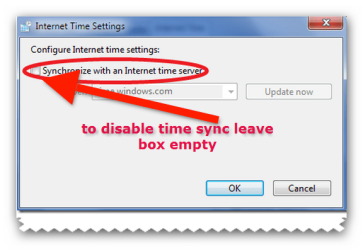
  1. Right-click the system clock and choose the Adjust date/time option.
  2. The Date and Time dialogue box will be displayed, now go to the Internet Time tab and click the Change setting button.
  3. Now in the Internet Time Settings dialogue box, uncheck the Synchronize with an Internet time server option.
  4. Click OK to complete the configuration and you are done.
 

Attachments

  • brys snap ?10 ?March ?2011 18h59m41s.png
    brys snap ?10 ?March ?2011 18h59m41s.png
    27.4 KB · Views: 8

My Computer

Computer Manufacturer/Model Number
packard bell IXTREME M5722
OS
Operating System : Windows 7 Home Premium Edition 6.01.7600 SP1 (x64)
CPU
Processor : Intel Core 2 Quad Q8300 @ 2500 MHz
Motherboard
Mainboard : Packard Bell (Acer EG43M )
Memory
Physical Memory :8GB Corsair4x 2GB 800MHz C5 DDR2
Graphics Card(s)
Video Card : XFX 6700 AMD
Monitor(s) Displays
Maestro 234DL - BenQ V2220 - BenQ VW2420H
Screen Resolution
Current Display :1920x1080p pixels at 60 Hz in HD LED
Hard Drives
Hard Disks : WDC (1000 GB)
Drive C: (Hard Disk) : 428 GB available on 491 GB
Drive D: (Hard Disk) : 426 GB available on 492 GB
SAMSUNG spinpoint HD103SJ 1000.2 GB
(X 2) KINGSTON SSD NOW V 30GB
PSU
XFX ProSeries 550W PSU
Case
PACKARD BELL IXTREME
Cooling
System Blower Current: 150mA Air Flow16CFM ;Akasa 90mm rear
Keyboard
Gigabyte Aivia K8100
Mouse
TRUST-Wireless Laser Mouse - Carbon edition MI-7770C
Internet Speed
TP-LINK > TL-WN951N / AV500 Gigabit Powerline Adapters
Browser
chrome dev
Other Info
EXTRA COOLING>(FAN CONTROLLER) PC Bay Cooler 3 x 40mm fans; Akasa AK-HD-BL Blue hard drive cooler 2 x 40 mm fan 4500 rpm 29.7 dBA
Bios> American Megatrends Inc.
Version : P01-A1
Date : 08/31/2009
The Internet time server option synchronization, was already unchecked... And Windows 7 automatic updates also is turned off...

Time still updates on internet connection...
 

My Computer

OS
Windows 7
So, as i understood, this problem cannot be fixed...
 

My Computer

OS
Windows 7
will look in to it again for you watch this space the procedure i posted should of worked. find out what port windows uses for time update and disable it ?


FROM WINDOWS http://technet.microsoft.com/en-us/library/cc773013(WS.10).aspx

Stopping Time Synchronization

There are certain situations in which you will want to stop a computer from synchronizing its time. For example, if a computer attempts to synchronize from a time source on the Internet or from another site over a WAN by means of a dial-up connection, it can incur costly telephone charges. When you disable synchronization on that computer, you prevent the computer from attempting to access a time source over a dial-up connection.

You can also disable synchronization to prevent the generation of errors in the event log. Each time a computer attempts to synchronize with a time source that is unavailable, it generates an error in the Event Log. If a time source is taken off of the network for scheduled maintenance and you do not intend to reconfigure the client to synchronize from another source, you can disable synchronization on the client to prevent it from attempting synchronization while the time server is unavailable.

It is useful to disable synchronization on the computer that is designated as the root of the synchronization network. This indicates that the root computer trusts its local clock. If the root of the synchronization hierarchy is not set to NoSync and if it is unable to synchronize with another time source, clients do not accept the packet that this computer sends out because its time cannot be trusted.

The only time servers that are trusted by clients even if they have not synchronized with another time source are those that have been identified by the client as reliable time servers.

Disabling the Windows Time Service

The Windows Time service (W32Time) can be completely disabled. If you choose to implement a third-party time synchronization product that uses NTP, you must disable the Windows Time service. This is because all NTP servers need access to User Datagram Protocol (UDP) port 123, and as long as the Windows Time service is running on the Windows Server 2003 operating system, port 123 remains reserved by Windows Time.
 

My Computer

Computer Manufacturer/Model Number
packard bell IXTREME M5722
OS
Operating System : Windows 7 Home Premium Edition 6.01.7600 SP1 (x64)
CPU
Processor : Intel Core 2 Quad Q8300 @ 2500 MHz
Motherboard
Mainboard : Packard Bell (Acer EG43M )
Memory
Physical Memory :8GB Corsair4x 2GB 800MHz C5 DDR2
Graphics Card(s)
Video Card : XFX 6700 AMD
Monitor(s) Displays
Maestro 234DL - BenQ V2220 - BenQ VW2420H
Screen Resolution
Current Display :1920x1080p pixels at 60 Hz in HD LED
Hard Drives
Hard Disks : WDC (1000 GB)
Drive C: (Hard Disk) : 428 GB available on 491 GB
Drive D: (Hard Disk) : 426 GB available on 492 GB
SAMSUNG spinpoint HD103SJ 1000.2 GB
(X 2) KINGSTON SSD NOW V 30GB
PSU
XFX ProSeries 550W PSU
Case
PACKARD BELL IXTREME
Cooling
System Blower Current: 150mA Air Flow16CFM ;Akasa 90mm rear
Keyboard
Gigabyte Aivia K8100
Mouse
TRUST-Wireless Laser Mouse - Carbon edition MI-7770C
Internet Speed
TP-LINK > TL-WN951N / AV500 Gigabit Powerline Adapters
Browser
chrome dev
Other Info
EXTRA COOLING>(FAN CONTROLLER) PC Bay Cooler 3 x 40mm fans; Akasa AK-HD-BL Blue hard drive cooler 2 x 40 mm fan 4500 rpm 29.7 dBA
Bios> American Megatrends Inc.
Version : P01-A1
Date : 08/31/2009
Back
Top