
Hello SevenForums, long time lurker here.
I've had a issue with my windows 7 explorer's toolbar not displaying icons of all applications (.exe files).
I've tried to depict the issue in the images (a,b) below
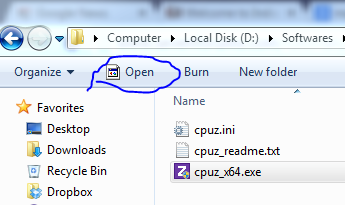
(a)

(b)
The only instance wherein I see icons are when I click a file associated with the software,
For example, a .mp4 video associated with VLC media player shows the VLC icon in the toolbar properly

I've googled to fix this for a few months now, but I haven't managed to yet.
So now I turn to your expertise, please help
I've had a issue with my windows 7 explorer's toolbar not displaying icons of all applications (.exe files).
I've tried to depict the issue in the images (a,b) below
(a)
(b)
The only instance wherein I see icons are when I click a file associated with the software,
For example, a .mp4 video associated with VLC media player shows the VLC icon in the toolbar properly
I've googled to fix this for a few months now, but I haven't managed to yet.
So now I turn to your expertise, please help
My Computer
- Computer type
- PC/Desktop
- Computer Manufacturer/Model Number
- Custom Build
- OS
- Windows 7 Ultimate 64bit
- CPU
- Intel i7 4790
- Memory
- 16 GB DDR3
- Graphics Card(s)
- Asus GTX 970


