Solved How to dual boot Windows 7 and Windows 8 on two hard drives

pragnesh89

New member
Power User
Local time
5:37 PM
Messages
173
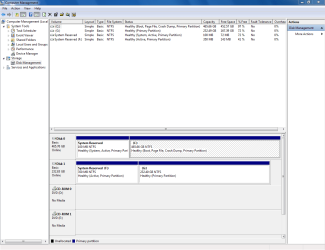
I have two hard drives. One with windows 7 and second with windows 8. When I add the windows 8 bootloader in windows 7 using EasyBCD, it adds it. When I restart the computer, it doesnt work and I only see an option for windows 7. When I go check EasyBCD again, I see that whatever I had added previously is erased. Attached is the screenshot from Computer management. C drive is Windows 7 and G drive is windows 8.
 

Attachments
  • Capture.PNG
    Capture.PNG
    32.9 KB · Views: 4

My Computer My Computer

At a glance

Windows 7 Professional 32 BitGenuine Intel(R) CPU T2080 @ 1.73GHz 1.73 GHz2GBATI Mobility Radeon X1400
Computer Manufacturer/Model Number
Dell Inspiron E 1505
OS
Windows 7 Professional 32 Bit
CPU
Genuine Intel(R) CPU T2080 @ 1.73GHz 1.73 GHz
Motherboard
DELL
Memory
2GB
Graphics Card(s)
ATI Mobility Radeon X1400
Sound Card
High Definition Audio Device
Screen Resolution
1280 by 800
Hard Drives
136 GB
Recovery 10 GB
Will 8 HD boot itself from BIOS Boot Menu key?

Did you add 8 by its Sys reserve partition drive letter, which should only be assigned for that purpose? If so try again. Then try adding it via 8 drive letter, then by Auto detect.

Try running a few Startup Repairs from 7 disk. If that fails try the Automatic repair from 8 disk. Report back.
 
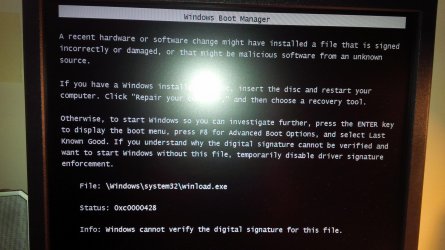
OK so I was able to get a bootloader working with older version of easybcd. Now when I press enter in the boot menu for Windows 8 I get this message.

I just checked to see that both hard drives work by removing the SATA cables for the windows 7 hard drive. Windows 8 was working just fine and loading up.
 

Attachments

  • IMG_20140407_170726.jpg
    IMG_20140407_170726.jpg
    455.4 KB · Views: 0

My Computer My Computer

At a glance

Windows 7 Professional 32 BitGenuine Intel(R) CPU T2080 @ 1.73GHz 1.73 GHz2GBATI Mobility Radeon X1400
Computer Manufacturer/Model Number
Dell Inspiron E 1505
OS
Windows 7 Professional 32 Bit
CPU
Genuine Intel(R) CPU T2080 @ 1.73GHz 1.73 GHz
Motherboard
DELL
Memory
2GB
Graphics Card(s)
ATI Mobility Radeon X1400
Sound Card
High Definition Audio Device
Screen Resolution
1280 by 800
Hard Drives
136 GB
Recovery 10 GB
In that case you might try adding Windows 7 from 8 using the latest version of EasyBCD.

Sometimes Automatic Repair - Run in Windows 8 will sort the Boot Menu. I was concerned that 8 SysReserved partition lacks the System flag meaning it is booting itself. But you said it boots with 7 unplugged so maybe there are some things that Repair can sort out to get the flag back on if necessary.

Once both HD's boot independently you can choose to set preferred to boot first in BIOS then boot the other using the BIOS Boot Menu key if you want. Normally in this condition you should be able to add the other one using EasyBCD from either.
 
It just doesnt seem to work. Dual booting windows 7 and XP was flawless and worked for 2 years. This one just isnt working. Windows 7 and Windows 8 works independently but after adding option for windows 8 in easybcd, it goes away upon reboot. I tried repair in both windows 7 and windows 8 independently. I even tried the two commands bootrec.exe/fixboot and fixmbr. It just doesnt work. I searched online and it seems that its quite frequent.

http://www.sevenforums.com/installa...64-windows-8-two-seperate-internal-hdd-s.html

look at post 10. I am having the same problem. I don't have a problem with installing windows 7 and windows 8 all over again on two hard drives if I know it will work.
 

My Computer My Computer

At a glance

Windows 7 Professional 32 BitGenuine Intel(R) CPU T2080 @ 1.73GHz 1.73 GHz2GBATI Mobility Radeon X1400
Computer Manufacturer/Model Number
Dell Inspiron E 1505
OS
Windows 7 Professional 32 Bit
CPU
Genuine Intel(R) CPU T2080 @ 1.73GHz 1.73 GHz
Motherboard
DELL
Memory
2GB
Graphics Card(s)
ATI Mobility Radeon X1400
Sound Card
High Definition Audio Device
Screen Resolution
1280 by 800
Hard Drives
136 GB
Recovery 10 GB
The Best Practice for running OS's on separate HD's is to boot them via the BIOS anyway. This keeps them independent so that each can come and go as you please.

Did you try adding 7 from 8 with the latest EasyBCD?

We can help you with this further if you want and will find a resolution, but I think you need to ask the mods to move it to its own thread, one which is descriptively titled so it will be found in searches for this issue and will help others for years to come.
 
It just doesnt seem to work. Dual booting windows 7 and XP was flawless and worked for 2 years. This one just isnt working. Windows 7 and Windows 8 works independently but after adding option for windows 8 in easybcd, it goes away upon reboot. I tried repair in both windows 7 and windows 8 independently. I even tried the two commands bootrec.exe/fixboot and fixmbr. It just doesnt work. I searched online and it seems that its quite frequent.

Dual boot Windows 7 X64 with Windows 8 on two seperate internal HDD's

Refer to post 10. I am having the same problem. I don't have a problem with installing windows 7 and windows 8 all over again on two hard drives if I know it will work.
 

My Computer My Computer

At a glance

Windows 7 Professional 32 BitGenuine Intel(R) CPU T2080 @ 1.73GHz 1.73 GHz2GBATI Mobility Radeon X1400
Computer Manufacturer/Model Number
Dell Inspiron E 1505
OS
Windows 7 Professional 32 Bit
CPU
Genuine Intel(R) CPU T2080 @ 1.73GHz 1.73 GHz
Motherboard
DELL
Memory
2GB
Graphics Card(s)
ATI Mobility Radeon X1400
Sound Card
High Definition Audio Device
Screen Resolution
1280 by 800
Hard Drives
136 GB
Recovery 10 GB
Just to be clear, you installed each OS on its respective hard drive while only that HD was connected, right?
 

My Computer My Computer

At a glance

Dual Boot: Windows 8.1 & Server 2012r2 VMs: K...A10 7700 Kavari SteamRoller8GB DDR3 SDRAM PC3-85001024MB ATI AMD Radeon R7 Graphics
Computer type
PC/Desktop
Computer Manufacturer/Model Number
Custom
OS
Dual Boot: Windows 8.1 & Server 2012r2 VMs: Kali Linux, Backbox, Matriux, Windows 8.1
CPU
A10 7700 Kavari SteamRoller
Motherboard
ASUS A88XM-PLUS (FM2+ )
Memory
8GB DDR3 SDRAM PC3-8500
Graphics Card(s)
1024MB ATI AMD Radeon R7 Graphics
Sound Card
Realtek High Definition Audio
Monitor(s) Displays
Samsung
Hard Drives
SSD Crucial 120gb
WD VelociRaptor 1tb
PSU
Rosewill Gaming 650w
Case
Rosewill Galaxy 2
Internet Speed
55/12
Antivirus
Malwarebytes, MSE, SAS
Browser
FireFox, Chrome
I asked the mods to copy your posts from XP Dual Boot thread to here, so finish those steps and report back here results of each.
 
Just to be clear, you installed each OS on its respective hard drive while only that HD was connected, right?

I think I did.
 

My Computer My Computer

At a glance

Windows 7 Professional 32 BitGenuine Intel(R) CPU T2080 @ 1.73GHz 1.73 GHz2GBATI Mobility Radeon X1400
Computer Manufacturer/Model Number
Dell Inspiron E 1505
OS
Windows 7 Professional 32 Bit
CPU
Genuine Intel(R) CPU T2080 @ 1.73GHz 1.73 GHz
Motherboard
DELL
Memory
2GB
Graphics Card(s)
ATI Mobility Radeon X1400
Sound Card
High Definition Audio Device
Screen Resolution
1280 by 800
Hard Drives
136 GB
Recovery 10 GB
I asked the mods to copy your posts from XP Dual Boot thread to here, so finish those steps and report back here results of each.

I've tried all the steps but it doesnt seem to work. Let me go ahead and redo everything. This time I will install windows 7 first in the hard drive and then windows 8.
 

My Computer My Computer

At a glance

Windows 7 Professional 32 BitGenuine Intel(R) CPU T2080 @ 1.73GHz 1.73 GHz2GBATI Mobility Radeon X1400
Computer Manufacturer/Model Number
Dell Inspiron E 1505
OS
Windows 7 Professional 32 Bit
CPU
Genuine Intel(R) CPU T2080 @ 1.73GHz 1.73 GHz
Motherboard
DELL
Memory
2GB
Graphics Card(s)
ATI Mobility Radeon X1400
Sound Card
High Definition Audio Device
Screen Resolution
1280 by 800
Hard Drives
136 GB
Recovery 10 GB
You said you tried everything suggested but what about booting via the BIOS which is best with separate HD's anyway?

Iif each OS Is booting via the BIOS then I'd use that method.
 
Ok I got it to work. I changed the hard drive positioning. Windows 8 first and windows 7 second. I was able to then use EasyBCD to make a boot for windows 7 from windows 8. And I chose windows 7 as default. So both actually work. Thanks for your help.
 

My Computer My Computer

At a glance

Windows 7 Professional 32 BitGenuine Intel(R) CPU T2080 @ 1.73GHz 1.73 GHz2GBATI Mobility Radeon X1400
Computer Manufacturer/Model Number
Dell Inspiron E 1505
OS
Windows 7 Professional 32 Bit
CPU
Genuine Intel(R) CPU T2080 @ 1.73GHz 1.73 GHz
Motherboard
DELL
Memory
2GB
Graphics Card(s)
ATI Mobility Radeon X1400
Sound Card
High Definition Audio Device
Screen Resolution
1280 by 800
Hard Drives
136 GB
Recovery 10 GB
I still would like to know why it doesnt work the other way around. Does windows 8 rewrite the boot sequence and override Windows 7?
 

My Computer My Computer

At a glance

Windows 7 Professional 32 BitGenuine Intel(R) CPU T2080 @ 1.73GHz 1.73 GHz2GBATI Mobility Radeon X1400
Computer Manufacturer/Model Number
Dell Inspiron E 1505
OS
Windows 7 Professional 32 Bit
CPU
Genuine Intel(R) CPU T2080 @ 1.73GHz 1.73 GHz
Motherboard
DELL
Memory
2GB
Graphics Card(s)
ATI Mobility Radeon X1400
Sound Card
High Definition Audio Device
Screen Resolution
1280 by 800
Hard Drives
136 GB
Recovery 10 GB
Actually I had already upgraded 8 to 8.1 before doing this. I was updating everything while trying to figure out why easybcd wasn't working. Thanks though. If I do have boot problems while updating again, I'll check back to the links you gave me.
 

My Computer My Computer

At a glance

Windows 7 Professional 32 BitGenuine Intel(R) CPU T2080 @ 1.73GHz 1.73 GHz2GBATI Mobility Radeon X1400
Computer Manufacturer/Model Number
Dell Inspiron E 1505
OS
Windows 7 Professional 32 Bit
CPU
Genuine Intel(R) CPU T2080 @ 1.73GHz 1.73 GHz
Motherboard
DELL
Memory
2GB
Graphics Card(s)
ATI Mobility Radeon X1400
Sound Card
High Definition Audio Device
Screen Resolution
1280 by 800
Hard Drives
136 GB
Recovery 10 GB
Back
Top