Solved How to edit track 0 but keep MBR intact

Westmalle

New member
Local time
12:49 AM
Messages
8
My PC works fine but I want to remove Nalpeiron security traces in sector 0 (located outside the MBR) from my PC. So my MBR is ok.
Win 7 runs on Raid 0 (2 1Tb drives used for that) and I have another 1Tb for datastorage available on the PC (can also be used to system backup for security reasons).
Who can help me to edit sector 0 as I have no knowledge at all about hex or lay-out of sector 0. So with a HEX editor in my hand I have no clue what I am doing.
In another forum someone figured out what I would like to accomplish:
"wipe out the track 0 except the MBR (in fact, only the sector(s) starting with FFC99A3B hex value, usually 60-63 physical)". Microsoft seems to have a tool called sector inspector which should be able to do this, but I have no clue how to apply this.
Can someone help me by providing step by step guidelines? I do have a good working system and would like to maintain that; I just would like to remove Nalpeiron traces in sector 0.
Thanks in advance.
 

My Computer My Computer

At a glance

Win 7 Pro 64I38GbXfX
Computer type
PC/Desktop
Computer Manufacturer/Model Number
Custom build
OS
Win 7 Pro 64
CPU
I3
Motherboard
MSI P55A-GD65
Memory
8Gb
Graphics Card(s)
XfX
Hard Drives
2 WD 1TB in Raid 0
1 WD 1TB for datastorage
Antivirus
Avira
Browser
IE Firefox
Nalpeiron is is used to copy protect certain software. Why do you wish to uninstall it?
 

My Computer My Computer

At a glance

Windows 10 Pro x64 ; Xubuntu x64Intel i7 860 @ 2.80 GHz O/C'ed to 4.0GHz16GB Corsair Vengance DDR3 @ 661 MHz Dual Cha...EVGA NVidia GTX 560 1024MB
Computer type
PC/Desktop
Computer Manufacturer/Model Number
Golden Mk. I.4
OS
Windows 10 Pro x64 ; Xubuntu x64
CPU
Intel i7 860 @ 2.80 GHz O/C'ed to 4.0GHz
Motherboard
Gigabyte P55A-UD3R Rev.1. Award BIOS F13
Memory
16GB Corsair Vengance DDR3 @ 661 MHz Dual Channel (9-9-9-24)
Graphics Card(s)
EVGA NVidia GTX 560 1024MB
Sound Card
Realtek Integrated
Monitor(s) Displays
Dual Samsung SyncMaster 2494HS
Screen Resolution
1920*1080 and 1920*1080
Hard Drives
1*Samsung 840 EVO 120GB SSD;
1*OCZ Vertex 2 60GB SSD;
2*Samsung F3 SpinPoint 1TB in RAID0;
1*Samsung F1 SpinPoint 1TB;
2*Western Digital 1TB External USB 3.0
1*Western Digital 500GB External USB 3.0
1*Seagate 500GB External USB 2.0
PSU
Thermaltake ToughPower QFan 750W
Case
Thermaltake Element S VK60001W2Z
Cooling
Corsair H60 Water Cooling, 2*230mm and 2*80mm case fans
Keyboard
Logitech G110
Mouse
Logitech MX518
Wiping out the Nalpeiron information in sector 0 will cause the Nalpeiron security to stop working and as such the software. I no longer use the Nalpeiron software. However the Nalpeiron traces can cause problems with Windows (there have been issues with Win 8 and Nalpeiron in sector 0). I would like to remove the Nalpeiron from my PC completly to avoid any potential issues before they arise.
 

My Computer My Computer

At a glance

Win 7 Pro 64I38GbXfX
Computer type
PC/Desktop
Computer Manufacturer/Model Number
Custom build
OS
Win 7 Pro 64
CPU
I3
Motherboard
MSI P55A-GD65
Memory
8Gb
Graphics Card(s)
XfX
Hard Drives
2 WD 1TB in Raid 0
1 WD 1TB for datastorage
Antivirus
Avira
Browser
IE Firefox
Why not just stop the service, instead of tampering with the disk sectors?

1. Hit windows key + R to open Run command.
2. Type in msconfig.exe and hit enter
3. go to the Services tab on the top
4. Uncheck the "Nalpeiron Licensing Service (Nalpeiron Ltd.)
5. Click Apply
6. Restart the computer
 

My Computer My Computer

At a glance

Windows 10 Pro x64 ; Xubuntu x64Intel i7 860 @ 2.80 GHz O/C'ed to 4.0GHz16GB Corsair Vengance DDR3 @ 661 MHz Dual Cha...EVGA NVidia GTX 560 1024MB
Computer type
PC/Desktop
Computer Manufacturer/Model Number
Golden Mk. I.4
OS
Windows 10 Pro x64 ; Xubuntu x64
CPU
Intel i7 860 @ 2.80 GHz O/C'ed to 4.0GHz
Motherboard
Gigabyte P55A-UD3R Rev.1. Award BIOS F13
Memory
16GB Corsair Vengance DDR3 @ 661 MHz Dual Channel (9-9-9-24)
Graphics Card(s)
EVGA NVidia GTX 560 1024MB
Sound Card
Realtek Integrated
Monitor(s) Displays
Dual Samsung SyncMaster 2494HS
Screen Resolution
1920*1080 and 1920*1080
Hard Drives
1*Samsung 840 EVO 120GB SSD;
1*OCZ Vertex 2 60GB SSD;
2*Samsung F3 SpinPoint 1TB in RAID0;
1*Samsung F1 SpinPoint 1TB;
2*Western Digital 1TB External USB 3.0
1*Western Digital 500GB External USB 3.0
1*Seagate 500GB External USB 2.0
PSU
Thermaltake ToughPower QFan 750W
Case
Thermaltake Element S VK60001W2Z
Cooling
Corsair H60 Water Cooling, 2*230mm and 2*80mm case fans
Keyboard
Logitech G110
Mouse
Logitech MX518
In order to remove Nalpeiron one need to wipe out certain parts of sector 0. Nalpeiron causes sometimes problems on PC's. As an example with SDL Strados software (which uses the Nalpeiron security). There is a thread on the SDL Strados company which involves participation of the SDL Strados support staff that concludes that the only way to remove Nalpeiron side effects is to remove it from the sector 0.
Here is the link in case you would like to read about it and see that disabling the service will not do the job. License Table Altered (SDL Trados support)

My original request was how to edit certain parts of sector 0. Could you help me with that? I hope I clarified why I ask the question and that stopping services will not do the job. Cleaning certain parts of sector 0 will prevent any software depending on Nalpeiron to run (as you can read in the SDL Strados discussion). Just like removing the 4 wheels of a car will for sure prevent the car from driving.
 

My Computer My Computer

At a glance

Win 7 Pro 64I38GbXfX
Computer type
PC/Desktop
Computer Manufacturer/Model Number
Custom build
OS
Win 7 Pro 64
CPU
I3
Motherboard
MSI P55A-GD65
Memory
8Gb
Graphics Card(s)
XfX
Hard Drives
2 WD 1TB in Raid 0
1 WD 1TB for datastorage
Antivirus
Avira
Browser
IE Firefox
It's a bit above our pay grade but someone may know. If not what might work is to save an image of the HD using the premium Acronis imaging/cloning app which comes free with any WD drive in the mix. WD Acronis free cloning app - The Manual is there with the download and easy to understand.

Then wipe the HD with Diskpart Clean Command to clear the boot sector and MBR, reimage it choosing not to save Track 0 and MBR, then write a new MBR by marking your boot partition Active then running Startup Repair - Run up to 3 Separate Times - the same repair which always works if a newly-reimaged WIn7 will not start, as it won't if you don't replace Track0 and MBR. Partition - Mark as Active

Otherwise I'd Clean Reinstall after wiping the HD and avoid the problematic software if possible.

http://www.sevenforums.com/tutorials/71432-partition-mark-active.html
 
Dear Gregrocker: I am amazed by your knowledge. It took me quite some time on Google to better realise the valuable information you provide me. Plesase be aware that I am just a beginner. I think I can perform your guideline steps (with many hours of Google guidance and patience - but one is never too old to learn!) and also am aware that your suggested steps are a very secured way do solve the issue. I highly appreciate your support !!

Pleae forgive me if I sound stubborn (English is also not my motherlanguage) but I think that overwriting parts of the sector 0 outside the MBR area with an Hex editor (e.g. HxD) requires just one or a few commands to accomplish. It will save also a lot of time and steps to perform compared to your solution. So would it not be easier to just issue some Hex editor commands (e.g. with HxD) to perform the task of overwriting parts of sector 0 and keep the MBR intact. I am interested in wipe out the track 0 except the MBR (in fact, only the sector(s) starting with FFC99A3B hex value, usually 60-63 physical).

There is a tool called sector inspector from Microsoft that easily can do the job, but it is not certified for Win 7.

So is there a set of Hex editor (e.g. HxD) commands I can use to accomplish the task?
 

My Computer My Computer

At a glance

Win 7 Pro 64I38GbXfX
Computer type
PC/Desktop
Computer Manufacturer/Model Number
Custom build
OS
Win 7 Pro 64
CPU
I3
Motherboard
MSI P55A-GD65
Memory
8Gb
Graphics Card(s)
XfX
Hard Drives
2 WD 1TB in Raid 0
1 WD 1TB for datastorage
Antivirus
Avira
Browser
IE Firefox
I think I found a solution that cleans sector 0 and leaves the MBR intact. As I am not an experienced Win 7 user I highly appreciate input from more experienced users to the soltuion I think I found.
MBR Tool from MBRtool manual has the option
/CT0 - clean track 0.
A disk must be selected (/DSK:0 - /DSK:3). This option will clean track 0 on disk. This means that track 0 will be wiped except for the MBR. This can be used to remove disk-overlay leftovers or to clear the MBRtool backups. This would also wipe signatures left by for instance Symantec Ghost or Powerquest Partition Magic.


Any experiences with MBR Tool ? Any thoughts/considerations/warnings on the usage of it?
 

My Computer My Computer

At a glance

Win 7 Pro 64I38GbXfX
Computer type
PC/Desktop
Computer Manufacturer/Model Number
Custom build
OS
Win 7 Pro 64
CPU
I3
Motherboard
MSI P55A-GD65
Memory
8Gb
Graphics Card(s)
XfX
Hard Drives
2 WD 1TB in Raid 0
1 WD 1TB for datastorage
Antivirus
Avira
Browser
IE Firefox
You just need to write back standard mbr program code. Bootrec can do that.

Inactive code outside the mbr has no effect, if there are no references to it.
 

My Computer My Computer

At a glance

Windows
OS
Windows
Hi Pallesenw, Thanks for your input. I checked the options for Bootrec on the Microsoft website but could not find an option that cleans sector 0. In my situation replacing the MBR has no use as my machine operates fine with the current MBR. I am trying to achive to clean leftovers in sector 0 outside the MBR so my system is clean there to avoid future problems before they arise. The leftovers I have on my system are known to be causing problems (e.g. Win 8 install or the Strados example above).
 

My Computer My Computer

At a glance

Win 7 Pro 64I38GbXfX
Computer type
PC/Desktop
Computer Manufacturer/Model Number
Custom build
OS
Win 7 Pro 64
CPU
I3
Motherboard
MSI P55A-GD65
Memory
8Gb
Graphics Card(s)
XfX
Hard Drives
2 WD 1TB in Raid 0
1 WD 1TB for datastorage
Antivirus
Avira
Browser
IE Firefox
Im with Greg formatting HDD and reimaging would be the easiest solution, then windows startup repair will rebuild the rest for you
Take a full system image before you start and you got nothing to lose :)
 

My Computer My Computer

At a glance

Win7 Ultimate X64Intel i5 3570K8GB DDR3 1600Onboard
Computer type
PC/Desktop
Computer Manufacturer/Model Number
Pauly Special
OS
Win7 Ultimate X64
CPU
Intel i5 3570K
Motherboard
Gigabyte Z77X-DS3H
Memory
8GB DDR3 1600
Graphics Card(s)
Onboard
Sound Card
Onboard
Screen Resolution
1280x1024
Hard Drives
Samsung 840 Evo SSD (OS)
1TB Spinner (Data)
PSU
800W Arctic
Case
Cooler Master
Cooling
3x120mm Fans
Keyboard
MS Wireless
Mouse
MS Wireless
Internet Speed
20M
I'm referring to fixmbr.

Why do you think inactive code outside the mbr will conflict with anything? Maybe if you want to install Nalpeiron again later, there might be something to think about, because it might look for data there.
 

My Computer My Computer

At a glance

Windows
OS
Windows
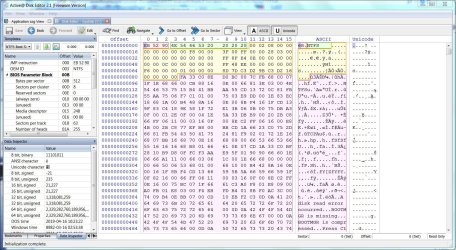
I don't normally suggest tinkering with disk mods but I've been using Active Disk Editor from LSoft Technologies. The link is the free version. I have their NTFS Data Recovery package that includes several disk utilities including the disk editor and a partition editor. Slick stuff but use at your own risk. What's really nice about it is that you can see and learn a lot about how various data blocks are identified.
 

Attachments

  • Disk Editor.JPG
    Disk Editor.JPG
    304.2 KB · Views: 9

My Computer My Computer

At a glance

Windows 7 Pro-x64i7-2600 3.4GHz - 3.8GHz Turbo8Gb - 2x4GB, Muskin 991770 PC3-1333Integrated Intel HD 2000
Computer type
PC/Desktop
Computer Manufacturer/Model Number
Built 2/11/2011
OS
Windows 7 Pro-x64
CPU
i7-2600 3.4GHz - 3.8GHz Turbo
Motherboard
Intel DH67BL-B3
Memory
8Gb - 2x4GB, Muskin 991770 PC3-1333
Graphics Card(s)
Integrated Intel HD 2000
Sound Card
Integrated Intel 10.1 HD, RealTek ALC892
Monitor(s) Displays
Asus LCD VH222H, Haier HL24XSL2a
Screen Resolution
1920x1080, 1920x1080
Hard Drives
Crucial SSD C300-128Gb,
Western Digital WD5002AALX - 500Gb,
Western Digital WD7501AALS - 750Gb
PSU
Seasonic 650W 80+ Gold Modular
Case
Rosewill Defender
Cooling
Stock CPU, Four 120mm case fans, PCH fan added
Keyboard
Logitech EX100 Y-RBH94 Wireless
Mouse
Logitech EX100 M-RCE95 Wireless
Internet Speed
3.0/1.5 Mbs
Antivirus
Microsoft Security Essentials
Browser
Microsoft Internet Explorer 11
Other Info
Antec Veris Premier-Multimedia IR Station,
Cyber Accoustics-3602 Speakers,
AFT XM-5U Card Reader,
Hauppauge TV-HVR-2250,
Sony LX300 USB Turntable
Hi All,

I solved my question by using an Hex editor (HxD) and manually applied the desired action to the sectors in track 0. I decided to go for this option as I felt confident after studying a lot of examples on how to do this. However, all who contributed in helping me triggered me to sort out things and learn from them. As a newbie I do not have the knowledge you guys have and I am thankfull that thanks to your help I learned so much more about Windows. One is never too old to learn. Again: Many thanks to all of you !
 

My Computer My Computer

At a glance

Win 7 Pro 64I38GbXfX
Computer type
PC/Desktop
Computer Manufacturer/Model Number
Custom build
OS
Win 7 Pro 64
CPU
I3
Motherboard
MSI P55A-GD65
Memory
8Gb
Graphics Card(s)
XfX
Hard Drives
2 WD 1TB in Raid 0
1 WD 1TB for datastorage
Antivirus
Avira
Browser
IE Firefox
Hi Westmalle, any chance of some details about the actual procedure for wiping track 0 in the hex editor? I'm in the same situation and don't know what to do.
 

My Computer My Computer

At a glance

Windows 7 Ultimate 32 bit
Computer type
PC/Desktop
OS
Windows 7 Ultimate 32 bit
Hi,

I use the HxD hexeditor. Once installed you open with right click to activate administrator rights. Once in HxD go to menuoption Extras and open disk. Be carefull as you now can edit sectors !!! If you do not know what you are doing leave the program !!!!!! But now you can jump to each desired sector and overwrite values at any desired offset location. I typically overwrite by using the 0. Once the changes are applied I leave the HxD editor and restart the PC. In my case I overwrite the sectors I want to blank out.
So the first thing you must sort out is which sectors you want to change, then use HxD to apply the changes you want to implement. I hope this helps you.
 

My Computer My Computer

At a glance

Win 7 Pro 64I38GbXfX
Computer type
PC/Desktop
Computer Manufacturer/Model Number
Custom build
OS
Win 7 Pro 64
CPU
I3
Motherboard
MSI P55A-GD65
Memory
8Gb
Graphics Card(s)
XfX
Hard Drives
2 WD 1TB in Raid 0
1 WD 1TB for datastorage
Antivirus
Avira
Browser
IE Firefox
Hi websurfer0,

Welcome to SevenForums.

Westmalle's last post was on 15 May 2013 and that was his last activity. He hasn't logged in since then.So I don't think he is going to answer your query.

If you know what to edit in Sector 0, then you can use bootice to do that.

If yours is a 32bit system then download the x86 version. Extract the BOOTICEx86_v1.321.rar into a folder named bootice32. It will be a single BOOTICEx86.exe which you will click to run. (I would advise you to create the bootice folder on a pendrive, extract the rar file into it and run booticeX86.exe from that pendrive.)

Select your correct drive and then click on Sector Edit. It will straightaway show you Sector 0. Select the field which you want to edit, type the hexadecimal you want to put. After you finish editing, click on the save button in the Toolbar to write it to the disk.

Familiarise yourself on how to use bootice here: http://www.sevenforums.com/hardware-devices/310295-lost-partitions.html#post2584426

Note:

1. Before you make any changes to Sector 0, back it up first. (By default Bootice will save it to the folder in which it is resident and in this case into the bootice folder in the pendrive.) If you muckup Sector 0 you can restore it with the backup.

2.If you are modifying Sector 0 of your system drive and if you muck it up, your system may become unbootable. To restore the backup from your pendrive, you may have to run bootice from a WinPE disk with bootice in it.

EDIT: Oh! What a surprise! I see Westmalle here.And he has posted. (Our posts crossed.) The OP can choose HexEditor or Bootice whichever he wants, But I would think bootice is a lot easier.
 
Last edited:

My Computer My Computer

At a glance

Windows 7 Home Premium 32 bit
OS
Windows 7 Home Premium 32 bit
Hi guys, thank you both very much for your answers! However, I will stay with HxD because Westmalle did what I want to do in that program.

So, @Westmalle - I am trying to do exactly what you did. In fact, I found your question here by googling the very same post from Proz that you quoted.

Now, I have opened the HxD editor and I have my disk opened in it. What I still don't understand is - which numbers represent "track 0"? Is track 0 a row or a column? HxD has marked sectors, but which numbers represent tracks? To quote the poster on Proz: "wipe out the track 0 except the MBR (in fact, only the sector(s) starting with FFC99A3B hex value, usually 60-63 physical)" - I need to find that track. I'm grateful for any help you can give.
 

My Computer My Computer

At a glance

Windows 7 Ultimate 32 bit
Computer type
PC/Desktop
OS
Windows 7 Ultimate 32 bit
No problem.

While you wait for WestMalle, please do the following and check.

1. Open the physical disk in HxD. Leave "Open as Readonly" checked as it is. That means you won't be able to write anything to the disk even if you try to.

2. Using the Right arrow, increment and go to Sector 63 and examine it. Does it appear like this with NTFS marked?

06-08-2015 17-56-54.jpg

If yes that will be the volume boot sector where your first partition begins. If you modify anything in it, you will lose that partition and won't be able to access it.

3. Now decrement and go to sector 62, 61, and 60 and examine each sector. The sector/s that start with FF C9 9A 3B is most probably the one that carries the license information and that is the one most probably you have to zero and write to the disk to get rid of it.

Just report and wait for Westmalle to give further instructions on how to zero it and save it to disk.( I hadn't done that with HxD so far, for I had always used Bootice to modify/ write/ save/ restore in all my experiments on HDDs)
 

My Computer My Computer

At a glance

Windows 7 Home Premium 32 bit
OS
Windows 7 Home Premium 32 bit
Back
Top