Solved how to find out if packard bell pc supports network booting?

evansj

New member
Local time
1:35 AM
Messages
18
Hi,
2 years ago i purchased my packard bell easynote tk85 from currys, anyway i would like to now how i can find out if my pc can boot over a network using PXE, are there any tools you need me to run or any extra info you need?

Thanks,
James
 

My Computer My Computer

At a glance

windows7 home premium 64 bit
Computer Manufacturer/Model Number
packard bell easy note tk85
OS
windows7 home premium 64 bit
Mouse
Touch Pad
Antivirus
AVAST Free Edition!
Browser
Google Chrome

My Computer My Computer

At a glance

Windows 7 Professional x64 SP1 ; Windows Serv...Intel Core i5 2400 @ 3.10GHz8.0GB DDR3 @ 665MHz (2GBx4)AMD Radeon HD 6870
Computer type
PC/Desktop
Computer Manufacturer/Model Number
Custom Built
OS
Windows 7 Professional x64 SP1 ; Windows Server 2012 R2 Standard
CPU
Intel Core i5 2400 @ 3.10GHz
Motherboard
Foxconn H67MP-S/-V/H67MP
Memory
8.0GB DDR3 @ 665MHz (2GBx4)
Graphics Card(s)
AMD Radeon HD 6870
Sound Card
Realtek High Definition Audio
Monitor(s) Displays
AOC 2243W & SMB1930NW
Screen Resolution
1440x900 & 1920x1080
Hard Drives
977GB Seagate ST31000524AS ATA Drive (SATA)
250GB WD iSCSI attached Drive
PSU
750W Gaming PSU
Case
Novatech Night
Cooling
Fan
Keyboard
Dell Standard PS/2 Keyboard
Mouse
R.A.T 07 Gaming Mouse
Internet Speed
Download: 10 Mbps Ping: 30ms Upload: 0.81 Mbps
Browser
Google Chrome
Other Info
Optiarc DVD RW AD-5260S ATA Device
hi,
its a Broadcom Netlink (TM) Gigabit Ethernet


I also noticed in the BIOS something saying Network boot: LEGACY PCI DEVICE

Would this be it,
Thanks again
James
 

My Computer My Computer

At a glance

windows7 home premium 64 bit
Computer Manufacturer/Model Number
packard bell easy note tk85
OS
windows7 home premium 64 bit
Mouse
Touch Pad
Antivirus
AVAST Free Edition!
Browser
Google Chrome
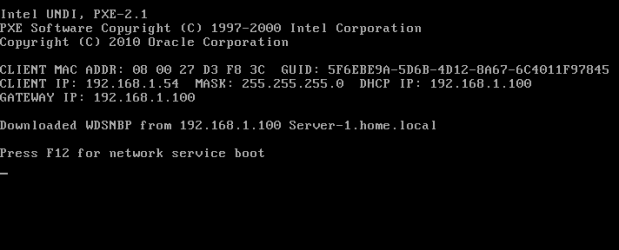
A quick check shows that the NIC does support PXE boot. In the BIOS you may need to look for PXE boot or network boot and need to enable it. After that you need to make sure that your NIC is set above your HDD in the boot priority. Then you may PXE boot.

Please remember that you need to have the appropriate configuration options in DHCP in order to sucessfully network boot. For example:

PXE.PNG

In order to PXE boot for Windows OS deployment the WDS server needs to be configured to listen on UDP port 67 so that DHCP discover messages can be received.

Hope This Helps,
Josh :)
 

My Computer My Computer

At a glance

Windows 7 Professional x64 SP1 ; Windows Serv...Intel Core i5 2400 @ 3.10GHz8.0GB DDR3 @ 665MHz (2GBx4)AMD Radeon HD 6870
Computer type
PC/Desktop
Computer Manufacturer/Model Number
Custom Built
OS
Windows 7 Professional x64 SP1 ; Windows Server 2012 R2 Standard
CPU
Intel Core i5 2400 @ 3.10GHz
Motherboard
Foxconn H67MP-S/-V/H67MP
Memory
8.0GB DDR3 @ 665MHz (2GBx4)
Graphics Card(s)
AMD Radeon HD 6870
Sound Card
Realtek High Definition Audio
Monitor(s) Displays
AOC 2243W & SMB1930NW
Screen Resolution
1440x900 & 1920x1080
Hard Drives
977GB Seagate ST31000524AS ATA Drive (SATA)
250GB WD iSCSI attached Drive
PSU
750W Gaming PSU
Case
Novatech Night
Cooling
Fan
Keyboard
Dell Standard PS/2 Keyboard
Mouse
R.A.T 07 Gaming Mouse
Internet Speed
Download: 10 Mbps Ping: 30ms Upload: 0.81 Mbps
Browser
Google Chrome
Other Info
Optiarc DVD RW AD-5260S ATA Device
Thanks,
Josh for all your help, much appreciated

I will now mark this thread as solved.
 

My Computer My Computer

At a glance

windows7 home premium 64 bit
Computer Manufacturer/Model Number
packard bell easy note tk85
OS
windows7 home premium 64 bit
Mouse
Touch Pad
Antivirus
AVAST Free Edition!
Browser
Google Chrome
No worries, I'm glad I could help :)

Josh :cool:
 

My Computer My Computer

At a glance

Windows 7 Professional x64 SP1 ; Windows Serv...Intel Core i5 2400 @ 3.10GHz8.0GB DDR3 @ 665MHz (2GBx4)AMD Radeon HD 6870
Computer type
PC/Desktop
Computer Manufacturer/Model Number
Custom Built
OS
Windows 7 Professional x64 SP1 ; Windows Server 2012 R2 Standard
CPU
Intel Core i5 2400 @ 3.10GHz
Motherboard
Foxconn H67MP-S/-V/H67MP
Memory
8.0GB DDR3 @ 665MHz (2GBx4)
Graphics Card(s)
AMD Radeon HD 6870
Sound Card
Realtek High Definition Audio
Monitor(s) Displays
AOC 2243W & SMB1930NW
Screen Resolution
1440x900 & 1920x1080
Hard Drives
977GB Seagate ST31000524AS ATA Drive (SATA)
250GB WD iSCSI attached Drive
PSU
750W Gaming PSU
Case
Novatech Night
Cooling
Fan
Keyboard
Dell Standard PS/2 Keyboard
Mouse
R.A.T 07 Gaming Mouse
Internet Speed
Download: 10 Mbps Ping: 30ms Upload: 0.81 Mbps
Browser
Google Chrome
Other Info
Optiarc DVD RW AD-5260S ATA Device
Back
Top