
more
Ever notice an annoying, persistent lag every ten seconds or so when you're watching a YouTube (or other) video in Firefox? Reader Bernard Sandberg has, and he's written in with a smart about:config that solves the problem for him.
Although Bernard's talking specifically about YouTube, this tweak should help fix any similar jumpiness in Firefox.Many users, myself included, visit YouTube on an almost daily basis. Ever since Firefox version 2.0 implemented the session restore function, when you are watching a video on YouTube (perhaps on other video sites as well, I haven't really tested that), you may notice a tiny freeze-up of the video every 10 seconds or so. This happens because the session restore is by default set to save all open tabs every 10 seconds. This is especially noticeable if you happen to have a lot of tabs open at once.We did a bit of research, and it looks like Bernard's not alone with his solution. I've experienced this problem plenty in Firefox, so it's great to see a relatively simple solution, even if it does mean sacrificing a bit in the way of up-to-the-minute session saving. If you give it a try, let's hear if it does the trick for you in the comments (assuming you've experienced this problem in the first place).
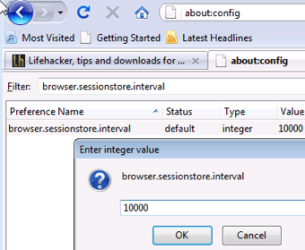
The quick fix for this problem, at least for my own sake, is to increase the time between each of the saves performed by session restore. By opening about:config in your Firefox address bar, then typing browser.sessionstore.interval in the filter box, you'll see a value of 10000, which is in milliseconds. (Meaning your session is saved every 10 seconds.) I changed this to 300000, or every 5 minutes, as I don't have the urgent need for tab restoration. If you feel like being more on the safe side, try increasing it to something a bit lower, say 120000, or every 2 minutes.
My Computer
At a glance
Windows 7 Professional 64-bitIntel E8400 3GHzKingston PC3-10700H 4GbXFX Radeon HD 5850 BlackEd.
- Computer Manufacturer/Model Number
- self built
- OS
- Windows 7 Professional 64-bit
- CPU
- Intel E8400 3GHz
- Motherboard
- Intel DX48BT2
- Memory
- Kingston PC3-10700H 4Gb
- Graphics Card(s)
- XFX Radeon HD 5850 BlackEd.
- Sound Card
- Asus Xonar DG
- Monitor(s) Displays
- 2x Samsung SM-T220HD 22"
- Screen Resolution
- 1680x1050 on two monitors
- Hard Drives
- OCZ Vertex 2 120gb 3.5" (OS)
Seagate Momentus XT 500gb
Samsung F3 1Tb (games)
2x Samsung F1 1Tb
- PSU
- Thermaltake ToughPower 850w
- Case
- Thermaltake Armor
- Cooling
- Scythe Mugen II
- Keyboard
- Microsoft Comfort Curve USB
- Mouse
- Razer Diamondback 3G
- Internet Speed
- 8128/443

