
How to fix aspect ratio problem

pypedreams

New member
Local time
1:50 PM
Messages
10
Location
Liverpool
Hello,

I've recently started having problems with my computers aspect ration when playing older PC games, as the picture now looks slightly stretched (full screen) even after changing the game resolution. I only have Intel integrated graphics, and the properties scaling is set to maintain display scaling. Could someone please advise me on how to possibly rectify the issue.
 

My Computer

OS
windows 7 home premium service pack 1 x64

My Computer

Computer type
PC/Desktop
Computer Manufacturer/Model Number
Own build (new) Desk1 / Asus ROG Win 7 / Desk2 1st build
OS
Desk1 7 Home Prem / Desk2 10 Pro / Main lap Asus ROG 10 Pro 2 laptop Toshiba 7 Pro Asus P2520 7 & 10
CPU
Desk1 i5 3750K / Laptop i7 GTX 860M / Desk2 i5 2500
Motherboard
Desk1 Asus P877-V / Desk2 Gigabyte H67 UD3H / Laptop ?
Memory
Desk1 8GB (1866) / Desk2 16GB (1333) / Laptop 8Gb DDR3
Graphics Card(s)
Desk 1& 2NVidia GTX 650 & Laptops on board Intel
Sound Card
Desk 1 & 2 -XONAR DG Realtek High Def audio Laptop
Monitor(s) Displays
Desk 1 Benq HD 2450 / Desk2 Philips 24" / Laptop 17.5"
Screen Resolution
1920x1080 D1 & D2 & Laptop 1
Hard Drives
Desk1 Samsung 120GB 830 SSD
Asus ROG 256GB 850 Pro SSD
Desk2 Samsung 840 256 SSD
Toshiba 120GB EVO
PSU
Desk 1 Corsair HX 1050/ Laptop ? / Desk 2 Corsair HX 650
Case
Desk 1 Cooler HAF XM ? Toshiba laptop / Desk2 Coolermaster
Cooling
Fans on all Desk1 -2 Desk2 - all Coolermasters 5 Laptop ?
Keyboard
Desk 1 MS Sidewinder X6 Desk 2 MS Sidewinder X 4
Mouse
Desk 1&2 - Gigabyte MS 900 gamer - laptop - Logitec wireless
Internet Speed
ADSL2+
Other Info
One other Desktop (tester) and spare Toshba laptop both with SSD's
Running Kaspersky 2016 ISS on all machines config'd identically
Logitec audio stereo systems on each machine (x3)
Canon MG5250MFC
Router/modem TP-Link running WPA2SK
It's a fairly old machine, but I tend to only play low spec PC games. My basic system specs:

OS Name Microsoft Windows 7 Home Premium
Version 6.1.7600 Build 7600
Other OS Description Not Available
OS Manufacturer Microsoft Corporation
System Manufacturer Packard Bell
System Model imedia S3810
System Type x64-based PC
Processor Intel(R) Core(TM) i3 CPU 540 @ 3.07GHz, 3067 Mhz, 2 Core(s), 4 Logical Processor(s)
BIOS Version/Date American Megatrends Inc. P01-A1, 31/03/2010
SMBIOS Version 2.6
Windows Directory C:\Windows
System Directory C:\Windows\system32
Boot Device \Device\HarddiskVolume2
Locale United Kingdom
Hardware Abstraction Layer Version = "6.1.7600.16385"
Installed Physical Memory (RAM) 3.00 GB
Total Physical Memory 2.93 GB
Available Physical Memory 1.92 GB
Total Virtual Memory 5.86 GB
Available Virtual Memory 4.60 GB
Page File Space 2.93 GB
 

My Computer

OS
windows 7 home premium service pack 1 x64
If it used to work fine and now does not, logically the most likely change is a driver update. You might look to see if there is a previous driver to roll back to. Alternatively you can pick up a very capable add-in display adapter for very short money. I was recently impressed with the visual enhancements in some of my older games following an upgrade to a sub-$100 card.
 

My Computer

Computer type
PC/Desktop
Computer Manufacturer/Model Number
Custom
OS
7 x64 Ultimate
CPU
AMD Ryzen 5
Motherboard
Gigabyte GA-AB350-Gaming
Memory
16GB DDR4
Graphics Card(s)
Radeon R7 360
Monitor(s) Displays
2 x Dell U2518D
Screen Resolution
2560x1440 2560x1440
Hard Drives
WD 500GB x2
Samsung SSD 128MB (OS)
XPG SX8200 Pro M.2 2280 1TB
PSU
Antec 500
Cooling
Hyper 212 EVO
Keyboard
Logitech cordless K800
Mouse
Logitech M510
Antivirus
Avira
I'd rather try a less drastic approach to resolving the aspect ratio issue. I'm not very tech-savvy, and driver updates can possibly make or break a computer, especially if you've never done it before.

I forgot to mention the aspect ratio problem originally started, after altering the resolution several times for an earlier installed game, then suddenly the monitor screen looked slightly stretched, but after installing another game, the issue still persisted. If anyone has any other advice, it would be much appreciated.
 

My Computer

OS
windows 7 home premium service pack 1 x64
Have you reset the screen res to the recommended settings through Control Panel>Appearance>Display>Screen Resolution?
 

My Computer

Computer type
PC/Desktop
Computer Manufacturer/Model Number
Custom
OS
7 x64 Ultimate
CPU
AMD Ryzen 5
Motherboard
Gigabyte GA-AB350-Gaming
Memory
16GB DDR4
Graphics Card(s)
Radeon R7 360
Monitor(s) Displays
2 x Dell U2518D
Screen Resolution
2560x1440 2560x1440
Hard Drives
WD 500GB x2
Samsung SSD 128MB (OS)
XPG SX8200 Pro M.2 2280 1TB
PSU
Antec 500
Cooling
Hyper 212 EVO
Keyboard
Logitech cordless K800
Mouse
Logitech M510
Antivirus
Avira
I assume you can also reset the screen res, by simply right-clicking and choose screen resolution, although I've never altered my recommended settings (1920 x 1080). Thanks for the advice.
 

My Computer

OS
windows 7 home premium service pack 1 x64
Did you create a custom setting for your video adapter to optimize visual performance in a particular game? Intel Graphics Control Panel?
 

My Computer

Computer type
PC/Desktop
Computer Manufacturer/Model Number
Custom
OS
7 x64 Ultimate
CPU
AMD Ryzen 5
Motherboard
Gigabyte GA-AB350-Gaming
Memory
16GB DDR4
Graphics Card(s)
Radeon R7 360
Monitor(s) Displays
2 x Dell U2518D
Screen Resolution
2560x1440 2560x1440
Hard Drives
WD 500GB x2
Samsung SSD 128MB (OS)
XPG SX8200 Pro M.2 2280 1TB
PSU
Antec 500
Cooling
Hyper 212 EVO
Keyboard
Logitech cordless K800
Mouse
Logitech M510
Antivirus
Avira
I've never had a reason to alter Intel custom settings, as I only play older low-spec games on my desktop. My computer isn't capable of running high-spec graphics, so I don't really require optimizing visual performance.
 
Last edited:

My Computer

OS
windows 7 home premium service pack 1 x64
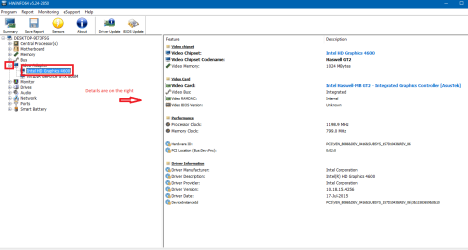
Hmm I was going to say something about the Intel graphics too but the specs on the CPU only show Intel graphics and nowadays they specify a series like mine runs Intel 4600 series see pic.

If you gnat some way of telling see this
Using HW Info
PART A:
You can test the volts on the PSU with HW Info HWiNFO, HWiNFO32/64 - Download < download the right bit version and close the right hand window select Sensors and scroll down to the power section where you will see what the volts are doing see my pic. In my pic the section (Nuvoton) with VBATT is a dead give away you are in the section for the rail voltages. There are other section titles and one that pops up often is ITE
Now the voltage on the different rails have to be within 5% =+/- of what is required or the machine will not work properly if at all.
IE
12v = 11.4v min to 12.6max
5v = 4.75v min 5.25v max
3.3v = 3.135v min to 3.465v max
See this for the rail voltage info
PSUs 101: A Detailed Look Into Power Supplies (Section 2.)
The original right hand window shows the machine running and is handy for that but for looking at the components in some detail close it and use the main left hand side panel
FOR OTHER COMPONENTS
PART B:
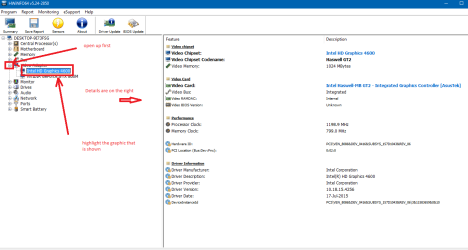
Open each small square with + in it on the section the components are in and then click on the individual component/s (it will highlight in blue) - in the right hand side will appear all sorts of details including brands speeds and other essential info that particular device. See pic for example.

Run PART B: and click on where I have marked it will tell you just what graphics you have in the machine and more. Post back what you find there is another way but this is the quickest.
 

Attachments

  • HW GRAPHICS.PNG
    HW GRAPHICS.PNG
    27.3 KB · Views: 2

My Computer

Computer type
PC/Desktop
Computer Manufacturer/Model Number
Own build (new) Desk1 / Asus ROG Win 7 / Desk2 1st build
OS
Desk1 7 Home Prem / Desk2 10 Pro / Main lap Asus ROG 10 Pro 2 laptop Toshiba 7 Pro Asus P2520 7 & 10
CPU
Desk1 i5 3750K / Laptop i7 GTX 860M / Desk2 i5 2500
Motherboard
Desk1 Asus P877-V / Desk2 Gigabyte H67 UD3H / Laptop ?
Memory
Desk1 8GB (1866) / Desk2 16GB (1333) / Laptop 8Gb DDR3
Graphics Card(s)
Desk 1& 2NVidia GTX 650 & Laptops on board Intel
Sound Card
Desk 1 & 2 -XONAR DG Realtek High Def audio Laptop
Monitor(s) Displays
Desk 1 Benq HD 2450 / Desk2 Philips 24" / Laptop 17.5"
Screen Resolution
1920x1080 D1 & D2 & Laptop 1
Hard Drives
Desk1 Samsung 120GB 830 SSD
Asus ROG 256GB 850 Pro SSD
Desk2 Samsung 840 256 SSD
Toshiba 120GB EVO
PSU
Desk 1 Corsair HX 1050/ Laptop ? / Desk 2 Corsair HX 650
Case
Desk 1 Cooler HAF XM ? Toshiba laptop / Desk2 Coolermaster
Cooling
Fans on all Desk1 -2 Desk2 - all Coolermasters 5 Laptop ?
Keyboard
Desk 1 MS Sidewinder X6 Desk 2 MS Sidewinder X 4
Mouse
Desk 1&2 - Gigabyte MS 900 gamer - laptop - Logitec wireless
Internet Speed
ADSL2+
Other Info
One other Desktop (tester) and spare Toshba laptop both with SSD's
Running Kaspersky 2016 ISS on all machines config'd identically
Logitec audio stereo systems on each machine (x3)
Canon MG5250MFC
Router/modem TP-Link running WPA2SK
I appreciate your detailed response, but as stated I'm not very tech-savvy. The various information about testing the volts on the PSU, is beyond my computer knowledge, and I doubt isolating specific information about individual components, would resolve my aspect ration problem. I'd wager a simpler answer would help.
 

My Computer

OS
windows 7 home premium service pack 1 x64
Hello mate I perhaps should have been a little more explanatory - look don't worry about the PSU volts all you need is to close down the three windows HW opens with leaving you with that list of components and then open up as in my pic
 

Attachments

  • HW GRAPHICS.PNG
    HW GRAPHICS.PNG
    28.9 KB · Views: 3

My Computer

Computer type
PC/Desktop
Computer Manufacturer/Model Number
Own build (new) Desk1 / Asus ROG Win 7 / Desk2 1st build
OS
Desk1 7 Home Prem / Desk2 10 Pro / Main lap Asus ROG 10 Pro 2 laptop Toshiba 7 Pro Asus P2520 7 & 10
CPU
Desk1 i5 3750K / Laptop i7 GTX 860M / Desk2 i5 2500
Motherboard
Desk1 Asus P877-V / Desk2 Gigabyte H67 UD3H / Laptop ?
Memory
Desk1 8GB (1866) / Desk2 16GB (1333) / Laptop 8Gb DDR3
Graphics Card(s)
Desk 1& 2NVidia GTX 650 & Laptops on board Intel
Sound Card
Desk 1 & 2 -XONAR DG Realtek High Def audio Laptop
Monitor(s) Displays
Desk 1 Benq HD 2450 / Desk2 Philips 24" / Laptop 17.5"
Screen Resolution
1920x1080 D1 & D2 & Laptop 1
Hard Drives
Desk1 Samsung 120GB 830 SSD
Asus ROG 256GB 850 Pro SSD
Desk2 Samsung 840 256 SSD
Toshiba 120GB EVO
PSU
Desk 1 Corsair HX 1050/ Laptop ? / Desk 2 Corsair HX 650
Case
Desk 1 Cooler HAF XM ? Toshiba laptop / Desk2 Coolermaster
Cooling
Fans on all Desk1 -2 Desk2 - all Coolermasters 5 Laptop ?
Keyboard
Desk 1 MS Sidewinder X6 Desk 2 MS Sidewinder X 4
Mouse
Desk 1&2 - Gigabyte MS 900 gamer - laptop - Logitec wireless
Internet Speed
ADSL2+
Other Info
One other Desktop (tester) and spare Toshba laptop both with SSD's
Running Kaspersky 2016 ISS on all machines config'd identically
Logitec audio stereo systems on each machine (x3)
Canon MG5250MFC
Router/modem TP-Link running WPA2SK
I am having the same issue. It used to work just fine, I would start the game, and it would automatically revert to the old 4x3 ratio, but now, it stretches the game to fit my widescreen monitor. I tried rolling back the driver update, but it still is stretching. Please help!
 

My Computer

Computer type
PC/Desktop
Computer Manufacturer/Model Number
HP
OS
Windows 7 home premium x64
CPU
AMD A8-5500 APU with Radeon(tm) HD Graphics
Motherboard
MSI 2AE0
Memory
8.00 GB
Graphics Card(s)
AMD Radeon HD 7560D
Hard Drives
WDC WDS 100T2B0A-00SM50 SATA Disk Device
Antivirus
Avast
Browser
Chrome
Back
Top