Solved How to get access to Document and Settings?

RadxBoy

New member
Member
Local time
7:10 PM
Messages
48
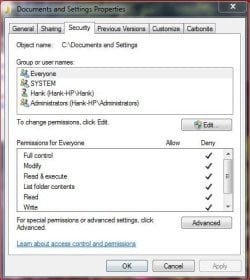
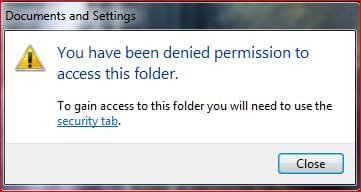
I'm a new user to Windows 7 (from XP), and I'm finding it difficult to get access to files and folders I used to have. I set the PC up with me as administrator and my wife with a standard account. I want full access to Documents and Settings. When ever I try to access it I get the following barrage of warnings:
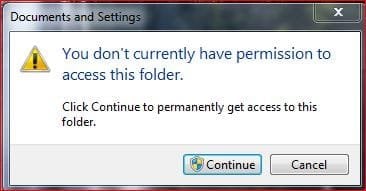
dont currently have permission.JPG
denied permission.JPG
security.JPG
This last I have no idea how to fill out, if it's even necessary.
Can someone please walk me through how to get access to these files?

Thanks you!
 

My Computer My Computer

Computer Manufacturer/Model Number
HP TouchSmart 610
OS
Windows 7 Home Premium 64bit

My Computer My Computer

Computer type
PC/Desktop
Computer Manufacturer/Model Number
Custom Build
OS
Windows 10 Pro x64
CPU
Intel Core i5 4440 @Stock
Motherboard
Gigabyte Z97 D3H
Memory
4 x 4GB HyperX Fury DDR3
Graphics Card(s)
Gigabyte GTX 1050Ti O4G
Sound Card
Integrated
Monitor(s) Displays
Dell P2417H
Screen Resolution
1920 x 1080
Hard Drives
Samsung EVO 850 120GB / Toshiba DT01ACA050 1TB 7200prm 32MB
PSU
Riotoro Onyx 750W
Case
NZXT H500 Black-Red
Cooling
Stock CPU + NZXT 120mm + 2x120mm red fans
Keyboard
Modecom Volcano Lanparty
Mouse
Asus ROG Gladius / DeepCool E-Pad Plus
Internet Speed
DOCSIS 50/3 Mbit
Browser
Google Chrome
Other Info
Asus K55VJ(i5 3210M, GT635M / 2GB, 8GB DDR3, 500GB HDD)
I'm a new user to Windows 7 (from XP), and I'm finding it difficult to get access to files and folders I used to have. I set the PC up with me as administrator and my wife with a standard account. I want full access to Documents and Settings. When ever I try to access it I get the following barrage of warnings:
View attachment 159749
View attachment 159750
View attachment 159751
This last I have no idea how to fill out, if it's even necessary.
Can someone please walk me through how to get access to these files?

Thanks you!

This is just an initial answer.....

1. First screenshot :
Just click Continue, and you will be allowed in.

2. 2nd screenshot and 3rd screenshot :
I think those 2 are tied in together.
Go back to the Security window shown by your last screenshot > click Hank (Hank-HP\Hank )
Where are the arrows located ? Are they all under Allow or one or two are under Deny ?
Do the same on Administrator ( Hank-HP\Hank ).

Please post the screenshots on those 2.
 

My Computer My Computer

Computer Manufacturer/Model Number
Acer Aspire 7741Z
OS
Windows 7 Home Premium 64-bit, SP1
CPU
Intel Pentium P6200, Cores 2, 2.13 GHz
Memory
4 GB
Graphics Card(s)
Intel HD
Sound Card
unknown
Monitor(s) Displays
17.3 inches
Screen Resolution
1600 x 900
Hard Drives
640 GB, 5400 PRM
PLEASE CHECK YOUR ADVICE BEFORE POSTING!!!

Windows 7 DOES NOT use "documents and settings" and if you take ownership of it or change permissions on it, you WILL screw up your computer to the point of needing to reinstall!

The correct path is c:\users for Windows 7. Documents and Settings is a junction point to that location. If you don't know what that means, you don't need to. DO NOT change permissions or take ownership of the documents and settings folder if you have one.

Read more here:
Junction Points in Vista (Yes, Vista...it applies to the subject)

and here:
Junction Dysfunction by Raymond Chen
 

My Computer My Computer

Computer Manufacturer/Model Number
Custom
OS
Windows 7 Ultimate RTM (Technet)
CPU
3.00 gigahertz Intel Core2 Duo E8400
Motherboard
ASUSTeK Computer INC. P5K/EPU Rev 1.xx
Memory
4GB
Graphics Card(s)
ATI Radeon X1950 Pro
Sound Card
Built in HD Audio
Monitor(s) Displays
22" Gateway LCD
Screen Resolution
1920 x 1200
Hard Drives
ST3160023A [Hard drive] (160.04 GB) -- drive 0, rev 8.01, ST3500630AS [Hard drive] (500.11 GB) -- drive 2, rev 3.AAK
ST3500630AS [Hard drive] (500.11 GB) -- drive 1, rev 3.AAK
Keyboard
Logitech G11
Mouse
Microsoft Wireless Laser Mouse 5000
Internet Speed
13.44 Mbps
errr... before the posts from t-4-2 and MacGyvr were posted, I tried the suggestion from StalkeR about taking ownership. It seems to have worked fime so far...

If I run into problems, I'll mention it.

Thanks to all.
 

My Computer My Computer

Computer Manufacturer/Model Number
HP TouchSmart 610
OS
Windows 7 Home Premium 64bit
errr... before the posts from t-4-2 and MacGyvr were posted, I tried the suggestion from StalkeR about taking ownership. It seems to have worked fime so far...

If I run into problems, I'll mention it.

Thanks to all.

You will....you're going to see infinite looping paths when you go into certain folders. The BEST thing you can do immediately is to perform a System Restore to a point before you made those changes. I CANNOT emphasize how important it is that you do this.

You DO NOT need access to documents and settings....c:\users is the SAME location and you have full access to it already.
 

My Computer My Computer

Computer Manufacturer/Model Number
Custom
OS
Windows 7 Ultimate RTM (Technet)
CPU
3.00 gigahertz Intel Core2 Duo E8400
Motherboard
ASUSTeK Computer INC. P5K/EPU Rev 1.xx
Memory
4GB
Graphics Card(s)
ATI Radeon X1950 Pro
Sound Card
Built in HD Audio
Monitor(s) Displays
22" Gateway LCD
Screen Resolution
1920 x 1200
Hard Drives
ST3160023A [Hard drive] (160.04 GB) -- drive 0, rev 8.01, ST3500630AS [Hard drive] (500.11 GB) -- drive 2, rev 3.AAK
ST3500630AS [Hard drive] (500.11 GB) -- drive 1, rev 3.AAK
Keyboard
Logitech G11
Mouse
Microsoft Wireless Laser Mouse 5000
Internet Speed
13.44 Mbps
Glad that your problem is solved. :)
 

My Computer My Computer

Computer type
PC/Desktop
Computer Manufacturer/Model Number
Custom Build
OS
Windows 10 Pro x64
CPU
Intel Core i5 4440 @Stock
Motherboard
Gigabyte Z97 D3H
Memory
4 x 4GB HyperX Fury DDR3
Graphics Card(s)
Gigabyte GTX 1050Ti O4G
Sound Card
Integrated
Monitor(s) Displays
Dell P2417H
Screen Resolution
1920 x 1080
Hard Drives
Samsung EVO 850 120GB / Toshiba DT01ACA050 1TB 7200prm 32MB
PSU
Riotoro Onyx 750W
Case
NZXT H500 Black-Red
Cooling
Stock CPU + NZXT 120mm + 2x120mm red fans
Keyboard
Modecom Volcano Lanparty
Mouse
Asus ROG Gladius / DeepCool E-Pad Plus
Internet Speed
DOCSIS 50/3 Mbit
Browser
Google Chrome
Other Info
Asus K55VJ(i5 3210M, GT635M / 2GB, 8GB DDR3, 500GB HDD)

My Computer My Computer

Computer Manufacturer/Model Number
Custom
OS
Windows 7 Ultimate RTM (Technet)
CPU
3.00 gigahertz Intel Core2 Duo E8400
Motherboard
ASUSTeK Computer INC. P5K/EPU Rev 1.xx
Memory
4GB
Graphics Card(s)
ATI Radeon X1950 Pro
Sound Card
Built in HD Audio
Monitor(s) Displays
22" Gateway LCD
Screen Resolution
1920 x 1200
Hard Drives
ST3160023A [Hard drive] (160.04 GB) -- drive 0, rev 8.01, ST3500630AS [Hard drive] (500.11 GB) -- drive 2, rev 3.AAK
ST3500630AS [Hard drive] (500.11 GB) -- drive 1, rev 3.AAK
Keyboard
Logitech G11
Mouse
Microsoft Wireless Laser Mouse 5000
Internet Speed
13.44 Mbps
Can anyone else on the Forums shed some light on the sharp disagreement in the above comments?
 

My Computer My Computer

Computer Manufacturer/Model Number
HP TouchSmart 610
OS
Windows 7 Home Premium 64bit
Certainly. Macgyvr is 100% correct. Your problem is not solved, it has only just began. You will get loops and duplicates of programs and files throughout, to the extent that, as stated you will probably have to restore. It serves no useful purpose to open up a "junction" folder, which is why Microsoft hid it.
Referring to your op. The files you are seeking now live under the username folder
 

My Computer My Computer

Computer Manufacturer/Model Number
Three desktops and one laptop with good specs..
OS
Vista and now 7 in 32 and 64 bit.
I will do a Restore (never done one before, but I found the Tutorial on this Forum) tonight. Then I will address the original problem again. Thank you.
 

My Computer My Computer

Computer Manufacturer/Model Number
HP TouchSmart 610
OS
Windows 7 Home Premium 64bit
I will do a Restore (never done one before, but I found the Tutorial on this Forum) tonight. Then I will address the original problem again. Thank you.

You've missed the point. There is no problem. You don't use documents and settings. You use the users folder. It is the SAME location. Documents and Settings is just a pointer for old applications to use. You can do whatever you need to do in c:\users.
 

My Computer My Computer

Computer Manufacturer/Model Number
Custom
OS
Windows 7 Ultimate RTM (Technet)
CPU
3.00 gigahertz Intel Core2 Duo E8400
Motherboard
ASUSTeK Computer INC. P5K/EPU Rev 1.xx
Memory
4GB
Graphics Card(s)
ATI Radeon X1950 Pro
Sound Card
Built in HD Audio
Monitor(s) Displays
22" Gateway LCD
Screen Resolution
1920 x 1200
Hard Drives
ST3160023A [Hard drive] (160.04 GB) -- drive 0, rev 8.01, ST3500630AS [Hard drive] (500.11 GB) -- drive 2, rev 3.AAK
ST3500630AS [Hard drive] (500.11 GB) -- drive 1, rev 3.AAK
Keyboard
Logitech G11
Mouse
Microsoft Wireless Laser Mouse 5000
Internet Speed
13.44 Mbps
Oh, yeah... I was distracted by the more recent posts from what I thought was the original problem. I assume I will automatically have access to the files in c:\users. Thanks for clarifying!
 

My Computer My Computer

Computer Manufacturer/Model Number
HP TouchSmart 610
OS
Windows 7 Home Premium 64bit
MacGyvr is indeed correct. The only problem is that system restore does not always restore security settings to app data, as is stated here, from which the excerpt is taken:

How do I restore security settings to a known working state?

2. Restore using System Restore:(For Windows client operating systems only)

The built-in System Restore feature automatically creates restore points at regular intervals and when applications are added via supported installer methods. Each restore point contains the necessary information needed to restore the system to the chosen system state. This method can be used to recover the system back to a specific state. As mentioned earlier in the previous method, this may not be helpful to restore security settings on application data and a Complete System backup may be needed for the same.

It is worth trying, however.

Another method is to use Xcacls.exe:

How to use Xcacls.exe to modify NTFS permissions

Unfortunately, this also has been known to fail.

The only 2 definites are:

1. Never use TakeOwnership on any system drive, files or folders or user folders. Never.

2. Restoring an image of the drive (such as one created with Acronis True Image, the Free Macrium Reflect and others). But this requires that an image be created before the problem event.


Unfortuanately, not everyone is aware of the hazards of wrongful use of TakeOwnership. We see many issues in these forums due to improper application of this tool.

James
 

My Computer My Computer

OS
Win7U 64 RTM
CPU
Q9550
Motherboard
GA-EP45-UD3R
Memory
8GB Gskill
Graphics Card(s)
ASUS|EAH4850/HTDI/1GD3/A
Sound Card
xfi Plat
Monitor(s) Displays
Dell 2405fpw
Screen Resolution
1920x1200
Hard Drives
Seagate & WD sata Drives
PSU
Antec
Case
Antec
Keyboard
MS Natural Ergonomic 4000
Mouse
Logitech MX610 USB Cordless
Oh brother... I'll try it and then...
 

My Computer My Computer

Computer Manufacturer/Model Number
HP TouchSmart 610
OS
Windows 7 Home Premium 64bit
Upon second thought, should I "re-install" Windows 7, or whatever is needed? The trouble is, it's an HP TouchSmart 610 that I bought at Best Buy less than two weeks ago. There is no installation disk, or any disk for that matter. Is there any way to restore it to its original state?
 

My Computer My Computer

Computer Manufacturer/Model Number
HP TouchSmart 610
OS
Windows 7 Home Premium 64bit
There should be an HP program in the start menu or Control Panel that will create Factory Restore disks, although I'm not sure if that will create Factory configuration or current configuration? Someone will know, or you could ask HP.
 

My Computer My Computer

OS
Win7U 64 RTM
CPU
Q9550
Motherboard
GA-EP45-UD3R
Memory
8GB Gskill
Graphics Card(s)
ASUS|EAH4850/HTDI/1GD3/A
Sound Card
xfi Plat
Monitor(s) Displays
Dell 2405fpw
Screen Resolution
1920x1200
Hard Drives
Seagate & WD sata Drives
PSU
Antec
Case
Antec
Keyboard
MS Natural Ergonomic 4000
Mouse
Logitech MX610 USB Cordless

My Computer My Computer

Computer Manufacturer/Model Number
HP Pavilion Elite 495UK
OS
Windows 7 Ultimate SP1 64-Bit
CPU
Intel Core i7 870 @ 2.93GHz
Motherboard
MSI 2A9C (CPU1)
Memory
8Gb Dual-Channel DDR3 @ 664MHz
Graphics Card(s)
nVidia GeForce GTX 460 1024MB dedicated RAM
Sound Card
Realtek HD Audio
Monitor(s) Displays
HP2310i
Screen Resolution
1920 x 1080
Hard Drives
1x1954GB Hitachi HDS22020ALA 330 (RAID), 1x1954GB Hitachi External for backup and storage
PSU
460W
Case
HP Elite
Cooling
Air cooled
Keyboard
Logitech K750 solar-powered keyboard
Mouse
Logitech Wireless M180 mouse
Internet Speed
2Mb
Other Info
Pure Avanti Flow Internet Radio with iPod Dock, 64Gb iPod, HP USB Speakers, Sony MDR-V500 Headphones, Sony Vaio F-Series Laptop
Good link, Seavixen. RadxBoy, do note this line at the resource Seavixen provides:

If recovery discs were not created before the recovery partition was damaged or erased, obtain new recovery discs. For more information, refer to Obtaining Recovery Discs (Asia, North America, and South America)

Apparently, the Recovery Disk creation proccess creates recovery for your current config, so the security settings will likely be carried into the disk set. Try the link provided to order new factory disks.

Edit: err...that may refer only to the recovery partition, so it may be OK to create them. May want to check with HP...

James
 

My Computer My Computer

OS
Win7U 64 RTM
CPU
Q9550
Motherboard
GA-EP45-UD3R
Memory
8GB Gskill
Graphics Card(s)
ASUS|EAH4850/HTDI/1GD3/A
Sound Card
xfi Plat
Monitor(s) Displays
Dell 2405fpw
Screen Resolution
1920x1200
Hard Drives
Seagate & WD sata Drives
PSU
Antec
Case
Antec
Keyboard
MS Natural Ergonomic 4000
Mouse
Logitech MX610 USB Cordless
I suppose now is the time to ask, is there anyway I can test the computer to see if I actually have a problem before I do any of this?
 

My Computer My Computer

Computer Manufacturer/Model Number
HP TouchSmart 610
OS
Windows 7 Home Premium 64bit
Back
Top