How to get aero start Menu/jumplist?

Bluesfear

New member
Local time
5:11 PM
Messages
8

My Computer My Computer

At a glance

Windows 7 Ultimate x86 SP1Intel Core2 6300 @ 3.00GHzNVIDIA GeForce 9600 GT
OS
Windows 7 Ultimate x86 SP1
CPU
Intel Core2 6300 @ 3.00GHz
Graphics Card(s)
NVIDIA GeForce 9600 GT
Screen Resolution
1280x1024
Keyboard
Logitech MX 3200 Keyboard
Mouse
Logitech MX 600 Cordless Laser Mouse
Internet Speed
100 Mbps
Well, from looking at the download you'll have to put the 'aero_fixed' folder and file into C:\Windows\Resources you'll have to replace the explorer.exe. To do so, you'll have to Take Ownership of the existing explorer. The explorer is located in C:\Windows. After you take ownership of the existing explorer, rename it to explorer.bak. Then take the 64-bit or 32-bit explorer in the package from Deviant Art (The one which is according to your OS version) and place it in C:\Windows. When done, log-out and back in.
When you right like your desktop and go to Personalize, you should see the theme from Deviant Art.
 

My Computer My Computer

At a glance

10 Home x64Intel Core i5 4670KCorsair XMS3 8GB DDr3 1600MHzSapphire NITRO Radeon R9 Fury
Computer type
PC/Desktop
OS
10 Home x64
CPU
Intel Core i5 4670K
Motherboard
Gigabyte GA-Z87-D3HP
Memory
Corsair XMS3 8GB DDr3 1600MHz
Graphics Card(s)
Sapphire NITRO Radeon R9 Fury
Sound Card
Asus Xonar DX
Monitor(s) Displays
Acer H236HLbmjd
Screen Resolution
1920x1080
Hard Drives
Force GS 128GB - Seagate 320GB - WD Caviar Black 1TB - WD Caviar Blue 500GB
PSU
EVGA SuperNOVA 650 P2
Case
Silverstone Raven 3 RV03B-W
Keyboard
Topre Realforce 104UG-HiPro
Mouse
Mionix Naos 7000
Internet Speed
76/4 On a good day
Antivirus
SmartScreen
Browser
Internet Explorer 11
Sorry, but that's not what I meant. I know how to install the theme, but I want to replicated the same effect on my other theme without using the theme. Sorry I didn't clarify enough.
 

My Computer My Computer

At a glance

Windows 7 Ultimate x86 SP1Intel Core2 6300 @ 3.00GHzNVIDIA GeForce 9600 GT
OS
Windows 7 Ultimate x86 SP1
CPU
Intel Core2 6300 @ 3.00GHz
Graphics Card(s)
NVIDIA GeForce 9600 GT
Screen Resolution
1280x1024
Keyboard
Logitech MX 3200 Keyboard
Mouse
Logitech MX 600 Cordless Laser Mouse
Internet Speed
100 Mbps
I find out that it's something to do with the msstyles, but I just dont know what to change with the file, please help
 

My Computer My Computer

At a glance

Windows 7 Ultimate x86 SP1Intel Core2 6300 @ 3.00GHzNVIDIA GeForce 9600 GT
OS
Windows 7 Ultimate x86 SP1
CPU
Intel Core2 6300 @ 3.00GHz
Graphics Card(s)
NVIDIA GeForce 9600 GT
Screen Resolution
1280x1024
Keyboard
Logitech MX 3200 Keyboard
Mouse
Logitech MX 600 Cordless Laser Mouse
Internet Speed
100 Mbps
I find out that it's something to do with the msstyles, but I just dont know what to change with the file, please help
Make sure you use a copy of aero.mstyles to work on that way do not miss up the original.
You can use Ave's Windows7 Style Builder to make all the changes. Look at the text document in the zip file that I have downloaded it will show you the difference between the original aero theme(File 1) and a custom one(File 2) you linked to.
You will need to do 1 of these 2 ways of Enabling custom themes for it to work.
http://www.sevenforums.com/tutorials/34579-enabling-custom-themes-windows-7-a.html
Or
http://www.sevenforums.com/tutorials/28377-theme-how-apply-custom-themes.html?filter

Jerry
 

Attachments

My Computer My Computer

At a glance

Win 7 Pro x64 / Win 10 ProIntel(R) Core(TM) i7-3630QM CPU @ 2.40GHz12 GB(1) Intel(R) HD Graphics 4000 (2) NVIDIA GeFo...
Computer type
Laptop
Computer Manufacturer/Model Number
Sager NP9170
OS
Win 7 Pro x64 / Win 10 Pro
CPU
Intel(R) Core(TM) i7-3630QM CPU @ 2.40GHz
Motherboard
CLEVO P170EM
Memory
12 GB
Graphics Card(s)
(1) Intel(R) HD Graphics 4000 (2) NVIDIA GeForce GTX 675M
Sound Card
(1) Realtek High Definition Audio (2) Intel(R) Display Aud
Monitor(s) Displays
17.3
Screen Resolution
1920x1080
Hard Drives
(1) Samsung 860 EVO 500GB(OS) (1) Samsung 860 EVO 500GB(Data)
Keyboard
Backlite
Antivirus
MSE, Malwarebytes Pro
Browser
Firefox
Other Info
DESKTOP: Custom-built.
OS: Win 10 Pro x64.
CASE: Rosewill R5.
CPU: Intel I5 4670K CPU @ 3.40GHz.
CPU COOLER: Cool Master Hyper 212 EVO.
MOTHERBOARD: Asus Z87-A.
MEMORY: Kingston HyperX 2x4 GB.
GPU: Nvidia Geforce 650 TI.
PSU: Corsair TX750.
DRIVES: (1) Samsung 840 120 GB SSD (2) Western Digital blue 500 GB 7200 RPM.
I find out that it's something to do with the msstyles, but I just dont know what to change with the file, please help
Make sure you use a copy of aero.mstyles to work on that way do not miss up the original.
You can use Ave's Windows7 Style Builder to make all the changes. Look at the text document in the zip file that I have downloaded it will show you the difference between the original aero theme(File 1) and a custom one(File 2) you linked to.
You will need to do 1 of these 2 ways of Enabling custom themes for it to work.
http://www.sevenforums.com/tutorials/34579-enabling-custom-themes-windows-7-a.html
Or
http://www.sevenforums.com/tutorials/28377-theme-how-apply-custom-themes.html?filter

Jerry

Nice help Jerry! Do you know off hand which Style Builder headings in your text relate to the jumplist backgrounds etc. ?
 

My Computer My Computer

At a glance

Windows 7 Professional 32-bit (6.1, Build 7600)Intel(R) Pentium(R) 4 3.00 GHz HT2.0 GBATI Mobility Radeon 9600 64MB
Computer Manufacturer/Model Number
Averatec 6130HS-20
OS
Windows 7 Professional 32-bit (6.1, Build 7600)
CPU
Intel(R) Pentium(R) 4 3.00 GHz HT
Memory
2.0 GB
Graphics Card(s)
ATI Mobility Radeon 9600 64MB
Sound Card
Realtek AC'97 Audio
Screen Resolution
1280 x 800
Hard Drives
Seagate 96023A 60GB 7200RPM -
Seagate FreeAgentDesktop 250GB
Cooling
20 Inch Box Fan
Mouse
Targus PAWM10 Wireless Optical Laptop Mouse
Nice help Jerry! Do you know off hand which Style Builder headings in your text relate to the jumplist backgrounds etc. ?
StartPanelComposited::StartPanelPriv <StartPanelPriv>.<12>.<default>:IMAGEFILE:FILENAME
file1 : IMAGE#779
file2 : IMAGE#878
for the image.

StartPanelPriv.<12>.<default>:TEXTCOLOR:COLOR
file1 : argb(0, 0, 0, 0)
file2 : argb(0, 0, 255, 255)
for the text color


In WSB it's at Start Menu > Panels > Aero > Top > JumpListUser for the image.
&
Start Menu > Panels > Basic > JumpListUser for the Text color
Jerry
 

My Computer My Computer

At a glance

Win 7 Pro x64 / Win 10 ProIntel(R) Core(TM) i7-3630QM CPU @ 2.40GHz12 GB(1) Intel(R) HD Graphics 4000 (2) NVIDIA GeFo...
Computer type
Laptop
Computer Manufacturer/Model Number
Sager NP9170
OS
Win 7 Pro x64 / Win 10 Pro
CPU
Intel(R) Core(TM) i7-3630QM CPU @ 2.40GHz
Motherboard
CLEVO P170EM
Memory
12 GB
Graphics Card(s)
(1) Intel(R) HD Graphics 4000 (2) NVIDIA GeForce GTX 675M
Sound Card
(1) Realtek High Definition Audio (2) Intel(R) Display Aud
Monitor(s) Displays
17.3
Screen Resolution
1920x1080
Hard Drives
(1) Samsung 860 EVO 500GB(OS) (1) Samsung 860 EVO 500GB(Data)
Keyboard
Backlite
Antivirus
MSE, Malwarebytes Pro
Browser
Firefox
Other Info
DESKTOP: Custom-built.
OS: Win 10 Pro x64.
CASE: Rosewill R5.
CPU: Intel I5 4670K CPU @ 3.40GHz.
CPU COOLER: Cool Master Hyper 212 EVO.
MOTHERBOARD: Asus Z87-A.
MEMORY: Kingston HyperX 2x4 GB.
GPU: Nvidia Geforce 650 TI.
PSU: Corsair TX750.
DRIVES: (1) Samsung 840 120 GB SSD (2) Western Digital blue 500 GB 7200 RPM.
Nice help Jerry! Do you know off hand which Style Builder headings in your text relate to the jumplist backgrounds etc. ?
StartPanelComposited::StartPanelPriv <StartPanelPriv>.<12>.<default>:IMAGEFILE:FILENAME
file1 : IMAGE#779
file2 : IMAGE#878
for the image.

StartPanelPriv.<12>.<default>:TEXTCOLOR:COLOR
file1 : argb(0, 0, 0, 0)
file2 : argb(0, 0, 255, 255)
for the text color


In WSB it's at Start Menu > Panels > Aero > Top > JumpListUser for the image.
&
Start Menu > Panels > Basic > JumpListUser for the Text color
Jerry

Yes, while waiting for a reply, I went ahead and changed them. I'm torn between two looks. I like it but I'm keeping my backup in case I want to change back. I more question. What color controls the Pinned and Tasks labels of the Jumplist? Right now the blueish color of those blend in too much with my background.
Thanks
 

My Computer My Computer

At a glance

Windows 7 Professional 32-bit (6.1, Build 7600)Intel(R) Pentium(R) 4 3.00 GHz HT2.0 GBATI Mobility Radeon 9600 64MB
Computer Manufacturer/Model Number
Averatec 6130HS-20
OS
Windows 7 Professional 32-bit (6.1, Build 7600)
CPU
Intel(R) Pentium(R) 4 3.00 GHz HT
Memory
2.0 GB
Graphics Card(s)
ATI Mobility Radeon 9600 64MB
Sound Card
Realtek AC'97 Audio
Screen Resolution
1280 x 800
Hard Drives
Seagate 96023A 60GB 7200RPM -
Seagate FreeAgentDesktop 250GB
Cooling
20 Inch Box Fan
Mouse
Targus PAWM10 Wireless Optical Laptop Mouse
Yes, while waiting for a reply, I went ahead and changed them. I'm torn between two looks. I like it but I'm keeping my backup in case I want to change back. I more question. What color controls the Pinned and Tasks labels of the Jumplist? Right now the blueish color of those blend in too much with my background.
Thanks
If it's where it says "Recent" at the top of the jumplist it's at Start Menu > Menus > Aero > PlaceList:ListView > GroupHeader > Heading1TextColor:Color
this also changes the recent list on the top right of the start menu when it extends.
Jerry
 

My Computer My Computer

At a glance

Win 7 Pro x64 / Win 10 ProIntel(R) Core(TM) i7-3630QM CPU @ 2.40GHz12 GB(1) Intel(R) HD Graphics 4000 (2) NVIDIA GeFo...
Computer type
Laptop
Computer Manufacturer/Model Number
Sager NP9170
OS
Win 7 Pro x64 / Win 10 Pro
CPU
Intel(R) Core(TM) i7-3630QM CPU @ 2.40GHz
Motherboard
CLEVO P170EM
Memory
12 GB
Graphics Card(s)
(1) Intel(R) HD Graphics 4000 (2) NVIDIA GeForce GTX 675M
Sound Card
(1) Realtek High Definition Audio (2) Intel(R) Display Aud
Monitor(s) Displays
17.3
Screen Resolution
1920x1080
Hard Drives
(1) Samsung 860 EVO 500GB(OS) (1) Samsung 860 EVO 500GB(Data)
Keyboard
Backlite
Antivirus
MSE, Malwarebytes Pro
Browser
Firefox
Other Info
DESKTOP: Custom-built.
OS: Win 10 Pro x64.
CASE: Rosewill R5.
CPU: Intel I5 4670K CPU @ 3.40GHz.
CPU COOLER: Cool Master Hyper 212 EVO.
MOTHERBOARD: Asus Z87-A.
MEMORY: Kingston HyperX 2x4 GB.
GPU: Nvidia Geforce 650 TI.
PSU: Corsair TX750.
DRIVES: (1) Samsung 840 120 GB SSD (2) Western Digital blue 500 GB 7200 RPM.
how about for start menu?
 

My Computer My Computer

At a glance

Windows 7 Ultimate x86 SP1Intel Core2 6300 @ 3.00GHzNVIDIA GeForce 9600 GT
OS
Windows 7 Ultimate x86 SP1
CPU
Intel Core2 6300 @ 3.00GHz
Graphics Card(s)
NVIDIA GeForce 9600 GT
Screen Resolution
1280x1024
Keyboard
Logitech MX 3200 Keyboard
Mouse
Logitech MX 600 Cordless Laser Mouse
Internet Speed
100 Mbps

My Computer My Computer

At a glance

Win 7 Pro x64 / Win 10 ProIntel(R) Core(TM) i7-3630QM CPU @ 2.40GHz12 GB(1) Intel(R) HD Graphics 4000 (2) NVIDIA GeFo...
Computer type
Laptop
Computer Manufacturer/Model Number
Sager NP9170
OS
Win 7 Pro x64 / Win 10 Pro
CPU
Intel(R) Core(TM) i7-3630QM CPU @ 2.40GHz
Motherboard
CLEVO P170EM
Memory
12 GB
Graphics Card(s)
(1) Intel(R) HD Graphics 4000 (2) NVIDIA GeForce GTX 675M
Sound Card
(1) Realtek High Definition Audio (2) Intel(R) Display Aud
Monitor(s) Displays
17.3
Screen Resolution
1920x1080
Hard Drives
(1) Samsung 860 EVO 500GB(OS) (1) Samsung 860 EVO 500GB(Data)
Keyboard
Backlite
Antivirus
MSE, Malwarebytes Pro
Browser
Firefox
Other Info
DESKTOP: Custom-built.
OS: Win 10 Pro x64.
CASE: Rosewill R5.
CPU: Intel I5 4670K CPU @ 3.40GHz.
CPU COOLER: Cool Master Hyper 212 EVO.
MOTHERBOARD: Asus Z87-A.
MEMORY: Kingston HyperX 2x4 GB.
GPU: Nvidia Geforce 650 TI.
PSU: Corsair TX750.
DRIVES: (1) Samsung 840 120 GB SSD (2) Western Digital blue 500 GB 7200 RPM.
I am really new to this custom theme thing, so I am not sure what I am looking at in the .txt file (I know its the differences between the two msstyles).

Could you provide the same info like for the jumplist, because that was really easy to understand. I changed the image file 878.png like you said and now my jumplist has aero on it. I wish to do the same for the start menu as well.
 

My Computer My Computer

At a glance

Windows 7 Ultimate x86 SP1Intel Core2 6300 @ 3.00GHzNVIDIA GeForce 9600 GT
OS
Windows 7 Ultimate x86 SP1
CPU
Intel Core2 6300 @ 3.00GHz
Graphics Card(s)
NVIDIA GeForce 9600 GT
Screen Resolution
1280x1024
Keyboard
Logitech MX 3200 Keyboard
Mouse
Logitech MX 600 Cordless Laser Mouse
Internet Speed
100 Mbps
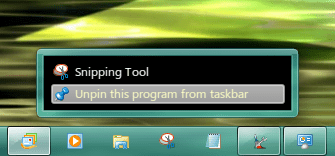
Hi Jerry, one remaining item. The system menu with no pinned items shows black.

Untitled.png
 

My Computer My Computer

At a glance

Windows 7 Professional 32-bit (6.1, Build 7600)Intel(R) Pentium(R) 4 3.00 GHz HT2.0 GBATI Mobility Radeon 9600 64MB
Computer Manufacturer/Model Number
Averatec 6130HS-20
OS
Windows 7 Professional 32-bit (6.1, Build 7600)
CPU
Intel(R) Pentium(R) 4 3.00 GHz HT
Memory
2.0 GB
Graphics Card(s)
ATI Mobility Radeon 9600 64MB
Sound Card
Realtek AC'97 Audio
Screen Resolution
1280 x 800
Hard Drives
Seagate 96023A 60GB 7200RPM -
Seagate FreeAgentDesktop 250GB
Cooling
20 Inch Box Fan
Mouse
Targus PAWM10 Wireless Optical Laptop Mouse
I am really new to this custom theme thing, so I am not sure what I am looking at in the .txt file (I know its the differences between the two msstyles).

Could you provide the same info like for the jumplist, because that was really easy to understand. I changed the image file 878.png like you said and now my jumplist has aero on it. I wish to do the same for the start menu as well.

I can give you the location numbers but if you are not using Windows Style Builder it will do you no good there are some properties that need changed to give the start menu transparent. So if you purchase WSB I will be able to help more.
Jerry
 

My Computer My Computer

At a glance

Win 7 Pro x64 / Win 10 ProIntel(R) Core(TM) i7-3630QM CPU @ 2.40GHz12 GB(1) Intel(R) HD Graphics 4000 (2) NVIDIA GeFo...
Computer type
Laptop
Computer Manufacturer/Model Number
Sager NP9170
OS
Win 7 Pro x64 / Win 10 Pro
CPU
Intel(R) Core(TM) i7-3630QM CPU @ 2.40GHz
Motherboard
CLEVO P170EM
Memory
12 GB
Graphics Card(s)
(1) Intel(R) HD Graphics 4000 (2) NVIDIA GeForce GTX 675M
Sound Card
(1) Realtek High Definition Audio (2) Intel(R) Display Aud
Monitor(s) Displays
17.3
Screen Resolution
1920x1080
Hard Drives
(1) Samsung 860 EVO 500GB(OS) (1) Samsung 860 EVO 500GB(Data)
Keyboard
Backlite
Antivirus
MSE, Malwarebytes Pro
Browser
Firefox
Other Info
DESKTOP: Custom-built.
OS: Win 10 Pro x64.
CASE: Rosewill R5.
CPU: Intel I5 4670K CPU @ 3.40GHz.
CPU COOLER: Cool Master Hyper 212 EVO.
MOTHERBOARD: Asus Z87-A.
MEMORY: Kingston HyperX 2x4 GB.
GPU: Nvidia Geforce 650 TI.
PSU: Corsair TX750.
DRIVES: (1) Samsung 840 120 GB SSD (2) Western Digital blue 500 GB 7200 RPM.

My Computer My Computer

At a glance

Win 7 Pro x64 / Win 10 ProIntel(R) Core(TM) i7-3630QM CPU @ 2.40GHz12 GB(1) Intel(R) HD Graphics 4000 (2) NVIDIA GeFo...
Computer type
Laptop
Computer Manufacturer/Model Number
Sager NP9170
OS
Win 7 Pro x64 / Win 10 Pro
CPU
Intel(R) Core(TM) i7-3630QM CPU @ 2.40GHz
Motherboard
CLEVO P170EM
Memory
12 GB
Graphics Card(s)
(1) Intel(R) HD Graphics 4000 (2) NVIDIA GeForce GTX 675M
Sound Card
(1) Realtek High Definition Audio (2) Intel(R) Display Aud
Monitor(s) Displays
17.3
Screen Resolution
1920x1080
Hard Drives
(1) Samsung 860 EVO 500GB(OS) (1) Samsung 860 EVO 500GB(Data)
Keyboard
Backlite
Antivirus
MSE, Malwarebytes Pro
Browser
Firefox
Other Info
DESKTOP: Custom-built.
OS: Win 10 Pro x64.
CASE: Rosewill R5.
CPU: Intel I5 4670K CPU @ 3.40GHz.
CPU COOLER: Cool Master Hyper 212 EVO.
MOTHERBOARD: Asus Z87-A.
MEMORY: Kingston HyperX 2x4 GB.
GPU: Nvidia Geforce 650 TI.
PSU: Corsair TX750.
DRIVES: (1) Samsung 840 120 GB SSD (2) Western Digital blue 500 GB 7200 RPM.

My Computer My Computer

At a glance

Windows 7 Professional 32-bit (6.1, Build 7600)Intel(R) Pentium(R) 4 3.00 GHz HT2.0 GBATI Mobility Radeon 9600 64MB
Computer Manufacturer/Model Number
Averatec 6130HS-20
OS
Windows 7 Professional 32-bit (6.1, Build 7600)
CPU
Intel(R) Pentium(R) 4 3.00 GHz HT
Memory
2.0 GB
Graphics Card(s)
ATI Mobility Radeon 9600 64MB
Sound Card
Realtek AC'97 Audio
Screen Resolution
1280 x 800
Hard Drives
Seagate 96023A 60GB 7200RPM -
Seagate FreeAgentDesktop 250GB
Cooling
20 Inch Box Fan
Mouse
Targus PAWM10 Wireless Optical Laptop Mouse
I am really new to this custom theme thing, so I am not sure what I am looking at in the .txt file (I know its the differences between the two msstyles).

Could you provide the same info like for the jumplist, because that was really easy to understand. I changed the image file 878.png like you said and now my jumplist has aero on it. I wish to do the same for the start menu as well.

I can give you the location numbers but if you are not using Windows Style Builder it will do you no good there are some properties that need changed to give the start menu transparent. So if you purchase WSB I will be able to help more.
Jerry
yeah, I have WSB installed.
 

My Computer My Computer

At a glance

Windows 7 Ultimate x86 SP1Intel Core2 6300 @ 3.00GHzNVIDIA GeForce 9600 GT
OS
Windows 7 Ultimate x86 SP1
CPU
Intel Core2 6300 @ 3.00GHz
Graphics Card(s)
NVIDIA GeForce 9600 GT
Screen Resolution
1280x1024
Keyboard
Logitech MX 3200 Keyboard
Mouse
Logitech MX 600 Cordless Laser Mouse
Internet Speed
100 Mbps
I am really new to this custom theme thing, so I am not sure what I am looking at in the .txt file (I know its the differences between the two msstyles).

Could you provide the same info like for the jumplist, because that was really easy to understand. I changed the image file 878.png like you said and now my jumplist has aero on it. I wish to do the same for the start menu as well.

I can give you the location numbers but if you are not using Windows Style Builder it will do you no good there are some properties that need changed to give the start menu transparent. So if you purchase WSB I will be able to help more.
Jerry
yeah, I have WSB installed.
Give me some time & I will get it for you. I may not get to it until the AM
Jerry
 

My Computer My Computer

At a glance

Win 7 Pro x64 / Win 10 ProIntel(R) Core(TM) i7-3630QM CPU @ 2.40GHz12 GB(1) Intel(R) HD Graphics 4000 (2) NVIDIA GeFo...
Computer type
Laptop
Computer Manufacturer/Model Number
Sager NP9170
OS
Win 7 Pro x64 / Win 10 Pro
CPU
Intel(R) Core(TM) i7-3630QM CPU @ 2.40GHz
Motherboard
CLEVO P170EM
Memory
12 GB
Graphics Card(s)
(1) Intel(R) HD Graphics 4000 (2) NVIDIA GeForce GTX 675M
Sound Card
(1) Realtek High Definition Audio (2) Intel(R) Display Aud
Monitor(s) Displays
17.3
Screen Resolution
1920x1080
Hard Drives
(1) Samsung 860 EVO 500GB(OS) (1) Samsung 860 EVO 500GB(Data)
Keyboard
Backlite
Antivirus
MSE, Malwarebytes Pro
Browser
Firefox
Other Info
DESKTOP: Custom-built.
OS: Win 10 Pro x64.
CASE: Rosewill R5.
CPU: Intel I5 4670K CPU @ 3.40GHz.
CPU COOLER: Cool Master Hyper 212 EVO.
MOTHERBOARD: Asus Z87-A.
MEMORY: Kingston HyperX 2x4 GB.
GPU: Nvidia Geforce 650 TI.
PSU: Corsair TX750.
DRIVES: (1) Samsung 840 120 GB SSD (2) Western Digital blue 500 GB 7200 RPM.
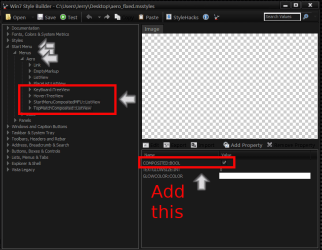
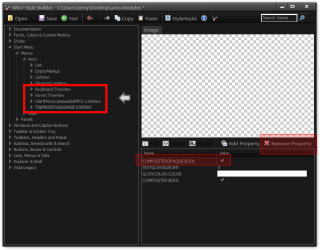
#1
Add the properties outlined in red to the four areas outlined in red.
wsb.PNG
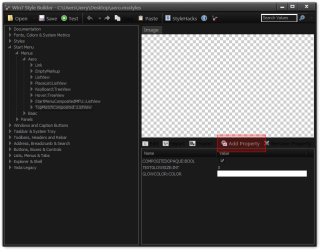
Click on add properties
1.png
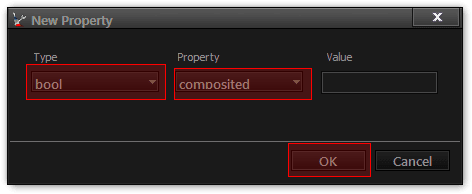
Choose the properties and click OK
New Property.png
Check the box
3.png
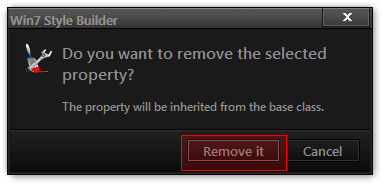
#2
Remove this property outlined in red to the four areas outlined in red.
4.png
Choose the property and press Delete Property button and then choose Remove It
5.png
#3
Export the images outlined in red and Import the images back in the same place in your msstyles
6.png
Jerry
 

My Computer My Computer

At a glance

Win 7 Pro x64 / Win 10 ProIntel(R) Core(TM) i7-3630QM CPU @ 2.40GHz12 GB(1) Intel(R) HD Graphics 4000 (2) NVIDIA GeFo...
Computer type
Laptop
Computer Manufacturer/Model Number
Sager NP9170
OS
Win 7 Pro x64 / Win 10 Pro
CPU
Intel(R) Core(TM) i7-3630QM CPU @ 2.40GHz
Motherboard
CLEVO P170EM
Memory
12 GB
Graphics Card(s)
(1) Intel(R) HD Graphics 4000 (2) NVIDIA GeForce GTX 675M
Sound Card
(1) Realtek High Definition Audio (2) Intel(R) Display Aud
Monitor(s) Displays
17.3
Screen Resolution
1920x1080
Hard Drives
(1) Samsung 860 EVO 500GB(OS) (1) Samsung 860 EVO 500GB(Data)
Keyboard
Backlite
Antivirus
MSE, Malwarebytes Pro
Browser
Firefox
Other Info
DESKTOP: Custom-built.
OS: Win 10 Pro x64.
CASE: Rosewill R5.
CPU: Intel I5 4670K CPU @ 3.40GHz.
CPU COOLER: Cool Master Hyper 212 EVO.
MOTHERBOARD: Asus Z87-A.
MEMORY: Kingston HyperX 2x4 GB.
GPU: Nvidia Geforce 650 TI.
PSU: Corsair TX750.
DRIVES: (1) Samsung 840 120 GB SSD (2) Western Digital blue 500 GB 7200 RPM.
that worked out great, thanks alot. One last question, how do I change the start menu text, right now it is black text.
 

My Computer My Computer

At a glance

Windows 7 Ultimate x86 SP1Intel Core2 6300 @ 3.00GHzNVIDIA GeForce 9600 GT
OS
Windows 7 Ultimate x86 SP1
CPU
Intel Core2 6300 @ 3.00GHz
Graphics Card(s)
NVIDIA GeForce 9600 GT
Screen Resolution
1280x1024
Keyboard
Logitech MX 3200 Keyboard
Mouse
Logitech MX 600 Cordless Laser Mouse
Internet Speed
100 Mbps
Back
Top